Sarrera
This manual provides comprehensive instructions for the setup, operation, maintenance, and troubleshooting of your Behringer XENYX X2222USB Premium 22-Input 2/2-Bus Mixer. Please read this manual thoroughly before operating the device to ensure proper use and to maximize its performance and longevity.
The Behringer XENYX X2222USB is a high-performance audio mixer designed for professional audio applications. It features an integrated USB computer audio interface, allowing for seamless blending and shaping of multiple audio signals and distribution to various outputs. Key features include eight top-tier XENYX microphone preamps, British-style EQs, eight user-friendly one-knob compressors, and a built-in 24-bit dual engine effects processor.
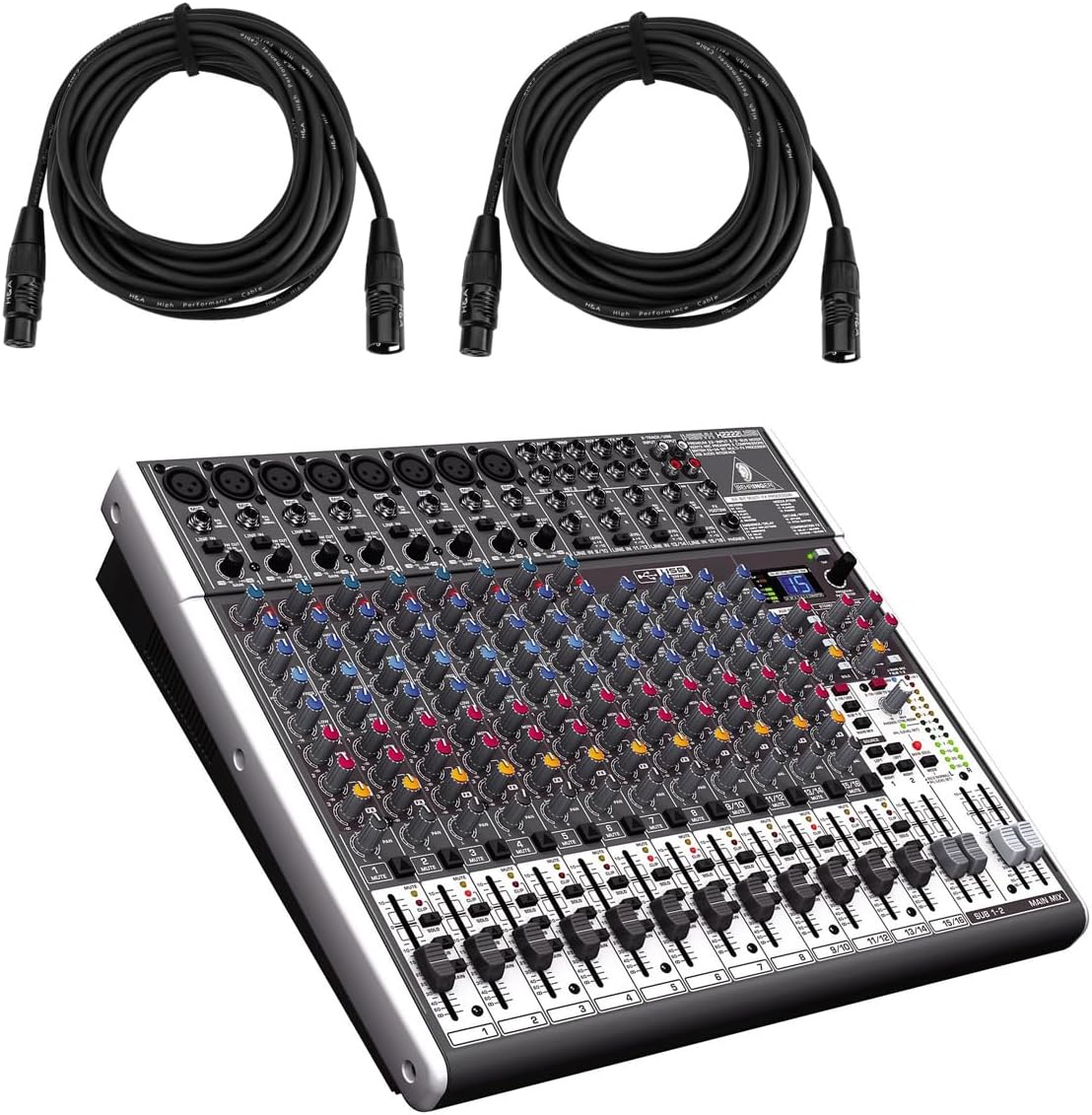
Figure 1: Behringer XENYX X2222USB Mixer with included XLR cables. This image shows the mixer from an angled top-front view, alongside two coiled XLR microphone cables.
Segurtasun-argibide garrantzitsuak
- Irakurri argibide hauek.
- Jarrai argibide hauek.
- Kontuan izan abisu guztiei.
- Jarraitu argibide guztiak.
- Ez erabili aparatu hau uraren ondoan.
- Garbitu zapi lehorrekin bakarrik.
- Ez blokeatu aireztapen-zulorik. Instalatu fabrikatzailearen argibideen arabera.
- Ez instalatu bero-iturri inongo ondoan, esate baterako, erradiadoreak, bero-erregistroak, sukaldeak edo beste aparatu batzuk (barne ampberoa sortzen duten argitzaileak).
- Ez zapaldu polarizatutako edo lurreko entxufearen segurtasun-helburua. Entxufe polarizatu batek bi pala ditu, bata bestea baino zabalagoa dutenak. Lurreratze motako entxufe batek bi pala eta lurreko hirugarren ahoa ditu. Pala zabala edo hirugarren ahoa zure segurtasunerako eskaintzen dira. Emandako entxufea zure entxufean sartzen ez bada, kontsultatu elektrizista bati zaharkitutako entxufea ordezkatzeko.
- Babestu korronte-kablea entxufeetan, erosotasun-harguneetan eta aparatutik irteten den puntuan ibiltzetik edo atzamarra ez dadin.
- Erabili soilik fabrikatzaileak zehaztutako eranskinak/osagarriak.
- Erabili fabrikatzaileak zehaztutako edo aparatuarekin saltzen den saskiarekin, euskarria, tripodea, euskarria edo mahaiarekin soilik. Orga bat erabiltzen denean, kontuz ibili saskia/aparatuaren konbinazioa mugitzean, iraultzeagatik zauririk ez izateko.
- Deskonektatu aparatu hau tximista-ekaitzetan edo denbora luzez erabiltzen ez duzunean.
- Jarri zerbitzu-zerbitzu guztiak zerbitzu-pertsonal kualifikatuari. Zerbitzua behar da aparatua edozein modutan hondatu denean, hala nola, elikatze-kablea edo entxufea hondatuta dagoenean, likidoa isuri denean edo objektuak aparatura erori direnean, aparatua euria edo hezetasuna jasan duenean, ez du normalean funtzionatzen. , edo erori egin da.
Paketearen edukia
Mesedez, egiaztatu behean zerrendatutako elementu guztiak zure paketean sartuta daudela:
- Behringer XENYX X2222USB Mixer
- Rack Muntaketak
- EnergyXT2.5 Software (download/license information)
- 2 x H&A XLR Cables (15' 8mm)
- Elikatze kablea
- Erabiltzailearen eskuliburua (dokumentu hau)
Konfigurazioa
Follow these steps to set up your Behringer XENYX X2222USB mixer for initial use.
1. Energia-konexioa
Connect the supplied power cord to the mixer's power input on the rear panel and then to a suitable AC power outlet. Ensure the power switch is in the OFF position before connecting.

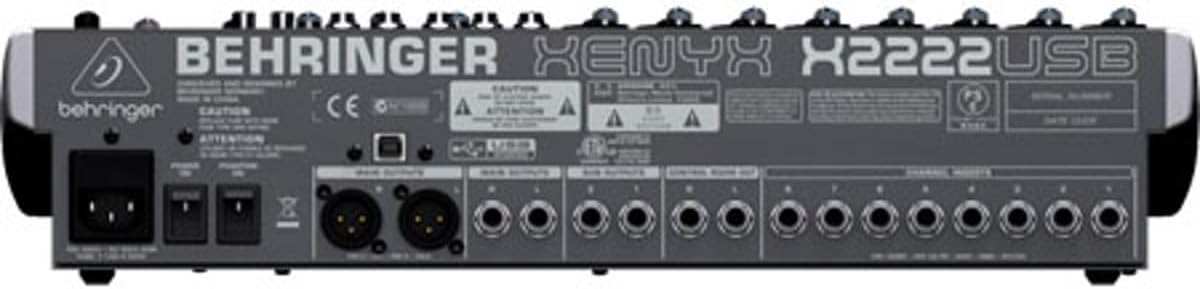
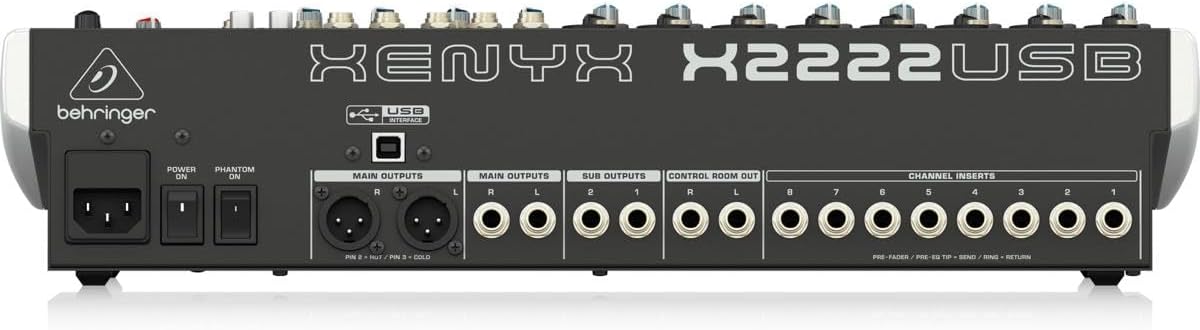
Figure 2: Rear panel of the XENYX X2222USB mixer, highlighting power input, main outputs, sub outputs, control room out, and channel inserts.
2. Audio-sarrerako konexioak
The mixer features 8 XLR mic inputs with XENYX preamps and 12 line inputs (8 mono, 4 stereo). Connect your microphones, instruments, and other audio sources to the appropriate input jacks.
- Mikrofonoak: Use XLR cables (like the included H&A cables) to connect microphones to the XLR inputs (1-8).
- Lerro mailako gailuak: Use 1/4" TRS or TS cables for line-level instruments or devices to the 1/4" line inputs.
3. irudia: Adibamples of XLR male (left) and female (right) connectors, commonly used for microphone connections.
3. Audio irteerako konexioak
Connect your main speakers, monitors, or recording devices to the mixer's output jacks.
- Irteera nagusiak: Use XLR or 1/4" TRS cables for your main stereo speakers.
- Control Room Out: For connecting studio monitors.
- Sub Outputs: For routing specific groups of channels.
4. USB Connection (for Computer Audio Interface)
Connect the mixer to your computer using a standard USB cable. This enables bi-directional audio transfer for recording and playback.
- Ensure your computer meets the system requirements for the EnergyXT2.5 software.
- Install any necessary drivers (usually automatically detected by modern operating systems, but check Behringer's website if issues arise).
- Install the included EnergyXT2.5 software for advanced recording and production capabilities.
Nahasgailuaren funtzionamendua
Atal honek gaina ematen duview nahasgailuaren kontrolak eta oinarrizko funtzionamendua.

4. Irudia: Aurrealdeko panela gaineanview of the XENYX X2222USB mixer, displaying all channels, faders, knobs, and the effects section.
Channel Strips (Mono Channels 1-8)
- Gain Control: Adjusts the input sensitivity for microphones and line-level signals. Set this to achieve a healthy signal level without clipping.
- Konpresorea: One-knob compressor for dynamic range control. Turn clockwise to increase compression.
- EQ (Ekualizatzailea): 3-band British-style EQ with swept mid.
- ALTUAK: Adjusts treble frequencies.
- MID: Adjusts mid-range frequencies. The MAIZTASUNA knob selects the specific mid-frequency to be adjusted.
- BAXUA: Adjusts bass frequencies.
- AUX bidalketak: Three auxiliary sends per channel (FX1, MON1, MON2) for routing signals to external effects processors or stage monitoreak.
- PAN: Positions the channel's signal in the stereo field (left to right).
- MUTU: Kanalaren irteera isilarazten du.
- BAKARRIK: Isolates the channel for monitoring.
- Kanal Fader: Kanal bakoitzaren irteera-maila kontrolatzen du.
Stereo Channels (9/10, 11/12, 13/14, 15/16)
These channels are designed for stereo line-level inputs and feature simplified controls compared to mono channels.
Efektuen prozesadorea
The built-in 24-bit dual engine effects processor offers 16 editable presets including reverb, chorus, flanger, delay, and pitch shifter. Use the PROGRAMA knob to select an effect and the FX BIDALI controls to apply it to channels.
USB audio interfazea
The integrated USB interface allows for bi-directional audio streaming with your computer. This enables direct recording of your mix and playback of audio from your computer through the mixer.
- Grabaketa: The main stereo mix can be sent to your computer for recording in a DAW (Digital Audio Workstation) like EnergyXT2.5.
- Erreprodukzioa: Audio from your computer can be routed back into the mixer for monitoring or integration into your live mix.
Nahasketa Atal Nagusia
- Nahasketa nagusiko fader-ak: Kontrolatu estereo nahasketa nagusiaren irteera-maila orokorra.
- Maila-neurgailuak: Provide visual indication of the main mix output level. Aim for levels around 0 dB to avoid clipping.
- Phantom Power (+48V): Activates phantom power for condenser microphones connected to XLR inputs. Ensure microphones requiring phantom power are connected before activating.
Mantentzea
Mantentze egokiak zure nahasgailuaren iraupena eta errendimendu optimoa bermatzen ditu.
- Garbiketa: Use a soft, dry cloth to clean the exterior of the mixer. Avoid using abrasive cleaners, solvents, or waxes. Do not spray liquids directly onto the mixer.
- Aireztapena: Ensure that the ventilation openings are not blocked. Adequate airflow is crucial to prevent overheating.
- Biltegiratzea: When not in use for extended periods, store the mixer in a cool, dry place, away from direct sunlight and extreme temperatures. If possible, use the original packaging or a protective case.
- Kableen kudeaketa: Regularly check all cables for damage. Replace frayed or damaged cables immediately to prevent signal loss or electrical hazards.
Arazoak konpontzea
Atal honek aurki ditzakezun arazo ohikoenak jorratzen ditu eta irtenbideak eskaintzen ditu.
| Arazoa | Kausa posiblea | Irtenbidea |
|---|---|---|
| Ez da soinurik ateratzen nahasketa nagusitik. |
|
|
| Soinu distortsionatua. |
|
|
| USB audio not working. |
|
|
Zehaztapenak
| Ezaugarri | Xehetasuna |
|---|---|
| Marka | Behringer |
| Eredua | XENYX X2222USB |
| Kanal kopurua | 22 (8 mono, 4 estereo) |
| Mikrofonoa Preamps | 8 x XENYX Mic Preamps |
| Konpresoreak | 8 x One-knob Compressors |
| Berdinketa | British-style 3-band EQ with swept mid on mono channels |
| Efektuen prozesadorea | 24-bit dual engine with 16 presets |
| Konektibitate Teknologia | USB (bi-directional audio interface) |
| Irteerako konektore mota | XLR, 1/4"-ko TRS |
| Energia iturria | Kable elektrikoa |
| Produktuaren neurriak | 20.75 x 15.8 x 6 hazbete (52.7 x 40.1 x 15.2 cm) |
| Elementuaren pisua | 15.22 libra (6.9 kg) |
Bermearen informazioa
The Behringer XENYX X2222USB Mixer bundle includes Adorama's 1-year warranty. For specific terms, conditions, and to register your product, please refer to the warranty documentation provided with your purchase or visit the official Behringer or Adorama support webguneak.
Mesedez, gorde zure erosketa-froga berme-erreklamazioetarako.
Laguntza
For further assistance, technical support, or to download the latest drivers and software, please visit the official Behringer webgunea:
You may also refer to the Behringer Store on Amazon for product information and related accessories: Behringer Amazon Store


