BYTECH Wireless Optical Mouse User Manual
Model: BYTECH Wireless Optical Mouse
Sarrera
This manual provides detailed instructions for the setup, operation, maintenance, and troubleshooting of your BYTECH Wireless Optical Mouse. Please read this manual thoroughly before using the device to ensure optimal performance and longevity.
Produktua amaituview
The BYTECH Wireless Optical Mouse is designed for comfortable and efficient navigation. It features a precise optical sensor, a scroll wheel, and a DPI adjustment button for customizable sensitivity. Its ergonomic design and wireless connectivity provide a clutter-free workspace.

1. irudia: Goitik behera view of the BYTECH Wireless Optical Mouse. The mouse is black with a silver stripe along its sides. A scroll wheel and a DPI button are visible on the top surface.
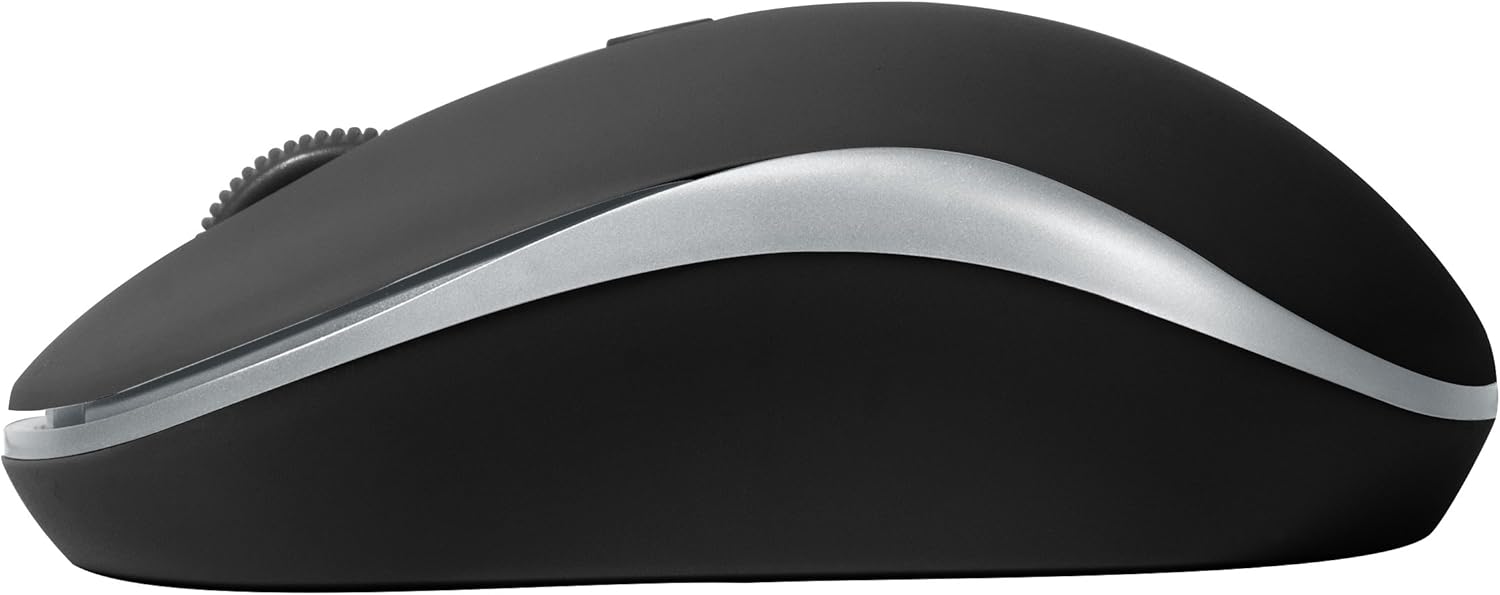
2. irudia: Aldea view of the BYTECH Wireless Optical Mouse. This angle highlights the ergonomic curve and the silver accent line that runs along the side of the mouse.
Konfigurazioa
1. Bateriaren instalazioa
- Kokatu bateriaren konpartimendua saguaren azpialdean.
- Ireki bateriaren konpartimenduaren estalkia.
- Insert one AA battery (not included) into the compartment, ensuring the correct polarity (+/-) as indicated inside.
- Itxi bateriaren konpartimenduaren estalkia ondo.
2. USB hargailuaren konexioa
- Remove the USB receiver from its storage slot, usually located inside the battery compartment or near it.
- Konektatu USB hargailua zure ordenagailuko edo ordenagailu eramangarriko USB ataka erabilgarri batean.
- Zure sistema eragileak automatikoki detektatu eta instalatu beharko lituzke beharrezko kontrolatzaileak. Honek minutu batzuk iraun ditzake.
3. Piztea
- Locate the On/Off switch on the underside of the mouse.
- Slide the switch to the "On" position. The mouse should now be ready for use.
Funtzionamendu-argibideak
Oinarrizko Funtzioak
- Ezkerreko klik: Sakatu ezkerreko botoia elementuak hautatzeko, estekak irekitzeko edo funtzioak aktibatzeko.
- Egin klik eskuineko botoiarekin: Sakatu eskuineko botoia testuinguru-menuak irekitzeko edo aukera gehigarrietara sartzeko.
- Korritzeko gurpila: Roll the wheel up or down to scroll through documents or web pages. Press the scroll wheel for middle-click functionality (e.g., opening links in new tabs).
DPI doikuntza
The mouse features a DPI (Dots Per Inch) button, typically located behind the scroll wheel. Press this button to cycle through different sensitivity settings. Each press will change the cursor speed, allowing you to find the optimal setting for your task.
- Sakatu DPI botoia once to switch to the next sensitivity level.
- Repeat until you find your preferred cursor speed.
Energia aurrezteko modua
To conserve battery life, the BYTECH Wireless Optical Mouse is designed to automatically enter a sleep mode after a period of inactivity. To wake the mouse, simply move it or click any button.
Mantentzea
Garbiketa
- Ziurtatu sagua itzalita dagoela garbitu aurretik.
- Erabili lipurrik gabeko zapi leun bat dampurarekin edo garbiketa-soluzio leun batekin jarri.
- Garbitu saguaren gainazala astiro. Saihestu gehiegizko hezetasuna.
- Sentsore optikoarentzat, erabili kotoi-zapi lehor bat hautsa edo hondakinak arretaz kentzeko.
- Ez erabili garbitzaile urratzailerik, alkoholik edo disolbatzailerik, gainazala kaltetu baitezakete.
Bateria ordezkatzea
When the mouse performance degrades or the cursor becomes erratic, it may be time to replace the battery. Follow the battery installation steps outlined in the "Setup" section.
Biltegiratzea
When not in use for an extended period, it is recommended to turn off the mouse to conserve battery life. The USB receiver can be stored in its dedicated slot on the mouse's underside to prevent loss.
Arazoak konpontzea
- Saguak ez du erantzuten:
- Ziurtatu sagua piztuta dagoela.
- Egiaztatu bateriaren maila eta ordeztu behar izanez gero.
- Egiaztatu USB hargailua ondo konektatuta dagoela funtzionatzen duen USB ataka batera. Saiatu beste USB ataka batekin.
- Berrabiarazi ordenagailua.
- Cursor erratic or jumping:
- Garbitu saguaren azpialdeko sentsore optikoa.
- Ensure you are using the mouse on a suitable surface (non-reflective, non-transparent). A mouse pad is recommended.
- Egiaztatu beste gailu batzuetatik interferentzia elektromagnetiko sendoak dauden.
- Konexio arazoak:
- Reduce the distance between the mouse and the USB receiver.
- Remove any large metal objects or electronic devices that might be obstructing the wireless signal.
- USB hub bat erabiltzen baduzu, saiatu hartzailea zuzenean ordenagailura konektatzen.
Zehaztapenak
| Ezaugarri | Xehetasuna |
|---|---|
| Marka | Bytech |
| Eredua | BYTECH Wireless Optical Mouse |
| Konektibitate Teknologia | Haririk gabeko (USB hargailua) |
| Mugimenduak detektatzeko teknologia | Optikoa |
| Kolorea | Beltza |
| Energia iturria | Pilaz elikatzen da (1x AA, ez daude barne) |
| Sistema eragileen bateragarritasuna | macOS, Android (and generally Windows) |
| Elementuaren pisua | 3.56 ontza |
| Produktuaren neurriak (LxWxH) | 1 x 1 x 1 hazbete (Gutxi gorabehera) |
Oharra: zehaztapenak aldatu egin daitezke, jakinarazi gabe.
Bermea eta Laguntza
Bytech products are manufactured to the highest quality standards. For information regarding warranty coverage, technical support, or service, please refer to the warranty card included with your product or visit the official Bytech webgunea. Gorde erosketa-agiria erosketaren frogagiri gisa berme-erreklamazioetarako.
For further assistance, please contact Bytech customer support through their official channels.


