Sarrera
The Akuvox SP-R50 is a business IP phone designed to provide high-quality, cost-effective communication solutions. It features HD Voice, a 2.3-inch 132x64 graphical LCD with backlight, and supports 3-way conferencing. This manual provides essential information for setting up, operating, maintaining, and troubleshooting your SP-R50 IP phone.
Paketearen edukia
Hasi aurretik, egiaztatu paketean elementu guztiak daudela:
- IP Phone (Akuvox SP-R50) x 1
- Stand x 1
- Handset with Cord x 1
- Ethernet kablea x 1
- Korronte egokitzailea x 1
Konfigurazioa
Follow these steps to set up your Akuvox SP-R50 IP Phone:
- Lotu standa: Securely attach the stand to the back of the IP phone.
- Konektatu telefonoa: Plug one end of the coiled handset cord into the handset and the other end into the handset port on the phone base.
- Konektatu sarera:
- If using Power over Ethernet (PoE), connect one end of the Ethernet cable to the LAN port on the phone and the other end to a PoE-enabled network switch or router.
- If not using PoE, connect one end of the Ethernet cable to the LAN port on the phone and the other end to your network switch or router. Then, connect the power adapter to the phone's power port and plug it into a power outlet.
- Hasierako abiaraztea: The phone will power on automatically. The LCD screen will display the boot-up sequence. Once complete, it will attempt to obtain an IP address and register with your SIP server.
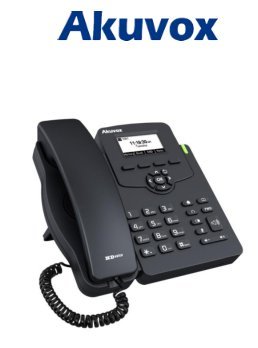
Image: Akuvox SP-R50 Business IP Phone, showing the main unit with the handset resting on its cradle and the stand attached, ready for setup.
Funtzionamendu-argibideak
This section covers the basic operation of your Akuvox SP-R50 IP Phone.
Deiak egitea eta jasotzea
- Dei bat egiteko: Pick up the handset or press the Speaker button. Dial the desired number and press the Markatu or # giltza.
- Dei bat jasotzeko: Hartu telefonoa edo sakatu Hizlaria botoia telefonoak jotzen duenean.
- Dei bat amaitzeko: Eskegi telefonoa edo sakatu Hizlaria botoia.
Deiaren ezaugarriak
- Deia zain: Allows you to answer a second incoming call while on an active call.
- Deiak desbideratzea: Sarrerako deiak beste zenbaki batera birbideratzen ditu.
- Dei transferentzia: Transfers an active call to another party.
- Call on Hold: Puts an active call on hold.
- Ezkutatu: Dei batean zehar mikrofonoa isilarazten du.
- Erantzun automatikoa: Configures the phone to automatically answer incoming calls.
- Berriro markatzea: Azken deitutako zenbakia markatzen du.
- Ez molestatu (DND): Blocks all incoming calls.
- Local 3-Way Conference: Allows you to conduct a three-way conference call.
Phonebook and Settings
- Telefono-agenda: The phone supports a phonebook of up to 500 groups and 5 remote phone book URLs. Access and manage contacts through the menu.
- Bolumenaren doikuntza: Use the volume keys on the phone to adjust the handset, speaker, or ringer volume.
- Dei-tonuak: Select from various ring tones through the phone's settings menu.
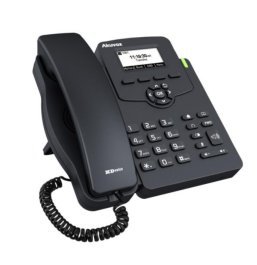
Image: Akuvox SP-R50 Business IP Phone, showcasing its ergonomic design and key layout from a slightly elevated angle, highlighting the display and navigation buttons.
Mantentzea
Mantentze egokiak zure IP telefonoaren iraupena eta errendimendu optimoa bermatzen ditu.
- Garbiketa: Erabili oihal leun eta lehor bat telefonoaren gainazala garbitzeko. Orban egoskorrak garbitzeko, garbitu apur batampGarbitu zapiarekin urarekin. Ez erabili produktu kimiko gogorrik, garbitzaile urratzailerik edo disolbatzailerik.
- Ingurumena: Keep the phone away from direct sunlight, excessive heat sources, and moisture. Ensure it is placed on a stable surface to prevent accidental falls.
- Kableak: Periodically check all connected cables (handset, Ethernet, power) for any signs of wear or damage. Replace damaged cables immediately.
Arazoak konpontzea
If you encounter issues with your Akuvox SP-R50, refer to the following common problems and solutions:
| Arazoa | Kausa posiblea | Irtenbidea |
|---|---|---|
| Telefonoa ez da pizten. | Ez dago korronte konexiorik edo korronte egokitzailea/PoE akastuna. | Check if the power adapter is securely plugged in or if the Ethernet cable is connected to a PoE-enabled port. Try a different power outlet or PoE port. |
| Markatze tonurik ez. | Network connection issue or SIP registration failure. | Verify the Ethernet cable is properly connected. Check the network status on the phone's display. Contact your network administrator or SIP service provider if the issue persists. |
| Ezin dira deiak egin edo jaso. | SIP registration failed, DND enabled, or network problem. | Ensure the phone is registered (check display). Disable DND if active. Confirm network connectivity. |
| Deiaren kalitate eskasa (oihartzuna, estatikoa). | Sare-pilaketak edo interferentziak. | Ensure your network has sufficient bandwidth. Avoid placing the phone near other electronic devices that may cause interference. |
Zehaztapenak
Key technical specifications for the Akuvox SP-R50 Business IP Phone:
| Ezaugarri | Deskribapena |
|---|---|
| Marka | Akuvox |
| Eredua | Akuvox SP-R50 |
| Bistaratzea | 2.3'' 132*64 Graphical LCD with Backlight |
| SIP kontuak | 1 Line (Support 1 SIP account) |
| Ahotsaren Ezaugarriak | HD Voice, 3-Way Conference |
| Telefono-gidaren edukiera | 500 groups, 5 Remote Phone Book URL Onartua |
| Deien erregistroak | 100 sarrera |
| Boterea | PoE Support, Power Adapter (included) |
| Ezaugarri bereziak | Call Waiting, Call Forward, Call Transfer, Call on Hold, Mute, Auto-answer, Redial, DND, Speed Dial, Hotline, Direct IP call, Music on hold, Intercom, Call Pickup, Group Call Pickup, Anonymous Call, Anonymous Call Rejection |
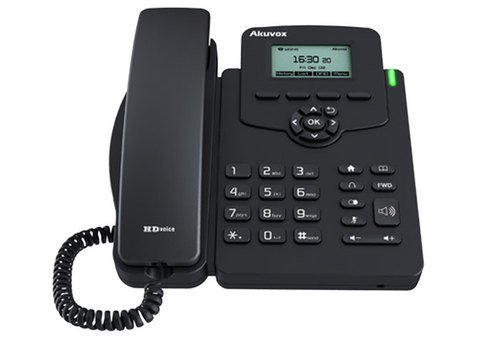
Irudia: Aurrealdea view of the Akuvox SP-R50 Business IP Phone, clearly showing the display, navigation keys, and numeric keypad.
Bermearen informazioa
The Akuvox SP-R50 Business IP Phone comes with a 2 Urteko Bermea from the date of purchase. This warranty covers manufacturing defects and malfunctions under normal use. Please retain your proof of purchase for warranty claims. For detailed terms and conditions, refer to the warranty card included with your product or contact Akuvox customer support.
Laguntza
If you require further assistance or have questions not covered in this manual, please contact your vendor or Akuvox customer support. You may also visit the official Akuvox webbaliabide gehigarrietarako eta maiz egiten diren galderak lortzeko gunea.


