Sarrera
Eskuliburu honek zure DirecTV H25-100 HD hargailuaren konfigurazio, funtzionamendu eta mantentze-lanetarako ezinbesteko informazioa eskaintzen du. Irakurri arretaz gailua erabili aurretik funtzionamendu egokia bermatzeko eta zure etekinak maximizatzeko. viewesperientzia.
Ezaugarri nagusiak
- SWiM (Kable Bakarreko Multiswitch) sareetarako soilik diseinatua.
- Definizio handiko (HD) bideo irteera.
- Diseinu trinkoa.
- 12V DC elikatze sarrera, hainbat potentzia konfiguraziotarako egokia.
- Irteera aukera anitz: 2x HDMI, 1x Konposatu, 1x Osagaiko, 1x Audio Optiko.
- DVR gaitasunik ez.
Kutxan dagoena
- DirecTV H25-100 HD hargailua
- AC Potentzia Egokitzailea

Irudia: Goian view DirecTV H25-100 HD hargailuaren erakusleihoaasinbere diseinu beltz trinkoa.
Konfigurazioa
Despaketatzea
Kontu handiz atera hargailua eta osagarri guztiak paketetik. Gorde paketea etorkizunean garraiatzeko edo biltegiratzeko.
Konexioak
H25-100 hargailuak hainbat ataka eskaintzen ditu telebistara eta satelite-antenera konektatzeko. Ziurtatu konexio guztiak ondo daudela gailua piztu aurretik.
- Satelitearen sarrera: Konektatu SWiM gaitutako satelite-anten kable koaxiala hargailuaren atzealdeko 'SAT IN' atakara.
- HDMI irteerak: Erabili HDMI kable bat hargailuko 'HDMI' ataka bat telebistako HDMI sarrera batera konektatzeko, definizio handiko bideoa eta audioa lortzeko.
- Irteera konposatua: Definizio estandarreko bideoa lortzeko, konektatu hargailuaren 'VIDEO OUT' eta 'AUDIO OUT' ataketatik telebistako dagokien sarreretara RCA kable horia (bideoa), zuria (ezkerreko audioa) eta gorria (eskuineko audioa) .
- Osagaien irteera: Definizio handiko bideo analogikorako, konektatu berdea (Y), urdina (Pb) eta gorria (Pr) osagai-bideo kablea hargailuaren 'COMPONENT OUT' ataketatik telebistara. Konektatu RCA kable zuria eta gorria audiorako.
- Audio Irteera Optikoa: Audio digitalerako, konektatu audio-kable optiko bat 'OPTICAL AUDIO' atakatik audio-hargailu edo soinu-sistema bateragarri batera.
- Potentzia: Konektatu barneko korronte-egokitzailea hargailuaren 'POWER IN 12V' atakara, eta ondoren entxufatu egokitzailea hormako entxufe batera.

Irudia: Aurrealdea eta atzealdea viewDirecTV H25-100 HD hargailuaren irudiak, konexiorako sarrera eta irteera ataka guztiak nabarmenduta.
Hasierako piztea
Konexio guztiak egin ondoren, sakatu hargailuaren aurrealdean edo DirecTV urrutiko agintean dagoen 'POWER' botoia. Jarraitu hasierako konfiguraziorako pantailan agertzen diren argibideei, hala nola hizkuntza hautatzea eta satelite seinalearen eskuratzea.
Funtzionamendu-argibideak
Aurrealdeko paneleko kontrolak
H25-100 hargailuaren aurrealdeko panelak funtzionamendurako oinarrizko kontrolak eskaintzen ditu:
- POTENTZIA: Hargailua pizten edo itzaltzen du.
- MENUA: Ezarpen eta aukeren menu nagusira sartzen da.
- AUKERATU: Menuetan egindako hautaketak berresten ditu.
- GIDA: Programaren gida bistaratzen du.
- RES (Ebazpena): Eskuragarri dauden bideo-bereizmenen artean txandakatzen da.
- Nabigazio geziak (Gora/Behera/Ezkerra/Eskuina): Menuetan nabigatzeko eta kanalak aldatzeko erabiltzen da.
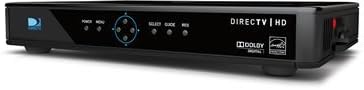
Irudia: Albokoa view DirecTV H25-100 HD hargailuarena, aurrealdeko paneleko pizteko, menuko, hautatzeko, gidako eta bereizmeneko botoiak argi erakusten dituena.
Oinarrizko Funtzionamendua
Piztu eta konfiguratu ondoren, DirecTV urrutiko agintea (hargailu honekin ez dator bat) erabil dezakezu kanalak nabigatzeko, programa gida atzitzeko, ezarpenak doitzeko eta DirecTV zerbitzuz gozatzeko.
- Kanalak aldatzea: Erabili CH+/CH- botoiak edo sartu kanal zenbakiak zuzenean urrutiko agintean.
- Sarbide Gida: Sakatu 'GIDA' botoia view programa zerrendak.
- Menuen nabigazioa: Erabili 'MENU' botoia sistemaren ezarpenetara, gurasoen kontrolak eta beste funtzio batzuetara sartzeko.
Mantentzea
Garbiketa
Hartzailearen itxura eta errendimendua mantentzeko, aldizka garbitu kanpoaldea. Erabili zapi leun eta lehor bat hautsa kentzeko. Orban egoskorrak kentzeko, garbitu apur bat.ampGarbitu zapiarekin urarekin. Ez erabili produktu kimiko gogorrik, garbitzaile urratzailerik edo disolbatzailerik, hauek akabera kaltetu baitezakete.
Software eguneraketak
DirecTV H25-100 hargailuak software eguneratze automatikoak jaso ditzake satelite bidez. Ziurtatu hargailua korronteari eta satelite antenari konektatuta dagoela eguneratze hauek gerta daitezen, errendimendua hobetu eta funtzio berriak gehi ditzakeelako.
Arazoak konpontzea
DirecTV H25-100 hargailuarekin arazoak badituzu, beheko taulan aurkituko dituzu arazo ohikoenak eta haien irtenbideak.
| Arazoa | Kausa posiblea | Irtenbidea |
|---|---|---|
| Botererik ez | Kable elektrikoa askatuta edo deskonektatuta; entxufea ez dabil. | Egiaztatu kablearen konexioa; saiatu beste entxufe batekin; ziurtatu egokitzailea funtzionatzen duela. |
| Seinalerik ez / Satelitea bilatzen | Satelite kablea askatuta edo deskonektatuta; antenak lerrokatzeko arazoa; eguraldi txarra. | Egiaztatu 'SAT IN' kablearen konexioa; ziurtatu antzinako irratiarekiko ikusmen-lerro garbia dagoela; itxaron eguraldia hobetu arte. |
| Irudirik ez / Pantaila beltza | Telebistako sarrera okerra hautatu da; bideo-kablea solte edo akastuna; hargailua ez dago piztuta. | Hautatu HDMI/AV sarrera zuzena telebistan; egiaztatu bideo-kablearen konexioak; itzali eta berrabiarazi hartzailea. |
| Audiorik ez | Audio kablea askatuta edo akastuna; telebista/audio sistema isilarazita edo bolumena baxua; audio irteeraren ezarpen okerra. | Egiaztatu audio-kablearen konexioak; aktibatu telebistaren/audio-sistemaren isiltasuna eta igo bolumena; egiaztatu hargailuaren audio-ezarpenak. |
Zehaztapenak
DirecTV H25-100 HD hargailuaren zehaztapen tekniko zehatzak:
| Ezaugarri | Deskribapena |
|---|---|
| Eredua | H25-100 |
| Marka | DIRECTV |
| Kolorea | Beltza |
| Konektibitate Teknologia | HDMI, Konposatua, Osagaia, Audio Optikoa |
| Satelite bidezko sarrera | 1 (SWM sistema bakarrik) |
| HDMI irteerak | 2 |
| Bideo irteera konposatua | 1 |
| Osagaien Bideo Irteera | 1 |
| Audio Irteera Optikoa | 1 |
| Potentzia Sarrera | 12V DC |
| ASIN | B07DB2YP79 |
| Eskuragarri dagoen lehen data | 7ko abuztuaren 2018a |
Bermea eta Laguntza
Produktuaren bermeari, laguntza teknikoari edo zerbitzuari buruzko informazioa lortzeko, kontsultatu DirecTV-k erosketa unean emandako dokumentazioa edo bisitatu DirecTV-ren laguntza ofiziala. webgunea. Gorde erosketa-agiria erosketaren frogagiri gisa berme-erreklamazioetarako.


