Sarrera
This manual provides detailed instructions for the Microsoft N9Z-00017 All-In-One Media Keyboard. This wireless keyboard features an integrated multi-touch trackpad, media hotkeys, and 128-bit AES encryption for secure data transmission. It is designed for use with Smart TVs, laptops, and desktop computers, offering a convenient and versatile input solution.
Please read this manual thoroughly before using your keyboard to ensure proper setup and operation.
Konfigurazioa
1. Paketearen edukia
- Microsoft N9Z-00017 All-In-One Media Keyboard
- USB Haririk gabeko Hargailua
- AA Batteries (pre-installed or included)
- Hasiera Azkarreko Gida (aplikagarria bada)
2. Bateriaren instalazioa
The keyboard typically comes with AA batteries pre-installed or included. If not, follow these steps:
- Bilatu bateriaren konpartimentuaren estalkia teklatuaren azpialdean.
- Irristatu edo altxatu estalkia konpartimentua irekitzeko.
- Sartu AA pilak, polaritate zuzena ziurtatuz (+ eta -).
- Itxi bateriaren konpartimenduaren estalkia ondo.
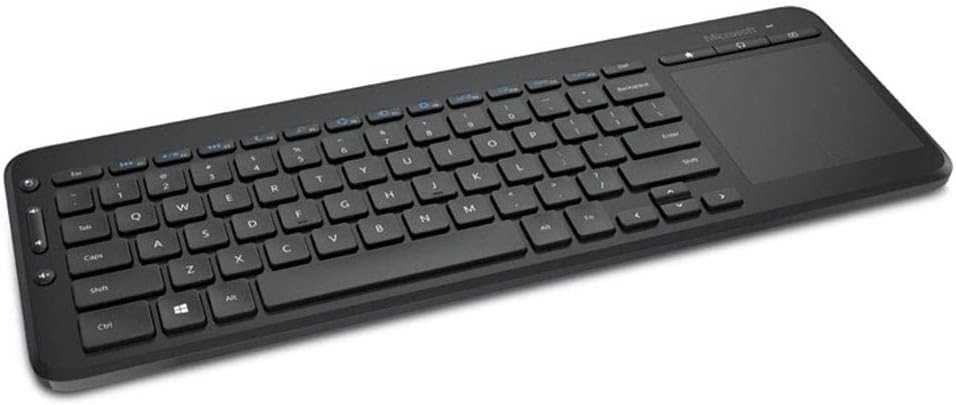
Image: The Microsoft All-In-One Media Keyboard, showing its compact design with an integrated touchpad on the right side. This image provides a general overview produktuaren itxurari buruz.
3. Haririk gabeko hargailua konektatzea
- Locate the USB wireless receiver, usually stored in a compartment on the keyboard or included separately.
- Plug the USB wireless receiver into an available USB port on your computer or Smart TV.
- The operating system should automatically detect and install the necessary drivers. This process may take a few moments.
- Once installed, the keyboard should be ready for use.
Funtzionamendu-argibideak
1. Oinarrizko teklatuaren funtzioak
The keyboard functions like a standard QWERTY keyboard. This specific model features a Turkish Q layout. All standard alphanumeric keys, function keys (F1-F12), and modifier keys (Shift, Ctrl, Alt) are present.
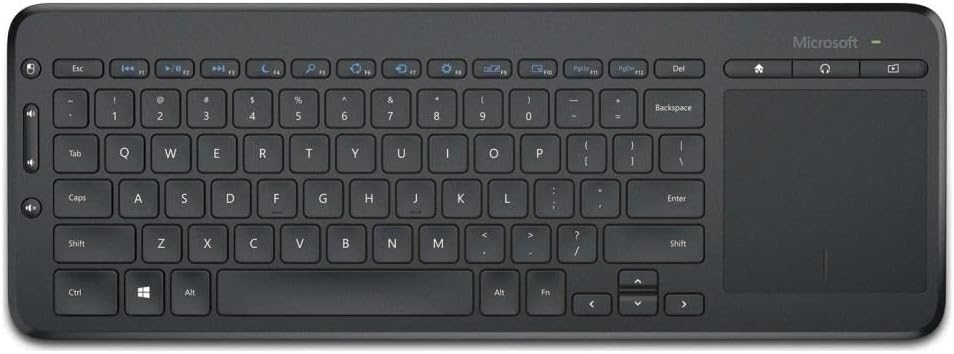
Irudia: Goitik behera view of the Microsoft All-In-One Media Keyboard, clearly displaying the Turkish Q keyboard layout and the integrated multi-touch trackpad.
2. Integrated Multi-Touch Trackpad
The large integrated trackpad supports multi-touch gestures, allowing for intuitive navigation.
- Hatz bakarreko ukitu: Egin klik ezkerreko botoiarekin.
- Bi hatzekin ukitzea: Egin klik eskuineko botoiarekin.
- Bi hatzekin korritzea: Scroll vertically or horizontally.
- Atximurkatu Zooma egiteko: Zoom in or out (application dependent).
3. Media Hotkeys
Dedicated media hotkeys are located above the function keys for quick access to media controls and other common functions. These include volume control, mute, play/pause, and home screen access.
4. 128-bit AES Encryption
The keyboard utilizes 128-bit Advanced Encryption Standard (AES) technology to encrypt your keystrokes. This feature helps protect your personal and business information by securing the wireless communication between the keyboard and the receiver.
5. Gailuen bateragarritasuna
This keyboard is compatible with a range of devices, including:
- Smart Televisions
- Ordenagailu eramangarriak
- Mahaigaineko Ordenagailuak
Ensure your device has an available USB port for the wireless receiver.
Mantentzea
1. Teklatua garbitzea
- Disconnect the keyboard from its power source (remove batteries) before cleaning.
- Erabili lipurrik gabeko zapi leun bat dampurarekin edo garbiketa-soluzio leun batekin jarri.
- Saihestu garbitzaile urratzaileak, disolbatzaileak edo aerosolak zuzenean teklatuan erabiltzea.
- Teklen artean garbitzeko, erabili aire konprimatua hautsa eta hondakinak kentzeko.
- Wipe the trackpad gently with a clean, dry cloth.
2. Bateria ordezkatzea
When the keyboard's performance degrades or the battery indicator (if present) signals low power, replace the batteries:
- Open the battery compartment on the underside of the keyboard.
- Kendu AA bateria zaharrak.
- Insert new AA batteries, observing the correct polarity.
- Itxi bateriaren konpartimendua ongi.
- Tokiko araudien arabera bota bateria zaharrak.
Arazoak konpontzea
| Arazoa | Kausa posiblea | Irtenbidea |
|---|---|---|
| Teklatuak ez du erantzuten |
|
|
| Keys not working correctly |
|
|
| Trackpad-ak ez du erantzuten |
|
|
Zehaztapenak
- Marka: Microsoft
- Eredua: N9Z-00017
- Konektibitate Teknologia: Haririk gabekoa
- Teklatuaren diseinua: Turkiako Q
- Gailu bateragarriak: Smart Television, Laptop, Desktop Computer
- Erabilera gomendatua: Office, Home Entertainment
- Segurtasuna: 128-bit AES enkriptatzea
- Energia iturria: AA bateriak
Bermea eta Laguntza
For warranty information, technical support, or to register your product, please visit the official Microsoft support website. You can typically find detailed warranty terms and contact information for customer service there.
Microsoft-en laguntza ofiziala: support.microsoft.com
Mesedez, gorde zure erosketa-froga berme-erreklamazioetarako.


