1. Sarrera
The Pyle PRJG98.5 is a compact digital multimedia projector designed for versatile projection of images, videos, audio, and text files. It supports Full HD 1080p resolution and features multiple input interfaces, making it suitable for home entertainment, office presentations, and educational use. This manual provides detailed instructions for setting up, operating, and maintaining your projector.
2. Segurtasun informazioa
- Ez begiratu zuzenean proiektorearen lenteari l dagoenean.amp piztuta dago.
- Berotu gehiegi ez dadin, ziurtatu proiektorearen inguruan aireztapen egokia dagoela. Ez blokeatu aireztapen-irekidurak.
- Erabili unitatearekin hornitutako korronte-egokigailua soilik.
- Avoid placing the projector in direct sunlight, near heat sources, or in environments with high humidity or dust.
- Ez saiatu proiektorea desmuntatzen edo aldatzen. Mantendu konponketa guztiak langile kualifikatuen esku.
- Mantendu proiektorea uretatik edo beste likido batzuetatik urrun.
3. Paketearen edukia
Mesedez, egiaztatu elementu guztiak paketean daudela:
- Digital Projector (Pyle PRJG98.5)
- Urruneko Kontrola
- VGA kablea
- AC kablea
- Elikatze kablea
4. Produktua amaitu daview
The Pyle PRJG98.5 projector features a compact design with various input options and controls for an optimal viewesperientzia.

4.1. irudia: Pyle PRJG98.5 Digital Multimedia Projector and included remote control. The projector is black with a lens on the front and control buttons on top. The remote is also black with various function buttons.
4.1 Front and Top Panel
- Proiekzio lentea: Irudia pantailara igortzen du.
- Fokatzeko eraztuna: Irudiaren zorroztasuna doitzen du.
- Keystone doikuntza: Trapezoidal distortsioa zuzentzen du.
- Kontrol-botoiak: Power, menu navigation, input selection.
4.2 Rear Panel (Connectivity)

4.2. irudia: Rear panel of the Pyle PRJG98.5 Projector, displaying various input ports including AV, USB (x2), HDMI, VGA, and DC power input. This allows connection to multiple devices.
- HDMI Sarrera: Connects to devices like Blu-Ray players, game consoles, laptops.
- USB atakak (x2): For multimedia file playback from USB drives or charging devices.
- VGA (RGB) Input: Connects to computers and laptops.
- AV (RCA) Input: Connects to older video sources.
- DC potentzia sarrera: Korronte-egokigailura konektatzen da.
- Audio irteera: Kanpoko bozgorailuak edo entzungailuak konektatzeko.
5. Konfigurazioa
5.1 Jartzea
Position the projector on a stable, flat surface or mount it overhead. Ensure the projector is perpendicular to the projection surface for the best image quality. The adjustable screen size ranges up to 120 inches.
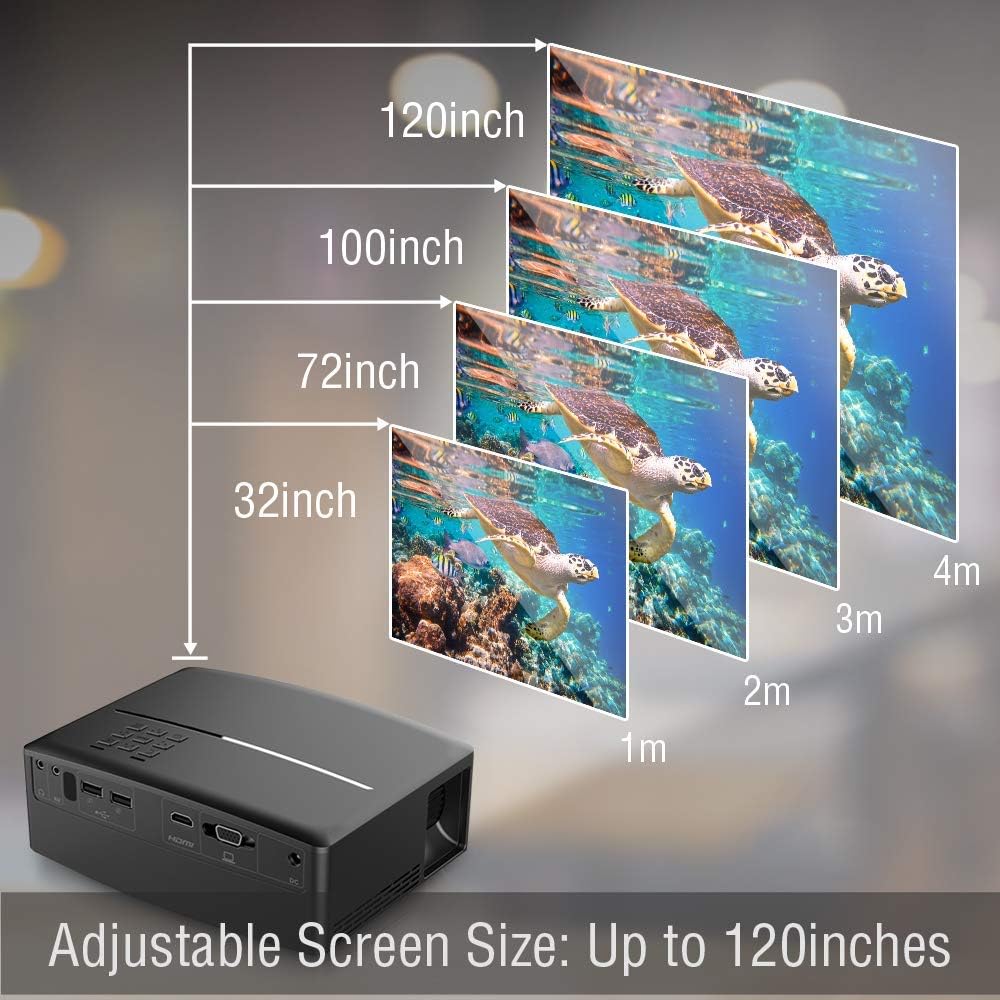
5.1. irudia: Illustration of the adjustable screen size capability of the Pyle PRJG98.5 Projector, showing projection sizes from 32 inches to 120 inches at varying distances from the screen.
5.2 Energia-konexioa
- Connect the power cord to the AC cable.
- Plug the AC cable into the DC Power Input port on the projector.
- Entxufatu korronte-kablearen beste muturra hormako entxufe batera.
5.3 Sarrerako gailuak konektatzea
Proiektoreak hainbat sarrera-iturri onartzen ditu:
- HDMI: Connect an HDMI cable from your device (e.g., laptop, game console, Blu-Ray player) to the HDMI port on the projector.
- USBa: Insert a USB flash drive into one of the USB ports for multimedia playback.
- VGA: Connect a VGA cable from your computer to the VGA port on the projector.
- OF: Use an RCA cable to connect to devices with AV output.
5.4 Irudiaren doikuntza
After powering on the projector, adjust the image for clarity and proper display.
- Fokuaren doikuntza: Rotate the focus ring around the lens until the projected image is sharp and clear.
- Keystone zuzenketa: If the image appears trapezoidal (wider at the top or bottom), use the keystone adjustment dial or lever on the projector to correct the distortion. The projector supports a 15-degree keystone angle adjustment.

5.2. irudia: Visual representation of keystone angle adjustment, showing how to correct a distorted rectangular display to a proper rectangular display using the projector's adjustment mechanism. The projector supports a 15-degree keystone adjustment.
6. Funtzionamendua
6.1 Piztu/Itzaltzea
- Pizteko: Press the power button on the projector or the remote control. The indicator light will turn on.
- Itzaltzeko: Sakatu berriro pizteko botoia. Berretsi itzaltzea eskatzen bazaizu.
6.2 Sarrera iturriaren hautaketa
After connecting your input device, select the corresponding source:
- Press the "Input" button on the projector or remote control.
- Use the arrow keys to navigate through the input options (HDMI, USB, VGA, AV).
- Press "OK" or "Enter" to confirm your selection.
6.3 Multimedia Playback (USB)
The projector supports various digital media file formats including AVI, MPG, MOV, MP3, WMV, and TXT.
- Sartu USB flash unitate bat USB atakan.
- Select "USB" as the input source.
- Nabigatu file browser to select the desired media file (image, video, audio, text).
- Press "OK" or "Enter" to play the file.
6.4 Menu Nabigazioa
Use the "Menu" button on the projector or remote to access settings. Navigate with arrow keys and confirm with "OK" or "Enter". Options include picture adjustment, sound settings, and system settings.
7. Mantentzea
7.1 Lentea garbitzea
Erabili lente optikoetarako bereziki diseinatutako zapi leun eta lint-gabea proiektorearen lentea astiro-astiro garbitzeko. Ez erabili garbitzaile urratzailerik edo indar gehiegirik.
7.2 Proiektorearen gorputza garbitzea
Wipe the exterior of the projector with a soft, dry cloth. For stubborn dirt, slightly dampGarbitu oihal bat urarekin, eta gero berehala lehortu.
7.3 lamp Bizitza
LED lamp in your projector has an estimated life of 30,000+ hours. No user-replaceable lamp mantentze-lanak beharrezkoak dira.
8. Arazoak
| Arazoa | Kausa posiblea | Irtenbidea |
|---|---|---|
| Ez da irudirik bistaratzen | Energia ez dago konektatuta; Sarrera-iturri okerra; Gailua ez dago behar bezala konektatuta. | Check power connection; Select correct input source; Ensure cables are securely connected. |
| Irudia lausoa da | Focus not adjusted; Projector too far/close to screen. | Doitu fokatze-eraztuna; Berriro kokatu proiektorea. |
| Irudia trapezoidala da | Proiektorea ez dago pantailarekiko perpendikularra. | Adjust keystone correction. |
| Soinurik ez | Volume too low; Muted; External speakers not connected. | Increase volume; Unmute; Connect external speakers if desired. |
| Urruneko kontrola ez dabil | Batteries low/dead; Obstruction between remote and projector. | Replace batteries; Ensure clear line of sight to IR receiver. |
9. Zehaztapenak
| Irudi Teknologia | 4.0'' LCD + LED Lamp |
| Adjustable Screen Size | Up to 120'' -inches |
| Berezko Ebazpena | 800 x 480 SVGA, 1080p Support |
| Kolore Tenperatura | Full Color, 16.7K |
| Kontraste-erlazioa | 2,200:1 (Dynamic: 10,000:1) |
| Distira | 1,800 lumen |
| Lamp Bizitza | 30,000 ordu baino gehiago |
| Eskala-erlazioa | 16:9, 4:3 |
| Freskatze tasa | 60Hz |
| Keystone Angle Adjustment | 15° gradua |
| Digitala File Laguntza | AVI, MPG, MOV, MP3, WMV, TXT & More |
| Bozgorailuaren potentzia | 2 x 5Watt |
| Elikatze Hornidura | 120V (12V Power Adapter) |
| Neurriak (L x W x H) | 7.5'' x 6.3'' x 2.7'' |
| Elementuaren pisua | 1.99 kilo |
10. Bermea eta Laguntza
Bermeari buruzko informazioa edo laguntza teknikoa lortzeko, mesedez, kontsultatu zure produktuarekin batera datorren berme-txartela edo bisitatu Pyle-ren webgune ofiziala. webgunea. Gorde erosketa-agiria erosketaren frogagiri gisa.


