1. Sarrera
This manual provides essential information for the safe and efficient operation of your Pyle 40 Inch LED TV with Built-in CD/DVD Player, Model PTVDLED40.5. Please read this manual thoroughly before using the product and retain it for future reference.

Irudia: Aurrealdea view of the Pyle 40 Inch LED TV, showing the screen displaying a landscape, a remote control, and a hand inserting a disc into the side-loading DVD player.
2. Segurtasun informazioa
ABISUA: DESKARGA ELEKTRIKOAREN ARRISKUA MURRIZTEKO, EZ Kendu estalkia (EDO ATZEKOA). BARRUAN ERABILTZAILEAREN LAGUNTZEKO PIEZARIK EZ. ZERBITZU ZERBITZU PERSONAL KALIFIKATUA.
- Irakurri argibide hauek.
- Jarrai argibide hauek.
- Kontuan izan abisu guztiei.
- Jarraitu argibide guztiak.
- Ez erabili aparatu hau uraren ondoan.
- Garbitu zapi lehor batekin bakarrik.
- Ez blokeatu aireztapen-irekidurak. Instalatu fabrikatzailearen argibideen arabera.
- Ez instalatu bero-iturri inongo ondoan, esate baterako, erradiadoreak, bero-erregistroak, sukaldeak edo beste aparatu batzuk (barne ampberoa sortzen duten argitzaileak).
- Ez zapaldu polarizatutako edo lurreko entxufearen segurtasun-helburua. Entxufe polarizatu batek bi pala ditu, bata bestea baino zabalagoa dutenak. Lurreratze-motako entxufe batek bi pala eta lurreko hirugarren ahoa ditu. Pala zabala edo hirugarren ahoa zure segurtasunerako eskaintzen dira. Emandako entxufea zure entxufean sartzen ez bada, kontsultatu elektrizista bati zaharkituta dagoen entxufea ordezkatzeko.
- Babestu korronte-kablea oinez ibiltzetik edo atxilotzetik, batez ere entxufeetan, erosotasun-harguneetan eta aparatutik irteten diren puntuetan.
- Erabili soilik fabrikatzaileak zehaztutako eranskinak/osagarriak.
- Erabili fabrikatzaileak zehaztutako edo aparatuarekin saltzen den saskiarekin, euskarria, tripodea, euskarria edo mahaiarekin soilik. Orga bat erabiltzen denean, kontuz ibili saskia/aparatuaren konbinazioa mugitzean, iraultzeagatik zauririk ez izateko.
- Deskonektatu aparatu hau tximista-ekaitzetan edo denbora luzez erabiltzen ez duzunean.
- Jarri zerbitzu-zerbitzu guztiak zerbitzu-pertsonal kualifikatuari. Zerbitzua behar da aparatua edozein modutan hondatu denean, hala nola, elikatze-kablea edo entxufea hondatuta dagoenean, likidoa isuri denean edo objektuak aparatura erori direnean, aparatua euria edo hezetasuna jasan duenean, ez du normalean funtzionatzen. , edo erori egin da.
3. Paketearen edukia
Egiaztatu behean zerrendatutako elementu guztiak zure paketean sartuta daudela:
- Pyle 40 Inch HD LED TV (Model PTVDLED40.5)
- Funtzio osoko urrutiko kontrola
- (2) Urruneko Kontrolerako AAA bateriak
- (2) Base Stands
- Mounting Screws for Base Stands
- Elikatze kablea

Image: Included accessories for the Pyle 40 Inch LED TV, showing the remote control, power cord, two base stands, and screws.
4. Produktua amaitu daview
4.1 Aurrealdea View
Irudia: Aurrealdea view of the Pyle 40 Inch LED TV, showcasing the screen and the Pyle logo.
- Pantaila bistaratzea: 40-inch D-LED Backlight display.
- Pyle Logo: Indicates brand.
- IR sentsorea: Urrutiko agintearen seinaleetarako.
- Potentzia adierazlea: Energia-egoera adierazten duen LED argia.
4.2 Alboko panelaren kontrolak

Image: Close-up of the side panel controls on the Pyle 40 Inch LED TV, showing buttons for volume, channel, menu, input, and power.
- VOL +/-: Bolumen maila doitzen du.
- CH +/-: Kanalak aldatzen ditu.
- MENUA: Accesses the on-screen menu.
- Sarrera: Sarrera iturria hautatzen du (HDMI, AV, etab.).
- POTENTZIA: Telebista pizten edo itzaltzen du.
4.3 Atzeko panelaren konexioak

Irudia: Atzealdea view of the Pyle 40 Inch LED TV, highlighting the various input and output ports.

Image: Detailed close-up of the input/output ports on the Pyle 40 Inch LED TV, including HDMI, VGA, PC Audio, RF, Earphone, USB, Coaxial, Audio Out, Mini YPbPr, and Video/Audio In (RCA).
- HDMI (x3): High-Definition Multimedia Interface inputs for digital audio/video.
- YPbPr (Osagai Bideoa): Analog video input (green, blue, red) for high-quality analog video.
- RCA (E/E audioa, bideoa): Analog audio (white, red) and composite video (yellow) inputs.
- VGA/PC: Video Graphics Array input for connecting a computer.
- PC Audioa: Audio input for VGA connection.
- RF (Antena): Input for connecting an antenna or cable TV.
- Optical (Digital) Audio Out: Digital audio output for connecting to a soundbar or receiver.
- Entzungailuak: 3.5mm audio output for headphones.
- USBa: For service or media playback (check manual for specific functionality).
- Coaxial: Audio irteera digitala.
4.4 Built-in CD/DVD Player
The TV features a side-loading CD/DVD player. Insert discs gently into the slot located on the side of the television.
Irudia: Albokoa view of the Pyle 40 Inch LED TV, clearly showing the slot for the built-in CD/DVD player.
5. Konfigurazioa
5.1 Oinarrizko euskarriak lotzea
- Kontu handiz jarri telebistaren pantaila beherantz gainazal leun eta garbi batean, marradurak saihesteko.
- Lerrokatu oinarri-euskarri bakoitza telebistaren behealdeko zirrikituekin.
- Secure each stand using the provided screws. Ensure they are tightened firmly.

Image: The Pyle 40 Inch LED TV shown with its two base stands securely attached, ready for placement on a flat surface.
5.2 Horman muntatzea (aukerakoa)
The TV is VESA mounting compatible (200mm x 200mm). Remove the base stands if you intend to wall mount the television. Use a VESA-compatible wall mount kit (sold separately) and follow the instructions provided with the wall mount.
WARNING: Wall mounting should be performed by qualified personnel to prevent injury or damage.
5.3 Potentzia konektatzea
- Connect the power cord to the AC input on the back of the TV.
- Plug the other end of the power cord into a standard electrical outlet (100-240V, 50/60Hz).
5.4 Kanpoko gailuak konektatzea
Refer to the "Rear Panel Connections" section for port locations.
- HDMI gailuak: Connect HDMI cables from your devices (e.g., Blu-ray player, game console) to the HDMI ports on the TV.
- Component Video (YPbPr) Devices: Connect component video cables (green, blue, red) and RCA audio cables (white, red) from your device to the corresponding inputs.
- Composite Video (RCA) Devices: Connect composite video cable (yellow) and RCA audio cables (white, red) from your device to the corresponding inputs.
- Antena/Kablea: Connect an RF coaxial cable from your antenna or cable wall outlet to the RF input.
- PC konexioa: Connect a VGA cable from your computer to the VGA port and an audio cable from your computer's audio output to the PC Audio input.
6. Funtzionamendua
6.1 Piztu/Itzali
Sakatu BOTEREA button on the remote control or the side panel to turn the TV on or off.
6.2 Urruneko kontrola
Insert two 'AAA' batteries into the remote control, observing polarity. Point the remote control towards the TV's IR sensor.
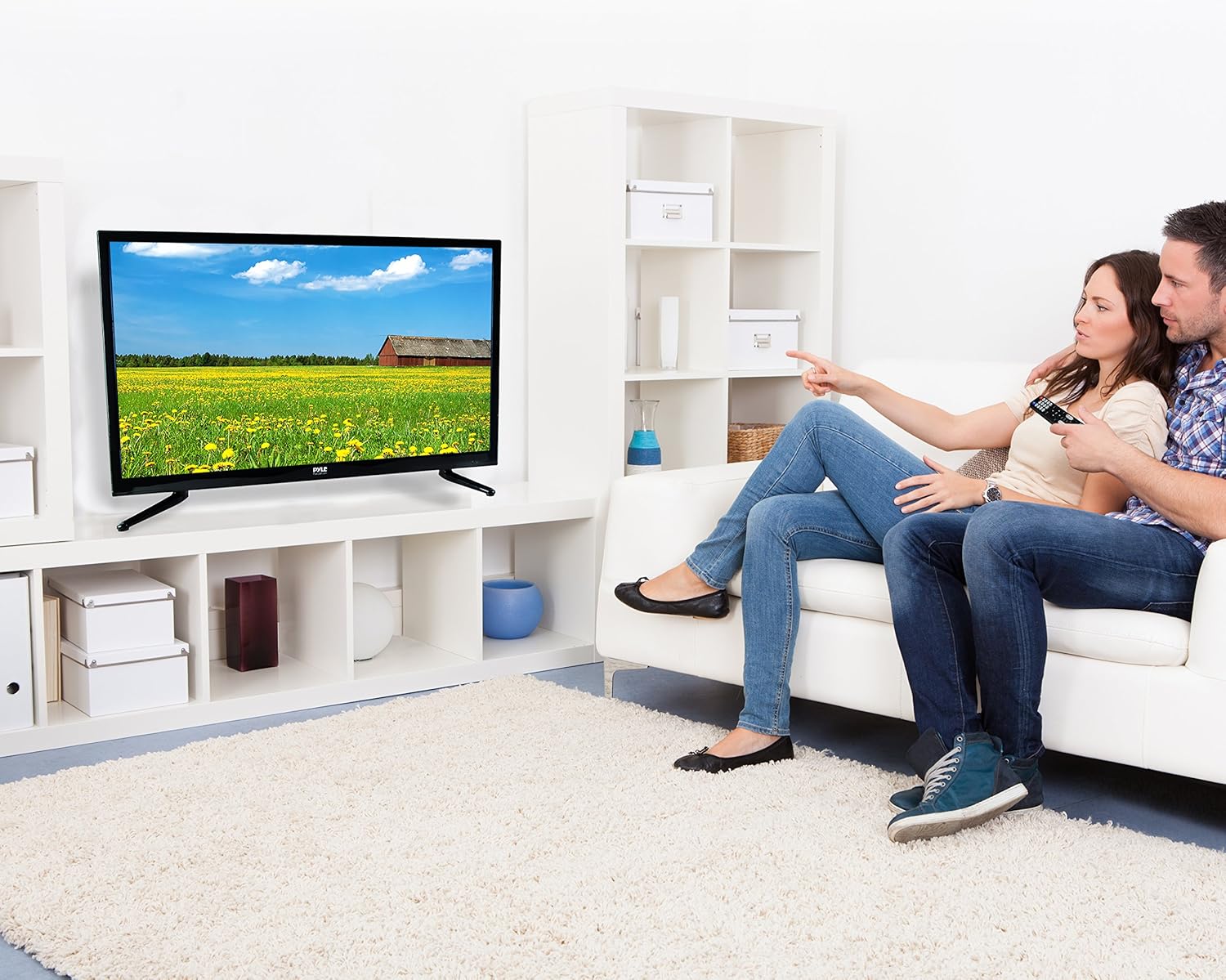
Image: The full-function remote control for the Pyle 40 Inch LED TV, showing various buttons for power, input, volume, channel, menu, and media playback.
- POTENTZIA: Telebista pizten edo itzaltzen du.
- Sarrera: Sarrerako iturria hautatzen du.
- VOL +/-: Bolumena doitzen du.
- CH +/-: Kanalak aldatzen ditu.
- MENUA: Menu nagusia irekitzen du.
- Nabigazio botoiak (Gora/Behera/Ezkerra/Eskuina/Ados): Nabigatu menuko aukeretan.
- EXIT/BACK: Exits current menu or goes back.
- MUTU: Soinua aktibatu/isilarazi.
- DVD Controls: Play, Pause, Stop, Fast Forward, Rewind, Next/Previous Track.
- V-TXIPA: Accesses V-Chip settings for parental control.
- CC (Closed Caption): Azpitituluak aktibatu/desaktibatu.
- LO: Lo egiteko tenporizadorea ezartzen du.
6.3 Sarrera iturria hautatzea
Sakatu SARRERA button on the remote control to cycle through available input sources (TV, HDMI1, HDMI2, HDMI3, YPbPr, AV, VGA, DVD).
6.4 Using the Built-in CD/DVD Player
- Ziurtatu telebista piztuta dagoela.
- Gently insert a compatible disc (DVD, DVD+/-R, DVD+/-RW, CD, CD-R, CD-RW, JPEG) into the side-loading slot with the label facing up.
- The TV should automatically switch to DVD mode. If not, press the SARRERA botoia eta hautatu "DVD".
- Use the DVD control buttons on the remote control (Play, Pause, Stop, etc.) to manage playback.
6.5 Menuen funtzioak
Sakatu MENUA button to access the on-screen display (OSD) menu. Use the navigation buttons to select and adjust settings.
- Irudiaren ezarpenak: Adjust brightness, contrast, color, sharpness, and picture modes (Standard, Dynamic, Movie, User).
- Soinu ezarpenak: Adjust bass, treble, balance, and sound modes (Standard, Music, Movie, User).
- Kanalaren ezarpenak: Auto scan for channels, manual tuning, channel list.
- Ordu ezarpenak: Set current time, sleep timer, auto power off.
- Aukeren ezarpenak: Language, V-Chip (parental control), Closed Caption, display modes (16:9, 4:3, Zoom, Cinema).
7. Mantentzea
- Pantaila garbitzea: Garbitu pantaila astiro-astiro zapi leun eta pelusik gabeko batekin. Orba egoskorrak kentzeko, garbituampGarbitu zapi bat gailu elektronikoetarako bereziki diseinatutako pantaila-garbitzaile kantitate txiki batekin. Ez ihinztatu garbitzailea zuzenean pantailan.
- Armairua garbitzea: Garbitu telebistaren armairua oihal leun eta lehor batekin. Saihestu garbitzaile edo disolbatzaile urratzaileak erabiltzea.
- Aireztapena: Ziurtatu telebistaren atzealdeko aireztapen-irekidurak ez daudela blokeatuta, gehiegi berotzea saihesteko.
- Elikatze kablea: Aldian-aldian egiaztatu kable elektrikoa kalterik dagoen. Kaltetuta badago, utzi erabiltzeari eta jarri harremanetan zerbitzu-langile kualifikatuekin.
8. Arazoak
| Arazoa | Kausa posiblea | Irtenbidea |
|---|---|---|
| Botererik ez | Kable elektrikoa ez dago konektatuta; ez dago korronterik entxufetik. | Ensure power cord is securely plugged in. Check if the outlet is working by plugging in another device. |
| Ez dago irudirik, baina soinua badago | Sarrera-iturri okerra hautatu da; bideo-kablea solte dago. | Sakatu SARRERA button to select the correct source. Check video cable connections. |
| Soinurik ez, baina irudia badago | Volume is muted or too low; incorrect audio cable connection. | Sakatu MUTU button or increase volume. Check audio cable connections. |
| Urruneko kontrola ez dabil | Bateriak agortuta edo gaizki sartuta daude; urrutiko agintearen eta telebistaren arteko oztopoa. | Replace batteries. Ensure correct polarity. Remove any obstructions. Point remote directly at the TV's IR sensor. |
| DVD erreproduzitzaileak ez du diskoa irakurtzen | Disc is dirty, scratched, or incompatible format; disc inserted incorrectly. | Clean the disc. Try a different, known-good disc. Ensure disc is inserted with the label facing up. |
| Poor picture quality from antenna | Weak signal; antenna not positioned correctly. | Adjust antenna position. Perform an auto channel scan. Consider a stronger antenna or signal ampbiziagoa. |
9. Zehaztapenak
| Ezaugarri | Xehetasuna |
|---|---|
| Modelo zenbakia | PTVDLED40.5 |
| Pantailaren tamaina | 40.0 hazbete (diagonala) |
| Bistaratzeko mota | D-LED Backlight |
| Bistaratzeko ebazpena | 1920 x 1080 (Full HD 1080p) |
| Seinaleen laguntza | 1080p, 1080i, 720p, 480p, 480i |
| Bistaratzeko moduak | 16:9, 4:3, Zoom, Zinema |
| Viewangelua | 178° bertikala, 178° horizontala |
| Bozgorailuaren potentzia | (2) x 8 Watt, 8Ω |
| Freskatze tasa | 60Hz |
| Telebista sintonizatzailea | ATSC / NTSC |
| Erantzun Denbora | 6 ms |
| Max. Kolore | 16.7M |
| Kontrastea | 5000:1 (50,000:1 Dinamikoa) |
| Distira | 250 cd/m2 |
| CD/DVD Disc Support | DVD, DVD+/-R, DVD+/-RW, CD, CD-R, CD-RW, JPEG |
| VESA muntaketa | 200 mm x 200 mm |
| Boterea | 100-240V, 50/60Hz |
| Neurriak (L x W x H) | 36.5'' x 3.5'' x 21.9'' (Panel Only) |
| Elementuaren pisua | 16.32 kilo |
| Dakarten osagaiak | 40'' HD LED TV, Full Function Remote Control |
| Konektibitate Teknologia | HDMI |
| Energia Eraginkortasuna | Urteko energia-kostua estimatua: 11.52 $ |
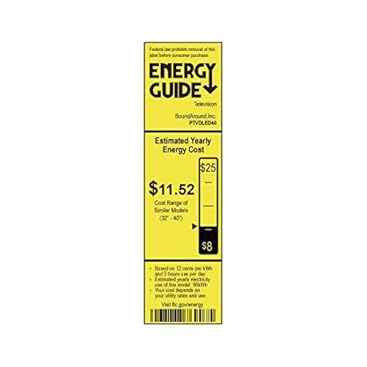
Image: Energy Guide label for the Pyle PTVDLED40 TV, showing an estimated yearly energy cost of $11.52.
10. Bermea eta laguntza
Bermeari buruzko informazioa eta laguntza teknikoa lortzeko, kontsultatu zure produktuarekin batera datorren berme-txartela edo bisitatu Pyle-ren webgune ofiziala. webgunea. Gorde erosketa-agiria erosketaren frogagiri gisa, berme-erreklamazioetarako.
For customer support inquiries, you may also refer to the Amazonen Bezeroarentzako Laguntza Orria.


