1. Sarrera
This manual provides detailed instructions for the proper use and maintenance of your Edifier W820BT Bluetooth Headphones. Please read this manual thoroughly before using the product to ensure optimal performance and longevity.
2. Paketearen edukia
Verify that all items listed below are included in your package. If any items are missing or damaged, please contact Edifier customer support.
- Edifier W820BT Bluetooth Headphones
- Kargatzeko kablea (USB)
- Audio kablea (3.5 mm)
- Erabiltzailearen eskuliburua (dokumentu hau)
3. Produktua amaitu daview
The Edifier W820BT headphones are designed for comfort and extended listening, featuring Bluetooth v4.1 connectivity and a long-lasting battery.
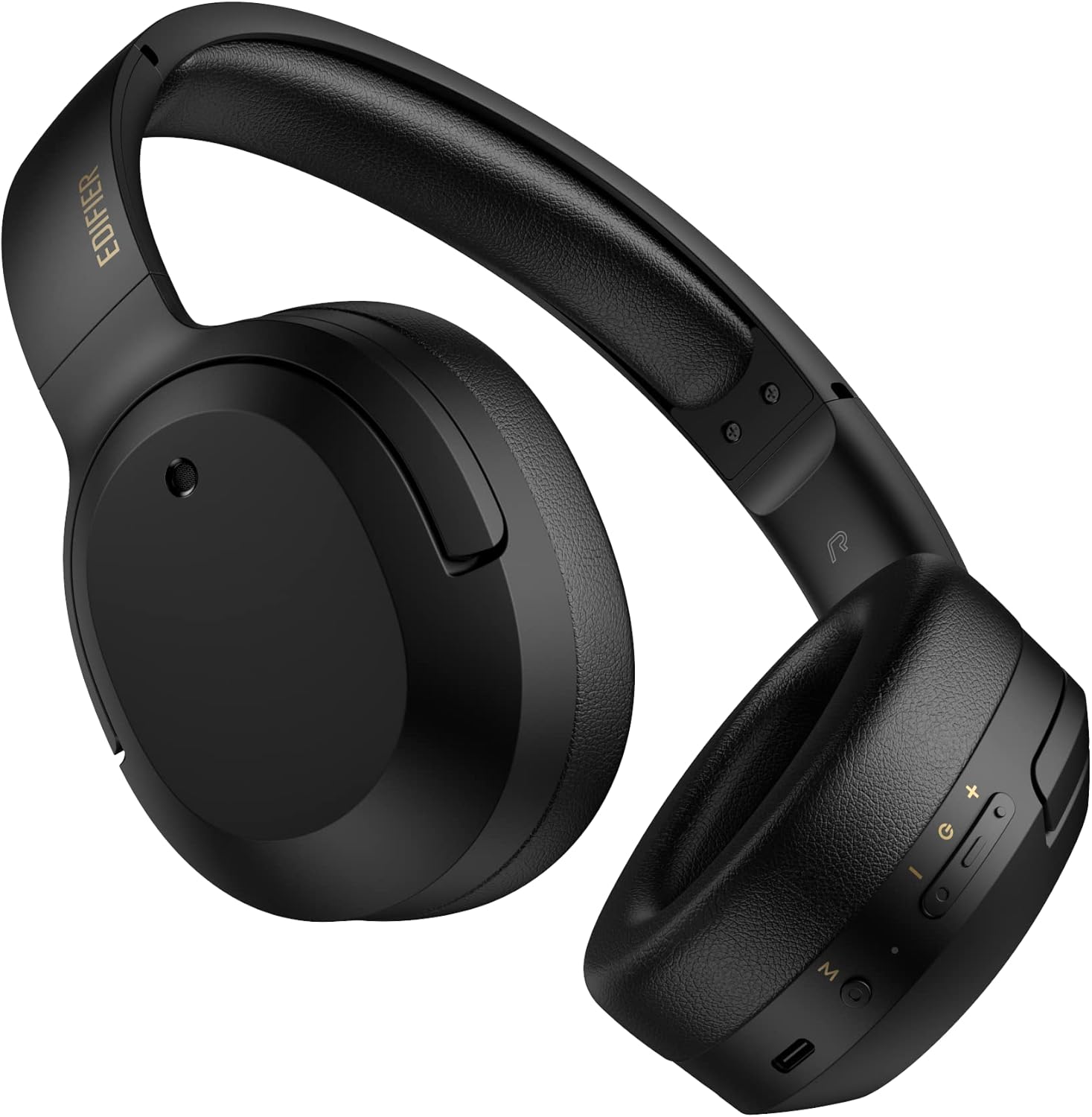
3.1. irudia: Aurrealdea view of the Edifier W820BT Bluetooth Headphones.

3.2. irudia: Aldea view of the Edifier W820BT Bluetooth Headphones, highlighting the control buttons.
Ezaugarri nagusiak:
- Bluetooth V4.1 with CSR Technology for stable wireless connection.
- Gehienez 80 orduko bateriaren iraupena.
- Diseinu tolesgarria eramangarritasunerako.
- Soft leather ear pads for comfort.
- Durable and flexible steel headband.
- On-ear controls for media playback and calls.
4. Konfigurazioa
4.1 Entzungailuak kargatzea
Before first use, fully charge the headphones.
- Connect the micro-USB end of the charging cable to the charging port on the headphone (located on the right earcup).
- Konektatu kargatzeko kablearen USB-A muturra USB elikatze-egokitzaile batera (ez dago barne) edo ordenagailuaren USB ataka batera.
- The LED indicator will illuminate during charging and turn off once fully charged.
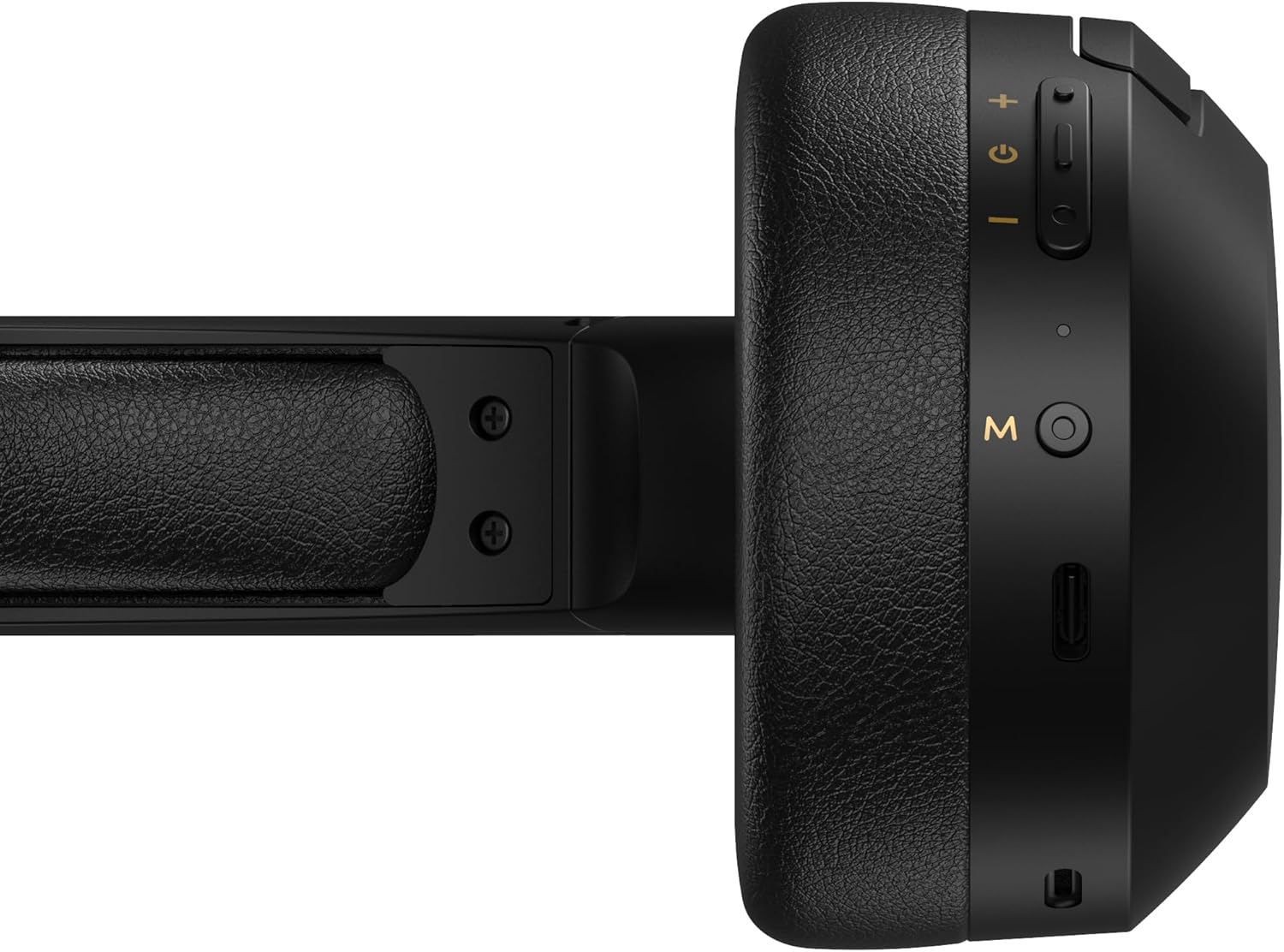
Figure 4.1: Close-up of the charging port and control buttons on the right earcup.
4.2 Piztu/Itzaltzea
- Pizteko: Press and hold the multi-function button (usually marked with a power icon or 'M') for approximately 3 seconds until the LED indicator flashes blue.
- Itzaltzeko: Press and hold the multi-function button for approximately 5 seconds until the LED indicator flashes red and then turns off.
4.3 Bluetooth parekatzea
Aurikularrak Bluetooth gaitutako gailu batera konektatzeko:
- Ziurtatu entzungailuak itzalita daudela.
- Press and hold the multi-function button for approximately 5-7 seconds until the LED indicator flashes red and blue alternately. This indicates pairing mode.
- Zure gailuan (telefono adimenduna, tableta, ordenagailua), gaitu Bluetooth eta bilatu eskuragarri dauden gailuak.
- Select "EDIFIER W820BT" from the list of found devices.
- Behin parekatuta, LED adierazlea urdinez keinuka hasiko da poliki.
Oharra: Entzungailuak automatikoki saiatuko dira azken parekatutako gailura berriro konektatzen piztean.
5. Funtzionamendu-argibideak
5.1 Belarrian gaineko kontrolak
The control buttons are located on the right earcup.
| Botoia/Ekintza | Funtzioa |
|---|---|
| Multi-function Button (M) |
|
| Bolumena igo (+) |
|
| Bolumena jaitsi (-) |
|
5.2 Kable bidezko konexioa
The W820BT headphones can also be used with a wired connection.
- Connect one end of the 3.5mm audio cable to the audio input jack on the left earcup of the headphones.
- Konektatu 3.5 mm-ko audio kablearen beste muturra zure gailuaren audio irteerako konektorera.
- Entzungailuak automatikoki aldatuko dira kable bidezko modura. Bluetooth funtzionalitatea desgaituko da.

Figure 5.1: Connecting the 3.5mm audio cable for wired listening.
6. Mantentzea
- Garbitu entzungailuak oihal leun eta lehor batekin. Ez erabili garbitzaile edo disolbatzaile urratzailerik.
- Saihestu entzungailuak muturreko tenperaturen, hezetasunaren edo eguzki-argiaren eraginpean jartzea.
- Gorde entzungailuak leku fresko eta lehor batean erabiltzen ez dituzunean. Tolestu daitekeen diseinuari esker, biltegiratze trinkoa egin daiteke.
- Do not disassemble the headphones. This will void the warranty.
7. Arazoak
If you encounter issues with your Edifier W820BT headphones, refer to the following common problems and solutions:
| Arazoa | Irtenbidea |
|---|---|
| Ezin da piztu | Ensure the headphones are charged. Connect to a power source using the charging cable. |
| Ezin da Bluetooth bidez parekatu |
|
| Soinurik ez |
|
| Soinu-kalitate eskasa |
|
8. Zehaztapenak
| Ezaugarri | Xehetasuna |
|---|---|
| Ereduaren izena | W820BT |
| Konektibitate Teknologia | Haririk gabekoa (Bluetooth), Kable bidezkoa (3.5 mm-ko jacka) |
| Bluetooth bertsioa | 4.1 |
| Bateriaren iraupena | Gehienez 80 ordu |
| Entzungailuaren forma | Belarri gainean |
| Materiala | Steel (headband) |
| Elementuaren pisua | 1.14 kilo (517 g inguru) |
| Produktuaren neurriak | 9.25 x 7.64 x 3.41 hazbete |
| Fabrikatzailea | Edifikatzailea |
9. Bermea eta Laguntza
Edifier provides a urtebeteko bermea in the USA and Canada for the W820BT headphones. For warranty claims or technical support, please contact Edifier customer service.
For more information, visit the official Edifier webgunea edo kontsultatu zure erosketa-dokumentazioa.
10. Bideo-erakustaldia
Watch the official product video for a visual guide on the Edifier W820BT Bluetooth Headphones' features and usage.
10.1. bideoa: Produktu ofiziala amaitu daview of the Edifier W820BT Bluetooth Headphones, demonstrating features like battery life, comfort, foldable design, and on-ear controls.


