1. Sarrera
Eskerrik asko erosketagatik.asing the Mesqool Digital Alarm Clock CR1008. This manual provides detailed instructions to help you set up and operate your new alarm clock, ensuring you can utilize all its features effectively. This clock is designed for ease of use and includes features such as a large display, adjustable brightness, a multi-color night light, and convenient charging ports.
2. Ezaugarri nagusiak
- 7.5-inch Large Number Screen: Highly visible time display for easy reading from a distance.
- 5 mailako distira-erreguladorea: Adjustable display brightness from very bright to very dim, allowing for comfortable viewegunez edo gauez.
- 7 koloreko gaueko argia: Integrated night light with 7 color options and adjustable brightness, perfect for ambient lighting.
- USB bikoitza kargatzeko ataka: Includes one USB-A and one Type-C port for convenient charging of mobile devices.
- Alarmaren bolumena doigarria: Alarm volume can be set to low, medium, or high, with a maximum of 80 dB, suitable for heavy sleepers.
- Gradual Alarm Sound: Alarm starts softly and gradually increases in volume to provide a gentle wake-up experience.
- 9-Minute Snooze Function: Large, easy-to-press snooze button for an additional 9 minutes of sleep.
- 12H/24H Time Format: Slider switch to easily select between 12-hour and 24-hour time display formats.
- Bateria babeskopia: Requires 2 AAA batteries (not included) to maintain time and alarm settings during a power outage.
- Daylight Saving Time (DST) Function: Convenient switch for adjusting to Daylight Saving Time.
3. Konfigurazioa
3.1 Energia-konexioa
The Mesqool Digital Alarm Clock CR1008 is a plug-in electric alarm clock. For all functions, including time display, alarm, and USB charging, the clock must be connected to a DC wall power outlet using the provided 5V 2A power adapter.
3.2 Bateriaren babeskopiaren instalazioa
To ensure your time and alarm settings are retained during a power failure, install 2 AAA batteries (not included) into the battery compartment located on the back of the unit. The screen display will not turn on when operating solely on battery backup; batteries are for memory retention only.

Figure 1: Battery backup compartment and power connection. Note: AAA batteries are not included.
3.3 Hasierako piztea
Once plugged in, the clock display will illuminate. You may then proceed to set the time and alarm as described in the operating instructions.
4. Funtzionamendu-argibideak
4.1 Ordua ezartzea
- Sakatu ORDUA JARRI button once. The hour digits will begin to flash.
- Erabili ORDUA button (left button on top) to adjust the hour.
- Sakatu ORDUA JARRI botoia berriro sakatu. Minutuen digituak keinuka hasiko dira.
- Erabili MINUTUA button (right button on top) to adjust the minutes.
- Sakatu ORDUA JARRI botoia hirugarren aldiz sakatu berresteko eta ordua ezartzeko modutik irteteko.
4.2 12H/24H Time Format Selection
Kokatu DENBORAREN FORMATUA slider switch on the back of the clock. Slide it to select either the 12-hour or 24-hour display format according to your preference.

Figure 2: Switching between 12H and 24H time formats.
4.3 Alarma ezartzea
- Sakatu JARRI ALARMA button once. The alarm hour digits will begin to flash.
- Erabili ORDUA button (left button on top) to adjust the alarm hour.
- Sakatu JARRI ALARMA botoia berriro sakatu. Alarmaren minutuko digituak keinuka hasiko dira.
- Erabili MINUTUA button (right button on top) to adjust the alarm minutes.
- Sakatu JARRI ALARMA botoia hirugarren aldiz sakatu berresteko eta alarma ezartzeko modutik irteteko.
- To activate or deactivate the alarm, use the ALARMA ON / OFF switch located on the back of the clock.
4.4 Alarmaren bolumena doitzea
On the back of the clock, locate the ALARMA BOLUMENA slider. Slide it to select your desired alarm volume: BAXUA, MED (Medium), or ALTU. The highest setting provides a loud alarm suitable for heavy sleepers.

Figure 3: Adjustable alarm volume levels.
4.5 Snooze funtzioa
Alarma jotzen duenean, sakatu botoi handia SNOOZE / ARGIA button on the top of the clock to temporarily silence the alarm for 9 minutes. The alarm will sound again after the snooze period. To turn off the alarm completely, press the ALARMA PAUSENA atzeko botoia.

Figure 4: Utilizing the snooze function for extra rest.
4.6 Night Light Operation
Tap the large SNOOZE / ARGIA button on the top of the clock to cycle through 7 different night light colors. Continue tapping to change colors. To turn off the night light, cycle through all colors until it switches off, or press and hold the button.
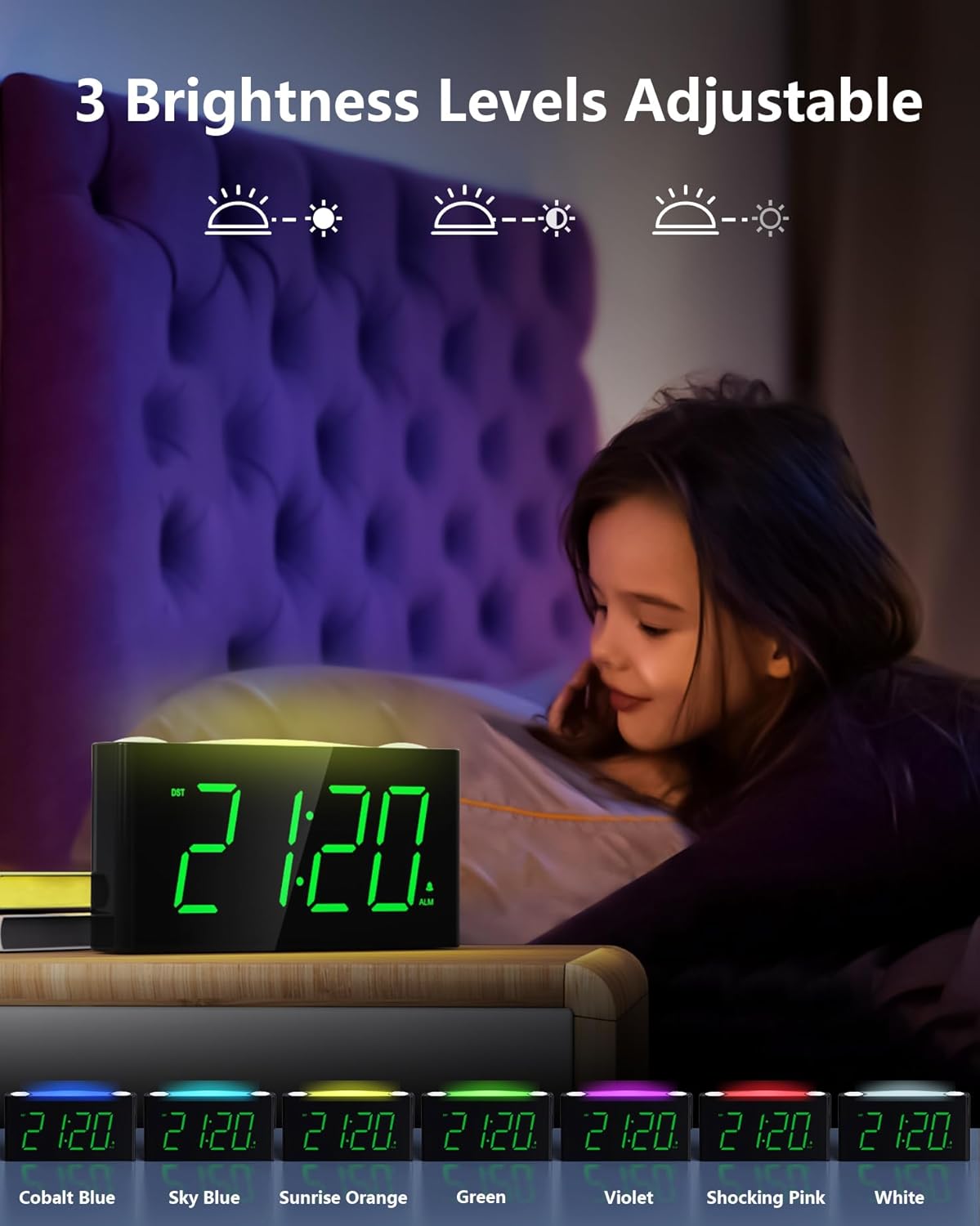
Figure 5: The 7-color night light feature.
Video 1: Demonstration of the 7-color night light and large LED display.
4.7 Adjusting Display Brightness (Dimmer)
On the back of the clock, locate the DIMMER slider. Slide it to adjust the brightness of the time display from its brightest to its dimmest setting. This allows you to customize the display visibility to your comfort level, especially for nighttime use.

Figure 6: Adjusting the 5-level display dimmer.
2. bideoa: Amaitu daview of clock features, including dimmer and USB ports.
4.8 USB kargatzeko atakak erabiltzea
The clock is equipped with a standard USB-A port and a Type-C port on the back. These ports allow you to charge your mobile devices conveniently while the clock is plugged into a wall outlet. This helps reduce the number of power outlets needed in your bedroom.

Figure 7: USB and Type-C charging ports.
4.9 Udako Ordutegia (UdG)
Kokatu DST switch on the back of the clock. Slide it to activate or deactivate the Daylight Saving Time adjustment as needed.
Video 3: Detailed look at the clock's features, including time and alarm setting.
5. Mantentzea
- Garbiketa: Wipe the clock with a soft, dry cloth. Avoid using abrasive cleaners or solvents.
- Likidoaren esposizioa: Ez jarri erlojua uraren edo beste likido batzuen eraginpean.
- Lekua: Place the clock on a stable, flat surface away from direct sunlight, heat sources, and excessive moisture.
- Bateria ordezkatzea: Replace AAA backup batteries annually or when the battery indicator suggests low power to ensure continuous memory retention.
6. Arazoak
- Clock Display is Off: Ensure the power adapter is securely plugged into both the clock and a working wall outlet. If using battery backup, remember the display does not illuminate; batteries only retain settings.
- Alarma ez da jotzen: Check that the ALARM ON/OFF switch on the back is in the 'ON' position. Verify the alarm time is correctly set.
- USB atakak ez dira kargatzen: Confirm the clock is properly plugged into a wall outlet. Ensure your device's charging cable is functional and correctly connected to the USB or Type-C port.
- Display Too Bright/Dim: Adjust the DIMMER slider on the back of the clock to your preferred brightness level.
- Night Light Not Changing Colors: Tap the SNOOZE/LIGHT button repeatedly to cycle through all available colors. If it remains stuck, try unplugging and re-plugging the clock to reset it.
7. Zehaztapenak
| Ezaugarri | Xehetasuna |
|---|---|
| Marka | Mesqool |
| Modelo zenbakia | CR1008 |
| Bistaratzeko mota | LED digitala |
| Bistaratzeko kolorea | Zifra berdeak |
| Gaueko argi koloreak | 7 Options (Oyster White, Cobalt Blue, Sky Blue, Green, Beige, Shocking Pink, Violet) |
| Energia iturria | Corded Electric (5V 2A Power Adapter included) |
| Bateria babeskopia | 2 AAA batteries required (not included) for time/alarm memory |
| USB kargatzeko atakak | 1x USB-A, 1x Type-C (USB Charger: 5V 1000mA) |
| Produktuaren neurriak | 6.46 hazbete (L) x 1.93 hazbete (W) x 3.39 hazbete (H) |
| Materiala | Akrilonitrilo Butadieno Estirenoa (ABS) |
| Ezaugarri bereziak | Adjustable Brightness, Adjustable Volume, Charging Port, Daylight Saving |
8. Bermea eta Laguntza
The Mesqool Digital Alarm Clock CR1008 comes with a one-year limited warranty. Additionally, Mesqool offers a 30-day money-back guarantee and 24-hour response support. For any inquiries or assistance, please contact support@mesqool.com.


