Sarrera
This manual provides essential information for setting up, operating, maintaining, and troubleshooting your Lenovo ThinkCentre M720q Tiny Desktop Computer. Please read these instructions carefully before using your device.

Figure 1: Lenovo ThinkCentre M720q Tiny Desktop Computer - Front View
Konfigurazio Argibideak
1. Deskargatzea
Carefully remove the computer and all accessories from the packaging. Ensure the following items are present:
- Lenovo ThinkCentre M720q mahaigaineko ordenagailu txikia
- Elikatze-moldagailua
- Dokumentazioa (eskuliburu hau, bermearen informazioa)
2. Periferikoak konektatzea
Connect your monitor, keyboard, and mouse to the appropriate ports on the computer.
- Pantaila: Connect your monitor using a DisplayPort or HDMI cable. The system supports resolutions up to 3840x2160.
- Teklatua eta sagua: Connect USB keyboard and mouse to any available USB ports. The device features multiple USB 3.0 ports.
- Sarea: For wired network access, connect an Ethernet cable to the RJ-45 port. For wireless, ensure your Wi-Fi network is available.
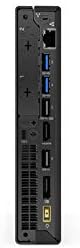
Figure 2: Rear ports of the ThinkCentre M720q, including display outputs and USB ports.

Figure 3: Front ports of the ThinkCentre M720q, including USB and audio jacks.
3. Energia-konexioa
Connect the power adapter to the computer's power input, then plug the power cord into a wall outlet.
4. Hasierako abiarazpena eta sistema eragilearen konfigurazioa
Press the power button located on the front of the computer. The system will boot into Windows 10 Pro. Follow the on-screen instructions to complete the initial setup, including language selection, network connection, and user account creation.
Funtzionamendu-argibideak
Piztu/Itzali
- Pizteko: Sakatu aurreko paneleko pizteko botoia.
- Itzateko: Egin klik Windows-eko Hasi botoian, eta ondoren hautatu Energia > Itzali.
- Berrabiarazteko: Egin klik Windows-eko Hasi botoian eta, ondoren, hautatu Energia > Berrabiarazi.
Sare-konektibitatea
- Sarea kableduna: If an Ethernet cable is connected, the system should automatically detect the network.
- Haririk gabeko sarea (Wi-Fi): The ThinkCentre M720q supports 802.11ac wireless. To connect, click the Wi-Fi icon in the system tray, select your network, and enter the password if prompted.
USB gailuak erabiltzea
The computer is equipped with multiple USB 3.0 ports. Simply plug your USB devices (e.g., external hard drives, flash drives, printers) into any available USB port. Windows will typically install necessary drivers automatically.
Bistaratzeko konfigurazioa
The ThinkCentre M720q supports multiple displays. You can configure display settings (resolution, orientation, extended/duplicated desktop) through the Windows Display Settings. Right-click on the desktop and select "Display settings".
Mantentzea
Ordenagailua garbitzea
- Always power off the computer and disconnect it from the power outlet before cleaning.
- Erabili lipurrik gabeko zapi leun bat dampKanpoko gainazalak garbitzeko urarekin edo garbiketa-soluzio leun batekin jarri.
- Ez erabili produktu kimiko gogorrik, garbitzaile urratzailerik edo disolbatzailerik.
- Erabili aire konprimatua hautsa astiro-astiro kentzeko aireztapen-hodietatik eta ataketatik.
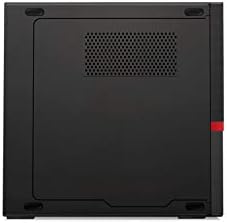
4. irudia: Goikoa view of the ThinkCentre M720q, highlighting ventilation areas.
Software eguneraketak
Regularly update your Windows operating system and drivers to ensure optimal performance and security. Windows Update can be accessed via Settings > Update & Security > Windows Update.
Arazoak konpontzea
If you encounter issues with your ThinkCentre M720q, refer to the following common solutions:
- Potentziarik gabe: Ensure the power adapter is securely connected to both the computer and a working electrical outlet. Try a different outlet.
- Ez dago pantailarik: Verify that the monitor is powered on and correctly connected to the computer. Check the input source on your monitor.
- Sistemaren moteltzea: Close unnecessary applications. Check for background processes using Task Manager. Ensure sufficient free space on the SSD.
- Periferikoa ez da detektatu: Try connecting the peripheral to a different USB port. Ensure drivers are installed (if required).
- Sarearen konexio arazoak: For wired connections, check the Ethernet cable. For Wi-Fi, ensure the network is available and you have the correct password. Restart your router if necessary.
Arazo konplexuagoetarako, kontsultatu Lenovo laguntza-zerbitzuarekin. webwebgunean edo jarri harremanetan bere bezeroarentzako zerbitzuarekin.
Zehaztapenak
| Ezaugarri | Xehetasuna |
|---|---|
| Marka | Lenovo |
| Seriea | ThinkCentre M720q |
| Elementuaren eredu-zenbakia | ThinkCentre M720q |
| Sistema eragilea | Windows 10 Pro |
| Prozesadorea | Intel Core i5 (1.7 GHz) |
| RAM | 8 GB DDR3 (2666 MHz-ko memoria-abiadura) |
| Disko gogorra | 256 GB SSD (Serial ATA-300 Interface) |
| Koprozesadore grafikoa | Intel Turbo Boost Technology 2 |
| Txartel grafikoaren deskribapena | Integratua |
| Gehienezko pantailaren bereizmena | 3840x2160 |
| Haririk gabeko mota | 802.11ac |
| USB 3.0 ataka kopurua | 3 |
| Elementuaren pisua | 3 kilo |
| Produktuaren neurriak (LxWxH) | 7 x 1.4 x 7.2 hazbete |
| Kolorea | Beltza |
Bermearen informazioa
For detailed warranty terms and conditions, please refer to the official Lenovo warranty documentation included with your product or visit the official Lenovo support webgunea. Bermearen estaldurak normalean material eta fabrikazio akatsak barne hartzen ditu erosketa-datatik aurrerako denbora-tarte jakin baterako.
Bezeroarentzako Arreta
If you require technical assistance, have questions about your product, or need to report an issue, please contact Lenovo customer support through their official channels. You can find contact information and online resources on the official Lenovo webgunea.
Lenovo Ofiziala Webgunea: www.lenovo.com


