Sarrera
This manual provides detailed instructions for the installation, operation, and maintenance of your be quiet! Silent Base 601 Mid-Tower ATX Computer Case. Please read these instructions carefully before beginning assembly to ensure proper functionality and to maximize the lifespan of your product. The Silent Base 601 is engineered for optimal silence and usability, featuring advanced noise dampening and efficient cooling capabilities.

Irudia: Aurrealdea view of the be quiet! Silent Base 601 computer case, showcasing its sleek design and orange accents.
Konfigurazioa eta Instalazioa
The Silent Base 601 is designed for straightforward assembly. Follow these steps for component installation.
1. Kasua prestatzea
- Alboko panela kentzea: To access the interior, depress the push-pins located on the rear of the case. The side panels will release and can be safely removed.
- Osagarrien kaxa: Locate the accessory box inside the case, which contains screws, cable ties, and additional mounting hardware.
2. Plaka amaren instalazioa
- The case supports E-ATX (30.5 x 27.5cm), ATX, M-ATX, and Mini-ITX motherboards.
- Install the necessary standoffs for your motherboard form factor.
- Carefully place the motherboard into position and secure it with screws.
3. Elikatze-iturriaren (PSU) instalazioa
- The PSU is installed from the rear of the case using the provided PSU bracket.
- Attach the PSU to the bracket, then slide the assembly into the designated slot and secure it.
4. Biltegiratze unitatearen instalazioa
- The PSU shroud contains a double HDD cage for 3.5" drives.
- 2.5" SSDs can be mounted in various locations using the provided brackets.
- Detachable cover plates on the PSU shroud allow for installation of a 120mm fan or additional storage.
5. Haizagailuaren eta erradiadorearen instalazioa
The Silent Base 601 comes with two pre-installed Pure Wings 2 140mm fans for optimal airflow and quiet operation.
- Aurrez instalatutako zaleak: Two Pure Wings 2 140mm fans are included.
- Additional Fans: The case supports up to 6 fans in total.
- Erradiadorearen euskarria: Radiators up to 360mm can be installed at the front, top, and rear. A detachable bracket simplifies top radiator installation.

Irudia: Barnekoa view of the Silent Base 601, highlighting the pre-installed front fan and the spacious interior for component installation.

Irudia: Lehertua view illustrating the modular design and various removable components of the Silent Base 601 case.
6. Kableen kudeaketa
- The PSU shroud effectively conceals cables for a clean interior.
- Utilize the numerous cable routing cutouts and included cable ties for organized cable management.

Image: Included accessories such as screws, cable ties, and drive cages for the Silent Base 601.
Funtzionamendu-argibideak
The Silent Base 601 is designed for quiet operation and ease of use.
1. S/I aurreko panela
The top front panel provides convenient access to essential ports and controls:
- Pizteko botoia: Sistema piztu edo itzaltzeko.
- Berrezarri botoia: Sistema berrabiarazteko.
- USB 2.0 ataka: One port for peripheral connectivity.
- USB 3.2 1. belaunaldiko atakak: Bi portu abiadura handiko datuak transferitzeko.
- HD Audio I/O: Microphone and headphone jacks.
- 3-Step Fan Controller: Adjusts the speed of up to three connected fans for balancing noise and cooling performance.

Image: Close-up of the top I/O panel, showing the power button, USB ports, audio jacks, and the 3-step fan controller.
2. Noise Dampening Features
The Silent Base 601 incorporates several features to minimize operational noise:
- Insulation Mats: Extra thick 10mm insulation mats are applied to the front, top, and side panels.
- Zarata Dampening Vents: Specially designed air inlets on the front reroute airflow to reduce airborne noise while maintaining air permeability.
- Decoupled Components: The PSU bracket and HDD cages are decoupled to minimize vibration transmission.
Mantentzea
Regular maintenance ensures optimal performance and longevity of your computer case.
1. Hauts-iragazkiaren garbiketa
The Silent Base 601 features easily accessible dust filters to prevent dust buildup inside the case.
- Aurrealdeko iragazkia: The front panel filter can be removed for cleaning.
- Bottom Filter: A removable filter is located at the bottom of the case, protecting the PSU intake.
- Garbiketa prozedura: Gently slide out the filters and clean them with a soft brush or by rinsing with water. Ensure filters are completely dry before reinstallation.
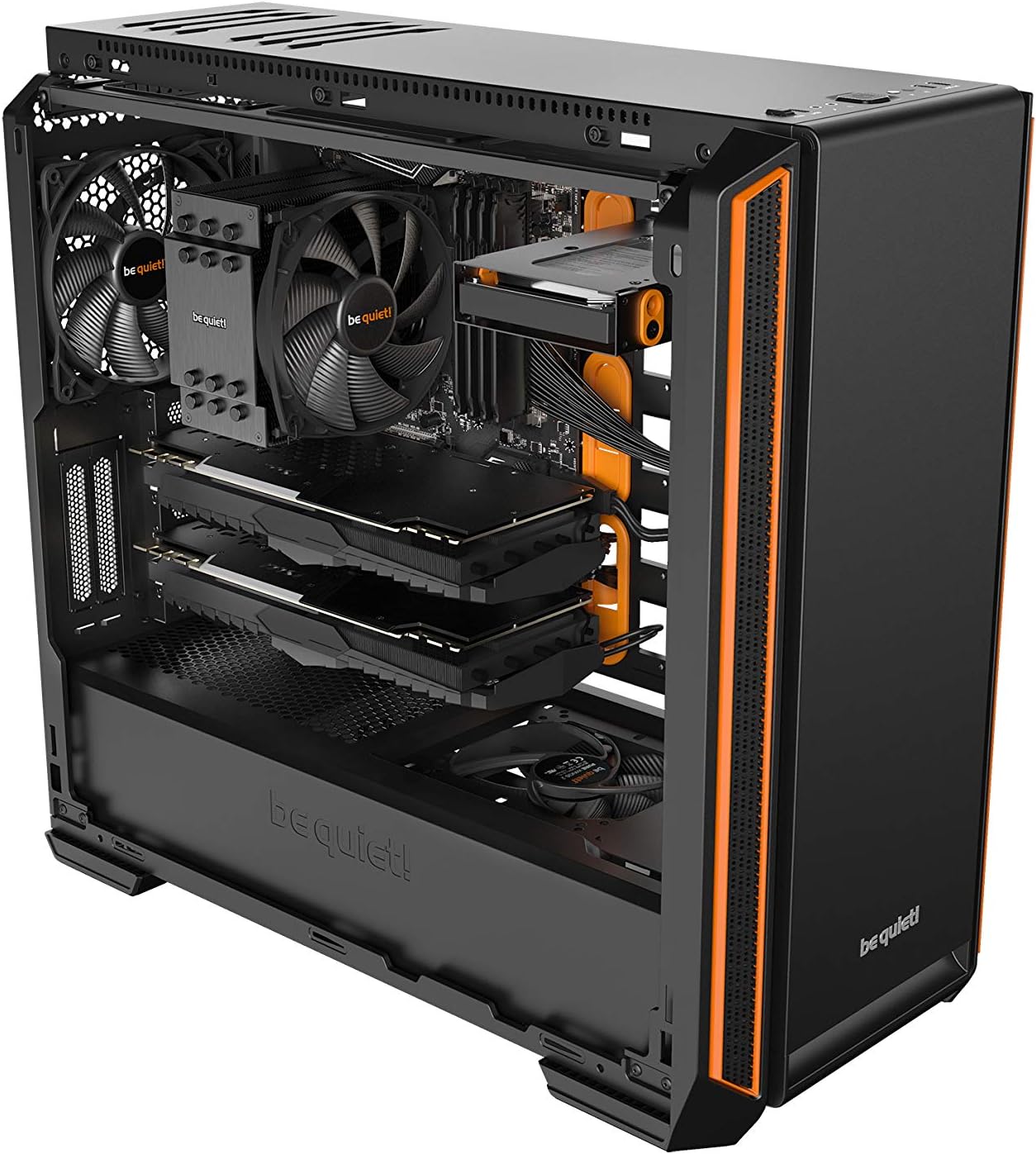
Image: The removable dust filters of the Silent Base 601, designed for easy cleaning and maintenance.
2. Barnealdeko garbiketa
- Periodically remove side panels and use compressed air to clear dust from internal components and fan blades.
- Ensure the system is powered off and unplugged before performing any interior cleaning.
Arazoak konpontzea
Atal honek aurki ditzakezun arazo ohikoenei heltzen die.
1. Sistemak ez du pizten
- Egiaztatu energia-konexioak: Ensure the PSU is properly connected to the wall outlet and the motherboard.
- Aurreko paneleko konektoreak: Verify that the power button and other front panel connectors are correctly attached to the motherboard headers.
- PSU Switch: Confirm the power switch on the PSU itself is in the 'ON' position.
2. Zarata gehiegi
- Fan abiadura: Use the 3-step fan controller on the front panel to adjust fan speeds. Lower settings reduce noise.
- Fan Obstructions: Check for any cables or debris obstructing fan blades.
- Component Vibrations: Ensure all components (HDDs, fans, etc.) are securely mounted to minimize vibrations.
3. High Temperatures
- Fan abiadura: Increase fan speeds using the 3-step controller.
- Aire-fluxua: Ensure proper airflow by checking fan orientation (intake/exhaust) and ensuring no vents are blocked.
- Hauts-pilaketa: Garbitu hauts-iragazkiak eta barneko osagaiak Mantentze-lanak atalean azaltzen den bezala.
- Component Cooling: For high-performance systems, consider upgrading to a more robust CPU cooler or adding additional case fans.
Zehaztapenak
| Ezaugarri | Xehetasuna |
|---|---|
| Eredua | Oinarri isila 601 |
| PSU forma-faktorea | ATX PS/2 |
| Plaka amaren bateragarritasuna | E-ATX (30.5 x 27.5 cm), ATX, M-ATX, Mini-ITX |
| Case Size (incl. stands L x W x H) | 553 x 245 x 502 mm |
| Pisua | 10.49 kg (23.1 lb) |
| Kolore aukera | Orange (for this variant) |
| USB 2.0 Portuak | 1 |
| USB 3.2 1. belaunaldiko portuak | 2 |
| HD Audio I/O | Mic + Audio |
| Zabaltzeko Slots | 7 + 2 |
| Fan Mounting Locations | 6 |
| Aurrez instalatutako zaleak | 2x Pure Wings 2 140mm |
| Erradiadorearen euskarria | Up to 360mm (front, top, rear) |
| Isolamendua | 10mm thick mats (front, top, sides) |
| Materiala | Acrylonitrile Butadiene Styrene (ABS), Alloy Steel |

Image: Technical drawing showing the dimensions of the Silent Base 601 case, including a height of 503mm.

Image: Technical drawing showing alternative dimensions of the Silent Base 601 case, including a height of 514mm.
Bermearen informazioa
The be quiet! Silent Base 601 Mid-Tower ATX Computer Case comes with a 3 urteko fabrikatzailearen bermea. Please retain your proof of purchase for warranty claims. For detailed terms and conditions, refer to the official be quiet! webwebgunean edo jarri harremanetan bere bezeroarentzako laguntzarekin.
Laguntza
For further assistance, technical support, or inquiries regarding your Silent Base 601 computer case, please visit the official be quiet! website or contact their customer service department. You can find contact information and FAQs on their support pages.
Sareko baliabideak: www.bequiet.com