Sarrera
The Bluesound Pulse 2i is a premium, high-resolution streaming music speaker designed to fill large spaces with rich, clear audio. As part of the Bluesound ecosystem, it offers unparalleled sound quality and versatile connectivity options for a seamless multi-room audio experience. This manual provides detailed instructions for setting up, operating, maintaining, and troubleshooting your Pulse 2i speaker.

1. irudia: Aurrealdea view of the Bluesound Pulse 2i Wireless Smart Speaker.
Konfigurazio Gida
1. Deskargatzea
Kontu handiz atera osagai guztiak paketetik. Kutxak honako hauek izan behar ditu:
- Hizlaria
2. Hasierako kokapena
Place your Pulse 2i speaker on a stable, flat surface. For optimal sound performance, ensure it is not obstructed and has clear space around it. The speaker is designed to deliver powerful audio in large rooms.

Figure 2: The Pulse 2i speaker positioned on a surface, ready for use.
3. Energia-konexioa
Connect the provided power cable to the AC input on the back of the Pulse 2i speaker, then plug the other end into a wall outlet. The speaker will power on automatically.
4. Sare-konexioa
The Pulse 2i supports both Wi-Fi and Gigabit Ethernet for network connectivity. For the most stable connection, especially when streaming high-resolution audio, a wired Ethernet connection is recommended.
- Wi-Fi: The speaker features leading-class dual-band Wi-Fi to ensure zero dropouts or delays. Follow the instructions in the BluOS Controller App to connect to your wireless network.
- Ethernet: Connect an Ethernet cable from your router or network switch to the LAN/USB port on the back of the speaker.
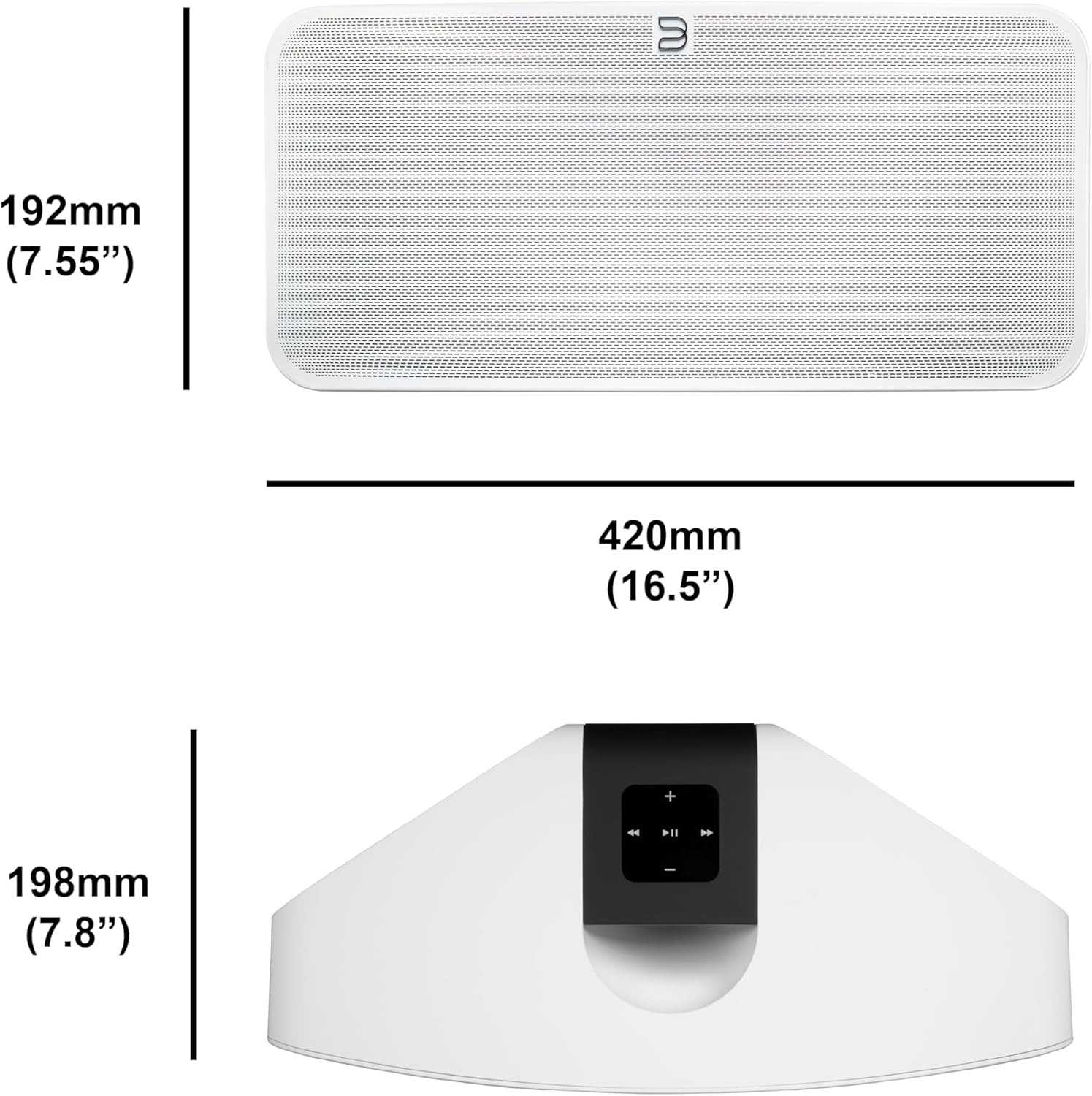
Figure 3: Rear panel of the Pulse 2i, highlighting the power input, LAN/USB, and optical/analog input ports.
Produktua amaituview Bideoa
Official product video demonstrating the features and capabilities of the Bluesound Pulse 2i speaker, including its design and connectivity options.
Funtzionamendu-argibideak
1. BluOS Controller App
The primary method for controlling your Pulse 2i is through the BluOS Controller App, available for smartphones, tablets, and desktop computers. This app allows you to:
- Browse and play music from various streaming services (Spotify, Tidal, Amazon Music HD, Qobuz, etc.)
- Access your local music library and internet radio stations.
- Group multiple Bluesound players for a synchronized multi-room audio experience.
- Adjust volume, playback, and sound settings.

Figure 4: Top panel of the Pulse 2i with touch controls for playback, volume, and track navigation.
2. Musikaren erreprodukzioa
The Pulse 2i supports high-resolution audio playback up to 24-bit/192 kHz. You can stream directly from Apple devices using AirPlay 2 or connect via two-way Bluetooth with Qualcomm aptX HD for high-quality wireless audio.
3. Ahots kontrola
The speaker is compatible with Amazon Alexa and Apple Siri, allowing for hands-free voice control of your music playback. Simply enable the Bluesound skill/action in your voice assistant app and link your account.
4. Multi-Room Audio
Expand your audio system by adding more Bluesound players throughout your home. Use the BluOS app to group speakers and play the same music in multiple rooms, or different music in each room.

Figure 5: The Pulse 2i seamlessly integrates into a kitchen environment, providing background music.

Figure 6: The Pulse 2i enhances the audio experience in a social setting.
Mantentzea eta zaintzea
To ensure the longevity and optimal performance of your Pulse 2i speaker, follow these care guidelines:
- Garbiketa: Use a soft, dry cloth to wipe the exterior surfaces. Do not use liquid cleaners, aerosols, or abrasive chemicals, as they may damage the finish.
- Lekua: Avoid placing the speaker in direct sunlight, near heat sources, or in areas with high humidity.
- Aireztapena: Ensure proper ventilation around the speaker to prevent overheating. Do not block any ventilation openings.
- Potentzia: Disconnect the power cable during lightning storms or when unused for long periods.
Arazoak konpontzea
If you encounter issues with your Pulse 2i speaker, refer to the table below for common problems and their solutions.
| Arazoa | Kausa posiblea | Irtenbidea |
|---|---|---|
| No power/No lights | Power cable disconnected or faulty outlet. | Egiaztatu kablearen konexioa. Saiatu beste entxufe batekin. |
| Soinurik ez | Volume too low, incorrect input selected, or network issue. | Increase volume. Verify correct input in BluOS app. Check network connection. |
| Ezin da wifira konektatu | Incorrect Wi-Fi password, router too far, or network interference. | Re-enter Wi-Fi password. Move speaker closer to router. Reduce interference from other devices. |
| Musika erreprodukzioaren etenaldiak | Wi-Fi seinale ahula edo sareko pilaketak. | Ensure strong Wi-Fi signal. Consider using a wired Ethernet connection. |
Irtenbide hauek probatu ondoren arazoa konpontzen ez bada, jarri harremanetan bezeroarentzako arreta-zerbitzuarekin.
Zehaztapen Teknikoak
| Ezaugarri | Xehetasuna |
|---|---|
| Ereduaren izena | PULSE 2i WHT |
| Hizlari mota | Gela anitzekoa |
| Konektibitate Teknologia | Bluetooth konexioa, Wi-Fi |
| Audio irteera modua | Estereoa |
| Bozgorailuaren irteera-potentzia maximoa | 25 Watt |
| Elementuaren pisua | 11.11 kilo |
| Produktuaren neurriak | 16" L x 8" W x 7" H |
| Gailu bateragarriak | Smartphone |
| Kontrol-metodoa | Ahotsa |
| Fabrikatzailea | Lenbrook Group |
Bermearen informazioa
The Bluesound Pulse 2i comes with a limited warranty. Please refer to the warranty card included with your product or visit the official Bluesound webwebgunean bermearen estaldurari eta zerbitzuari buruzko baldintza zehatzak ikusteko.
Bezeroarentzako Arreta
For further assistance, technical support, or service inquiries, please contact Bluesound customer support through their official website or the contact information provided in your product packaging. Ensure you have your model number (PULSE 2i WHT) and serial number ready when contacting support.


