Sarrera
This manual provides detailed instructions for the installation, setup, and operation of your JVC KD-X260BT Digital Media Receiver. This unit is designed to provide high-quality audio playback and hands-free communication in your vehicle, featuring Bluetooth connectivity, USB input, and a 13-band equalizer. Please note, this unit does not play CDs. Read this manual thoroughly before use to ensure proper operation and to prevent damage.

Irudia: Aurrealdea view of the JVC KD-X260BT Digital Media Receiver, showing the display and control buttons.
Segurtasun Informazioa
- Do not operate the unit in a way that distracts you from driving. Always keep your attention on the road.
- Ensure proper wiring connections to prevent short circuits or damage to the vehicle's electrical system.
- Saihestu unitatea hezetasun edo tenperatura altuen eraginpean jartzea.
- Ez saiatu unitatea desmuntatzen edo aldatzen. Mantendu konponketa guztiak langile kualifikatuen esku.
- Use only accessories specified by JVC.
Paketearen edukia
Egiaztatu elementu guztiak paketean daudela:
- JVC KD-X260BT Digital Media Hargailua
- Kableatu Harness
- External Wired Microphone
- Muntatzeko Hardwarea
- Argibide eskuliburua (dokumentu hau)
Instalazioa
Professional installation is recommended for this product. Incorrect installation can lead to damage to the unit or vehicle. The KD-X260BT features a short body design, which facilitates easier installation in various vehicle dashboards.
Kableatu konexioak:
- Connect the wiring harness according to your vehicle's wiring diagram.
- Ziurtatu konexio guztiak seguru eta isolatuta daudela zirkuitu laburrak saihesteko.
- Connect the external microphone to the designated input for hands-free calling. Position the microphone in a location that provides clear voice pickup.
- Konektatu antena-kablea.
- Kanpokoa erabiliz gero amplifiers, connect the 2.5V preamp outputs (rear/subwoofer selectable).
Muntaketa:
- Jarri muntatzeko zorroa aginte-paneleko irekiduran.
- Slide the receiver into the mounting sleeve until it locks into place.
- Erantsi eraztuna.
Konfigurazioa
Hasierako piztea:
After installation, turn on your vehicle's ignition. The unit should power on. Follow any on-screen prompts for initial setup, such as language selection.
Bluetooth bidezko lotura
The KD-X260BT supports Bluetooth 3.0+EDR and allows for two phones to be connected full-time. This enables receiving calls from either phone with a push of a key.
- On the receiver, navigate to the Bluetooth menu.
- Hautatu "Parekatzea" edo "Gailuaren bilaketa".
- Zure telefonoan, gaitu Bluetooth-a eta bilatu eskuragarri dauden gailuak.
- Select "KD-X260BT" from the list on your phone.
- Eskatzen bazaizu, berretsi parekatze-kodea bi gailuetan.
- Once paired, the unit will display a confirmation.
The unit supports Bluetooth profiles HFP (Hands-Free Profile 1.6 for wideband speech), HSP (Headset Profile), PBAP (Phone Book Access Profile), A2DP (Audio Banaketa Aurreratua Profile), eta AVRCP (Audio/Video Remote Control Profile 1.5).
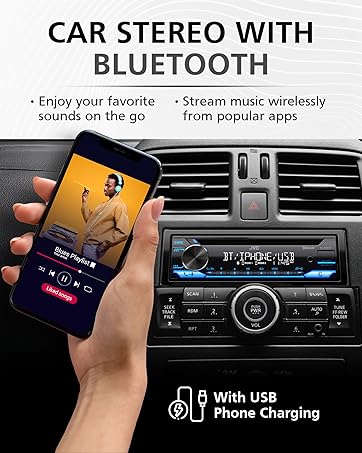
Image: JVC KD-X260BT display indicating Bluetooth connection, with a smartphone showing music playback, illustrating wireless audio streaming.
JVC Remote App:
Download the "JVC Remote" app (available for iOS and Android) to control the receiver's source directly from your smartphone using simple finger gestures.
Funtzionamendu-argibideak
Oinarrizko kontrolak:
- Pizteko botoia: Sakatu unitatea pizteko/itzaltzeko.
- Bolumen-eskulekua: Rotate to adjust the volume level. Press to access menu options.
- Iturriaren botoia: Press to cycle through available audio sources (Tuner, USB, Bluetooth Audio, AUX).
- Bistaratzeko botoia: Changes display information (e.g., clock, track title).
Irrati-sintonizatzailea:
- Press the Source button to select "Tuner" (AM/FM).
- Use the seek buttons to find radio stations.
- Press and hold a preset button (1-6) to store a station.
USB erreprodukzioa:
Connect a USB device to the front USB port. The unit supports MP3/WMA/WAV/FLAC playback. The USB port also provides high current 1.5A charging for smartphones.
- Insert the USB device. The unit will automatically switch to USB source and begin playback.
- Use the track buttons to skip tracks.
- Use the folder buttons to navigate through folders.
- MP3 ID3 Tag Display (title/artist/album) is supported.
- Android music playback (AOA 2.0) is supported for Android phones (version 4.1 or later).
Bluetooth audio erreprodukzioa:
Once a Bluetooth device is paired, select "Bluetooth Audio" as the source to stream music wirelessly. Use the receiver's controls or the paired device to manage playback (play, pause, skip, search via AVRCP 1.5).
Esku libreko deiak:
When a call comes in on a paired phone, the unit will display the caller ID. Press the call button to answer, and the end call button to hang up. The external microphone ensures clear communication.
Audio Settings (Equalizer):
The unit features a 13-Band Graphic Equalizer with 10 preset EQ settings and 1 user-customizable setting. Access the audio menu to adjust:
- Equalizer: Select from preset curves or customize your own.
- Baxu Boost: Enhances low frequencies.
- OZENTASUNAREKIN: Compensates for perceived loss of bass and treble at low volumes.
- Balantzea/Fader: Adjusts sound distribution between left/right and front/rear speakers.
- Subwoofer kontrola: Adjust subwoofer output level and frequency if connected.
Internet Radio/Digital Radio Control:
Control Pandora, iHeartRadio, and Spotify directly from the receiver when connected to a compatible Android device via Bluetooth.
Steering Wheel Remote Control:
Factory steering wheel control functions can be retained with a third-party adapter (sold separately).
Mantentzea
- Unitatea garbitzea: Erabili zapi leun eta lehor bat aurrealdeko panela garbitzeko. Ez erabili garbitzaile edo disolbatzaile urratzailerik.
- USB ataka: Mantendu USB ataka hautsik eta hondakinik gabe.
- Firmware eguneraketak: Check the JVC website periodically for any available firmware updates for improved performance and features.
Arazoak konpontzea
| Arazoa | Irtenbidea |
|---|---|
| Botererik ez | Check vehicle's fuse. Ensure wiring harness is correctly connected. |
| Soinurik ez | Check speaker connections. Verify volume level. Ensure correct source is selected. |
| Bluetootha ez da konektatzen | Ensure Bluetooth is enabled on both devices. Delete previous pairing and re-pair. Move devices closer. |
| USB gailua ez da ezagutzen | Ensure USB device is formatted correctly (FAT16/32). Check for compatible file motak. Saiatu beste USB gailu batekin. |
| Irrati-harrera eskasa | Check antenna connection. Ensure antenna is fully extended (if applicable). |
Zehaztapenak
| Ezaugarri | Xehetasuna |
|---|---|
| Modelo zenbakia | KD-X260BT |
| Power Output (Peak) | 50 watt x 4 kanal |
| Potentzia irteera (RMS) | 22 watt x 4 kanal |
| Bistaratzea | VA LCD Display, Spanish Text Display |
| USB sarrera | Front USB, 1.5A Charging, MP3/WMA/WAV/FLAC Playback, Android AOA 2.0 |
| Sarrera osagarria | 3.5mm Front Audio Auxiliary Input |
| Bluetooth bertsioa | 3.0+EDR Certified |
| Bluetooth Profiles | HFP 1.6, HSP, PBAP, A2DP, AVRCP 1.5 |
| Berdinketa | 13-Band Graphic Equalizer (10 Preset x 1 User) |
| Aurreamp Irteerak | 1 Set of 2.5V (Rear/Subwoofer Selectable) |
| Internet Radio Control | Pandora, Spotify, iHeartRadio (for Android) |
| Neurriak (produktua) | 4 x 9 x 8 hazbete |
| Elementuaren pisua | 1.79 kilo |
Bermea eta Laguntza
This JVC KD-X260BT Digital Media Receiver comes with a 1-Year Manufacturer's Warranty. For warranty claims, technical support, or service inquiries, please contact JVC customer support or visit the official JVC webgunea. Gorde erosketaren egiaztagiria bermea balioztatzeko.
JVC Customer Support: Refer to the contact information provided with your product packaging or on the official JVC webgunea.


