1. Sarrera
Thank you for choosing the AKASO Mini Projector, Model 874801. This pocket-sized DLP portable projector is designed for versatility, offering clear and bright projection for various uses, from entertainment and office presentations to creative applications like cookie decorating. This manual provides essential information to help you set up, operate, and maintain your projector for optimal performance.
2. Segurtasun informazio garrantzitsua
Please read all safety instructions before using the projector to prevent injury or damage to the device. Keep this manual for future reference.
- Ez begiratu zuzenean proiektorearen lenteari l dagoenean.amp piztuta dago.
- Avoid placing the projector in unstable locations or on uneven surfaces.
- Mantendu proiektorea uretatik, hezetasunetik eta muturreko tenperaturetatik urrun.
- Ziurtatu aireztapen egokia gehiegi berotzea saihesteko. Ez blokeatu aireztapen-zuloak.
- Use only the power adapter and accessories provided by AKASO.
- Do not attempt to disassemble or repair the projector yourself. Contact customer service for assistance.
3. Paketearen edukia
Egiaztatu elementu guztiak zure paketean daudela:
- AKASO Mini Projector (Model 874801)
- Urruneko Kontrola
- Mini tripodea
- HDMI kablea
- Type-C USB Cable (for charging/data)
- Elikatze-moldagailua
- Projection Lens Cover
- Erabiltzailearen eskuliburua (dokumentu hau)
4. Produktua amaitu daview
The AKASO Mini Projector is a compact and lightweight device designed for portability and ease of use. It features DLP technology for vivid projections and offers multiple connectivity options.
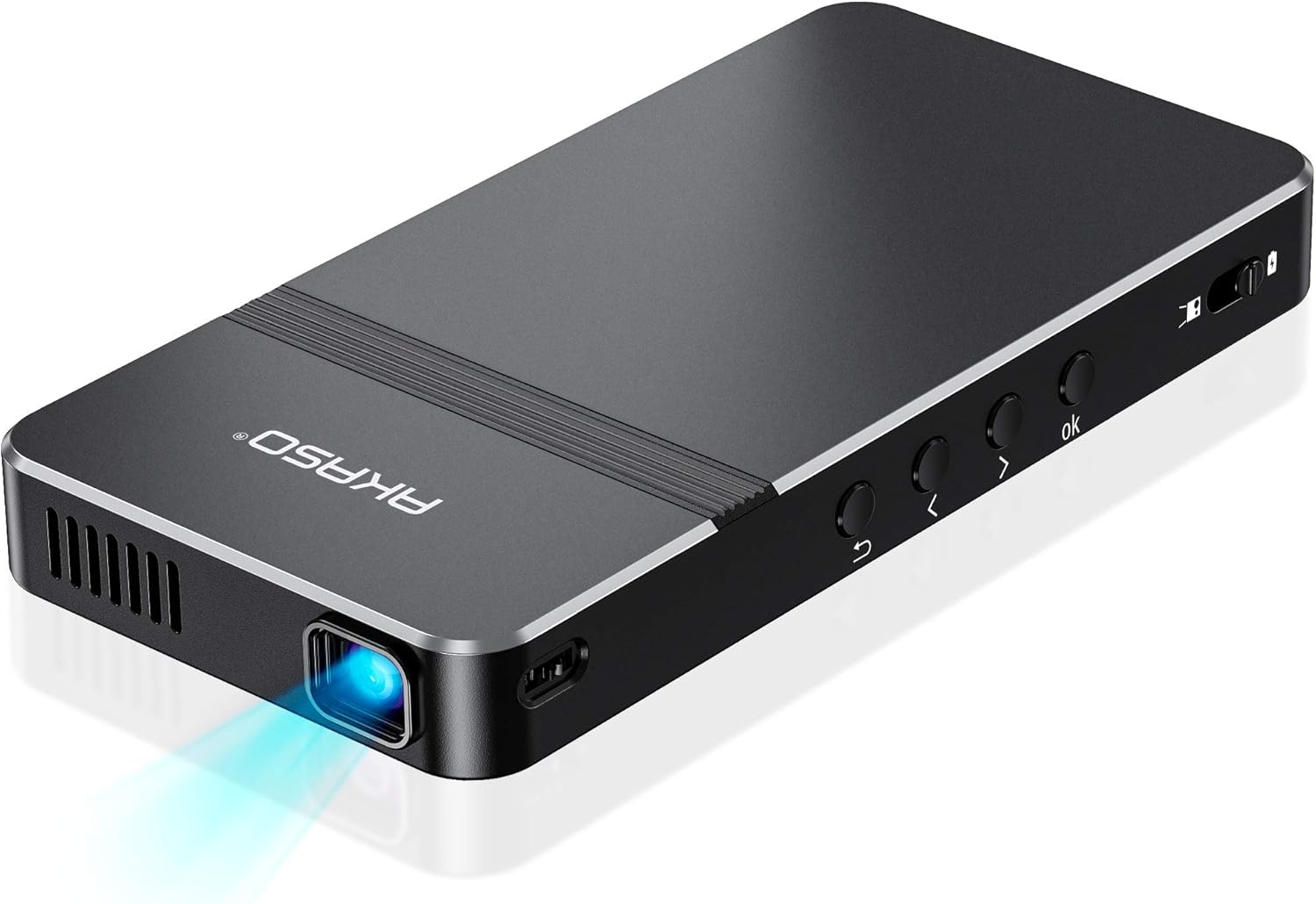
1. irudia: Goitik behera view of the AKASO Mini Projector, showcasinbere diseinu dotorea eta formatu trinkoa.

Figure 2: The AKASO Mini Projector held in a hand, illustrating its pocket-sized and portable design.
4.1 Portuak eta kontrolak
The projector is equipped with various ports for connectivity and physical buttons for direct control.

3. irudia: Aldea view of the AKASO Mini Projector, highlighting its DC power input, USB-C port, HDMI port, earphone jack, and Micro SD card slot.
- DC Sarrera: Korronte-egokigailua konektatzeko.
- USB-C ataka: For connecting compatible devices or charging.
- HDMI ataka: Definizio handiko bideo eta audio sarrerarako.
- Entzungailuen kablea: Kanpoko audio gailuak konektatzeko.
- Mikro SD txartelaren zirrikitua: Mikro SD txartel batetik multimedia zuzenean erreproduzitzeko.
- Switch potentziala: Slide to turn the projector on/off.
- Navigation Buttons (OK, Left, Right, Up, Down, Back): Menuetan nabigatzeko eta hautatzeko.
- Focus Adjuster: A small wheel or slider to sharpen the projected image.
5. Konfigurazio gida
5.1 Hasierako piztea eta kargatzea
- Connect the power adapter to the DC input port on the projector and plug it into a power outlet.
- Slide the power switch to the 'On' position. The projector will power on, and a green indicator light will illuminate when charging.
- Allow the projector to fully charge before its first use for optimal battery life. The built-in 4000mAh battery provides up to 2.5 hours of playtime on a full charge.
5.2 Proiektorearen kokapena
Place the projector on a stable surface. For hands-free operation or specific projection angles, attach the included mini tripod to the tripod mount on the bottom of the projector.

Figure 4: The AKASO Mini Projector mounted on its tripod, demonstrating its ability to project at various angles with automatic keystone correction.
5.3 Fokua doitzea
Once powered on and projecting an image, use the focus adjuster (typically a small wheel or slider on the side) to sharpen the image until it is clear and crisp.
5.4 Gailuak konektatzea
The projector supports multiple wired and wireless connectivity methods:
- HDMI: Connect devices like laptops, gaming consoles, or DVD players using the provided HDMI cable.
- USB-C / USB: Connect cameras, storage drives, or other compatible devices.
- Mikro SD: Insert a Micro SD card directly into the slot to play media.
- Wireless Mirroring (Airplay / EZCast): For mobile devices, connect wirelessly via Airplay (for iOS) or EZCast (for Android/other devices). Refer to the on-screen instructions for specific steps.
1. bideoa: Kutxa ireki eta amaituview of the AKASO Mini Projector, demonstrating its compact size, various ports, and included accessories. This video highlights the ease of connecting different devices and the overall portability of the unit.
6. Funtzionamendu-argibideak
6.1 Interfazean nabigatzea
Use the remote control or the physical buttons on the projector to navigate the on-screen menu. Select your desired input source (e.g., HDMI, Media, EZCast, EZWire, Settings) to begin projecting content.
Video 2: A demonstration of the projector's interface and remote control functionality, showing how to select different input options and navigate the menu. This video emphasizes the user-friendly nature of the controls.
6.2 Projection for Entertainment and Presentations
The projector supports up to a 150-inch adjustable screen, making it suitable for watching HD movies, sharing photos, playing games, or conducting presentations.
- For best image performance, use the projector in a dark environment.
- Note: Copyrighted content from services like Hulu, Netflix, etc., cannot be mirrored or screencast via wireless transmission or HDMI cable due to content protection protocols.

Figure 5: A group of people enjoying a movie projected onto a wall by the AKASO Mini Projector, illustrating its use for entertainment.
6.3 Projection for Creative Uses (e.g., Cookie Decorating)
The projector is ideal for image/text tracing, such as decorating cookies or art projects. Its compact size and adjustable stand allow for precise overhead projection.

Figure 6: A person meticulously decorating a cookie, using the AKASO Mini Projector to project a design for tracing, highlighting its utility in creative crafts.
Video 3: A detailed demonstration of using the AKASO Mini Projector for cookie decorating, showing how to project intricate designs onto cookies for precise tracing with icing. This video emphasizes the projector's utility for bakers and artists.
7. Mantentzea
Mantentze egokiak zure proiektorearen iraupena eta errendimendu optimoa bermatzen ditu.
- Lenteen garbiketa: Garbitu proiektorearen lentea oihal leun eta pelusik gabeko batekin. Ez erabili garbitzaile edo disolbatzaile urratzailerik.
- Aireztapena: Regularly check and clean the ventilation openings to prevent dust buildup, which can lead to overheating.
- Biltegiratzea: When not in use, store the projector in a cool, dry place, away from direct sunlight and extreme temperatures. Use the lens cover to protect the lens from dust and scratches.
- Bateria zaintzea: To maintain battery health, avoid fully discharging the projector frequently. Charge it regularly, even if not in active use.
8. Arazoak
If you encounter issues with your AKASO Mini Projector, refer to the following common solutions:
- Irudirik ez / Irudi lausoa:
- Ensure the projector is powered on and the lens cover is removed.
- Doitu fokatze-gurpila irudia garbi egon arte.
- Check the distance between the projector and the projection surface.
- Egiaztatu sarrera-iturria behar bezala hautatuta dagoela.
- Soinurik ez:
- Egiaztatu bolumen-ezarpenak bai proiektorean bai konektatutako gailuan.
- If using an external speaker, ensure it is properly connected and powered on.
- Konexio arazoak (haririk gabekoa):
- Ensure your mobile device and projector are connected to the same Wi-Fi network.
- Berrabiarazi proiektorea eta zure gailu mugikorra.
- Ensure no firewalls or network restrictions are blocking the connection.
- Proiektorearen gehiegi berotzea:
- Ziurtatu aireztapen-zuloak ez daudela blokeatuta.
- Erabili proiektorea ondo aireztatutako gune batean.
- Turn off the projector and allow it to cool down if it feels excessively hot.
9. Zehaztapenak
| Ezaugarri | Zehaztapena |
|---|---|
| Marka | AKASO |
| Modelo zenbakia | 874801 |
| Produktuaren neurriak | 5.71 x 3.15 x 0.79 hazbete |
| Elementuaren pisua | 7.4 ontza |
| Bistaratzeko ebazpena | 720 x 480 (Supports 1080P input) |
| Distira | 50 ANSI Lumen |
| Kontraste-erlazioa | 1000:1 |
| LED Lamp Zerbitzu-bizitza | Gehienez 30,000 ordu |
| Konektibitate Teknologia | HDMI, USB, Type-C, Micro SD, Wi-Fi (Airplay, EZCast) |
| Ezaugarri Berezia | Built-In Wi-Fi, Built-in Rechargeable Battery, Stereo Speakers |
| Gomendatutako Erabilerak | Gaming, Home Cinema, Cookie Decorating, Presentations |
| Bateriaren iraupena | Gehienez 2.5 ordu |
10. Bermea eta Laguntza
AKASO is committed to providing excellent customer service and product support.
10.1 AKASOGO Club Member Benefits
Register your product to become a member of the AKASOGO Club and enjoy exclusive benefits:
- 12 Months Product Warranty Extension
- Priority & Personalized Customer Service
- Up to 50% off Exclusive Coupon for Next Purchase
- Free Trial of New Released Product - Guaranteed!
Scan the QR code on your AKASOGO Club card or visit the AKASO webizena emateko gunea.
10.2 Bezeroarentzako laguntza
For any questions, technical assistance, or warranty claims, please contact the AKASO-Store customer service. You can find contact information on the official AKASO webgunea edo zure erosketa plataformaren bidez.