Sarrera
This manual provides comprehensive instructions for the proper installation and use of the Logitech Rally Mounting Kit, Model 939-001644. Please read these instructions carefully before proceeding with installation to ensure correct setup and optimal performance of your Logitech Rally system components.
Produktua amaituview eta paketearen edukia
The Logitech Rally Mounting Kit is designed to securely mount various Logitech Rally system components. Verify that all items listed below are present in your package.
Paketearen edukia:
- 2 x Speaker Brackets
- 1 x Camera Bracket (invertible)
- 2 x Cable Retention Brackets
- Associated mounting hardware (screws, anchors - not explicitly listed in input but implied for a mounting kit)
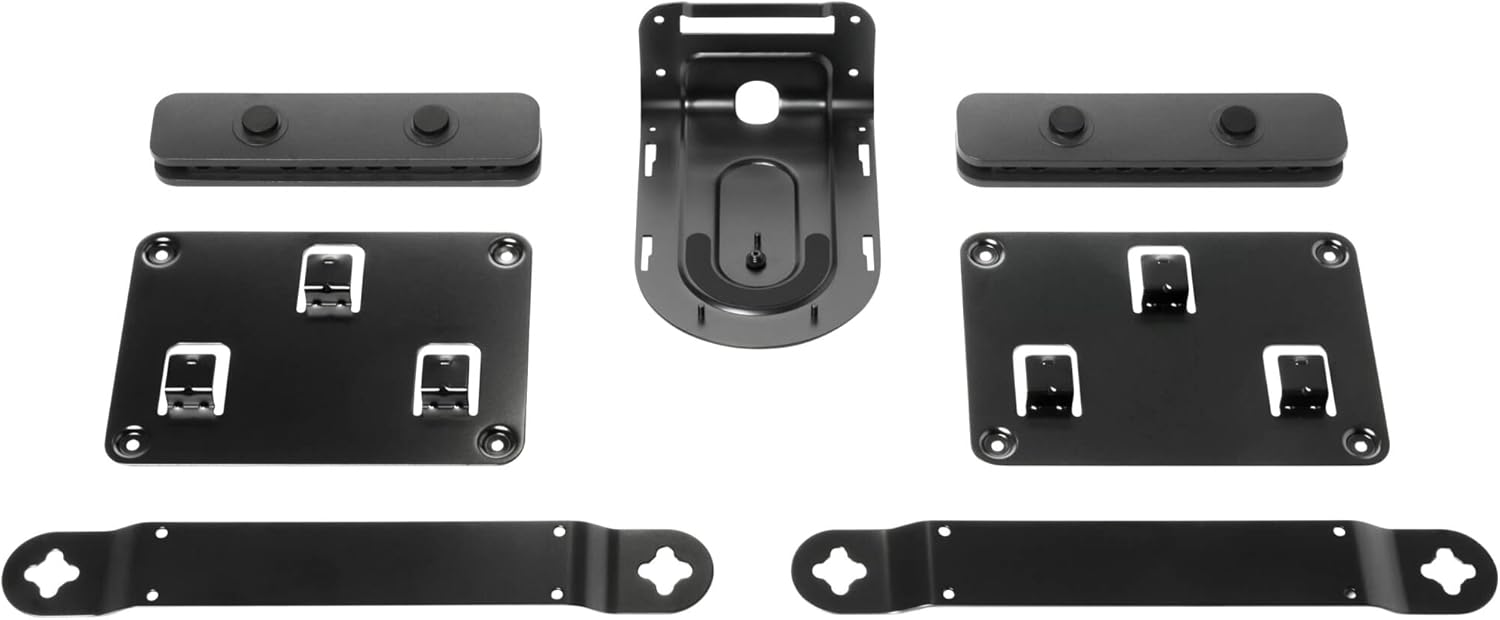
Figure 1: All components of the Logitech Rally Mounting Kit, including speaker brackets, camera bracket, and cable retention brackets.
Konfigurazioa eta Instalazioa
This section details the steps for installing the Logitech Rally Mounting Kit. Ensure you have the necessary tools (e.g., drill, screwdriver, level) before beginning.
Muntatze motak:
The kit supports various mounting configurations, including wall mount, ceiling mount, and tripod mount, depending on the specific component.
Instalazio-urrats orokorrak:
- Muntatzeko kokapena identifikatu: Determine the optimal location for your Logitech Rally speaker, camera, or hub. Consider cable routing and viewangeluak.
- Azalera prestatu: For wall or ceiling mounts, ensure the surface is structurally sound. Use appropriate anchors if mounting into drywall or hollow surfaces.
- Erantsi euskarriak: Secure the relevant mounting bracket (speaker, camera, or cable retention) to the chosen surface using the provided screws. Ensure the bracket is level and firmly attached.
- Muntatzeko gailua: Carefully attach your Logitech Rally component to the installed bracket. The camera bracket is invertible, allowing for flexible orientation.
- Kable seguruak: Utilize the cable retention brackets to manage and secure cables, preventing accidental disconnections and maintaining a tidy installation. This feature ensures secure connections with robust cable retention.
- Egiaztatu egonkortasuna: After installation, gently test the mounted component to ensure it is stable and securely fastened.
Funtzionamendu-argibideak
Once properly installed, the Logitech Rally Mounting Kit provides a stable and secure platform for your Logitech Rally system components. No specific operational steps are required for the brackets themselves; their function is passive support.
Mantentzea
The Logitech Rally Mounting Kit requires minimal maintenance. Periodically inspect the brackets and mounting points to ensure they remain secure. If any looseness is detected, re-tighten screws as necessary. Clean the brackets with a soft, dry cloth if dust accumulates.
Arazoak konpontzea
| Gaia | Kausa posiblea | Irtenbidea |
|---|---|---|
| Bracket feels loose after installation. | Screws not fully tightened; incorrect anchors used; unsuitable mounting surface. | Ensure all screws are tightened. Use appropriate wall anchors for your surface type. If the surface is not suitable, relocate the mounting point. |
| Device does not fit onto the bracket. | Incorrect bracket for the device; device not aligned properly. | Verify you are using the correct bracket for the specific Logitech Rally component. Ensure proper alignment before attempting to secure the device. |
| Cables are not securely retained. | Cable retention bracket not used or improperly installed. | Ensure cable retention brackets are correctly installed and cables are routed through them as intended. |
Zehaztapenak
| Marka | Logitech |
| Modelo zenbakia | 939-001644 |
| Produktuaren neurriak | 4.92 x 11.14 x 3.27 hazbete |
| Elementuaren pisua | 2.86 kilo |
| Kolorea | Beltza |
| Ezaugarri bereziak | Invertible camera bracket, robust cable retention brackets |
| Muntatze Mota | Ceiling Mount, Tripod, Wall Mount |
| Gailu bateragarriak | Logitech Rally Speakers, Cameras, Table Hub, Display Hub |
Bermea eta Laguntza
For information regarding warranty coverage and technical support for your Logitech Rally Mounting Kit, please refer to the official Logitech website or contact Logitech customer service directly. Keep your proof of purchase for warranty claims.
Informazio gehiago eta laguntza baliabideak aurki ditzakezu hemen: Logitech official webgunea.


