1. Sarrera
The Optex ORT 8930-HD is a digital terrestrial receiver designed to receive free-to-air digital programs broadcast in MPEG2/MPEG4 format, compatible with DVB-T2 and HEVC/H.265 standards. This device connects to your television via HDMI or SCART. It features a USB input for future software updates, multimedia file playback (photos, music, videos), and direct recording to an external USB storage device (not included).
This manual provides detailed instructions for the proper installation, operation, and maintenance of your Optex ORT 8930-HD receiver. Please read it thoroughly before use to ensure optimal performance and to prevent damage.
2. Segurtasun informazioa
- Ziurtatu gailuaren inguruan aireztapen egokia gehiegi berotzea saihesteko.
- Do not expose the receiver to rain, moisture, or extreme temperatures.
- Saihestu gailua bero-iturrietatik gertu, esate baterako, erradiadoreak edo sukaldeak.
- Erabili unitatearekin hornitutako korronte-egokigailua soilik.
- Ez ireki c-a.asing; bidali mantentze-lan guztiak langile kualifikatuen esku.
- Deskonektatu entxufea hormako entxufetik tximista-ekaitzetan edo denbora luzez erabili gabe dagoenean.
3. Paketearen edukia
Egiaztatu elementu guztiak paketean daudela:
- 1 x Optex ORT 8930-HD Digital Receiver
- 1 x Urruneko kontrola
- 1 x Erabiltzailearen eskuliburua
4. Produktua amaitu daview
4.1 Aurreko panela

1. irudia: Aurrealdea view of the Optex ORT 8930-HD receiver, showing the display, USB port, and control buttons.
The front panel includes a digital display for channel numbers, a USB 2.0 port for external storage, and basic control buttons (CH+, CH-, Power).
4.2 Atzeko panela
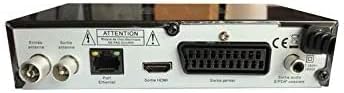
2. irudia: Atzekoa view of the Optex ORT 8930-HD receiver, displaying various connectivity ports.
The rear panel provides the following connections:
- Antenna In/Out: IEC 9.52 mm connectors for terrestrial antenna.
- HDMI irteera: For connecting to an HD television.
- SCART Connector: For connecting to older televisions.
- S/PDIF Coaxial Audio: Audio irteera digitala.
- Potentzia sarrera: For the external power adapter.
4.3 Urruneko kontrola

3. irudia: The remote control unit for the Optex ORT 8930-HD receiver.
The remote control allows full operation of the receiver, including power, channel selection, volume, menu navigation, recording functions, and multimedia playback controls.
5. Konfigurazioa
5.1 Antena konektatzea
- Connect your terrestrial antenna cable to the "Antenna In" port on the rear panel of the receiver.
- If you wish to loop the antenna signal to another device, connect a coaxial cable from the "Antenna Out" port to the input of the next device.
5.2 Telebistara konektatzea
Aukeratu konexio metodo hauetako bat:
- HDMI (Recommended for HD): Connect an HDMI cable from the "HDMI Output" port on the receiver to an available HDMI input on your television.
- SCART: Connect a SCART cable from the "SCART Connector" on the receiver to the SCART input on your television.
5.3 Energia-konexioa
- Connect the power adapter to the power input port on the receiver.
- Entxufatu korronte-egokitzailea hormako entxufe egoki batera.
5.4 Initial Channel Scan
- Turn on your television and select the correct input source (HDMI or SCART) corresponding to your connection.
- Power on the Optex ORT 8930-HD receiver.
- The first-time setup wizard should appear. Follow the on-screen instructions to perform an automatic channel search. This will scan for all available digital terrestrial channels in your area.
- If the wizard does not appear, navigate to the "Menu" > "Installation" > "Automatic Search" using the remote control.
6. Funtzionamendu-argibideak
6.1 Oinarrizko funtzionamendua
- Piztu/Itzali: Sakatu BOTEREA urrutiko agintean edo aurrealdeko panelean dagoen botoia.
- Kanalaren hautaketa: Erabili CH+ / CH- buttons or enter the channel number directly using the numeric keypad.
- Bolumen kontrola: Erabili VOL+ / Boluntario botoiak.
- Ezkutatu: Sakatu MUTU botoia audioa aldi baterako isilarazteko.
6.2 Kanalen kudeaketa
- Automatic/Manual Search: Sarbidea bidez Menua > Instalazioa to rescan for channels.
- LCN funtzioa: The Logical Channel Numbering (LCN) function automatically sorts channels into a logical order. This can usually be enabled/disabled in the installation menu.
- Favorite List: Create personalized lists of your preferred channels for quick access. Refer to the on-screen menu for instructions on adding and managing favorite channels.
6.3 Grabaketa eta erreprodukzioa
To use recording and multimedia playback features, connect a USB storage device (e.g., USB flash drive or external hard drive) to the USB port on the front panel.
- USB Grabaketa: Sakatu REC button on the remote control to start recording the current program. Press GELDITU grabatzen amaitzeko.
- Timeshift Function: This allows you to pause live TV and resume watching later. Activate Timeshift via the remote control (usually a dedicated button or through the menu).
- Multimedia erreprodukzioa: Access the multimedia player via the Menua. You can browse and play music, photo, and video files stored on your connected USB device.
6.4 Programaren Gida Elektronikoa (EPG)
Sakatu EPG urrutiko agintean dagoen botoia view the Electronic Program Guide, which displays program schedules for upcoming broadcasts.
6.5 Gurasoen blokeoa
Set up a parental lock to restrict access to certain channels or programs. This feature is typically found in the Menua > Sistemaren ezarpenak > Gurasoen Kontrola atala.
6.6 Tenporizadorearen funtzioa
The timer function allows you to schedule the receiver to turn on/off or record a specific program at a set time. Access this feature through the Menua.
6.7 Software Update via USB
Aldian-aldian egiaztatu fabrikatzailearen website for available software updates. Download the update file to a USB drive and follow the instructions in the Menua > Sistemaren ezarpenak > Software eguneratzea section to install it.
7. Mantentzea
- Garbiketa: Erabili zapi leun eta lehor bat hargailuaren kanpoaldea garbitzeko. Ez erabili garbitzaile likido edo aerosolik.
- Aireztapena: Ensure that the ventilation slots on the device are not blocked to prevent overheating.
- Softwarea: Keep the receiver's software updated to ensure optimal performance and access to the latest features.
8. Arazoak
| Arazoa | Kausa posiblea | Irtenbidea |
|---|---|---|
| Botererik ez | Power cable disconnected; power outlet faulty. | Egiaztatu kablearen konexioa; saiatu beste entxufe batekin. |
| Seinalerik ez / Kanalrik ez | Antenna not connected; incorrect input source on TV; no channel scan performed. | Check antenna connection; select correct TV input; perform an automatic channel scan. |
| Urruneko kontrola ez dabil | Bateriak agortuta; urrutiko agintearen eta hargailuaren arteko oztopoa. | Replace batteries; ensure clear line of sight to the receiver's IR sensor. |
| USB grabaketa ez dabil | USB device not connected or formatted incorrectly; insufficient storage space. | Ensure USB device is properly connected; format USB device (FAT32/NTFS); check available space. |
| Device freezes or becomes unresponsive | Softwarearen aldi baterako akatsa. | Disconnect power for a few seconds, then reconnect. If problem persists, check for software updates. |
9. Zehaztapenak
| Ezaugarri | Xehetasuna |
|---|---|
| Eredua | ORT 8930-HD |
| Marka | Optex |
| Sintonizatzaile mota | Lurreko (DVB-T2) |
| Bideo Deskodetzea | HEVC/H.265, MPEG-2.5 |
| Konektibitatea | 1x HDMI, 1x SCART, 1x USB 2.0, 1x S/PDIF Coaxial Audio, Antenna In/Out |
| Kanalaren Edukiera | Over 1000 channels |
| Grabaketa | External USB media (PVR function) |
| Multimedia erreprodukzioa | Music, Photos, Videos |
| Ezaugarri bereziak | Timeshift, EPG, Parental Lock, Favorite List, Multi-language Menu, LCN, 5V Antenna Power, Timer Function, Dolby Digital+ compatible |
| Audio irteera modua | [SOM] |
| Speaker Surround Sound Configuration | 5.1 |
| Potentzia Irteera | 5 Watt |
| Produktuaren pisua | 600 g |
10. Bermea eta Laguntza
Specific warranty information is not provided within this manual. Please refer to the warranty card included with your purchase, contact your retailer, or visit the official Optex webwebgunean bermearen baldintza zehatzak ikusteko.
For technical support or service inquiries, please contact your local Optex distributor or the customer service department as indicated on the product packaging or manufacturer's webgunea.


