1. Sarrera
The AMX VA-55 is an outdoor amplified antenna designed for receiving HDTV, ATSC, VHF, and UHF signals, as well as FM radio. This antenna features a twin output signal amplifier and power supply, allowing connection to two televisions or a TV and an FM tuner. Its robust design supports various installation locations, including rooftops, attics, balconies, or mobile homes.
This manual provides detailed instructions for the proper installation, operation, and maintenance of your AMX VA-55 antenna to ensure optimal performance.
2. Segurtasun informazioa
Please read all safety instructions before installing or operating the antenna. Failure to follow these instructions may result in injury or damage to the product.
- Segurtasun elektrikoa: Ensure the power supply is disconnected before making any connections. Avoid contact with power lines during installation.
- Muntatzeko segurtasuna: When installing on a rooftop or mast, use appropriate safety gear and ensure the mounting structure is stable and secure. Avoid installation during stormy weather.
- Kableen kudeaketa: Secure all cables to prevent tripping hazards and damage from environmental factors.
3. Paketearen edukia
Instalazioa hasi aurretik, egiaztatu osagai guztiak daudela:
- AMX VA-55 Outdoor Ampantena argitua
- Twin Output Signal Ampbiziagoa
- Power Supply (117vAC or 12vDC compatible)
- Bracket Hardware for mounting
- 25' (7.6M) Interconnect Cable (between antenna and ampbiziagoa)
4. Instalazioa eta konfigurazioa
The AMX VA-55 antenna is designed for simple installation and does not require special skills or tools for hook-up. However, proper placement is crucial for optimal signal reception.
4.1. Instalazio kokapena aukeratzea
Select a location that offers the clearest line of sight to broadcast towers. Common locations include:
- Teilatua: Provides the best elevation and fewest obstructions. May require a mast (not included).
- Ganbara: Offers protection from weather but may reduce signal strength due to building materials.
- Balcony: Suitable for apartments or condos with clear views.
- Etxe mugikorra: Flexible mounting options depending on the structure.
Avoid placing the antenna near large metal objects, power lines, or other sources of electromagnetic interference.
4.2. Antena muntatzea
- Assemble the antenna using the provided bracket hardware. Ensure all connections are secure.
- Mount the antenna securely to your chosen location (e.g., mast, wall bracket). Use appropriate fasteners for the surface.
- Orient the antenna towards the general direction of your local broadcast towers. You may need to fine-tune this later.

Figure 1: The AMX VA-55 antenna mounted on a pole, showing its compact design and mounting bracket.
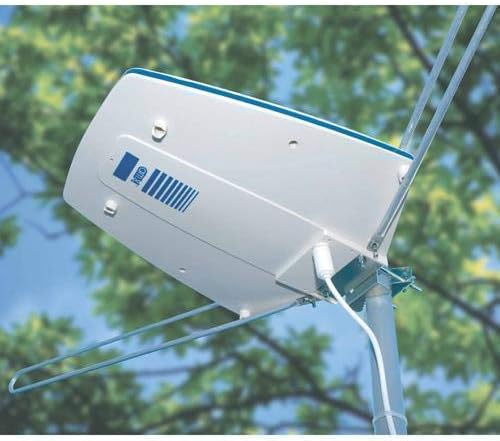
Figure 2: The AMX VA-55 antenna installed outdoors, demonstrating a typical rooftop or elevated mounting scenario.
4.3. Konektatzea Amplifier eta Elikatze Hornidura
- Connect one end of the 25' interconnect cable to the antenna's output port.
- Connect the other end of the interconnect cable to the input port of the twin output signal ampbiziagoa.
- Konektatu elikadura iturrira amplifier and plug it into a 117vAC outlet. Alternatively, if using a 12vDC power source, connect it to the amplifier's 12vDC input.
- -tik amplifier's two output ports, connect coaxial cables (not included) to your television(s) or FM tuner.

Figure 3: The AMX VA-55 antenna shown with its included twin output signal amplifier and power adapter, illustrating the components for signal ampLififikazioa eta banaketa.
5. Funtzionamendua
Once the antenna is installed and connected, follow these steps to scan for channels:
- Turn on your television or FM tuner.
- Access the TV's menu and navigate to the 'Channel Scan' or 'Auto Program' function. Ensure the input source is set to 'Antenna' or 'Air'.
- Initiate the channel scan. This process may take several minutes.
- After the scan is complete, check the received channels. If reception is not optimal, try adjusting the antenna's direction slightly and performing another channel scan.
- For FM radio, tune your FM tuner to desired stations.
6. Mantentzea
The AMX VA-55 antenna is designed for outdoor use and requires minimal maintenance. However, periodic checks can help ensure long-term performance.
- Ikus-ikuskapena: Annually inspect the antenna, mounting hardware, and cables for any signs of wear, corrosion, or damage, especially after severe weather.
- Kable konexioak: Ensure all coaxial cable connections remain tight and free from moisture. Consider using weatherproof tape or sealant for outdoor connections.
- Garbiketa: If necessary, gently clean the antenna's surface with a soft, damp zapi bat erabili zikinkeria edo hondakinak kentzeko. Ez erabili produktu kimiko gogorrik edo garbitzaile urratzailerik.
7. Arazoak
If you experience issues with your AMX VA-55 antenna, refer to the following common problems and solutions:
- Seinalerik ez edo harrera eskasa:
- Verify all cable connections are secure between the antenna, amplifier, and TV/tuner.
- Ziurtatu amplifier's power supply is properly connected and receiving power.
- Adjust the antenna's direction. Use online resources (e.g., TV Fool, AntennaWeb) to find the optimal direction for local broadcast towers.
- Perform a new channel scan on your TV after any adjustments.
- Check for obstructions (trees, buildings) that may have grown or been built since installation.
- Fewer Channels Than Expected:
- Ensure your TV's input is set to 'Antenna' or 'Air' before scanning.
- Try repositioning the antenna and rescanning. Even small changes can affect reception.
- Confirm your TV supports ATSC digital tuning.
- Seinale galera etengabea:
- Check for loose cable connections, especially outdoor ones that may be exposed to weather.
- Kableak kalterik ote duten egiaztatu.
- Environmental factors like heavy rain or strong winds can temporarily affect signal quality.
8. Zehaztapenak
| Ezaugarri | Zehaztapena |
|---|---|
| Marka | AMX |
| Eredua | VA-55 |
| Antena Mota | Kanpoan AmpHDTV antena argitua |
| Seinalearen Harrera | HDTV, ATSC, VHF, UHF, FM Radio |
| Irteerak | 2 (for TV or TV/FM Tuner) |
| Elikatze Hornidura | 117vAC or 12vDC |
| Kablearen luzera barne | 25' (7.6M) Interconnect Cable |
| Kolorea | Zuria |
| UPC | 619317865884 |
9. Bermea eta Laguntza
Specific warranty information for the AMX VA-55 antenna is not provided in this document. For warranty details, technical support, or further assistance, please refer to the product packaging or contact AMX customer service directly.


