Sarrera
The Insignia NS-SPBTWAVE2-BK Wave 2 Portable Bluetooth Speaker provides high-quality wireless audio streaming from your compatible devices. Designed for versatility, its robust construction and rubberized feet allow for stable placement in both horizontal and vertical orientations. Enjoy hands-free communication with the built-in speakerphone and extended listening sessions thanks to its 12-hour battery life.
This manual provides essential information for setting up, operating, maintaining, and troubleshooting your speaker. Please read it thoroughly before use and retain it for future reference.
Paketearen edukia
Ziurtatu elementu guztiak paketean daudela:
- Insignia NS-SPBTWAVE2-BK Wave 2 Portable Bluetooth Speaker
- USB kargatzeko kablea
- 3.5mm Audio Cable (Auxiliary)
- Quick Setup Guide (or similar documentation)
Produktuaren Ezaugarriak
- Haririk gabeko konektagarritasuna: Connects wirelessly to smartphones, tablets, and other Bluetooth-enabled devices.
- Bateriaren iraupen luzea: Features a rechargeable 2,000 mAh battery, providing up to 12 hours of playback on a full charge.
- Mikrofono integratua: Enables hands-free calling directly through the speaker.
- Auxiliary Audio Input: Allows for wired connection to audio devices via a 3.5mm audio cable.
- Kokapen polifazetikoa: Designed to stand securely in both horizontal and vertical positions.
Hizlariaren zatiak
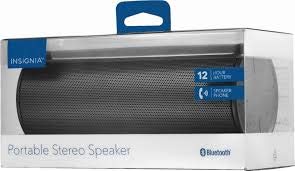
1. irudia: Aurrealdea view of the Insignia Wave 2 Speaker in horizontal orientation.

Figure 2: Vertical view of the speaker, illustrating the power button, charging port, and auxiliary input port at the bottom.
Refer to the images above for the location of key components such as the power button, volume controls, Bluetooth indicator, charging port, and auxiliary input.
Konfigurazioa
1. Bozgorailua kargatzea
- Connect the small end of the USB charging cable to the charging port on the speaker (refer to Figure 2).
- Connect the large end of the USB charging cable to a USB power adapter (not included) or a powered USB port on a computer.
- The charging indicator light will illuminate. Allow approximately 12 hours for a full charge before first use. The indicator light will change or turn off once charging is complete.
2. Bluetooth parekatzea
- Ensure the speaker is fully charged. Press and hold the Power button to turn on the speaker. The Bluetooth indicator light will begin to flash, indicating it is in pairing mode.
- On your Bluetooth-enabled device (smartphone, tablet, etc.), navigate to the Bluetooth settings and ensure Bluetooth is enabled.
- Bilatu available devices. Select "Insignia Wave 2" from the list.
- Once paired, the Bluetooth indicator light on the speaker will become solid, and you may hear an audible confirmation.
- Pasahitza eskatzen badizute, idatzi "0000".
3. Auxiliary (Wired) Connection
- Connect one end of the 3.5mm audio cable to the AUX input port on the speaker (refer to Figure 2).
- Connect the other end of the 3.5mm audio cable to the headphone jack or audio output port of your audio device.
- The speaker will automatically switch to auxiliary mode when a cable is detected.
Bozgorailua funtzionatzea
Piztu/Itzali
- To turn on: Press and hold the Power button until the indicator lights illuminate.
- To turn off: Press and hold the Power button until the indicator lights turn off.
Bolumen kontrola
- Doitu bolumena bozgorailuko bolumen-botoiak erabiliz.
- You can also control the volume from your connected Bluetooth device or auxiliary audio source.
Esku libreko deiak
When connected via Bluetooth, the speaker can be used for hands-free calls:
- Erantzun dei bati: Press the Play/Pause/Call button once.
- Amaitu dei bat: Sakatu Erreproduzitu/Pausatu/Deitu botoia behin dei batean zehar.
- Dei bat baztertu: Press and hold the Play/Pause/Call button.
- Speak clearly towards the speaker's built-in microphone for optimal voice pickup.
Mantentzea
- Garbiketa: Use a soft, dry, lint-free cloth to clean the speaker's exterior. Do not use liquid cleaners, aerosols, or solvents.
- Bateria zaintzea: To prolong battery life, avoid fully discharging the battery frequently. Recharge the speaker regularly, even if not in use. Avoid exposing the speaker to extreme temperatures (hot or cold).
- Biltegiratzea: When not in use for extended periods, store the speaker in a cool, dry place away from direct sunlight and moisture.
- Uraren erresistentzia: Hizlari hau da EZ waterproof. Avoid exposure to water or excessive moisture.
Arazoak konpontzea
| Arazoa | Irtenbide posiblea |
|---|---|
| Bozgorailua ez da pizten. | Ziurtatu bateria kargatuta dagoela. Konektatu bozgorailua energia-iturri batera USB kargatzeko kablea erabiliz. |
| Bozgorailuaren soinurik ez. | Check the volume level on both the speaker and the connected device. Ensure the correct input source (Bluetooth or AUX) is selected. Verify the Bluetooth connection or auxiliary cable. |
| Ezin da Bluetooth bidez parekatu. | Ensure the speaker is in pairing mode (flashing Bluetooth indicator). Turn off and on Bluetooth on your device. Move the speaker closer to your device. Forget the speaker from your device's Bluetooth list and try pairing again. |
| Soinu-kalitate eskasa edo distortsioa. | Ensure the speaker is within Bluetooth range (approx. 33 ft / 10 m). Reduce the volume on the source device or speaker. Check for interference from other wireless devices. Try a different audio source or file. |
| Mikrofonoa ez dabil deietan zehar. | Ensure the speaker is properly connected via Bluetooth. Speak directly towards the speaker. Check your phone's call settings to ensure audio is routed to the Bluetooth speaker. |
Zehaztapenak
- Ereduaren izena: 2. olatua
- Modelo zenbakia: NS-SPBTWAVE2-BK
- Konektibitate Teknologia: Bluetootha
- Bateriaren iraupena: Gehienez 12 ordu
- Bateria mota: 1 litio ioi (barne)
- Kargatzeko denbora: Gutxi gorabehera 12 ordu
- Produktuaren neurriak: 6.8 x 2.8 x 2.8 hazbete (17.3 x 7.1 x 7.1 cm)
- Elementuaren pisua: 1 libra (0.45 kg)
- Audio irteera modua: Estereoa
- Seinaleztapen-zarata ratioa: 80 dB
- Mikrofono integratua: Bai
- Sarrera osagarria: Bai (3.5 mm)
- Iragazgaitza: Ez
- Materiala: Plastikoa
- UPC: 600603230455
Bermea eta Laguntza
This Insignia NS-SPBTWAVE2-BK Wave 2 Portable Bluetooth Speaker comes with a Berme mugatua. For specific terms and conditions of your warranty, please refer to the warranty card included with your purchase or visit the official Insignia webgunea.
For technical support, troubleshooting assistance, or warranty claims, please contact Insignia Customer Service. Contact information can typically be found on the Insignia webgunean edo zure produktuaren dokumentazioan.


