1. Sarrera eta Overview
The DEWALT DXF2490 High Velocity Fan is a robust 24-inch industrial-grade fan designed for powerful air circulation in various environments. Its durable construction and adjustable features make it suitable for both indoor and outdoor applications, providing efficient cooling and ventilation.
Key features include a unique trumpet-shaped drum that generates a strong and steady airflow of 6500 CFM, a 360-degree adjustable fan head for precise air direction, and sturdy semi-pneumatic tires for smooth movement across uneven surfaces. The fan is built with durable metal construction and aluminum blades to withstand rigorous daily use.

1. irudia: Aurrealdea view of the DEWALT DXF2490 High Velocity Fan.
2. Konfigurazioa eta Muntaketa
The DEWALT DXF2490 fan requires minimal assembly. Follow these steps to prepare your fan for use:
- Unpack all components from the packaging. Verify that all parts, including the fan unit, wheels, and foot supports, are present.
- Attach the semi-pneumatic wheels to the designated axles on the fan's frame. Secure them using the provided hardware (nuts and washers). A socket wrench may be required for this step.
- Install the non-skid foot pads/supports to the opposite side of the frame from the wheels. These typically attach with screws, requiring a Phillips screwdriver.
- Ensure all components are securely fastened before attempting to move or operate the fan.
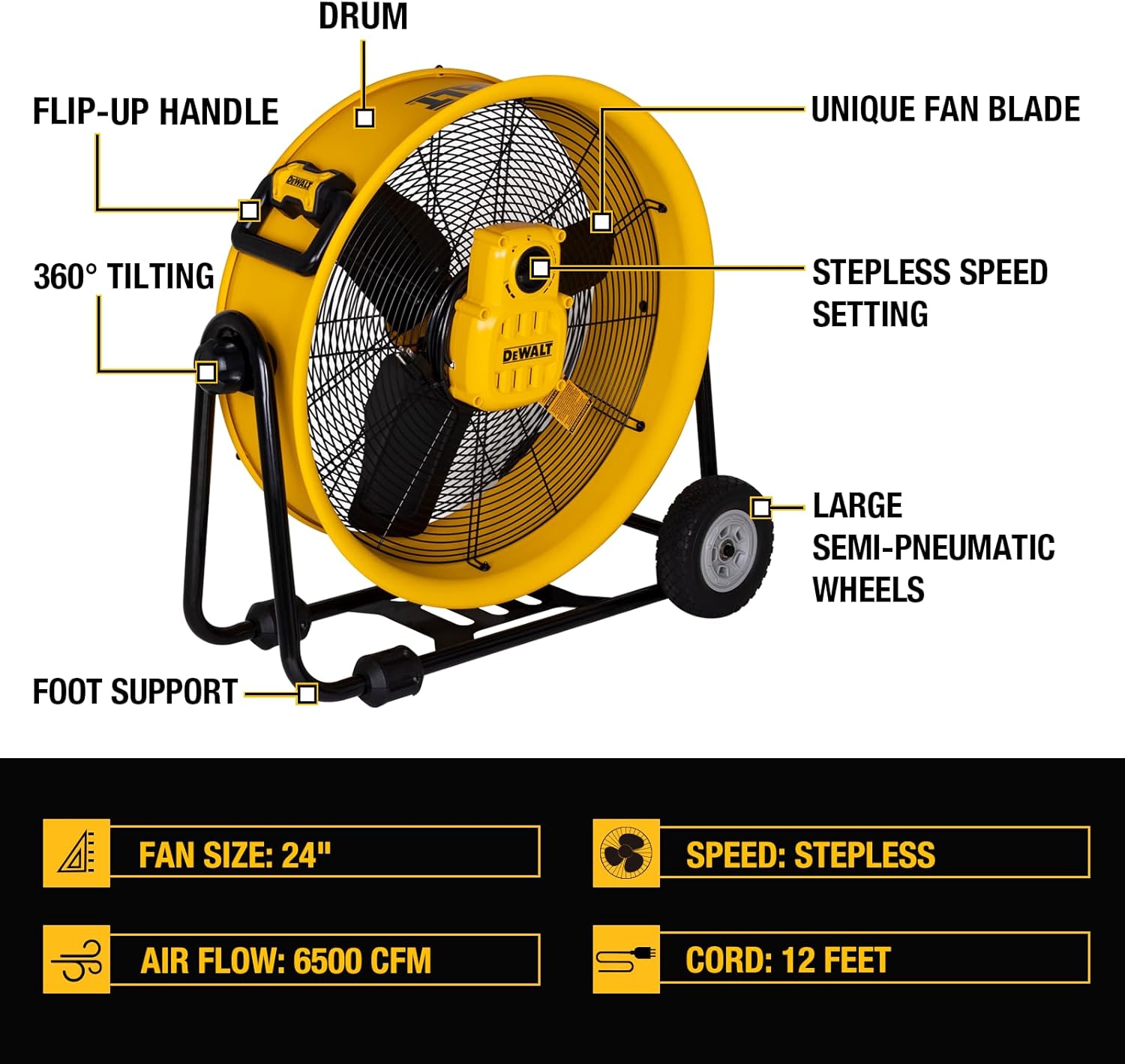
Figure 2: Labeled diagram of the DEWALT DXF2490 fan's components.
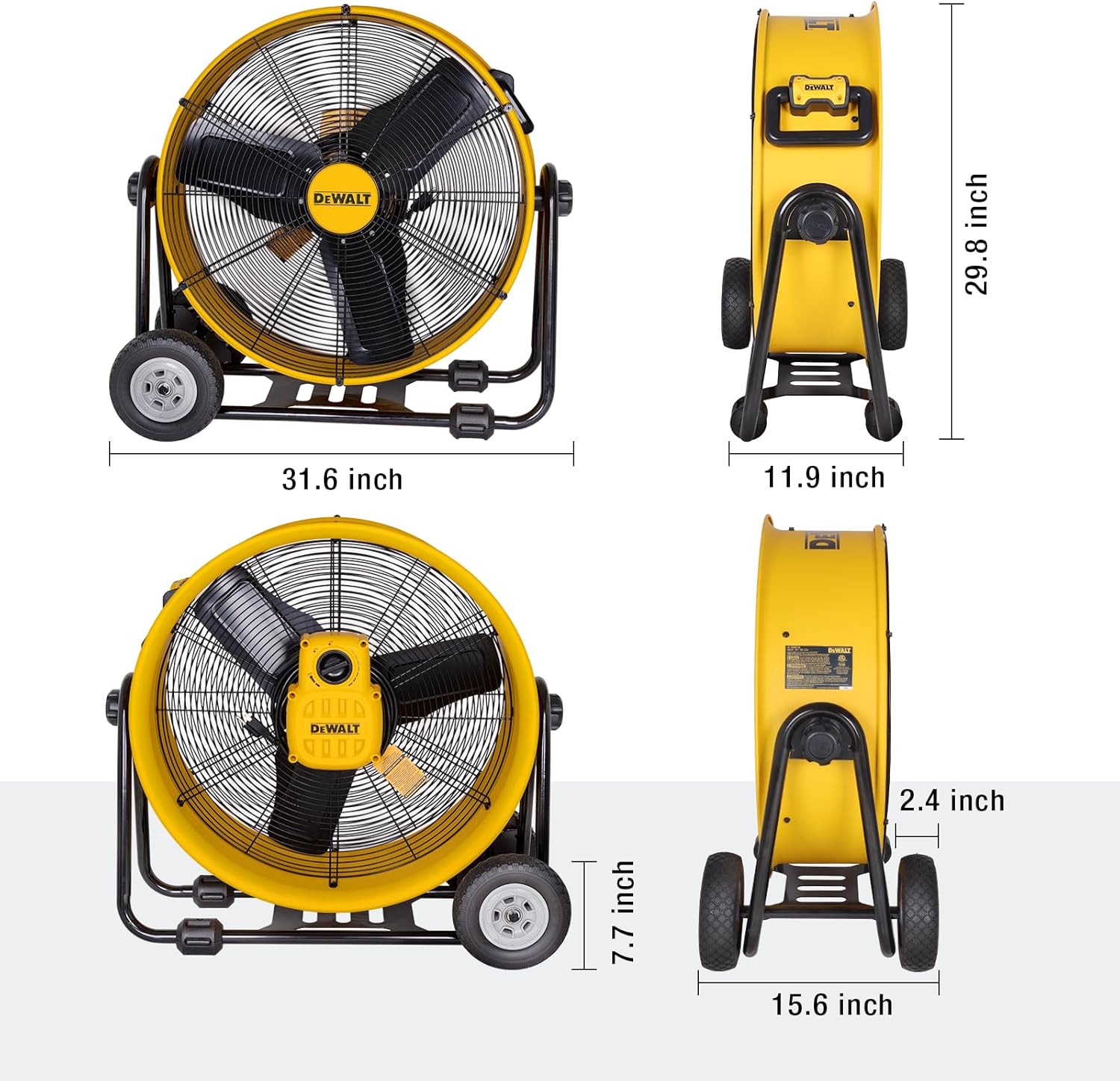
Figure 3: Detail of the semi-pneumatic tires for easy mobility.
3. Funtzionamendu-argibideak
To operate your DEWALT DXF2490 High Velocity Fan, follow these simple steps:
- Lekua: Position the fan on a stable, level surface. Ensure there are no obstructions around the fan's intake or exhaust grilles.
- Potentzia-konexioa: Plug the 12-foot power cord into a standard 120V, 60Hz electrical outlet.
- Aire-fluxua doitzea: Use the stepless speed setting dial, located on the side of the fan motor housing, to turn the fan on and adjust the airflow intensity. Rotate the dial clockwise to increase speed and counter-clockwise to decrease speed or turn off.
- Tilting the Fan Head: The fan head can be tilted 360 degrees. Loosen the knobs on either side of the fan drum, adjust the fan to your desired angle, and then tighten the knobs to secure its position. This allows for precise direction of airflow.

Figure 4: Stepless speed setting for precise airflow control.

Figure 5: 360-degree adjustable tilt for directing airflow.
4. Mantentzea
Regular maintenance ensures optimal performance and longevity of your DEWALT DXF2490 fan. Always unplug the fan from the power outlet before performing any maintenance.
- Garbiketa: Periodically use a soft, damp cloth to wipe down the exterior surfaces of the fan. For the fan blades and protective grilles, carefully remove any accumulated dust or debris. Do not use abrasive cleaners or solvents.
- Ikuskapena: Regularly inspect the power cord for any signs of damage, fraying, or wear. Ensure the fan's wheels, frame, and all fasteners are secure and free from damage.
- Biltegiratzea: When not in use for extended periods, store the fan in a dry, clean area, protected from extreme temperatures and direct sunlight.
5. Arazoak
If your DEWALT DXF2490 fan is not operating as expected, refer to the following common troubleshooting steps:
| Arazoa | Kausa posiblea | Irtenbidea |
|---|---|---|
| Fan ez da pizten | No power to the unit; Speed dial set to 'Off' | Check if the power cord is securely plugged into a working electrical outlet. Verify the outlet is live. Ensure the speed control dial is turned to an 'On' position. |
| Aire fluxu baxua | Obstructions; Dirty blades/grilles | Check for any obstructions around the fan's intake or exhaust. Clean the fan blades and grilles if dust or debris has accumulated. |
| Ezohiko zarata edo bibrazioa | Unstable placement; Loose parts; Damaged blades | Ensure the fan is placed on a stable, level surface. Check for any loose parts or foreign objects within the fan housing. Verify that the fan blades are not bent or damaged. |
If issues persist after performing these checks, contact customer support for further assistance.
6. Zehaztapenak
| Ezaugarri | Zehaztapena |
|---|---|
| Marka | DEWALT |
| Ereduaren izena | DXF2490 |
| Haizagailu elektrikoaren diseinua | Solairuko haizagailua |
| Energia iturria | Kable elektrikoa |
| Produktuaren neurriak (L x W x H) | 31.42" L x 15.63" W x 30.51" H |
| Zarata Maila | 60 dB |
| Wattage | 30 watt |
| Aire Fluxuaren Ahalmena | 6500 oin kubiko minutuko (CFM) |
| Pala Luzera | 24 hazbete |
| Abiadura | 1050 RPM |
| liburukiatage | 120V |
| Elementuaren pisua | 33.07 kilo |
| Barruko/Kanpoko erabilera | Kanpoan |
| Pala Materiala | Aluminioa |
7. Bermea eta Laguntza
The DEWALT DXF2490 High Velocity Fan comes with a Urtebeteko fabrikatzailearen berme mugatua. Berme honek ohiko erabileran materialen eta eskulanen akatsak estaltzen ditu.
For warranty claims, technical support, or service inquiries, please refer to the contact information provided in your product packaging or visit the official DEWALT website. You can find more information and support resources by visiting the DEWALT denda.