1. Sarrera
This user manual provides comprehensive instructions for the setup, operation, and maintenance of your SHARP LC-32HI5012E HD Ready Smart LED TV. Please read this manual thoroughly before using your television to ensure proper functionality and safety.
The SHARP LC-32HI5012E is an 81 cm (32-inch) HD Ready Smart LED TV featuring Active Motion 200 technology for enhanced picture quality and a Triple Tuner for versatile reception options. It includes integrated Wi-Fi and a Harman/Kardon sound system for a complete entertainment experience.
2. Paketearen edukia
Paketea irekitzean, egiaztatu honako elementu guztiak daudela:
- SHARP LC-32HI5012E Main Unit
- Urruneko kontrola (pilekin)
- Erabiltzailearen eskuliburua (dokumentu hau)

Irudia: Aurrealdea view of the SHARP LC-32HI5012E television, displaying a vibrant city skyline on its screen. This image shows the slim bezel design and the central SHARP logo.
3. Konfigurazioa
3.1 Standa muntatzea
Carefully place the TV screen-down on a soft, flat surface to prevent damage. Attach the two stand feet to the designated slots at the bottom of the TV, securing them with the provided screws. Ensure the stand is firmly attached before proceeding.
3.2 Periferikoak konektatzea
Zure telebistak kanpoko gailuetarako hainbat konexio aukera eskaintzen ditu:
- HDMI atakak (x3): Konektatu Blu-ray erreproduzitzaileak, joko kontsolak edo set-top kutxak.
- USB atakak (x2): USB unitateetatik multimedia erreproduzitzeko.
- Antenna In (RF): Connect your terrestrial antenna for DVB-T/T2HD reception.
- Sat In: Connect your satellite dish for DVB-S/S2 reception.
- RJ45 (LAN): Kable bidezko internet konexiorako.
- CI+ Port: For conditional access modules (CAM) to view enkriptatutako kanalak.
- Mini Component/YPbPr, Mini AV Composite: Gailu analogiko zaharragoetarako.
- Audio-irteera optiko digitala: Kanpoko audio sistemetara konektatzeko.
- Audio out / Headphone: Entzungailuetarako edo kanpoko bozgorailuetarako.

Irudia: Atzealdea view of the SHARP LC-32HI5012E television, highlighting the arrangement of various input and output ports for connecting external devices.
3.3 Hasierako piztea eta lehen konfigurazioa
After connecting all necessary cables, plug the power cord into an electrical outlet. Press the power button on the remote control or the TV. The first-time setup wizard will guide you through:
- Hizkuntza hautatzea.
- Sare konexioa (Wi-Fi edo kable bidezko LAN).
- Channel scanning for DVB-C, DVB-S/S2, or DVB-T/T2HD.
- Ordu-zona eta beste oinarrizko ezarpen batzuk.
4. Funtzionamendu-argibideak
4.1 Oinarrizko telebista funtzioak
- Piztu/Itzali: Erabili urrutiko agintearen edo telebistaren pizteko botoia.
- Bolumen kontrola: Use the VOL +/- buttons.
- Kanalaren hautaketa: Use CH +/- or number buttons.
- Sarrera iturria: Press the SOURCE button to switch between HDMI, AV, TV, etc.
- Menuen nabigazioa: Use arrow keys and OK button to navigate menus.
4.2 Telebista adimendunaren ezaugarriak
Your SHARP LC-32HI5012E is equipped with integrated Wi-Fi and offers access to various smart features:
- Aurrez instalatutako aplikazioak: Access popular streaming services like Netflix and YouTube directly.
- Web Arakatzailea: Arakatu Interneten zuzenean zure telebistatik.
- Aquos Net+: Access additional online content and services provided by Sharp.
Ensure your TV is connected to the internet for full Smart TV functionality.
4.3 Audio-sistema
The integrated Harman/Kardon sound system provides a high-quality audio experience with excellent dynamics and clarity. Adjust audio settings in the TV menu to customize your sound preferences.
5. Mantentzea
5.1 Pantaila garbitzea
Pantaila garbitzeko, astiro-astiro zapi leun eta pelusik gabeko batekin garbitu. Orban egoskorrak izanez gero, apur bat garbitu.ampGarbitu oihal bat urarekin edo pantaila-garbitzaile espezializatu batekin. Ez spray liquid directly onto the screen.
5.2 Arreta orokorra
- Mantendu telebista eguzki-argitik eta bero-iturrietatik urrun.
- Ziurtatu telebistaren inguruan aireztapen egokia dagoela.
- Deskonektatu telebista korronte-entxufetik tximista-ekaitzetan edo denbora luzez zaindu gabe uzten denean.
6. Arazoak
If you encounter any issues with your TV, please refer to the following common problems and solutions before contacting support.
| Arazoa | Kausa posiblea | Irtenbidea |
|---|---|---|
| Botererik ez | Power cord unplugged, power outlet issue. | Egiaztatu kablearen konexioa. Saiatu beste entxufe batekin. |
| Irudirik ez, baina soinua badago | Incorrect input source, faulty cable. | Verify correct input source. Check HDMI/AV cable connections. |
| Soinurik ez | Volume muted or too low, external audio system issue. | Unmute volume, increase volume. Check external audio connections. |
| Ezin da Wi-Fira konektatu | Incorrect password, router issue, TV too far from router. | Sartu pasahitza berriro. Berrabiarazi bideratzailea. Gerturatu telebista edo erabili kable bidezko konexioa. |
7. Zehaztapenak
| Ezaugarri | Xehetasuna |
|---|---|
| Marka | ZORROTZA |
| Modelo zenbakia | LC-32HI5012E |
| Pantaila Teknologia | LED |
| Ebazpena | HD prest (1366 x 768 pixel) |
| Pantaila Diagonala | 81.3 cm (32 hazbete) |
| Freskatze tasa | 60 Hz |
| Ezaugarri Berezia | Internet (Telebista Adimenduna) |
| Onartutako Interneteko zerbitzuak | Netflix, YouTube, Browser |
| Konektibitate Teknologia | USB, HDMI, LAN, Wi-Fi |
| Sintonizatzaileak | DVB-C, DVB-S/S2, DVB-T/T2HD |
| Audio Sistema | Harman/Kardon |
| Produktuaren neurriak (x x H x D) | 74 x 49.1 x 18 cm (euskarriarekin) |
| Pisua | 4.8 kilogramo |
| Muntatze Mota | Mahai-muntaia |
7.1 Energia-eraginkortasuna
The SHARP LC-32HI5012E has an energy efficiency rating of F. For detailed energy consumption information, please refer to the energy label and product information sheet.

Image: Energy efficiency label for the SHARP LC-32HI5012E television, showing its energy class F and power consumption details.
Xehetasun gehiago lortzeko, bisitatu EPREL datu-base ofiziala: https://eprel.ec.europa.eu/qr/402565
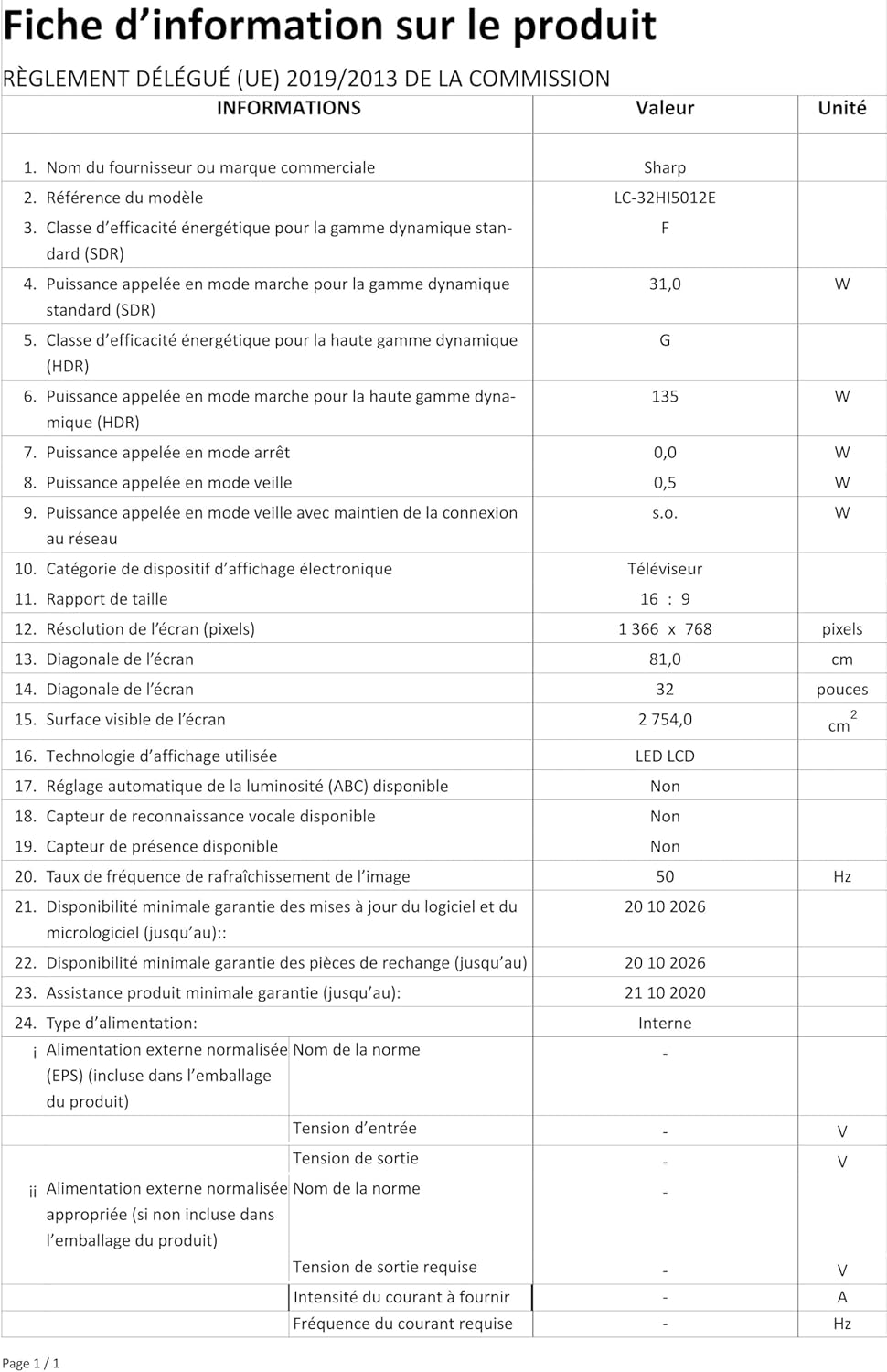
Image: Product information sheet detailing technical specifications and compliance information for the SHARP LC-32HI5012E television.
8. Bermea eta Laguntza
For warranty information, please refer to the warranty card included with your product or visit the official SHARP webgunea. Gorde erosketa-agiria erosketaren frogagiri gisa, berme-erreklamazioetarako.
For technical support or service inquiries, please contact SHARP customer service. Contact details can typically be found on the SHARP official webgunean edo produktuaren ontzian.


