1. Produktua amaitu daview
MOOER Mikro Aurrebistaamp 18 Custom 100 (MMPA18) is a compact digital preamp pedal designed to accurately recreate the sound, dynamics, and response of popular tube amplifiers. Utilizing advanced digital technology, this pedal offers a versatile solution for guitarists seeking high-quality amplifier tones in a miniature form factor.
Key features include dual channels for diverse tonal options, an integrated speaker cabinet simulation for direct recording or PA connection, and dual operating modes to adapt to various performance and recording setups.
2. Ezaugarriak
- Sonically accurate digital recreations of classic tube amplifier preamp atalak.
- Dual channels for versatile clean and gain tones.
- Integrated speaker cabinet simulation for direct output.
- Dual operating modes to suit various user needs.
- Diseinu trinkoa eta iraunkorra.
3. Kontrolak eta konexioak
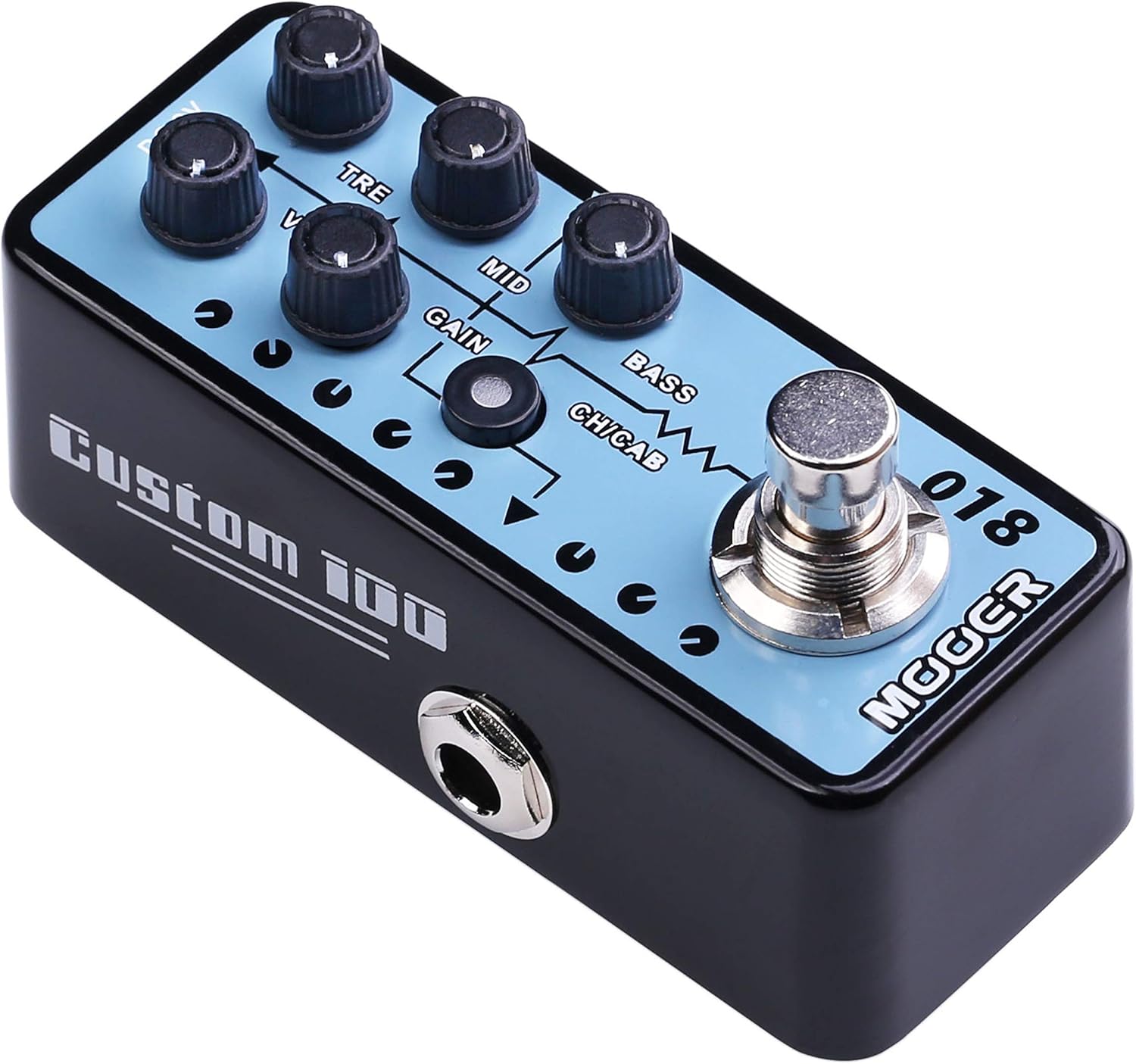
1. irudia: Goikoa view of the MOOER Micro Preamp 18 Custom 100, highlighting the control knobs and footswitch.
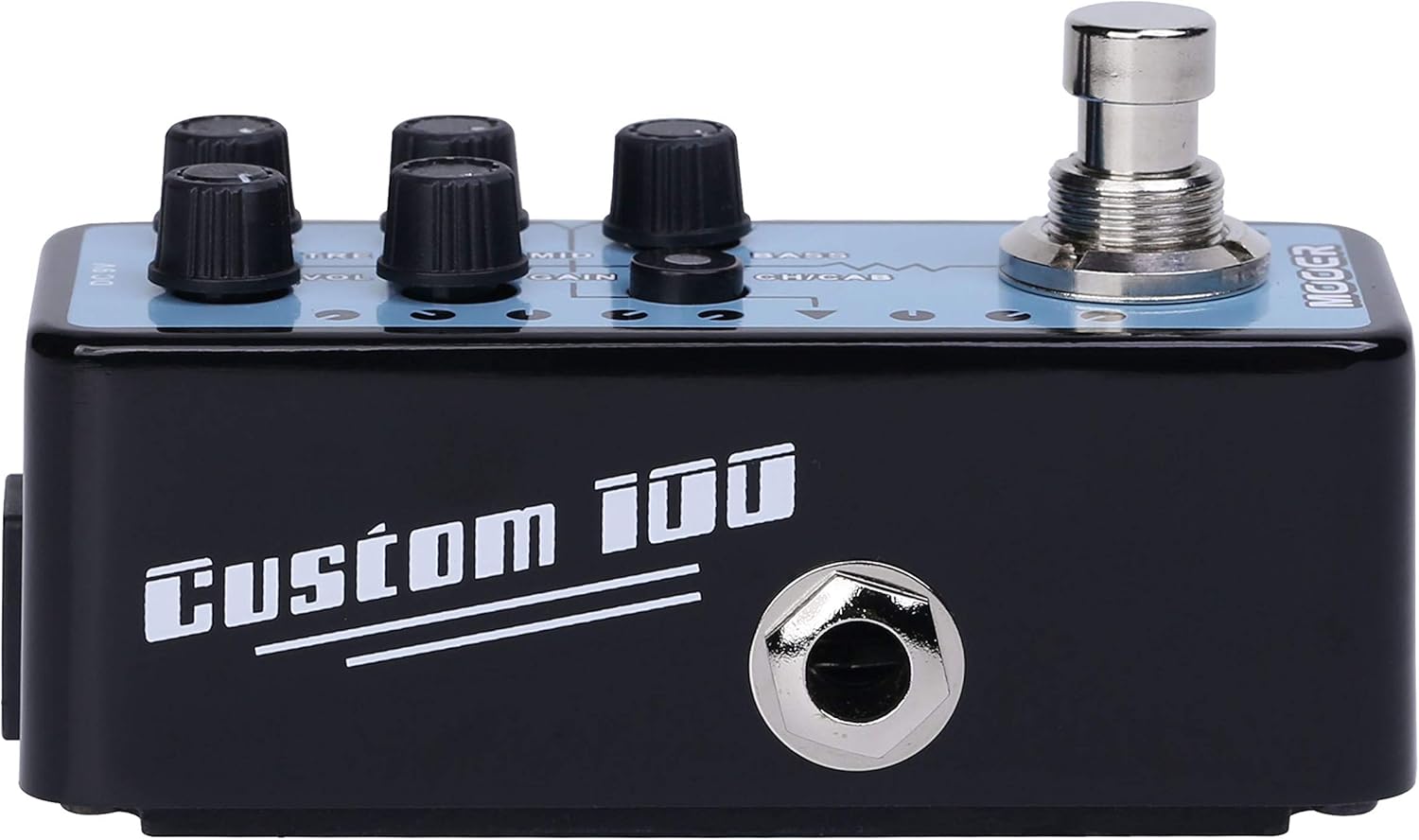
2. irudia: Aldea view of the MOOER Micro Preamp 18 Custom 100, illustrating the 1/4" input and output jacks.
Kontrolak:
- VOL (Bolumena): Aurreragailuaren irteera-maila orokorra doitzen duamp.
- TRE (Treble): Maiztasun handiko erantzuna kontrolatzen du.
- MID (Middle): Erdi-mailako maiztasun-erantzuna doitzen du.
- IRABAZIA: Controls the amount of overdrive/distortion.
- BAXUA: Maiztasun baxuko erantzuna doitzen du.
- CH/CAB (Channel/Cabinet Simulation Switch): This switch serves two functions:
- In normal operation, it switches between the two available channels (e.g., Clean and Gain).
- When held down, it toggles the integrated speaker cabinet simulation on or off.
- Oinen etengailua: Engages or bypasses the pedal.
Konexioak:
- Input Jack (1/4" / 6.35mm): Konektatu zure gitarra edo beste instrumentu bat hemen.
- Output Jack (1/4" / 6.35mm): Konektatu zure amplifier, audio interface, or other effects pedals.
- DC 9V sarrera: Connect a 9V DC power adapter (center negative, 300mA minimum).
- USB 2.0 (Hardware Interface): For firmware updates or potential software integration.
4. Konfigurazioa eta funtzionamendua
Hasierako konfigurazioa:
- Ziurtatu zure ampLifter-a eta beste audio ekipoak itzalita daude.
- Konektatu zure gitarrara Sarrera Jack of the MMPA18.
- Konektatu Irteera Jack of the MMPA18 to the input of your ampargitzailea edo audio interfazea.
- Connect a 9V DC power adapter (center negative, 300mA minimum) to the DC 9V Sarrera.
- Piztu zure amplifier and other audio equipment.
Oinarrizko funtzionamendua:
- Engaging/Bypassing: Press the footswitch to turn the preamp effect on or off. The LED indicator will illuminate when the effect is active.
- Kanal-aldaketa: Sakatu labur CH/CAB switch to toggle between the two channels (e.g., a clean channel and a gain channel). The LED color or state may change to indicate the active channel.
- Kabinetearen simulazioa: Eduki sakatuta CH/CAB switch for a few seconds to activate or deactivate the integrated speaker cabinet simulation. This is particularly useful when connecting directly to a mixing console, audio interface, or headphones, providing a more natural, mic'd cabinet sound.
- Tonua doitzea: Erabili VOL, TRE, MID, GAIN, eta BASS knobs to sculpt your desired tone. Experiment with different settings for each channel.
5. Mantentzea
- Garbiketa: Erabili zapi leun eta lehor bat pedala garbitzeko. Saihestu garbitzaile edo disolbatzaile urratzaileak.
- Biltegiratzea: Gorde pedala leku fresko eta lehor batean, eguzki-argitik eta muturreko tenperaturetatik babestuta.
- Elikatze-iturria: Always use a compatible 9V DC (center negative) power supply with a minimum of 300mA. Using an incorrect power supply can damage the unit and void the warranty.
- Konexioak: Aldian-aldian egiaztatu kable-konexio guztiak higadura edo haustura dagoen. Ziurtatu entxufeak hautsik eta hondakinik gabe daudela.
6. Arazoak
- Soinurik ez:
- Check all cable connections (guitar, pedal, ampbizigailua, elikatze-iturria).
- Ensure the power supply is correctly connected and providing power.
- Verify the pedal is engaged (LED illuminated).
- Check the volume settings on the pedal and your ampbiziagoa.
- Soinu-kalitate eskasa / Zarata gehiegi:
- Ziurtatu kable guztiak egoera onean daudela eta behar bezala babestuta daudela.
- Try a different power supply to rule out power-related noise.
- Adjust the GAIN knob; very high gain settings can introduce noise.
- If using the cabinet simulation, ensure it is appropriate for your output device.
- Ensure the pedal is not placed too close to power transformers or other sources of electromagnetic interference.
- Pedalak ez du erantzuten:
- Deskonektatu eta berriro konektatu elikadura iturria.
- If issues persist, contact MOOER support.
- Gehiegizko berotzea: While normal operation may cause some warmth, excessive heat could indicate an issue. Ensure proper ventilation and use the correct power supply. If the pedal becomes unusually hot, discontinue use and contact support.
7. Zehaztapenak
| Zehaztapena | Balioa |
|---|---|
| Modelo zenbakia | MMPA18 |
| Elementuaren pisua | 5.8 ontza (165 gramo) |
| Produktuaren neurriak | 3.54 x 3.54 x 3.54 hazbete |
| Gailu bateragarriak | Musical Instrument(s) |
| Konektore mota | 1/4" (6.35mm) Jack, 1/8" (3.5mm) Jack |
| Hardware interfazea | USB 2.0 |
| Seinalearen formatua | Digitala |
| Irteera Wattage | 100 Watt |
| Energia iturria | AC egokitzailea |
| liburukiatage | 9 Volt |
| Marka | MOOER |
| Kolorea | Mehrfarbig |
8. Bermea eta Laguntza
MOOER products are designed for reliability and performance. For specific warranty information, please refer to the warranty card included with your product or visit the official MOOER website. In case of any issues or technical support needs, please contact MOOER customer service through their official channels.
Laguntza gehiago lortzeko, bisita dezakezu MOOER denda Amazonen.


