Sarrera
This manual provides comprehensive instructions for the Zerone Type C Qi Wireless Charging Receiver Module (Model: Zerone78ye2tc135). This ultra-slim receiver enables Qi wireless charging for smartphones equipped with a USB Type-C interface. Please read this manual carefully before use to ensure proper installation and operation.
Ezaugarri nagusiak
- Qi Standard Compatibility: Designed for devices with a USB 3.1 Type-C interface, providing charging that works with any Qi-enabled charger.
- Karga eraginkorra: Features an output voltage of 5V, output current of 1.5A, and a charging current of 1000mA, operating at a frequency of 100-200KHz.
- Kablerik gabeko erosotasuna: Eliminates the need for charging cables, prolonging the life of your phone's charging port and allowing for uninterrupted use during charging.
- Diseinu trinkoa eta arina: Ultra-slim (0.04 inch) and lightweight, adding minimal bulk to your phone. The connector is designed for easy plug-in and removal, compatible with most phone cases.
Konfigurazio Argibideak
Follow these steps to properly install and set up your Zerone Type C Qi Wireless Charging Receiver Module:
- Prestatu hartzailea:
Carefully remove the wireless charging receiver from its packaging. Ensure the Type-C connector is intact.

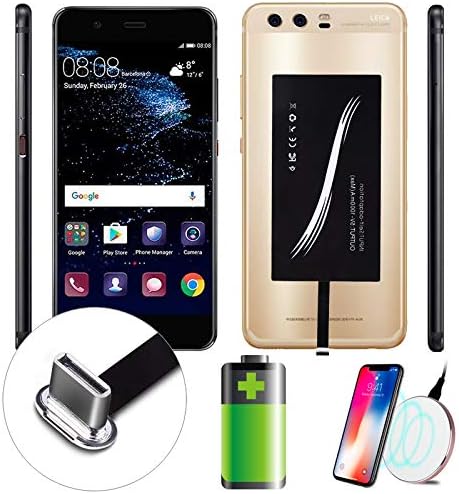
Image: The Zerone Type C Qi Wireless Charging Receiver Module, highlighting its compact design and Type-C connector.
- Connect to Your Smartphone:
Locate the USB Type-C charging port on your smartphone. Gently insert the receiver's Type-C connector into your phone's charging port. Ensure it is fully seated.
Irudia: Gertutik view of the Type-C connector being inserted into a smartphone's charging port.
- Hartzailea kokatu:
Once connected, carefully fold the receiver pad onto the back of your smartphone. The adhesive on the receiver helps secure it in place. Ensure the charging coil on the receiver aligns with the general area where your wireless charger will make contact.

Image: The wireless charging receiver module attached to the back of a smartphone, ready for wireless charging.
- Install Phone Case (Optional):
For added protection and to keep the receiver securely in place, you can install a phone case over your smartphone with the receiver attached. The ultra-slim design of the receiver allows it to fit under most standard phone cases.
Konfigurazio erakustaldi bideoa
Video: This video demonstrates the installation process of the USB C Qi Wireless Charging Receiver Module for a smartphone, showing how to connect it and place it under a phone case.
Funtzionamendu-argibideak
Once the Zerone Type C Qi Wireless Charging Receiver Module is installed, using it is straightforward:
- Place on Wireless Charger:
Place your smartphone, with the receiver attached, onto a Qi-compatible wireless charging pad. Ensure the phone is centered on the charging pad for optimal connection.

Image: A smartphone with the wireless charging receiver attached, placed on a Qi-compatible wireless charging pad, indicating active charging.
- Egiaztatu kargatzea:
Your smartphone should indicate that it is charging wirelessly. Most wireless charging pads also have an indicator light to confirm a successful connection.
- Remove for Wired Charging (Optional):
If you need to use wired charging, simply unplug the receiver's Type-C connector from your phone's port. The receiver can be reconnected when you wish to use wireless charging again.
Mantentzea
To ensure the longevity and optimal performance of your Zerone Type C Qi Wireless Charging Receiver Module, follow these maintenance guidelines:
- Mantendu garbi: Regularly wipe the receiver pad and connector with a soft, dry cloth to remove dust and debris. Avoid using harsh chemicals or abrasive materials.
- Kontuz maneiatu: Avoid bending or twisting the flexible cable connecting the pad to the Type-C connector, as this can damage internal wiring.
- Saihestu muturreko baldintzak: Do not expose the receiver to extreme temperatures, direct sunlight for prolonged periods, or moisture.
- Biltegiratze egokia: When not in use, store the receiver in a cool, dry place, away from direct heat or humidity.
Arazoak konpontzea
If you encounter issues with your Zerone Type C Qi Wireless Charging Receiver Module, refer to the following common problems and solutions:
| Arazoa | Kausa posiblea | Irtenbidea |
|---|---|---|
| Telefonoa ez da haririk gabe kargatzen. |
|
|
| Kargatzeko abiadura motela. |
|
|
| Phone or receiver getting hot. |
|
|
Zehaztapenak
| Ezaugarri | Xehetasuna |
|---|---|
| Modelo zenbakia | Zerone78ye2tc135 |
| Marka | Zerone |
| Konektore mota | USB C mota |
| Gailu bateragarriak | Cellular Phones with Type C interface |
| Telefono eredu bateragarriak | Qi gaitutakoa |
| Irteera boltage | 5V |
| Irteera Korrontea | 1.5A |
| Karga-korrontea | 1000mA |
| Lan Maiztasuna | 100-200KHz |
| Produktuaren neurriak | 5.91 x 2.76 x 0.39 hazbete |
| Elementuaren pisua | 0.352 ontza |

Image: Diagram showing the dimensions of the wireless charging receiver module.
Bermea eta Laguntza
For any questions regarding this charging adapter or for technical support, please contact Zerone customer service. Refer to your purchase documentation for specific warranty details and contact information.
