1. Sarrera
This manual provides essential information for the safe and efficient operation of your Intex SH4004 40-inch HD Ready LED Smart TV. Please read these instructions carefully before using the product and retain them for future reference. Your Intex SH4004 TV features a 40-inch HD Ready LED display, smart TV capabilities with Android OS, built-in Wi-Fi, and multiple connectivity options.
2. Segurtasun informazioa
Jarraitu beti oinarrizko segurtasun neurriak telebista hau erabiltzean sute, deskarga elektriko eta lesio arriskua murrizteko.
- Energia iturria: Ziurtatu telebista bolumen zehatzeko energia-iturri batera konektatuta dagoela.tage sorta. Ez gainkargatu entxufeak.
- Aireztapena: Ez blokeatu aireztapen-irekidurak. Utzi nahikoa leku telebistaren inguruan aire-fluxu egokia izan dadin eta gehiegi berotzea saihesteko.
- Ura eta hezetasuna: Ez jarri telebista euripean edo hezetasunean. Ez jarri likidoz betetako objekturik, hala nola loreontziak, telebistaren gainean.
- Garbiketa: Deskonektatu telebista entxufetik garbitu aurretik. Erabili zapi leun eta lehor bat. Ez erabili garbitzaile likidorik edo aerosol garbitzailerik.
- Lekua: Jarri telebista gainazal egonkor eta lau batean. Saihestu eguzki-argitan edo bero-iturrietatik gertu jartzea.
- Zerbitzua: Ez saiatu produktu hau zuk zeuk ematen. Bidali zerbitzu guztiak zerbitzu kualifikatuko langileengana.
3. Paketearen edukia
Egiaztatu elementu guztiak paketean daudela:
- Intex SH4004 40-inch HD Ready LED Smart TV
- Urruneko Kontrola
- Telebista-euskarria (2 pieza)
- Telebista-euskarrirako torlojuak
- Elikatze-kablea
- Erabiltzailearen eskuliburua
4. Produktua amaitu daview
4.1 Aurrealdea View
The front of the Intex SH4004 TV features the 40-inch LED display and the Intex brand logo at the bottom center.

4.1. irudia: Aurrealdea view of the Intex SH4004 Smart TV.
4.2 Atzekoa View and Connectivity Ports
The rear panel houses various input and output ports for connecting external devices.

4.2. Irudia: Atzealdea view of the Intex SH4004 Smart TV, highlighting port locations.
Eskuragarri dauden portuak:
- HDMI atakak (x2): For connecting set-top boxes, Blu-ray players, gaming consoles, and other HDMI-enabled devices.
- USB ataka (x1): For connecting USB hard drives, flash drives, and other USB devices for media playback.
- Antena sarrera: For connecting an aerial for terrestrial TV channels.
- Audio/Bideo sarrerak: For connecting older devices using composite cables.
- Ethernet ataka: Interneteko kable bidezko konexio baterako.
4.3 Neurriak
The physical dimensions of the TV are important for placement and installation.
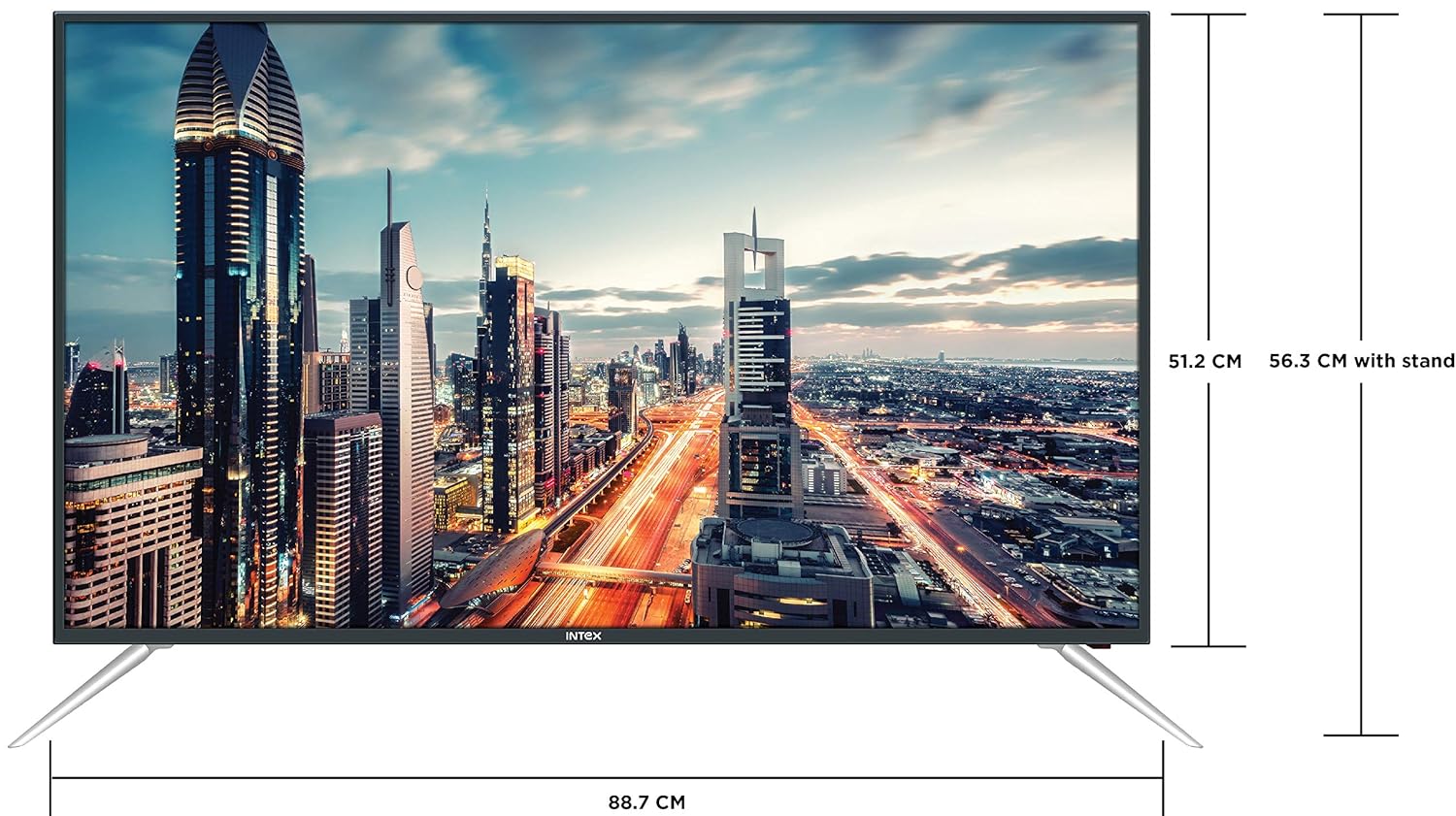
Figure 4.3: Intex SH4004 Smart TV dimensions.
- Pantailaren tamaina: 40 hazbete (98 cm)
- Zabalera: 88.7 cm inguru
- Altuera (zutilarik gabe): 51.2 cm inguru
- Altuera (zutiluarekin): 56.3 cm inguru
- Paketearen neurriak: 102 x 60.5 x 16 cm
- Elementuaren pisua: 10.8 kg
5. Konfigurazioa
5.1 Telebistaren euskarria muntatzea
- Kontu handiz jarri telebista aurpegia behera gainazal leun eta garbi batean, pantaila kaltetu ez dadin.
- Align the stand pieces with the corresponding slots at the bottom of the TV.
- Lotu euskarri-piezak emandako torlojuak erabiliz. Ziurtatu ondo estututa daudela.
5.2 Horman muntatzea
If you prefer to wall mount your TV, please contact Intex support for professional installation. Refer to the Warranty and Support section for contact details. Ensure you use a compatible VESA wall mount kit (not included) and follow its instructions carefully.
5.3 Potentzia konektatzea
Connect the power cable to the TV's power input and then plug the other end into a wall outlet.
5.4 Kanpoko gailuak konektatzea
- HDMI: Use an HDMI cable to connect devices like set-top boxes, gaming consoles, or Blu-ray players to the HDMI ports on the TV's rear panel.
- USBa: Insert USB flash drives or external hard drives into the USB port for media playback.
- Antena: Connect your antenna cable to the ANTENNA IN port for receiving broadcast channels.
5.5 Hasierako konfigurazio-morroia
Lehen aldiz piztean, telebistak hasierako konfigurazio prozesu batean gidatuko zaitu:
- Hizkuntza hautaketa: Aukeratu zure hizkuntza hobetsia.
- Sarearen konfigurazioa: Connect to your Wi-Fi network or use a wired Ethernet connection. Enter your Wi-Fi password if prompted.
- Kanalen miaketa: The TV will scan for available broadcast channels.
- Ordu-eremua: Ezarri zure tokiko ordu-zona.
6. Funtzionamendu-argibideak
6.1 Urruneko kontrolaren funtzioak
The remote control allows you to navigate the TV's features. Common buttons include Power, Volume Up/Down, Channel Up/Down, Input Source, Menu, Navigation (Up/Down/Left/Right), OK, Back, Home, and Smart TV app shortcuts.
6.2 Oinarrizko telebista funtzioak
- Piztu/Itzali: Sakatu urrutiko agintean edo telebistan pizteko botoia.
- Bolumenaren doikuntza: Erabili bolumena igotzeko/jaisteko botoiak.
- Kanalaren hautaketa: Erabili kanala gora/behera botoiak edo sartu kanal zenbakiak zuzenean.
- Sarrera iturria: Press the Input/Source button to switch between HDMI, USB, AV, and TV inputs.
6.3 Smart TV Ezaugarriak (Android sistema eragilea)
Your Intex SH4004 runs on Android OS, providing access to various smart features:
- Wi-Fi konexioa: Konektatu zure etxeko sarera interneterako sarbidea izateko.
- App Store: Download and install applications. Supported internet services include Sony, TV Store, YouTube, and Zee5.
- Multimedia erreprodukzioa: Play videos, music, and view photos from connected USB devices.
- Motion Sensor Gaming: The TV supports motion sensor gaming. An in-built tennis game is included for entertainment.
- Energia aurrezte adimenduna: Features designed to optimize energy consumption.
- Eye Safe-T Matrix: Display technology aimed at reducing eye strain.
7. Mantentzea
7.1 Telebista garbitzea
- Deskonektatu beti telebista garbitu aurretik.
- Erabili zapi leun, lehor eta lihorik gabeko bat pantaila eta kabina astiro-astiro garbitzeko.
- Pantailan marka egoskorrak badituzu, arinki garbituampen the cloth with water or a specialized screen cleaner (ensure it's suitable for LED screens) and wipe gently. Do not spray liquid directly onto the screen.
- Saihestu garbitzaile urratzaileak, argizariak edo disolbatzaileak erabiltzea.
7.2 Arreta orokorra
- Mantendu telebista eguzki-argitik eta bero-iturrietatik urrun.
- Ziurtatu aireztapen egokia telebistaren inguruan.
- Telebista denbora luzez erabiliko ez baduzu, deskonektatu korronte-hartunetik.
8. Arazoak
Before contacting support, try these basic troubleshooting steps for common issues.
| Arazoa | Kausa posiblea | Irtenbidea |
|---|---|---|
| Botererik ez | Power cable disconnected; Power outlet fault. | Check power cable connection; Try a different outlet; Press power button on TV/remote. |
| Irudirik ez, baina soinua badago | Hautatutako sarrera-iturri okerra; Kanpoko gailuaren arazoa. | Press the 'Input/Source' button to select the correct input; Check external device connections. |
| Soinurik ez, baina irudia badago | Bolumena isilarazita edo baxuegia; Kanpoko audio sistemaren arazoa. | Unmute volume or increase level; Check audio cables to external sound system. |
| Wi-Fi konexio-arazoak | Incorrect password; Router too far; Router issue. | Re-enter Wi-Fi password; Move TV closer to router or use Ethernet; Restart router. |
| Urruneko kontrola ez dabil | Bateriak agortuta; Oztopoa urrutiko agintearen eta telebistaren artean. | Replace remote batteries; Remove any obstructions; Point remote directly at TV sensor. |
9. Zehaztapenak
Detailed technical specifications for the Intex SH4004 Smart TV.
| Ezaugarri | Zehaztapena |
|---|---|
| Marka | Intex |
| Ereduaren izena | SH4004 |
| Bistaratzeko Teknologia | LED |
| Pantailaren tamaina | 40 hazbete (98 cm) |
| Ebazpena | HD prest (1366 x 768 pixel) |
| Freskatze tasa | 60 Hz |
| Viewangelua | 178 gradu |
| Aspektu-erlazioa | 16:9 |
| Sistema eragilea | Android |
| Prozesadorea | 1.2GHz Quad core Mali 450 |
| RAM | 512MB |
| Barne Memoria | 4 GB |
| Konektibitatea | 2 HDMI ports, 1 USB port, Built-In-Wifi, Ethernet |
| Soinu Irteera | 20 Watts (2 speakers, Stereo) |
| Onartutako Interneteko zerbitzuak | Sony, TV Store, Youtube, Zee5 |
| Muntatze Mota | Wall Mount / Table Top |
| Elementuaren pisua | 10.8 kg |
10. Bermea eta Laguntza
Bermearen informazioa:
- The product comes with a 1-year manufacturer warranty from the date of purchase.
- An additional 2 years of extended warranty is provided by Intex.
Installation and Support:
For requesting installation, wall mounting, or a product demonstration after delivery, please contact Intex support directly.
Intex Support Contact:
- Telefonoa: 0120-4895555
When contacting support, please provide the product's model name (SH4004) and seller's details as mentioned on your invoice.


