1. Sarrera
The ENHANCE Infiltrate USB Gaming Mouse is designed for an enhanced gaming experience, featuring customizable controls and dynamic lighting. This manual provides instructions for setting up, operating, and maintaining your gaming mouse.

Image: The ENHANCE Infiltrate USB Gaming Mouse, showcasing its ergonomic design and sleek black finish.
2. Ezaugarri nagusiak
- Multi-Color LED Light: Dynamic rainbow lighting pattern illuminates the mouse accents, slowly fading between colors.
- On-the-Fly DPI Adjustment: Quickly select from 4 DPI intervals (800, 1200, 1600, 2400) using the dedicated DPI button.
- Ergonomic Design with Smooth Rubber Grip: The top features a sleek rubber coating, while the side includes two extra thumb buttons with a textured grip for comfort.
- 6 botoi programagarriak: Customize your gaming experience with additional buttons for macros or specific functions.
- Plug & Play diseinua: Connects easily to your PC via a gold-plated USB connector for immediate use.
- Durable Braided Cable: Designed for longevity and resistance to tangles.
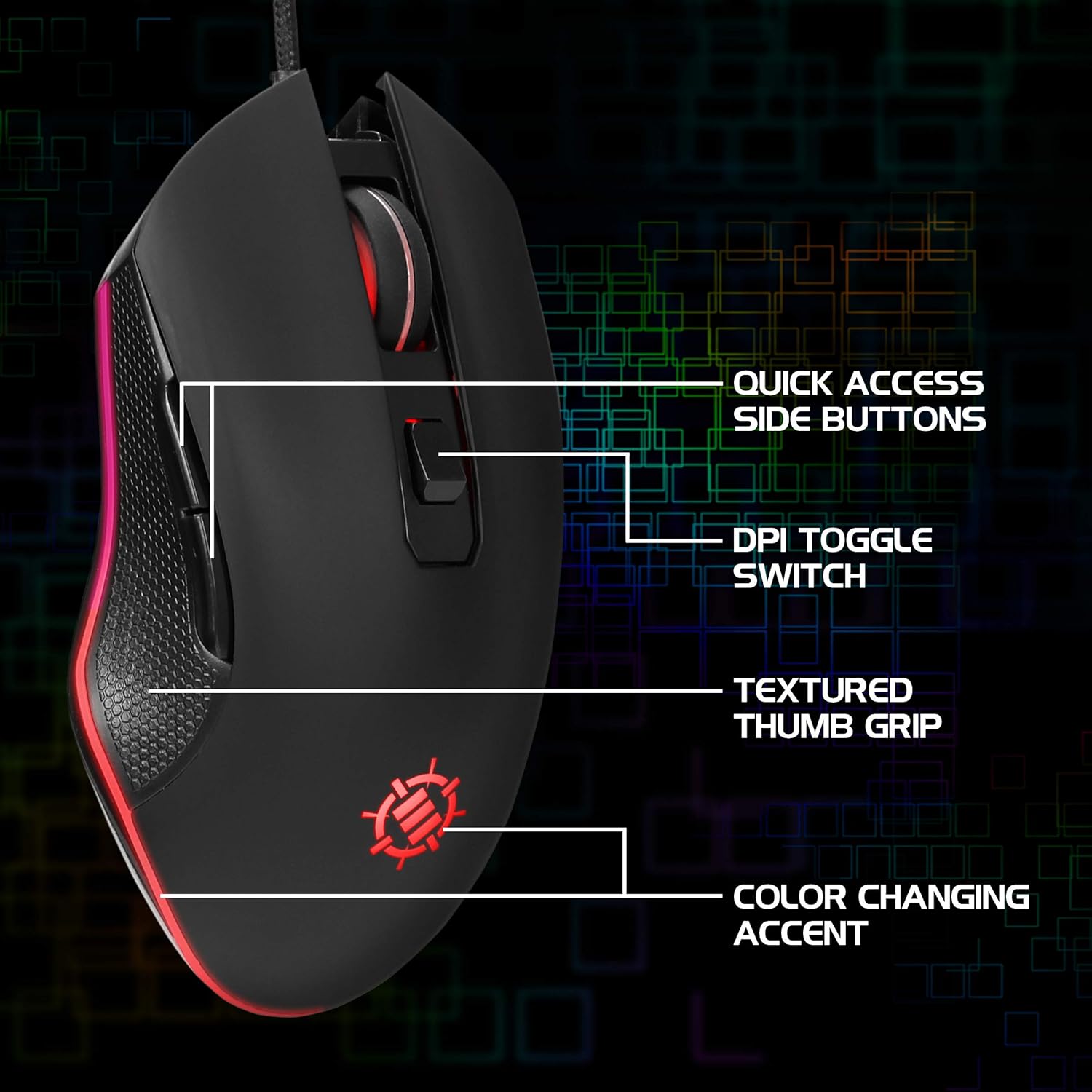
Image: Diagram highlighting key features of the ENHANCE Infiltrate mouse, including quick access side buttons, DPI toggle switch, textured thumb grip, and color-changing accent.
3. Konfigurazio gida
- Sagua deskonprimitu: Carefully remove the ENHANCE Infiltrate USB Gaming Mouse from its packaging.
- Konektatu ordenagailura: Locate an available USB port on your computer. Insert the gold-plated USB connector of the mouse into the USB port. The mouse is plug-and-play, so no additional drivers are typically required for basic functionality.
- Hasierako aitorpena: Zure sistema eragileak automatikoki detektatu eta instalatu beharko lituzke beharrezko kontrolatzaileak. Prozesu honek minutu batzuk iraun ditzake.
- Egiaztatu funtzionaltasuna: Once installed, the mouse's LED lighting should activate, and you should be able to move the cursor on your screen.

Irudia: Gertutik view of the heavy-duty braided cable and gold-plated USB connector, ready for connection.
For a visual guide on connecting and using the mouse, please watch the official product video below.
Video: Official product video demonstrating the ENHANCE Infiltrate USB Gaming Mouse, including connection and feature highlights.
4. Funtzionamendu-argibideak
4.1 Basic Mouse Functions
The ENHANCE Infiltrate mouse functions like a standard USB mouse. It includes left-click, right-click, and a scroll wheel with a clickable middle button.

Image: A hand demonstrating the ergonomic grip of the ENHANCE Infiltrate Gaming Mouse on a gaming mouse pad.
4.2 DPI doikuntza
The mouse features a dedicated DPI button located behind the scroll wheel. Press this button to cycle through four preset DPI (Dots Per Inch) sensitivity levels:
- 800 DPI
- 1200 DPI
- 1600 DPI
- 2400 DPI
Each DPI setting may correspond to a different LED color on the mouse, providing visual feedback for the current sensitivity level.
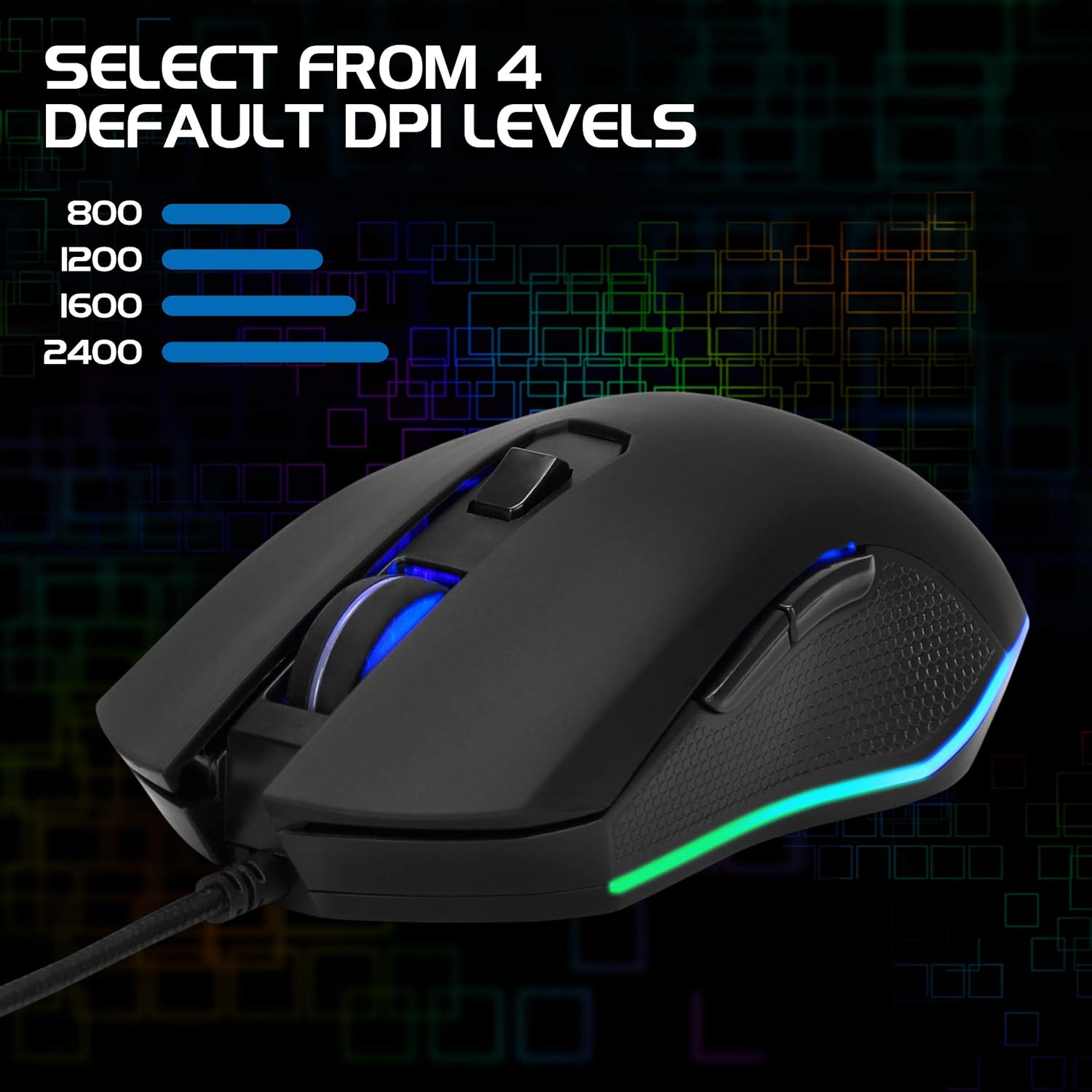
Image: The ENHANCE Infiltrate Gaming Mouse illustrating the four selectable DPI levels (800, 1200, 1600, 2400) and their corresponding LED indicators.
4.3 Multi-Color LED Lighting
The Infiltrate mouse features dynamic multi-color LED lighting that cycles through a rainbow pattern. This lighting is automatic and provides an aesthetic enhancement to your gaming setup.

Image: The ENHANCE Infiltrate Gaming Mouse displaying its sleek color-changing lighting accents.

Irudia: Alboko profesionalafile of the ENHANCE Infiltrate Gaming Mouse, showcasing its blue LED lighting.
4.4 botoi programagarri
The mouse includes 6 programmable buttons. For advanced customization and programming of these buttons, please refer to your operating system's mouse settings or any third-party software compatible with generic gaming mice. Specific software for this model is not provided by the manufacturer.
5. Mantentzea
- Garbiketa: Erabili zapi leun eta lehor bat saguaren gainazala garbitzeko. Zikinkeria egoskorra bada, garbitu zapi pixka bat.amp oihal bat erabil daiteke, barneko osagaietan hezetasunik ez sartzeko ziurtatuz.
- Sentsore optikoa: Periodically clean the optical sensor area on the underside of the mouse with a cotton swab to ensure optimal tracking performance.
- Kableen zainketa: Kalteak ekiditeko, saihestu USB kable txirikordatua gehiegi tolestea edo tiratzea.
- Biltegiratzea: Erabiltzen ez duzunean, gorde sagua leku garbi eta lehor batean, muturreko tenperaturetatik urrun.
6. Arazoak
- Saguak ez du erantzuten:
- Ziurtatu USB kablea ondo konektatuta dagoela ordenagailuko USB ataka funtzional batean.
- Saiatu sagua beste USB ataka batera konektatzen.
- Berrabiarazi ordenagailua.
- Probatu sagua beste ordenagailu batean arazoa saguarekin edo zure sistemarekin den zehazteko.
- Cursor Movement is Erratic or Jumpy:
- Garbitu saguaren azpialdeko sentsore optikoa.
- Ziurtatu sagua gainazal garbi eta islatzailerik gabeko batean erabiltzen ari zarela. Sagu-alfonbra bat erabiltzea gomendatzen da.
- Egiaztatu zure ordenagailuan software gatazkarik edo kontrolatzaile zaharkiturik dagoen.
- LED argiak ez funtzionatzen:
- Egiaztatu sagua behar bezala konektatuta dagoela ordenagailura.
- The LED lighting is automatic and should activate upon connection. If not, try a different USB port or computer.
- DPI botoiak ez du sentikortasuna aldatzen:
- Ensure the mouse is fully recognized by your computer.
- Sakatu DPI botoia gogor.
7. Zehaztapenak
| Marka | HOBETU |
| Modelo zenbakia | ENINMNU100BOEW |
| Hardware Plataforma | Mac, ordenagailua |
| Elementuaren pisua | 4.4 ontza |
| Produktuaren neurriak (LxWxH) | 4.92 x 2.68 x 1.56 hazbete |
| Kolorea | Beltza |
| Energia iturria | Kable elektrikoa (USB) |
| Konektibitate Teknologia | USBa |
| Ezaugarri Berezia | Diseinu Ergonomikoa |
| Mugimenduak detektatzeko teknologia | Optikoa |
| DPI mailak | 800, 1200, 1600, 2400 |
8. Bermea eta Laguntza
The ENHANCE Infiltrate USB Gaming Mouse is backed by a 3 urteko fabrikatzailearen bermea. Berme honek ohiko erabileran materialen eta eskulanen akatsak estaltzen ditu.
For warranty claims or technical support, please contact ENHANCE customer service. Keep your proof of purchase for warranty validation.
For further assistance, visit the official ENHANCE Gaming webgunea edo jarri harremanetan haien laguntza-kanalekin.


