
1. Sarrera
Welcome to the instruction manual for your Sygonix SY-RSL-T3 Wireless Wall Switch. This manual provides essential information for the safe and efficient use of your device. Please read it thoroughly before installation and operation, and keep it for future reference.
2. Segurtasun-argibideak
Beti jarraitu segurtasun neurri hauek gailuari lesioak edo kalteak saihesteko:
- Ez ireki gailua casing. Ez dago erabiltzaileak konpondu beharreko piezarik barruan.
- Keep the device away from moisture, water, and extreme temperatures.
- Use only the specified battery type (12V, not included) and ensure correct polarity during installation.
- Dispose of used batteries according to local regulations. Do not dispose of batteries in household waste.
- This device is designed for indoor use. If used outdoors, ensure it is protected from direct weather exposure.
- Mantendu ontziratzeko materialak haurrengandik urrun.
3. Produktua amaitu daview
3.1. Osagaiak
The Sygonix SY-RSL-T3 Wireless Wall Switch consists of the following main components:
- Wireless Wall Switch Unit (1 piece)
- Mounting Hardware (screws, if included with purchase)
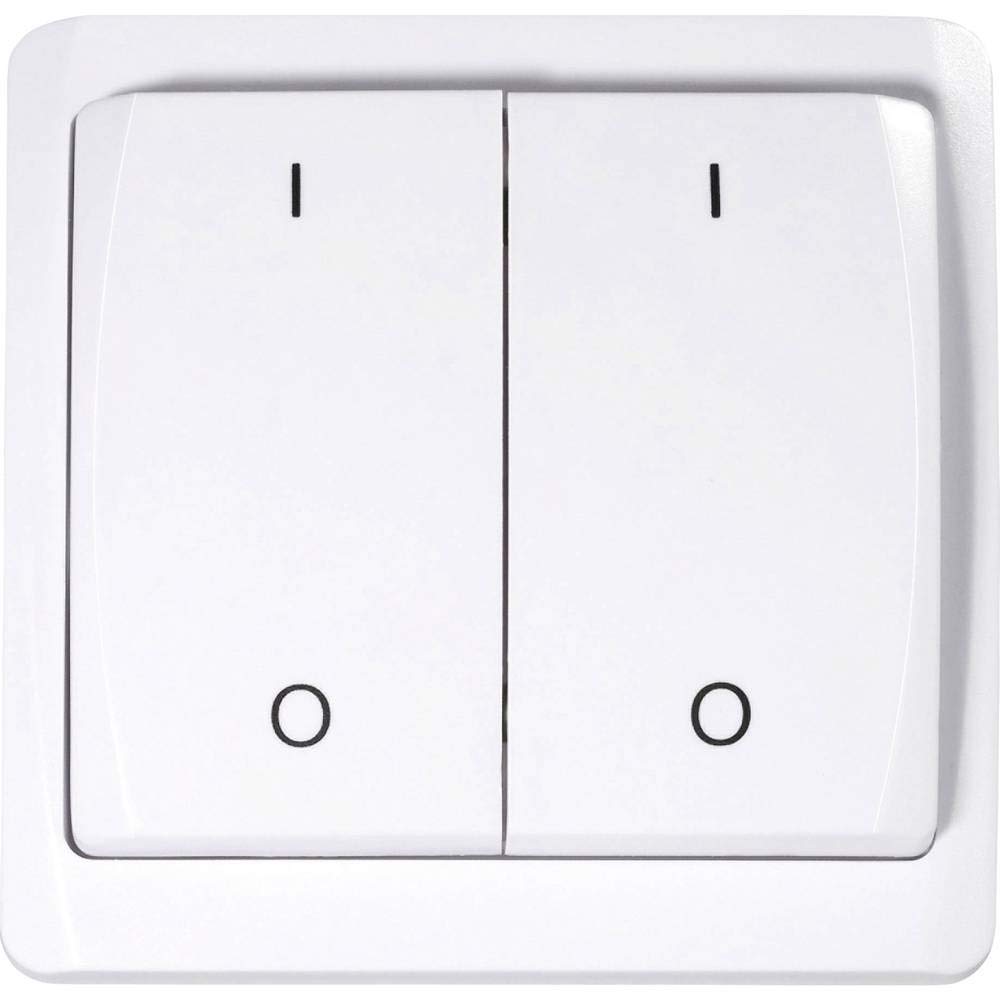
This image shows the front of the Sygonix SY-RSL-T3 wireless wall switch. It is white with two large push-buttons. The left button is marked with an 'I' (for ON) and a circle (for OFF), and the right button is similarly marked. The switch has a slightly curved, modern design.
3.2. Ezaugarriak
- Surface-mounted RSL wall switch
- Maximum wireless range: 70 meters (in open field)
- Push-button style operation (ON-OFF mode)
- Requires 12V battery (not included)
- Materiala: Plastikoa
4. Konfigurazioa eta instalazioa
4.1. Deskargatzea
Carefully remove all components from the packaging. Ensure all parts are present and undamaged. Retain the packaging for future transport or storage.
4.2. Bateriaren instalazioa
The device requires a 12V battery (not included). To install the battery:
- Locate the battery compartment on the back of the switch.
- Ireki bateriaren konpartimenduaren estalkia.
- Insert the 12V battery, ensuring correct polarity (+ and - terminals match the markings).
- Itxi bateriaren konpartimenduaren estalkia ondo.
4.3. Mounting the Wall Switch
The SY-RSL-T3 is a surface-mounted switch. Choose a suitable, flat location for installation, free from excessive moisture or heat. Use appropriate screws or adhesive (not specified if included) to secure the switch to the wall. Ensure the mounting surface is clean and dry before installation.

Angelu bat. view of the white Sygonix SY-RSL-T3 wireless wall switch, highlighting its two push-buttons and sleek profile.

Alde bat view of the Sygonix SY-RSL-T3 wireless wall switch, showing its depth and how it would sit on a surface.
5. Funtzionamendu-argibideak
5.1. Pairing with an RSL Receiver
To operate the switch, it must first be paired with a compatible Sygonix RSL receiver (sold separately). The SY-RSL-T3 uses the RSL wireless protocol.
- Refer to your RSL receiver's instruction manual for specific pairing instructions.
- Typically, you will need to put the RSL receiver into a pairing or learning mode.
- Within the specified time frame (usually a few seconds), press one of the buttons (e.g., 'I' or 'O') on the SY-RSL-T3 wall switch.
- The receiver should indicate successful pairing (e.g., by flashing an LED or clicking).
- Repeat the process if you wish to pair the other button to a different receiver or channel, if supported by your receiver.
5.2. Oinarrizko Funtzionamendua
Once successfully paired with an RSL receiver:
- Press the button marked with 'I' to send an ON signal to the paired receiver.
- Press the button marked with 'O' to send an OFF signal to the paired receiver.
The switch operates in a simple ON-OFF mode, controlling the connected device via the RSL receiver.
6. Mantentzea
6.1. Garbiketa
Clean the surface of the switch with a soft, dry, lint-free cloth. Do not use abrasive cleaners, solvents, or harsh chemicals, as these can damage the plastic surface.
6.2. Bateria ordezkatzea
When the switch's wireless range decreases significantly, or it stops responding to button presses, the battery may need replacement. Follow the steps in section 4.2 (Battery Installation) to replace the 12V battery.
7. Arazoak
| Arazoa | Kausa posiblea | Irtenbidea |
|---|---|---|
| Device not responding to button presses. | Bateria agortuta edo baxua. Not paired with receiver. Receiver is out of range or not powered. | Ordeztu 12Vko bateria. Perform the pairing procedure (see section 5.1). Ensure the RSL receiver is powered and within the 70m range. |
| Haririk gabeko irismen murriztua. | Bateria baxua. Obstructions between switch and receiver. | Ordeztu 12Vko bateria. Minimize physical obstructions (e.g., thick walls, metal objects) between the switch and the receiver. |
8. Zehaztapenak
| Ezaugarri | Xehetasuna |
|---|---|
| Fabrikatzailea | Sygonix |
| Modelo zenbakia | SY-3523488 |
| Produktuaren neurriak (L x W x H) | 1.9 x 8 x 8 cm (19 x 80 x 80 mm) |
| Pisua | 100 gramo |
| Materiala | Plastikoa |
| Energia iturria | Bateriaren bidez |
| Bateria behar da | Yes (12 Volts, not included) |
| Aldatu estiloa | Sakatu-botoia |
| Funtzionamendu modua | PIZTU ITZALI |
| Egungo balorazioa | 1 A |
| Haririk gabeko protokoloa | RSL |
| Max. Range (open field) | 70 metro |
| Pakete bakoitzeko kantitatea | 1 unitate |
| Spare Parts Availability (EU) | 1 Urte |
9. Bermea eta Laguntza
Sygonix provides a 1-year warranty for spare parts availability within the EU. For further support, technical assistance, or warranty claims, please contact your retailer or Sygonix customer service. Please have your model number (SY-3523488) and ASIN (B07NLBNPTF) ready when contacting support.
Fabrikatzailea: Sygonix
Modelo zenbakia: SY-3523488
ASIN: B07NLBNPTF