Sarrera
The Remo+ RemoBell S is a wired smart doorbell camera designed to enhance your home security. It provides high-definition video surveillance with a wide viewing angle, motion detection, two-way audio communication, and smart home integration. This manual provides essential information for the proper installation, operation, and maintenance of your RemoBell S.
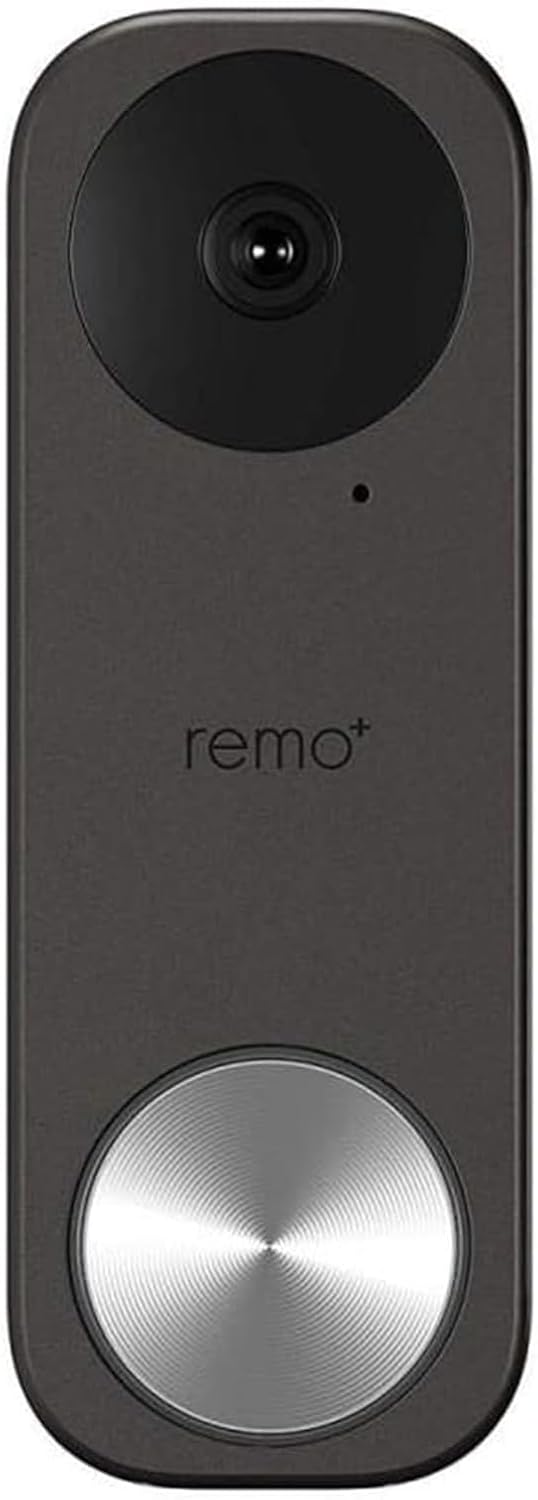
1. irudia: Aurrealdea view of the Remo+ RemoBell S Smart Doorbell Camera.
Zer sartzen da
Mesedez, ziurtatu osagai guztiak daudela instalazioa hasi aurretik:
- RemoBell S Smart Doorbell Camera
- Muntatzeko plaka(k)
- Instalazio torlojuak eta aingurak
- Kableatu Harness
- Erabiltzailearen eskuliburua (dokumentu hau)

Figure 2: Remo+ RemoBell S product packaging, showing the doorbell and included accessories.
Konfigurazioa
1. Power Requirements and Wiring
The RemoBell S requires a wired connection to your existing doorbell's transformer, providing 16-24 Volts AC. Ensure your current transformer meets these specifications for optimal performance. If your existing transformer does not meet these requirements, it may need to be replaced.
2. Instalazio fisikoa
- Itzali energia: Before any wiring, locate your doorbell's circuit breaker and turn off the power to your doorbell system. Verify power is off using a voltage probatzailea.
- Kendu dagoen txirrina: Carefully remove your old doorbell button from the wall. Disconnect the two existing wires.
- Choose Mounting Option: The RemoBell S includes multiple mounting plates. Select the appropriate plate for your installation (e.g., flat or angled bracket if mounting against a wall).
- Muntatu euskarria: Position the chosen mounting plate on the wall where your old doorbell was located. Mark the drill holes. Drill pilot holes if necessary and secure the mounting plate using the provided screws and anchors.
- Konektatu kableatzea: Connect the two wires from your existing doorbell system to the terminals on the back of the RemoBell S. Ensure a secure connection.
- Attach Doorbell to Bracket: Carefully attach the RemoBell S camera unit to the mounted bracket.
- Berrezarri boterea: Turn the power back on at your circuit breaker. The doorbell should power on and indicate readiness for app setup.
1. bideoa: Over batview of the RemoBell S features and quick setup process.
3. Aplikazioaren konfigurazioa eta parekatzea
- Download the Remo+ App: Download the official Remo+ app from your smartphone's app store (iOS or Android).
- Create Account/Log In: Open the app and create a new account or log in with existing credentials.
- Gehitu gailua: Follow the in-app instructions to add a new device. Select the RemoBell S from the list of available products.
- Konektatu wifira: The RemoBell S operates on 2.4 GHz Wi-Fi networks. Ensure your smartphone is connected to a 2.4 GHz network during the setup process. Input your Wi-Fi network name and password when prompted.
- Parekatzea: The app will guide you through the pairing process, which may involve scanning a QR code or following voice prompts from the doorbell.

Figure 3: Simple setup process for the Remo+ RemoBell S.
Funtzionamendu-argibideak
1. Bizi View eta Bikoitzako Hitzaldia
Access live video streaming of your front door anytime through the Remo+ app. When a visitor presses the doorbell or motion is detected, you will receive a push notification. Tap the notification to view the live feed and engage in two-way conversation with your visitor.

Figure 4: Monitoring live view from the RemoBell S on a smartphone.
2. Mugimenduaren detekzioa
Customize motion detection zones to focus on specific areas of interest. Adjust sensitivity levels within the app to minimize false alerts. You will receive instant push notifications when motion is detected, even if the doorbell is not pressed.

Figure 5: Smart motion alerts and two-way communication via the RemoBell S.
3. Gaueko Ikusmena
The RemoBell S features infrared night vision, providing clear video footage in low-light conditions or complete darkness. This ensures continuous surveillance and security around the clock.

Figure 6: Clear night vision capabilities of the RemoBell S.
4. Hodeiko biltegiratzea
The device includes 3-day rolling cloud storage at no additional cost, allowing you to review recent activity. Optional paid plans are available for extended storage durations.
5. Konexio Adimenduna
The RemoBell S integrates seamlessly with Amazon Alexa, Google Assistant, and IFTTT, allowing for enhanced smart home functionality and voice control.

Figure 7: RemoBell S integration with Google Home and Amazon Alexa.
Mantentzea
To ensure optimal performance and longevity of your RemoBell S, regular maintenance is recommended:
- Garbiketa: Aldian-aldian garbitu kameraren lentea eta txirrinaren kanpoaldea zapi leun eta lehor batekin.amp oihala hautsa eta hondakinak kentzeko. Saihestu produktu kimiko gogorrak erabiltzea.
- Firmware eguneraketak: Keep your device's firmware updated through the Remo+ app to access the latest features and security enhancements.
- Konexio-egiaztapena: Regularly check your Wi-Fi connection strength in the app to ensure stable operation.
Arazoak konpontzea
If you encounter issues with your RemoBell S, try the following solutions:
- Wi-Fi konexio-arazoak:
- Ziurtatu zure Wi-Fi sarea 2.4 GHz-koa dela. Gailuak ez ditu 5 GHz-ko sareak onartzen.
- During initial setup, connect your smartphone to the 2.4 GHz Wi-Fi band.
- If using a mobile phone for setup, temporarily disable cellular data (LTE) to prevent interference.
- Verify your router's 2.4 GHz and 5 GHz bands have different SSIDs.
- Check your router's settings for the maximum number of connected devices, especially on guest networks, and increase if necessary.
- No Power/Chime Not Working:
- Confirm your existing doorbell transformer provides 16-24 Volts AC. An incompatible transformer may prevent proper operation.
- Ziurtatu kable-konexio guztiak seguru daudela.
- If using a mechanical chime, verify the chime type setting in the Remo+ app is correctly configured.
- Mugimendu faltsuen alertak:
- Adjust motion detection sensitivity settings in the app to a lower level.
- Refine motion zones to exclude areas with frequent, irrelevant movement (e.g., busy streets, swaying trees).
- Consider using an angled mounting plate to direct the camera away from high-traffic areas if applicable.
- Bideoaren kalitate-arazoak:
- Ensure a strong Wi-Fi signal at the doorbell's location.
- Adjust video quality settings (e.g., from 'Best' to 'Average') in the app if experiencing buffering or poor streaming.
- Gailua berrezarri: If experiencing persistent issues, you may need to reset the device. Consult the app or quick start guide for specific reset instructions.
Zehaztapenak
| Ezaugarri | Zehaztapena |
|---|---|
| Modelo zenbakia | RMBL-1809H |
| Barruko/Kanpoko erabilera | Kanpoan |
| Energia iturria | Wired (16-24V AC) |
| Konektibitate-protokoloa | Wi-Fi (2.4 GHz) |
| Bideo Harrapaketa Ebazpena | 1080p |
| Eremua View | 180 gradu |
| Argi gutxiko teknologia | Gaueko kolorea (infragorria) |
| Alerta mota | Mugimendua bakarrik |
| Nazioarteko Babesteko Balorazioa | IP54 |
| Gailu bateragarriak | Amazon Alexa, Android, Google Assistant, iOS |
| Elementuaren neurriak L x W x H | 5.1 x 0.84 x 1.8 hazbete |
| Elementuaren pisua | 4.64 ontza |
Bermea eta Laguntza
The RemoBell S comes with a manufacturer's warranty. For specific warranty terms, technical support, or service inquiries, please refer to the official Remo+ webwebgunera edo jarri harremanetan zuzenean bezeroarentzako arreta-zerbitzura. Gorde erosketaren frogagiria berme-erreklamazioetarako.


