1. Sarrera
The myTouchSmart In-Wall Push-Button Countdown Timer Switch (Model 40953) is designed to simplify your routine by providing convenient automation for indoor or outdoor lighting and various appliances. This timer replaces any standard single-pole light switch and offers preset countdown times to automatically turn off connected devices. It is compatible with LED, CFL, incandescent, and halogen bulbs.

The product packaging displays the in-wall digital countdown timer switch, highlighting its key features such as preset countdown times and compatibility with various bulb types.
2. Segurtasun informazioa
Before beginning installation, read all instructions carefully. Improper installation can result in electrical shock or fire. Always consult a qualified electrician if you are unsure about any part of the installation process.
- ITZULI ENERGIA at the circuit breaker or fuse box before wiring.
- Gailu hau Kode Elektriko Nazionalaren eta tokiko araudiaren arabera instalatu da.
- Erabili kobrezko alanbrea soilik.
- NEUTRAL WIRE REQUIRED funtzionamendurako.
3. Instalazioa
3.1 Beharrezko tresnak
- Bihurkin (Phillips eta Flathead)
- Hari-ebakitzaileak
- Zinta Elektrikoa
- liburukiatage Tester (recommended)
3.2 Kableatzeko jarraibideak
- Itzali energia to the switch location at the circuit breaker or fuse box. Verify power is off using a voltage probatzailea.
- Remove the existing wall plate and switch from the wall box.
- Carefully disconnect the wires from the old switch. Identify and label the LINE (hot), LOAD, NEUTRAL, and GROUND wires. The timer requires a neutral wire for proper operation.
- Connect the wires to the myTouchSmart timer using the screw terminals:
- Konektatu LERROA (hot) wire to the terminal labeled 'LINE'.
- Konektatu ZARGA wire (to the light/appliance) to the terminal labeled 'LOAD'.
- Konektatu NEUTROA wire (typically white) to the terminal labeled 'NEUTRAL'.
- Konektatu LURZORUA wire (typically bare copper or green) to the terminal labeled 'GROUND'.
- Ziurtatu hari-konexio guztiak seguru daudela.
- Carefully push the wired timer into the wall box.
- Mount the timer to the wall box using the provided screws.
- Attach the desired color faceplate (White or Light Almond included, wallplate not included).
- Berrezarri energia etengailuan.

Atzealdea view of the timer, displaying the screw terminals for Line, Load, Neutral, and Ground connections, essential for proper installation.

Alboko profesional batfile of the timer, showing its depth and how it fits into a standard electrical wall box, with wiring connections visible.
4. Funtzionamendu-argibideak
The myTouchSmart timer features an ON/OFF door panel that conceals preset buttons and LEDs when closed. Opening the door provides access to all countdown options.
4.1 Activating a Countdown
- Open the front door panel to reveal the preset buttons.
- Press the desired countdown button: 5 Min, 10 Min, 30 Min, 60 Min, 2 Hour, or 4 ordu.
- A blue LED indicator light next to the selected button will illuminate, confirming the countdown is active. The connected device will turn on and remain on for the selected duration, then automatically turn off.
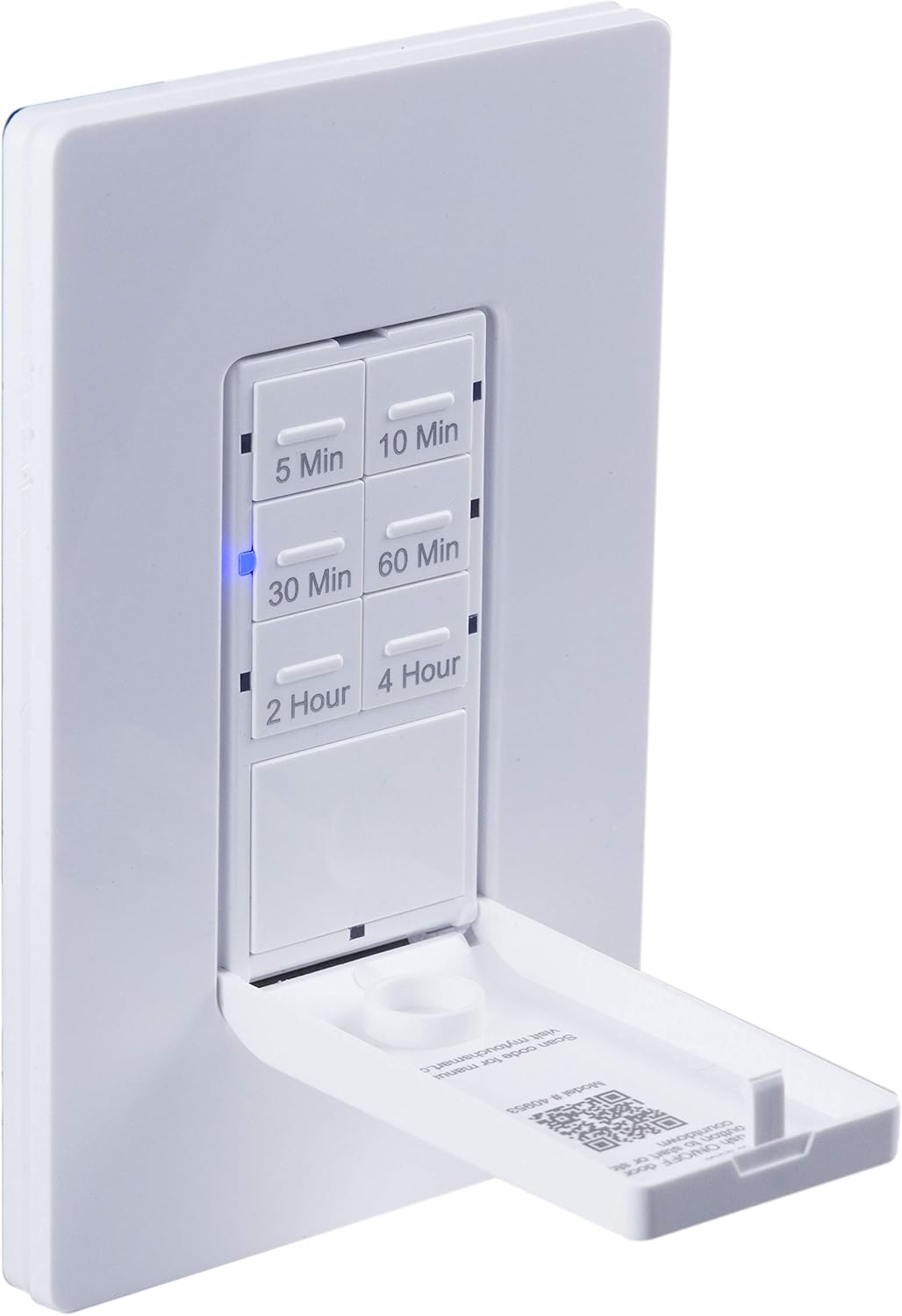
Gertu bat view of the timer with its front door panel open, exposing the six preset countdown buttons (5, 10, 30, 60 minutes, 2, and 4 hours) and the manual ON/OFF button.

The in-wall timer with its door open, showing the preset buttons and a blue LED illuminated next to the '30 Min' button, indicating an active countdown.

A hand pressing one of the preset countdown buttons on the timer, demonstrating user interaction.
4.2 Manual ON/OFF Override
- To manually turn the connected device ON or OFF at any time, press the large ON/OFF button located at the bottom of the timer (this button is also the door panel when closed).
- Pressing this button will override any active countdown. If no countdown is active, it functions as a standard ON/OFF switch.
4.3 Aplikazioak
This timer is suitable for a variety of applications, including:
- Barruko eta kanpoko argiztapena
- Ihes-haizegailuak
- Berogailuak
- Other compatible appliances

An image illustrating various applications for the timer, including controlling indoor/outdoor lights, ceiling fans, and exhaust fans.
5. Mantentzea
The myTouchSmart timer requires minimal maintenance. Follow these guidelines:
- Garbiketa: Deskonektatu zirkuitu-hausletik korrontea garbitu aurretik. Garbitu gainazala zapi leun eta lehor batekin.amp oihal. Ez erabili produktu kimiko gogorrak edo garbitzaile urratzaileak.
- Ikuskapena: Periodically check for any loose connections or damage to the switch. If any damage is observed, discontinue use and consult a qualified electrician.
6. Arazoak
If you experience issues with your myTouchSmart timer, refer to the following common problems and solutions:
| Arazoa | Kausa posiblea | Irtenbidea |
|---|---|---|
| Timer does not turn on/off. | No power to the switch; Incorrect wiring (Line/Load reversed); Loose connections. | Check circuit breaker. Verify wiring connections (Line to Line, Load to Load, Neutral, Ground). Ensure all wires are securely fastened. |
| Countdown does not activate. | Button not fully pressed; Faulty unit. | Ensure the desired countdown button is pressed firmly until the blue LED illuminates. If issue persists, contact customer support. |
| LED adierazleak ez dute funtzionatzen. | Argindarrik ez; Unitatearen matxura. | Check power supply. If the timer functions but LEDs do not, contact customer support. |
| Etengabeko funtzionamendua. | Loose wiring; Overload. | Check all wiring connections for tightness. Ensure the connected load does not exceed the timer's electrical ratings. |
Arazoa konpontzeko urratsek ez badute konpontzen, jarri harremanetan bezeroarentzako arreta-zerbitzuarekin.
7. Zehaztapenak
| Ezaugarri | Zehaztapena |
|---|---|
| Modelo zenbakia | 40953 |
| Eragiketa modua | Automatically, Off, Push Button |
| Egungo balorazioa | 15 Amps |
| Bolumen eragileatage | 120 VCA, 60 Hz |
| Karga erresistentea | 15A |
| Wolframioaren karga | 1200W |
| Motorren balorazioa | 1 / 2 HP |
| Bonbilla bateragarriak | LED, CFL, Goritasuna, Halogenoa |
| Muntatze Mota | Hormako Muntaia |
| Neurriak (L x W x H) | 2.75 x 4.85 x 6.85 hazbete |
| Elementuaren pisua | 5.9 ontza |
| Hari Neutroa | Beharrezkoa |
| Dakarten osagaiak | In-Wall Timer, White/Light Almond Door Panels |
8. Bermea eta Laguntza
Bermeari buruzko informazioa eta laguntza teknikoa lortzeko, jo fabrikatzailearen webgune ofizialera. webwebgunera edo jarri harremanetan bezeroarentzako arreta-zerbitzuarekin. Gorde erosketa-agiria erosketaren frogagiri gisa.
Fabrikatzailea: myTouchSmart
UPC: 030878409537
Webgunea: www.mytouchsmart.com (Mesedez, egiaztatu ofiziala) webwebgunea laguntza-informazio eguneratuena lortzeko.)


