1. Sarrera
This manual provides comprehensive instructions for the setup, operation, and maintenance of your Xprinter XP-360B Thermal Label Barcode Printer. Please read this manual thoroughly before using the printer to ensure proper functionality and to prevent damage.
The XP-360B is a high-speed thermal label printer designed for various applications, including barcode printing, shipping labels, and receipt printing. It supports label widths from 20mm to 80mm and offers a maximum print speed of 200mm per second.

Figure 1.1: Xprinter XP-360B Thermal Label Barcode Printer. This image shows the printer from a front-right angle, with labels being fed out of the front slot.
2. Segurtasun informazioa
To ensure safe operation and prolong the life of your printer, please observe the following safety precautions:
- Ez jarri inprimagailua uraren edo hezetasun gehiegiaren eraginpean.
- Saihestu inprimagailua eguzki-argitan edo bero-iturrietatik gertu jartzea.
- Use only the power adapter supplied with the printer.
- Ez saiatu inprimagailua zeuk desmuntatzen edo konpontzen. Jarri harremanetan zerbitzu-langile kualifikatuekin.
- Mantendu inprimagailua hautsetatik eta hondakinetatik urrun.
- Ensure the printer is placed on a stable, flat surface.
- Deskonektatu inprimagailua entxufetik garbitu aurretik edo denbora luzez erabiltzen ez duzunean.
3. Paketearen edukia
Egiaztatu elementu guztiak paketean daudela:
- Xprinter XP-360B Thermal Label Barcode Printer
- Elikatze-moldagailua
- USB kablea
- Erabiltzailearen eskuliburua (dokumentu hau)
- Gidarien CDa (edo gidariak deskargatzeko esteka)
4. Produktua amaitu daview
4.1. Aurrealdea View

4.1. irudia: Aurrealdea view of the XP-360B printer, showing the label output slot and control buttons.
- Label Output Slot: Where printed labels exit the printer.
- Kontrol-botoiak:
- POTENTZIA: Potentzia adierazlea.
- ERROREA: Errore adierazlea.
- PAUSA: Inprimatzea pausatzen edo berrabiarazten du.
- ELIKADURA: Feeds a blank label.
4.2. Aldea View
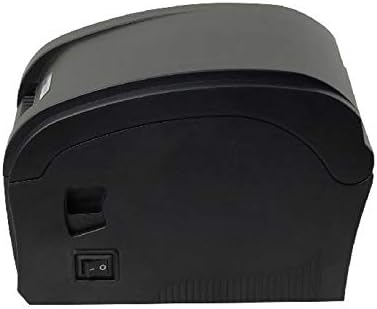
4.2. irudia: Aldea view of the XP-360B printer, highlighting the power switch.
- Switch potentziala: Inprimagailua pizten edo itzaltzen du.
4.3. Barnekoa View (Cover Open)

4.3. irudia: Barnekoa view of the XP-360B printer with the top cover open, showing the label roll compartment and print head assembly.
- Print Head Assembly: Contains the thermal print head.
- Etiketa-erroiluaren konpartimentua: Area for loading the label roll.
- Adjustable Paper Guides: Guides to align the label roll.
5. Konfigurazioa
5.1. Desontziratzea eta kokatzea
- Kontu handiz atera inprimagailua eta osagarri guztiak paketetik.
- Jarri inprimagailua gainazal egonkor eta lau batean, aireztapen egokia duena.
- Ensure there is enough space around the printer for proper operation and maintenance.
5.2. Inprimagailua konektatzea
- Konektatu korronte-egokitzailea inprimagailuaren sarrera-atakara.
- Entxufatu korronte-egokigailua entxufe elektriko egoki batean.
- Connect one end of the USB cable to the printer's USB port.
- Konektatu USB kablearen beste muturra ordenagailuko USB ataka erabilgarri batera.
5.3. Etiketak kargatzea
- Ziurtatu inprimagailua itzalita dagoela.
- Ireki inprimagailuaren goiko estalkia.
- Place the label roll into the label compartment, ensuring the labels feed from the bottom of the roll towards the front of the printer.
- Adjust the movable paper guides to fit the width of your label roll snugly, without being too tight.
- Pull a few labels out past the print head and through the label output slot.
- Itxi goiko estalkia ondo, bere lekuan klik egin arte.

Figure 5.1: Loading a roll of thermal labels into the XP-360B printer's internal compartment.
5.4. Gidariaren instalazioa
Before using the printer, you must install the appropriate drivers on your computer. Drivers are typically provided on a CD or can be downloaded from the manufacturer's official webgunea.
- Insert the driver CD into your computer's CD-ROM drive, or navigate to the official Xprinter support website to download the XP-360B drivers.
- Jarraitu pantailako argibideei kontrolatzailearen instalazioa amaitzeko.
- Instalazioaren ondoren, ordenagailua berrabiaraztea gomendatzen da.
6. Funtzionamendu-argibideak
6.1. Piztu/Itzaltzea
- To turn on the printer, flip the power switch located on the side of the printer to the 'ON' position. The POWER indicator light will illuminate.
- To turn off the printer, flip the power switch to the 'OFF' position.
6.2. Oinarrizko inprimaketa
- Ziurtatu inprimagailua ordenagailura konektatuta eta piztuta dagoela.
- Open the document or application from which you wish to print labels (e.g., label design software, shipping platform).
- Go to the print settings (File > Inprimatu).
- Select "Xprinter XP-360B" as your printer.
- Adjust the paper size and orientation settings to match your labels (e.g., 4x6 inch, portrait/landscape).
- Click "Print". The printer will automatically detect the label gaps and print accordingly.
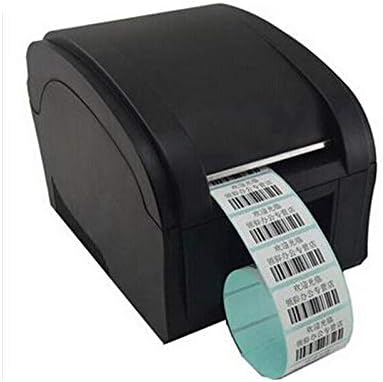
Figure 6.1: The XP-360B printer in operation, feeding out a continuous roll of printed labels.
6.3. Using Control Buttons
- FEED botoia: Press this button once to feed a single blank label. This is useful for testing label alignment or advancing to the next label.
- PAUSE botoia: Press this button to temporarily pause a print job. Press it again to resume printing.
7. Mantentzea
Mantentze-lan erregularrak errendimendu optimoa bermatzen du eta inprimagailuaren bizitza luzatzen du.
7.1. Inprimatze-burua garbitzea
The print head should be cleaned regularly, especially if print quality degrades or after printing a large volume of labels.
- Turn off the printer and unplug it from the power outlet.
- Ireki inprimagailuaren goiko estalkia.
- Wait a few minutes for the print head to cool down if the printer has been recently used.
- Gently wipe the thermal print head surface with an alcohol swab or a lint-free cloth lightly dampisopropil alkoholarekin egina.
- Utzi inprimatzeko burua guztiz lehortzen estalkia itxi eta inprimagailua piztu aurretik.
7.2. Plaka-arrabola garbitzea
The platen roller helps feed the labels smoothly. Clean it if you notice feeding issues.
- Follow steps 1-3 from "Cleaning the Print Head".
- Rotate the platen roller manually and wipe its surface with an alcohol swab or a lint-free cloth lightly dampisopropil alkoholarekin egina.
- Allow it to dry completely before closing the cover.
8. Arazoak
This section addresses common issues you might encounter with your XP-360B printer.
| Arazoa | Kausa posiblea | Irtenbidea |
|---|---|---|
| Inprimagailua ez da pizten | Power cable loose; Power outlet faulty; Printer fault | Check power cable connection; Try a different outlet; Contact support if problem persists. |
| Inprimatzerik ez / Inprimagailua lineaz kanpo | USB cable loose; Driver not installed; Printer offline in OS | Check USB connection; Install drivers; Check printer status in computer settings. |
| Inprimatze-kalitate eskasa / Inprimatze desagertzen ari dira | Inprimatze-buru zikina; Kalitate baxuko etiketak; Inprimatze-dentsitatearen ezarpen okerrak | Clean the print head (see Section 7.1); Use high-quality thermal labels; Adjust print density in driver settings. |
| Etiketak ez dira behar bezala elikatzen | Labels loaded incorrectly; Paper guides not adjusted; Dirty platen roller | Re-load labels correctly; Adjust paper guides; Clean platen roller (see Section 7.2). |
| ERROR light is on | Paper jam; Cover open; Print head overheating | Clear any paper jams; Ensure cover is closed properly; Turn off printer and let it cool down. |
9. Zehaztapenak
| Ezaugarri | Deskribapena |
|---|---|
| Eredua | XP-360B |
| Inprimatzeko metodoa | Zuzeneko Termikoa |
| Interfazea | USBa |
| Inprimatzeko abiadura | Gehienez 200 mm/segundo |
| Paperaren gehienezko zabalera | 80mm (adjustable from 20mm) |
| Papera elikatzeko modua | Automatikoa |
| Sareko Inprimaketa | Kableatua |
| Duplex Inprimaketa | Ez |
| Neurriak | 25 x 22 x 21 cm |
| Pisua | 2 kg |
10. Bermea eta Laguntza
Xprinter products are designed for reliability and performance. For specific warranty terms and conditions, please refer to the warranty card included with your product or visit the official Xprinter webgunea.
If you encounter any issues that cannot be resolved using the troubleshooting guide, or if you require technical assistance, please contact Xprinter customer support through their official webgunea edo zure produktuaren dokumentazioan emandako harremanetarako informazioa.
Please have your model number (XP-360B) and purchase information ready when contacting support.


