1. Sarrera
This manual provides essential information for the safe and efficient use of your Lenovo ThinkPad T590 laptop. Please read this manual thoroughly before operating your device to ensure proper setup, operation, and maintenance. Keep this manual for future reference.
2. Produktua amaitu daview
The Lenovo ThinkPad T590 is a high-performance laptop designed for productivity. It features a 15.6-inch Full HD IPS display, an Intel Core i5-8265U processor, 8GB of RAM, and a 256GB SSD, running on Windows 10 Pro.
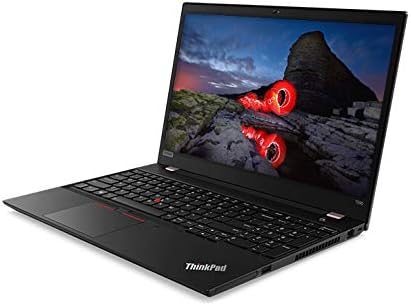
2.1. irudia: Angelukoa view of the Lenovo ThinkPad T590 laptop, showcasing its sleek design and full-size keyboard.
Funtsezko osagaiak:
- Pantaila: 15.6-inch Full HD (1920x1080) IPS anti-glare screen.
- Prozesadorea: Intel Core i5-8265U Quad-Core (1.60GHz).
- Memoria: 8 GB DDR4 RAM.
- Biltegiratzea: 256GB PCIe NVMe Solid State Drive (SSD).
- Sistema eragilea: Windows 10 Pro 64-bit.
- Grafikoak: Integrated Intel UHD Graphics 620.
- Konektibitatea: Intel 9560ac Wi-Fi and Bluetooth 5.0.
- Webkamera: Integrated 720p HD camera with microphone and ThinkShutter privacy cover.
- Portuak: Includes USB 3.0 ports.
- Bateria: 3-cell Li-Polymer battery.
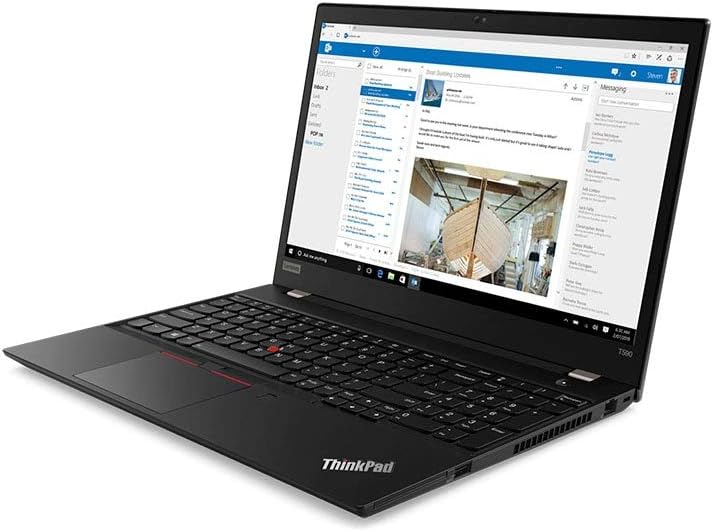
2.2. irudia: The laptop screen displaying an email application, demonstrating its capability for professional use.

2.3. irudia: The laptop screen displaying a video conference call, highlighting its integrated webcam and microphone for communication.

2.4. irudia: Atzekoa view of the Lenovo ThinkPad T590 laptop, showing the hinge and ventilation design.
3. Konfigurazioa
3.1 Paketatzea
Kontu handiz atera ordenagailu eramangarria eta osagarri guztiak paketetik. Ziurtatu elementu hauek daudela:
- Lenovo ThinkPad T590 Laptop
- AC egokigailua
- Elikatze kablea
- Dokumentazioa (eskuliburu hau barne)
3.2 Energia-egokitzailea konektatzea
- Konektatu korronte kablea CA egokitzaileari.
- Entxufatu korronte-egokitzailea entxufe elektriko egoki batera.
- Connect the AC adapter's output plug to the power input port on your ThinkPad T590.
- Utzi bateria kargatzen gutxienez 30 minutuz lehenengo aldiz erabili aurretik, edo bateriaren adierazleak karga nahikoa erakutsi arte.
3.3 Hasierako piztea
Press the power button located on the laptop to turn it on. Follow the on-screen instructions to complete the initial setup of Windows 10 Pro, including language selection, network connection, and user account creation.
4. Funtzionamendua
4.1 Using the Keyboard and TrackPoint/Touchpad
Your ThinkPad T590 features a full-size keyboard, a TrackPoint pointing device, and a multi-touch touchpad. Refer to the on-screen tutorials in Windows for detailed gestures and customization options.
4.2 Sare batera konektatzea
Wi-Fi sare batera konektatzeko:
- Egin klik sistemaren erretiluan dagoen Wi-Fi ikonoan (pantailaren beheko eskuineko izkinan).
- Hautatu nahi duzun sarea zerrendatik.
- Sareko segurtasun-gakoa (pasahitza) idatzi eskatzen bazaizu.
- Egin klik "Konektatu" aukeran.
For wired connections, connect an Ethernet cable to the laptop's Ethernet port (if available or via an adapter).
4.3 Kanpoko gailuak erabiltzea
Connect USB devices such as external hard drives, mice, or keyboards to the available USB 3.0 ports. For display output, use the appropriate video output ports (e.g., HDMI, USB-C with display capabilities) to connect to external monitors or projectors.
5. Mantentzea
5.1 Ordenagailu eramangarria garbitzea
- Pantaila: Erabili lipurrik gabeko zapi leun bat dampUrarekin edo pantaila-garbitzaile batekin garbitu. Ez ihinztatu likidoa zuzenean pantailan.
- Teklatua eta Casing: Erabili zapi leun eta lehor bat. Zikinkeria egoskorra bada, ukitu apur batamp xaboi leunarekin bustitako oihal bat erabil daiteke, likidorik irekiduretan sartzen ez dela ziurtatuz.
- Aireztapena: Periodically check and clean the ventilation openings to prevent dust buildup, which can affect cooling performance. Use compressed air if necessary.
5.2 Bateria zaintzea
Bateriaren iraupena maximizatzeko:
- Saihestu muturreko tenperaturak.
- Ez deskargatu bateria guztiz maiz.
- Ordenagailu eramangarria denbora luzez gordetzen baduzu, ziurtatu bateria % 50-60 inguru kargatuta dagoela.
5.3 Software eguneraketak
Regularly update your Windows operating system and Lenovo drivers to ensure optimal performance, security, and compatibility. Windows updates can be managed through the Settings app, and Lenovo updates can be found on the official Lenovo support webgunea.
6. Arazoak
Atal honek zure ThinkPad T590-arekin izan ditzakezun arazo ohikoenak jorratzen ditu.
6.1 Ordenagailu eramangarria ez da pizten
- Ziurtatu korronte-egokitzailea ondo konektatuta dagoela ordenagailu eramangarrira eta funtzionatzen duen entxufe batera.
- Egiaztatu entxufea funtzionatzen duela beste gailu bat konektatuz.
- Bateria guztiz agortuta badago, minutu batzuk behar izan daitezke kargatzeko ordenagailu eramangarria piztu aurretik.
6.2 Screen Remains Black or Goes to Sleep Mode Unexpectedly
- Press any key or move the mouse/TrackPoint to wake the system.
- Check power settings in Windows to ensure display sleep timers are set appropriately.
- If the issue persists, try connecting an external monitor to determine if the laptop's display is faulty.
- Perform a hard reset by holding the power button for 10-15 seconds until the laptop powers off, then restart.
6.3 Wi-Fi konexio arazoak
- Ziurtatu Wi-Fi gaituta dagoela Windows ezarpenetan.
- Berrabiarazi zure bideratzailea eta modema.
- Ahaztu sarea eta konektatu berriro, pasahitza berriro sartuz.
- Update your wireless adapter drivers from the Lenovo support webgunea.
- If experiencing issues with 5GHz networks, try connecting to a 2.4GHz network if available, or ensure your router's 5GHz channel is not congested.
6.4 BIOS Password Set Out of the Box
If you encounter a BIOS password prompt upon initial setup, this indicates an unusual configuration. Contact Lenovo support immediately for assistance. Do not attempt to guess or bypass the password, as this may lead to data loss or system lockout.
7. Zehaztapenak
| Ezaugarri | Zehaztapena |
|---|---|
| Ereduaren izena | ThinkPad T590 |
| Elementuaren eredu-zenbakia | 20N4001NUS |
| Prozesadorea | Intel Core i5-8265U (1.6 GHz, Quad-Core) |
| RAM | 8 GB DDR4 |
| Biltegiratzea | 256 GB-ko SSDa (PCIe) |
| Bistaratzea | 15.6 Inches, Full HD (1920 x 1080) IPS |
| Grafikoak | Intel UHD Graphics 620 (Integratua) |
| Sistema eragilea | Windows 10 Pro |
| Haririk gabeko mota | Bluetooth, Intel 9560ac Wi-Fi |
| USB atakak | 2 x USB 3.0 ataka |
| Elementuaren pisua | 6.1 libra (gutxi gorabehera 2.77 kg) |
| Produktuaren neurriak (LxWxH) | 20 x 12 x 3 hazbete (gutxi gorabehera 50.8 x 30.5 x 7.6 cm) |
| Bateria | 1 Lithium Ion battery (3-cell Li-Polymer) |
| Kolorea | Beltza |
| Ezaugarri Berezia | Hatz-marken irakurgailua |
8. Bermea eta Laguntza
8.1 Produktuaren bermea
Your Lenovo ThinkPad T590 laptop typically comes with a 3-Year Depot Warranty. This warranty covers manufacturing defects and hardware failures under normal use conditions. For specific terms and conditions, please refer to the warranty documentation included with your product or visit the official Lenovo support webgunea.
Extended protection plans may also be available for purchase separately, offering additional coverage beyond the standard warranty period.
8.2 Laguntza Teknikoa
Laguntza teknikoa, kontrolatzaileak deskargatzeko edo zerbitzu eskaerak jasotzeko, bisitatu Lenovo Laguntza ofiziala website. You will need your product's serial number (usually found on a label on the bottom of the laptop or in the BIOS settings) to access specific support resources.
Lenovo laguntza Webgunea: support.lenovo.com
When contacting support, be prepared to provide your model number (20N4001NUS) and a detailed description of the issue.