1. Sarrera
This manual provides comprehensive instructions for the setup, operation, and maintenance of your Drawmer CMC2 Compact Monitor Controller. Please read this manual thoroughly before using the device to ensure proper functionality and to maximize its performance.
2. Segurtasun informazioa
- Elikatze-iturria: Use only the factory-supplied 15V DC power supply. Using an incorrect power supply may damage the unit and void the warranty.
- Aireztapena: Ziurtatu aireztapen egokia dagoela unitatearen inguruan. Ez blokeatu aireztapen-irekidurak.
- Hezetasuna: Ez jarri unitatea euripean, hezetasunean edo gehiegizko hezetasunean.
- Garbiketa: Deskonektatu korrontea garbitu aurretik. Erabili zapi lehor eta leun bat. Ez erabili garbitzaile likidorik edo aerosolik.
- Zerbitzua: Konponketa guztiak zerbitzu-langile kualifikatuei eskatu. Ez saiatu unitatea zeuk irekitzen edo konpontzen.
3. Paketearen edukia
Egiaztatu zure paketeak elementu hauek dituela:
- Drawmer CMC2 Compact Monitor Controller
- 15V DC Power Supply Unit
- Erabiltzailearen eskuliburua (dokumentu hau)
4. Produktua amaitu daview
4.1 Aurrealdeko panelaren kontrolak
The front panel provides all primary controls for audio monitoring and source selection.

4.1. irudia: Aurrealdea view of the Drawmer CMC2 Compact Monitor Controller, showing all knobs and buttons for input selection, speaker selection, master volume, headphone control, and mix check functions.
- AUX INPUT Knob: Adjusts the level of the auxiliary input.
- SOURCE SELECT Buttons (I/P1, I/P2, AUX): Selects the active audio input source.
- SPEAKER SELECT Buttons (A, B, SUB): Activates the selected speaker outputs.
- BOLUMEN NAGUSIAREN botoia: Controls the overall output level to the selected speakers.
- MUTE botoia: Mutes all speaker outputs.
- HEADPHONE Knob: Entzungailuen irteeraren bolumena doitzen du.
- MIX CHECK Buttons (ØREV, MONO, DIM): Provides phase reverse, mono sum, and dim functions for mix analysis.
- AUX INPUT (3.5mm Jack): Front panel auxiliary input for portable devices.
- HEADPHONE Output (6.35mm Jack): Front panel headphone output.
4.2 Atzeko panelaren konexioak
The rear panel houses all audio input and output connectors, along with the power input.

4.2. Irudia: Atzealdea view of the Drawmer CMC2 Compact Monitor Controller, displaying the DC power input, speaker outputs (Mono/Sub, R-B-L, R-A-L), and inputs (R-2-L, R-1-L).
- DC=15V Input: Konektatu hemen emandako 15V-ko korronte-egokitzailea.
- Switch potentziala: Unitatearen piztea/itzaltzea txandakatzen du.
- SPEAKER OUTPUTS (MONO/SUB, R-B-L, R-A-L): Balanced XLR outputs for connecting up to two pairs of stereo monitors (A and B) and a mono subwoofer.
- INPUTS (R-2-L, R-1-L): Balanced XLR inputs for two stereo audio sources.
5. Konfigurazioa
Follow these steps to set up your CMC2 controller:
- Potentzia-konexioa: Connect the supplied 15V DC power adapter to the 'DC=15V' input on the rear panel. Plug the adapter into a suitable power outlet. Do not power on the unit yet.
- Sarrerako konexioak:
- Connect your primary audio source (e.g., audio interface, mixer) to the 'INPUTS R-1-L' using balanced XLR cables.
- Connect a secondary audio source to the 'INPUTS R-2-L' using balanced XLR cables.
- For portable devices, connect to the front panel 'AUX INPUT' (3.5mm jack) or the rear panel RCA auxiliary inputs (if available on your model, refer to specific product documentation).
- Bozgorailu konexioak:
- Connect your main studio monitors to the 'SPEAKER OUTPUTS R-A-L' using balanced XLR cables.
- If using a second pair of monitors, connect them to 'SPEAKER OUTPUTS R-B-L'.
- If using a subwoofer, connect it to the 'SPEAKER OUTPUTS MONO/SUB'.
- Aurikularretarako konexioa: If desired, connect your headphones to the front panel 'HEADPHONE' 6.35mm jack.
- Piztu: Once all connections are secure, press the power switch on the rear panel to turn on the CMC2.
6. Funtzionamendu-argibideak
This section details the functions of the CMC2's controls.
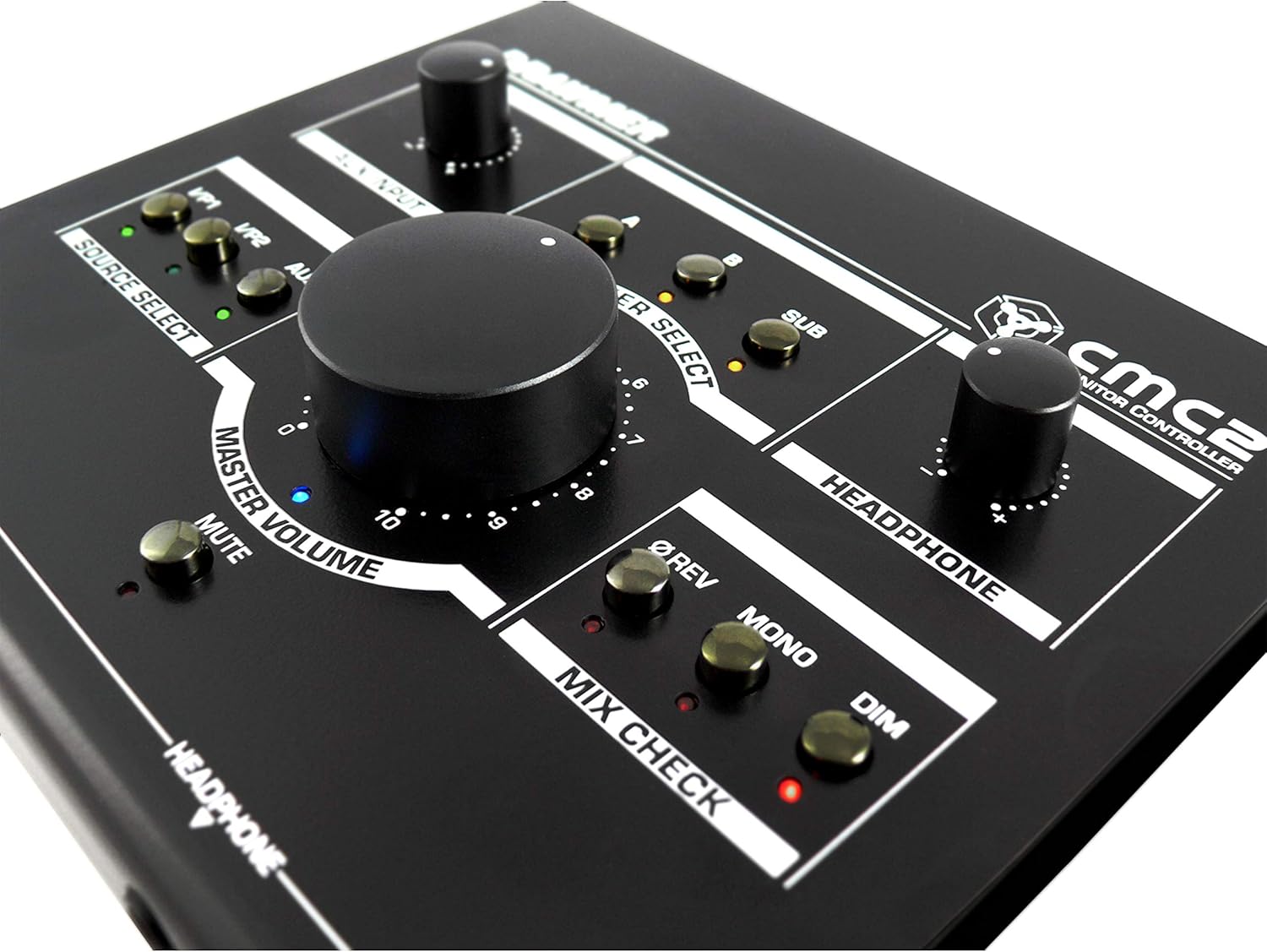
6.1. irudia: hurbileko planoa view of the Drawmer CMC2 front panel, highlighting the master volume, source select, speaker select, headphone, and mix check controls.
6.1 Iturria hautatzea
- Sakatu I/P1 button to select the audio source connected to Input 1.
- Sakatu I/P2 button to select the audio source connected to Input 2.
- Sakatu AUX button to select the auxiliary input (front panel 3.5mm jack).
- Only one source can be active at a time. The LED next to the selected button will illuminate.
6.2 Bozgorailuen hautaketa
- Sakatu A button to route the selected source to Speaker Output A.
- Sakatu B button to route the selected source to Speaker Output B.
- Sakatu AZPI button to route the selected source to the Subwoofer Output.
- Multiple speaker outputs can be active simultaneously (e.g., A and SUB). The LEDs indicate active outputs.
6.3 Bolumen kontrola
- Biratu handia. MASTER BOLUMENA knob clockwise to increase the output level to the selected speakers, and counter-clockwise to decrease it.
- Biratu AURKULTURAK knob to adjust the listening level for connected headphones.
- Biratu LAGUNTZA AUX knob to adjust the input level of the auxiliary source.
6.4 Mix Check Functions
- Sakatu ØREV button to reverse the phase of the right channel, useful for checking phase compatibility.
- Sakatu MONO button to sum the stereo signal to mono, allowing you to check for mono compatibility issues in your mix.
- Sakatu DIM button to temporarily reduce the output volume by a fixed amount, useful for quick listening level changes without losing your main volume setting.
6.5 Mutu funtzioa
- Sakatu MUTU button to instantly silence all active speaker outputs. The LED will illuminate when mute is active. Press again to unmute.
7. Mantentzea
The Drawmer CMC2 is designed for reliable operation with minimal maintenance.
- Garbiketa: Keep the unit clean by wiping it with a dry, soft, lint-free cloth. Avoid abrasive cleaners or solvents.
- Ingurumena: Operate the unit in a clean, dry environment, away from direct sunlight, heat sources, and excessive dust.
- Aireztapena: Ziurtatu aireztapen-zirrikituak ez daudela oztopatuta gehiegi berotzea saihesteko.
8. Arazoak
If you encounter issues with your CMC2, refer to the following common problems and solutions:
- Potentziarik gabe:
- Ensure the 15V DC power adapter is securely connected to the unit and a working power outlet.
- Check that the rear panel power switch is in the 'ON' position.
- Audio-irteerarik ez:
- Verify that the correct input source (I/P1, I/P2, or AUX) is selected and its LED is illuminated.
- Ensure that at least one speaker output (A, B, or SUB) is selected and its LED is illuminated.
- Check that the MASTER VOLUME knob is turned up and the MUTE button is not active (LED off).
- Confirm all audio cables are securely connected to both the CMC2 and your speakers/audio sources.
- Test with different cables or audio sources to isolate the problem.
- Audio distortsionatua:
- Murriztu audio iturriaren sarrera-maila.
- Lower the MASTER VOLUME on the CMC2.
- Egiaztatu audio kableak hondatuta dauden.
- Headphone Output Not Working:
- Ensure headphones are fully plugged into the front panel jack.
- Adjust the HEADPHONE volume knob.
- Test with a different pair of headphones.
If the problem persists, contact Drawmer customer support or your authorized dealer for assistance.
9. Zehaztapenak
| Ereduaren izena | CMC2 |
| Marka | Marrazkilaria |
| Gomendatutako Erabilerak | Audio-jarraipena |
| Konektibitate Teknologia | XLR, RCA (Auxiliary) |
| Audio irteera modua | Estereoa |
| Hizlari mota | Monitorea |
| Produktuaren neurriak | 13 x 9 x 3 hazbete (33 x 22.86 x 7.62 cm) |
| Elementuaren pisua | 3 libra (1.36 kg) |
| Fabrikatzailea | Marrazkilaria |
10. Bermea eta Laguntza
The Drawmer CMC2 Compact Monitor Controller is covered by a manufacturer's warranty. Please refer to the warranty card included with your product or visit the official Drawmer webwebgunean bermearen baldintza zehatzak ikusteko.
For technical support, service, or further inquiries, please contact your authorized Drawmer dealer or the Drawmer customer support team through their official channels.


