1. Sarrera eta Overview
Thank you for choosing the Lorex Analog 4K Weatherproof Indoor/Outdoor HD Wired Add-On Security Camera. This manual provides essential information for the proper installation, operation, and maintenance of your new security camera. This camera is designed as an add-on unit and requires a compatible Lorex recorder (DVR/NVR) for full functionality.
This camera features 4K resolution for superior image clarity, robust weatherproof construction for reliable indoor and outdoor use, and advanced deterrence features such as motion-activated lights and remote-triggered sirens. Its long-range night vision ensures comprehensive surveillance even in low-light conditions.
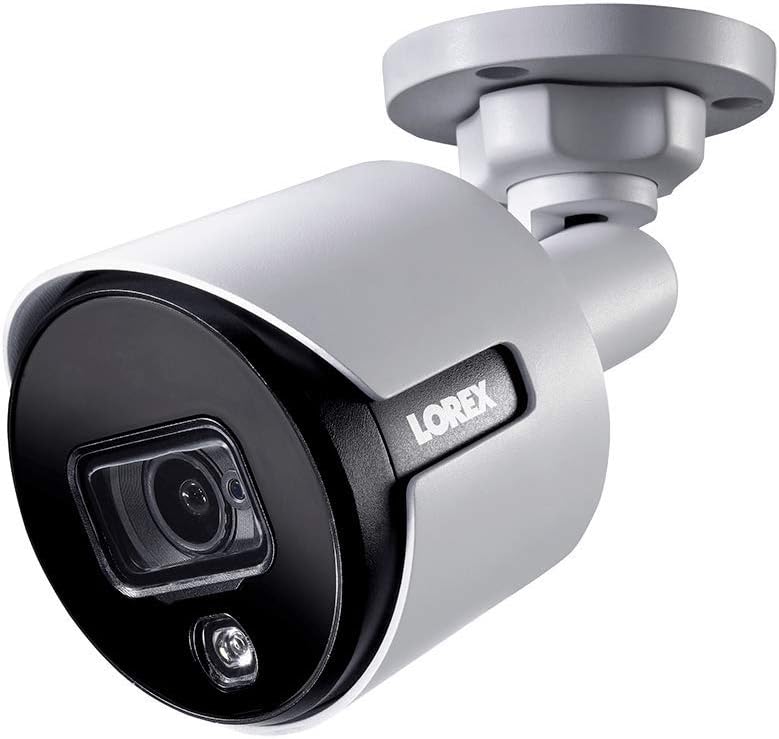
1.1. irudia: Aurrealdeko angelua view of the Lorex 4K Weatherproof Security Camera. This image shows the camera's bullet form factor, lens, and integrated light.
2. Paketearen edukia
The Lorex Analog 4K Weatherproof Indoor/Outdoor HD Wired Add-On Security Camera package includes:
- 1 x Lorex Analog 4K Weatherproof Indoor/Outdoor HD Wired Add-On Security Camera (Model: LBV8543XW)
- Mounting Kit (screws and wall plugs)
- Allen Key (for adjustment)
Note: This is an add-on camera. Video cables, power adapters, and a compatible Lorex recorder are sold separately and are required for operation.
3. Ezaugarri nagusiak
- 4K Ultra HD bereizmena: Provides exceptional detail and clarity with an 8MP effective still resolution.
- Eguraldiarekiko erresistentea den diseinua (IP67): Durable metal housing ensures reliable performance in various weather conditions, suitable for both indoor and outdoor installation.
- Long Range Night Vision: See clearly up to 150 feet (45m) in ambient night conditions and up to 98 feet (30m) in total darkness. Features Color Night Vision for enhanced detail in low light.
- Motion-Activated Warning Light: Integrated LED light can be triggered by motion to deter intruders.
- Remote-Triggered Siren: Activate a loud siren directly from your Lorex recorder or connected app to scare away unwanted visitors.
- Wired Connectivity (BNC): Ensures a stable and secure connection to your Lorex DVR/NVR system.
- Funtzionamendu-tenperatura zabala: Functions reliably in temperatures up to 60 degrees Celsius.
4. Konfigurazioa eta instalazioa
Before installation, ensure you have a compatible Lorex recorder (DVR/NVR) and necessary video/power cables.
4.1 Kokapena aukeratzea
Aukeratu nahi duzuna eskaintzen duen kokapen bat viewing angle and is within reach of your Lorex recorder and a power source. Consider areas prone to intrusion, such as entry points or vulnerable perimeters. The camera is suitable for ceiling mount and wall mount applications.

4.1. irudia: Aldea view of the Lorex 4K Weatherproof Security Camera, showing its adjustable mounting base.
4.2 Kamera muntatzea
- Markatu zulatzeko zuloak: Use the mounting template (if provided) or the camera base to mark the positions for drilling.
- Zulatzeko zuloak: Drill pilot holes for the mounting screws. If mounting on drywall or masonry, insert the provided wall plugs.
- Kamera segurua: Lerrokatu kameraren oinarria zuloekin eta finkatu emandako torlojuak erabiliz.
- Egokitu Angelua: Loosen the adjustment screws on the camera body using the Allen key to position the camera for the optimal viewangelua. Doitu ondoren, estutu torlojuak.
4.3 Kamera konektatzea
- Konektatu bideo-kablea: Connect one end of the BNC video cable (not included) to the camera's BNC port and the other end to an available video input channel on your Lorex recorder.
- Konektatu energia: Connect the camera's power input to a compatible power adapter (not included). Ensure the power adapter is connected to a power outlet.
- Power On Recorder: Ensure your Lorex recorder is powered on and properly configured.
5. Funtzionamendu-argibideak
Once the camera is physically installed and connected to your Lorex recorder, you can begin operation.
5.1 ViewZuzeneko jarioa egitea
Access your Lorex recorder's interface (via monitor, Lorex Home app, or client software) to view the live video feed from the camera. Ensure the correct channel is selected.

5.1. irudia: hurbileko planoa view of the Lorex 4K Weatherproof Security Camera's lens and integrated light.
5.2 Motion Detection and Smart Deterrence
Your Lorex recorder manages motion detection settings. Refer to your recorder's manual for detailed instructions on configuring motion zones and sensitivity.
- Motion-Activated Light: The camera's integrated light can be set to activate automatically upon motion detection. This setting is typically configured within your Lorex recorder's deterrence or alarm settings.
- Remote-Triggered Siren: You can manually activate the camera's siren through your Lorex recorder's interface or the Lorex Home app. This feature is useful for immediate deterrence.

Figure 5.2: The Lorex 4K Weatherproof Security Camera mounted on a brick wall at night, demonstrating its motion-activated light feature.
5.3 Gaueko ikusmena
The camera automatically switches to night vision mode in low-light conditions. The infrared (IR) LEDs provide illumination for clear black and white video. Color Night Vision (CNV) may be available if there is sufficient ambient light, providing full-color video in low-light scenarios.
6. Mantentzea
Mantentze-lan erregularrak zure segurtasun-kameraren errendimendu optimoa eta iraupena bermatzen ditu.
- Garbiketa: Aldian-aldian garbitu kameraren lentea eta karkasa zapi leun eta lehor batekinamp cloth. Avoid abrasive cleaners or solvents that could damage the finish or lens.
- Egiaztatu konexioak: Ensure all cable connections (BNC and power) are secure and free from corrosion, especially for outdoor installations.
- Firmware eguneraketak: Regularly check the Lorex website or your recorder's settings for available firmware updates for your camera and recorder to ensure the latest features and security enhancements.
- Ingurumen-baldintzak: While weatherproof, extreme conditions outside the specified operating temperature range (up to 60°C) may affect performance.
7. Arazoak
If you encounter issues with your Lorex camera, refer to the following common troubleshooting steps:
| Arazoa | Kausa posiblea | Irtenbidea |
|---|---|---|
| Ez dago bideo-jariorik kameratik | Kable konexio soltea Kamerari ez zaio energiarik ematen Incorrect channel selected on recorder | Check BNC and power connections. Ensure power adapter is working and connected. Verify the correct input channel on your Lorex recorder. |
| Irudi kalitate eskasa / bideo lausoa | Lente zikina Foku desegokia (doigarria bada) Cable interference/damage | Garbitu kameraren lentea zapi leun batekin. Ensure the camera is properly focused (if applicable). Check video cable for damage or interference. Use high-quality cables. |
| Gaueko ikusmenak ez du funtzionatzen | IR LEDak oztopatu dira Potentzia nahikoa ez Kameraren ezarpenak | Ziurtatu ezerk ez duela IR LEDak oztopatzen. Egiaztatu energia-hornidura egonkorra dela. Check night vision settings on your Lorex recorder. |
| Mugimendu detekzioa ez da aktibatzen | Incorrect motion zone setup Sentsibilitatea baxuegia Oztopoa view | Review and adjust motion detection zones on your recorder. Increase motion sensitivity. Kendu kameraren eremuko oztopo guztiak view. |
For more advanced troubleshooting, consult your Lorex recorder's user manual or visit the Lorex support webgunea.
8. Zehaztapenak
| Ezaugarri | Zehaztapena |
|---|---|
| Modelo zenbakia | LBV8543XW |
| Bideo Harrapaketa Ebazpena | 4K (8MP-ko argazki-bereizmen eraginkorra) |
| Konektibitate Teknologia | BNC (Wired) |
| Barruko/Kanpoko erabilera | Barruan, Kanpoan |
| Nazioarteko Babesteko Balorazioa | IP67 (eguraldiarekiko erresistentea) |
| Gaueko Ikusmenaren barrutia | 150 oin (45 m) |
| Ezaugarri bereziak | Motion Sensor, Night Vision, Motion Activated Lights, Remote-Triggered Siren |
| Forma-faktorea | Bala |
| Materiala | Metala |
| Funtzionamendu-tenperatura (goikoa) | 60 gradu Celsius |
| Produktuaren neurriak (L x W x H) | 16 x 6 x 6 hazbete |
| Elementuaren pisua | 0.01 ontza |
| UPC | 695529017136 |
| Kontrol-metodoa | App, Remote (via compatible Lorex recorder) |
9. Bermea eta Laguntza
Lorex products are designed for reliability and performance. For information regarding your product's warranty, please refer to the warranty policy available on the official Lorex website or the documentation included with your Lorex recorder.
For technical support, product registration, or to download the latest software and firmware updates, please visit the official Lorex support page or the Lorex Store:
- Lorex Store: Visit the Lorex Store on Amazon
- Erabiltzailearen gida (PDF): Erabiltzailearen gida osoa PDF formatuan deskargatzeko ere eskuragarri dago: Deskargatu Erabiltzailearen Gida
When contacting support, please have your product model number (LBV8543XW) and serial number ready.


