1. Sarrera
The HOLOSUN HM3X is a durable 3X magnifier designed to enhance the capabilities of your red dot sight. It features a convenient flip-to-side mechanism, allowing for quick transitions between magnified and unmagnified viewing. Constructed from aluminum, it is built to withstand demanding conditions and is IP67 certified for water and dust resistance. The HM3X includes a Quick Detach (QD) mount and a spacer, ensuring compatibility with both absolute and lower 1/3 co-witness optics.

Image 1.1: Front angled view of the HOLOSUN HM3X Magnifier with its integrated QD mount.
2. Segurtasun informazioa
Always prioritize safety when handling firearms and optical accessories. Adhere to all local and federal laws regarding firearm use and ownership.
- Always ensure your firearm is unloaded and safe before attempting to install, adjust, or remove the magnifier.
- Wear appropriate eye protection during installation and use.
- Do not look directly at the sun or any intense light source through the magnifier, as this can cause permanent eye damage.
- Keep the magnifier out of reach of children.
- Handle the magnifier with care to prevent damage to the lenses or housing.
3. Paketearen edukia
Egiaztatu behean zerrendatutako elementu guztiak zure produktuaren ontzian daudela:
- HOLOSUN HM3X 3X Magnifier
- Quick Detach (QD) Mount
- Spacer (for lower 1/3 co-witness)
- Lenteen tapak
- Doikuntza tresna
- Erabiltzailearen eskuliburua (dokumentu hau)
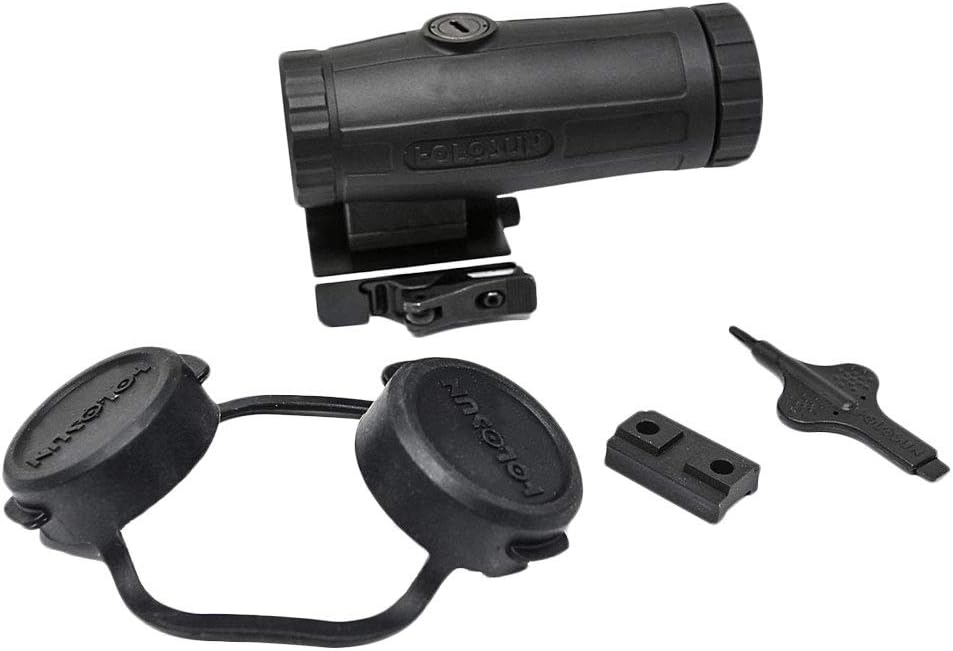
Image 3.1: The HOLOSUN HM3X Magnifier shown with its QD mount, spacer, lens caps, and adjustment tool.
4. Produktua amaitu daview
Familiarize yourself with the main components of your HM3X Magnifier:
- Magnifier Body: The main housing of the optical system.
- Lente objektiboa: The front lens of the magnifier, facing the target.
- Okularren lentea: The rear lens of the magnifier, through which you view.
- Dioptria doitzeko eraztuna: Located on the eyepiece, used to adjust focus for individual eyesight.
- Quick Detach (QD) Mount: Allows for rapid attachment and detachment from a Picatinny rail.
- Flip-to-Side Mechanism: Enables the magnifier to be quickly pivoted to the side when not in use.
- Muntatzeko torlojuak: Secure the magnifier to the QD mount.

4.1 irudia: Albokoa view of the HM3X Magnifier, illustrating the main body, lenses, and QD mount.
5. Konfigurazioa eta instalazioa
Follow these steps to properly install your HM3X Magnifier:
- Prestatu su-arma: Ziurtatu arma deskargatuta dagoela eta norabide seguru batera zuzenduta dagoela.
- Altuera zehaztu: The HM3X comes with a QD mount and a spacer. Use the spacer if your primary optic (e.g., red dot sight) is set to a lower 1/3 co-witness height. If your primary optic is absolute co-witness, the magnifier can be mounted directly to the QD mount without the spacer.
- Attach Magnifier to Mount: If not already assembled, align the magnifier with the QD mount and secure it using the provided mounting screws. Ensure they are tightened firmly but do not overtighten.
- Mount to Rail: Open the QD lever on the mount. Place the magnifier onto the Picatinny rail behind your primary optic. Ensure it is seated fully forward in a rail slot to prevent movement under recoil.
- Ziurtatu muntaketa: Close the QD lever. It should close with firm resistance. If it is too loose or too tight, adjust the tension screw on the QD mount until it provides a secure fit.
- Align with Primary Optic: Position the magnifier directly behind your red dot sight or other primary optic. The goal is to have the magnifier's field of view centered on your primary optic's reticle.
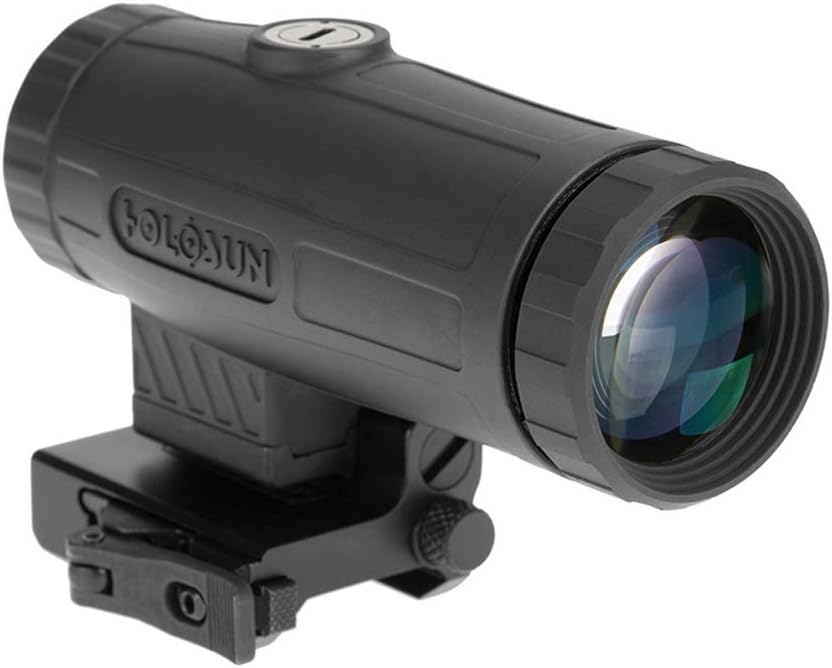
Image 5.1: The HM3X Magnifier securely mounted on a Picatinny rail, ready for use.
6. Funtzionamendua
Using your HM3X Magnifier is straightforward:
6.1. Engaging and Disengaging Magnification
- To engage the 3X magnification, simply push the magnifier forward until it locks into place directly behind your primary optic.
- To disengage magnification and use your primary optic unmagnified, push the magnifier to the side. It will pivot and lock into a stowed position, clearing your line of sight.

Image 6.1: The HM3X Magnifier shown in its flipped-to-side, stowed position.
6.2. Dioptrioen doikuntza
The diopter adjustment ring allows you to fine-tune the focus of the magnifier to your individual eyesight, ensuring a crisp image of your primary optic's reticle.
- With the magnifier engaged (in line with your primary optic), look through the eyepiece.
- Rotate the diopter adjustment ring (located on the eyepiece) until the reticle of your primary optic appears sharp and clear through the magnifier.
- Once adjusted, the diopter should not need frequent readjustment unless different users operate the magnifier.
7. Mantentzea
Proper care and maintenance will ensure the longevity and optimal performance of your HM3X Magnifier.
7.1. Garbiketa
- Lenteak: Use a soft, clean microfiber cloth specifically designed for optics. For stubborn smudges, a small amount of lens cleaning solution can be applied to the cloth (not directly to the lens). Avoid using abrasive materials or harsh chemicals.
- Gorputza: Wipe the aluminum housing with a damp Zapi bat erabili zikinkeria eta hondakinak kentzeko. Ondo lehortu.
7.2. Biltegiratzea
- When not in use, store the magnifier in a cool, dry place, away from direct sunlight and extreme temperatures.
- Utilize the included lens caps to protect the objective and eyepiece lenses from dust and scratches.
8. Arazoak
If you encounter issues with your HM3X Magnifier, refer to the following common problems and solutions:
- Arazoa: Irudia lausoa edo fokutik kanpo agertzen da.
Irtenbidea: Adjust the diopter ring on the eyepiece until the image is clear. Ensure your primary optic's reticle is also in focus. - Arazoa: Magnifier feels loose on the rail or shifts under recoil.
Irtenbidea: Check the tension of the QD mount lever. Adjust the tension screw on the QD mount to ensure a secure fit on the Picatinny rail. - Arazoa: Magnifier does not flip smoothly or locks up.
Irtenbidea: Ensure the flip-to-side mechanism is clean and free of debris. Apply a small amount of light lubricant if necessary, but avoid getting it on the lenses. - Arazoa: Reticle of primary optic is not centered in the magnifier's view.
Irtenbidea: The HM3X does not have windage/elevation adjustments for reticle centering. Ensure your primary optic is properly zeroed. Minor optical alignment issues are normal and typically do not affect accuracy.
9. Zehaztapenak
Detailed technical specifications for the HOLOSUN HM3X Magnifier:
| Zehaztapena | Balioa |
|---|---|
| Paketearen neurriak L x W x H | 4.76 x 3.66 x 3.11 hazbete |
| Paketearen pisua | 0.5 kilogramo |
| Elementuaren neurriak LxWxH | 1.53 x 3.94 x 2.44 hazbete |
| Elementuaren pisua | 0.67 kilo |
| Marka Izena | HOLOSUN |
| Ereduaren izena | HM3X |
| Kolorea | Beltza |
| Materiala | Aluminioa |
| Elementu kopurua | 1 |
| Fabrikatzailea | Holosun Technologies, Inc |
| Zati zenbakia | HM3X |
| Estiloa | Red Dot Sight (Magnifier) |
| Tamaina | 1ko paketea |
| Eskuragarri dagoen lehen data | 22ko martxoaren 2019a |
10. Bermea eta Laguntza
For detailed warranty information regarding your HOLOSUN HM3X Magnifier, please refer to the manufacturer's official warranty policy. This information is typically available on the HOLOSUN website or through direct contact with their customer support.
For technical support, service, or any inquiries not covered in this manual, please contact HOLOSUN Technologies, Inc. customer service directly. Contact details can usually be found on the official HOLOSUN webgunea (www.holosun.com).


