Segurtasun-argibide garrantzitsuak
When using electrical appliances, basic precautions should always be followed to reduce the risk of fire, electric shock, and injury to persons. Read all instructions before using this fan.
- Always plug fans directly into a wall outlet/receptacle. Never use with an extension cord or relocatable power tap (outlet/power strip).
- Ez erabili haizagailurik kablea edo entxufea hondatuta duen. Baztertu haizagailua edo itzuli baimendutako zerbitzu-instalazio batera aztertu eta/edo konpontzera.
- Ez jarri kablea alfonbra azpian. Ez estali kablea alfonbra, lasterkari edo antzeko estalkiekin. Jarri kablea trafiko-eremutik urrun eta estropezu egingo ez den tokitik.
- Deskonektatu beti haizagailua mugitu, mantendu edo garbitu aurretik.
- Ez sartu hatzak edo objektu arrotzak aireztapen edo ihes-irekiduretan, deskarga elektrikoa edo sutea eragin baitezake, edo haizagailua kaltetu.
- Ez blokeatu aire hartuneak edo ihesak inolaz ere. Ez erabili gainazal bigunetan, ohean bezala, baoak blokeatuta egon baitaitezke.
- Haizagailu hau ez dago hezean edo damp kokapenak.
- This fan is not suitable for use in agricultural facilities including areas where livestock, poultry or other animals are confined.
- This fan is not suitable for use in hazardous locations.
Kutxan dagoena
Muntaketa hasi aurretik, egiaztatu osagai guztiak daudela.
- Lasko T48322 Tower Fan Unit
- Fan Base (two halves)
- Urruneko Kontrola
- Mounting Screws for Base
Konfigurazioa eta Muntaketa
Follow these steps to assemble your Lasko T48322 Tower Fan.
- Oinarria muntatu: Carefully align the two halves of the fan base. Ensure the cable channel on one half matches the opening on the other. Snap them together.
- Attach Base to Fan: Place the assembled base onto the bottom of the tower fan unit. Align the screw holes.
- Ziurtatu oinarria: Insert the provided mounting screws through the base and into the fan unit. Tighten securely with a screwdriver. Do not overtighten.
- Kokatu zalea: Place the fan on a firm, level surface. Ensure it is away from curtains or other objects that could obstruct airflow.
- Konektatu: Insert the power cord into a 120V AC wall outlet.

Irudia: Aurrealdea view of the Lasko T48322 Tower Fan. This image shows the fan's slim, upright design with its black and silver finish, and the digital display panel at the top.

Irudia: Atzealdea view of the Lasko T48322 Tower Fan, highlighting the integrated handle and the remote control storage slot.
Funtzionamendua
Your Lasko T48322 Tower Fan can be operated using the control panel on the top of the fan or with the included remote control.
Kontrol panelaren funtzioak

Image: Close-up of the Lasko T48322 Tower Fan's control panel, showing the power, speed, timer, oscillation, and nighttime mode buttons, along with the digital speed display.
- Pizteko botoia (⏻): Sakatu haizagailua pizteko edo itzaltzeko.
- Abiadura botoia (☸): Press repeatedly to cycle through the three fan speeds: Low (1), Medium (2), High (3). The current speed will be displayed on the digital screen.
- Oszilazio botoia (⌛): Press to activate or deactivate the oscillation function, which allows the fan to rotate from side to side, distributing air over a wider area.
- Tenporizadorearen botoia (⏱): Press to set the fan to automatically turn off after a set period. Each press increases the timer setting by 1 hour, up to a maximum of 8 hours. The selected time will be indicated by illuminated LEDs.
- Nighttime Mode Button (🌙): Press to activate Nighttime Mode. In this mode, the fan's speed will automatically decrease every hour until it reaches the lowest speed. The display lights will also dim for minimal disturbance.
Urruneko Kontrolaren Eragiketa
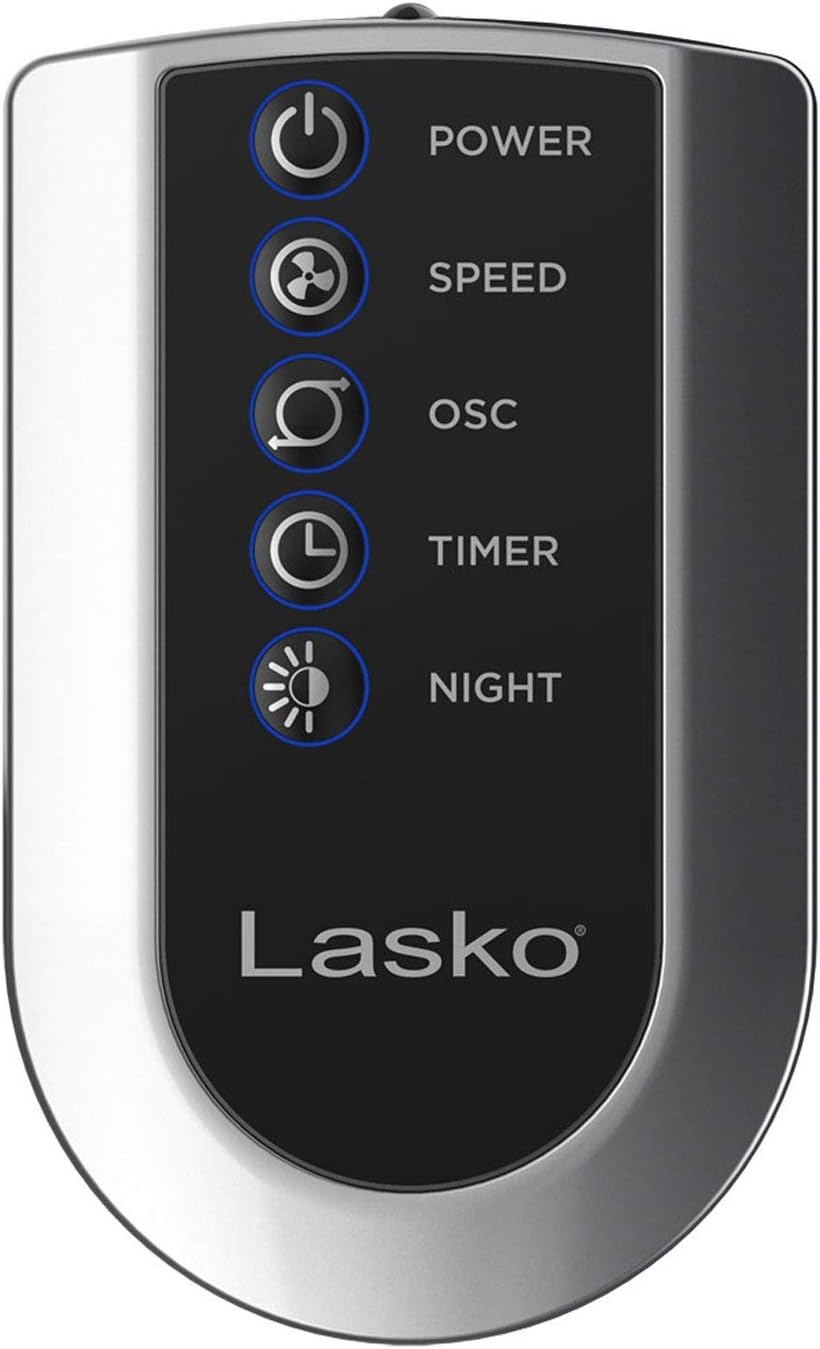
Image: The remote control for the Lasko T48322 Tower Fan, showing buttons for power, speed, oscillation, timer, and nighttime mode.
The remote control duplicates all functions of the control panel. Ensure the remote has working batteries (typically 2 AAA batteries, not always included). Point the remote directly at the fan's control panel for optimal response.
Zainketa eta Mantentzea
Proper care and maintenance will ensure the longevity and efficient operation of your fan.
- Garbiketa: Always unplug the fan before cleaning. Use a soft cloth moistened with a mild soap solution to clean the exterior surfaces. Do not use gasoline, benzene, thinner, harsh cleaners, etc., as they will damage the fan. Never immerse the fan in water.
- Hautsa kentzea: Erabili eskuila-eranskin bat duen xurgagailua aire-sarrerako eta irteerako saretatik hautsa kentzeko.
- Biltegiratzea: When not in use, store the fan in its original carton in a cool, dry place. The remote control can be stored in the designated slot on the back of the fan.
- Zerbitzua: This fan has permanently lubricated bearings and requires no further lubrication.
Arazoak konpontzea
If your fan is not operating as expected, refer to the following common issues and solutions.
| Arazoa | Kausa posiblea | Irtenbidea |
|---|---|---|
| Haizagailua ez da pizten. | Unitateari ez dago energiarik. | Ensure the power cord is securely plugged into a working 120V AC outlet. Check household circuit breaker/fuse. |
| Haizagailua funtzionatzen du, baina aire-fluxua ahula da. | Air intake/exhaust grilles are blocked or dusty. | Unplug the fan and clean the grilles using a vacuum cleaner with a brush attachment. Ensure no objects are obstructing airflow. |
| Fan zaratatsua da. | Loose parts or fan not on a level surface. | Ensure the fan is placed on a firm, level surface. Check if the base is securely attached. If noise persists, discontinue use and contact customer support. |
| Urruneko kontrola ez dabil. | Bateriak agortuta edo oztopoak. | Replace batteries in the remote control. Ensure there is no obstruction between the remote and the fan's control panel. |
Zehaztapenak
- Eredua: T48322
- Marka: Tolestu
- Kolorea: Beltza
- Forma-faktorea: Dorrea
- Energia iturria: Kable elektrikoa
- liburukiatage: 120 voltio (AC)
- Potentzia-maila kopurua: 3
- Ezaugarri bereziak: Oscillating, 8-Hour Timer, Nighttime Mode, Remote Control
- Dakarten osagaiak: Urruneko Kontrola
- Barruko/Kanpoko erabilera: Barruan
- Materiala: Metala
Bermea eta Laguntza
Lasko Products, LLC warrants this product against defects in workmanship and/or materials for a period specified in the product's original packaging or on the official Lasko website. This warranty extends only to the original purchaser of the product.
For technical assistance, product information, or warranty claims, please contact Lasko Customer Service:
- Webgunea: www.lasko.com
- Telefonoa: Refer to the Lasko webuneko harremanetarako zenbakien gunea.
- Posta elektronikoa: Refer to the Lasko webuneko harremanetarako helbide elektronikoaren gunea.
Please have your model number (T48322) and purchase date available when contacting support.


