Sarrera
This manual provides detailed instructions for the setup, operation, and maintenance of your Sunbuck TAV-339BT Wireless Karaoke Bluetooth Power Amplifier System. This 2-channel stereo amplifier is designed for home audio and karaoke applications, featuring Bluetooth connectivity, USB/SD card playback, FM radio, and dual microphone inputs. Please read this manual thoroughly before using the product to ensure proper operation and to prevent damage.

1. irudia: Aurrealdea view of the Sunbuck TAV-339BT amplifier. This image displays the main unit with its various controls and inputs on the front panel, including the power switch, microphone inputs, volume knobs, and digital display.
Segurtasun Informazioa
- Energia iturria: Konektatu amplifier only to the specified power supply (AC 110V or DC 12V 5A). Ensure the voltage matches the requirements before plugging in.
- Aireztapena: Ez blokeatu aireztapen-irekidurak. Ziurtatu aire-fluxu egokia dagoela unitatearen inguruan gehiegi berotzea saihesteko.
- Ura eta hezetasuna: Do not expose the unit to rain, moisture, or dripping/splashing liquids. Do not place objects filled with liquids, such as vases, on the apparatus.
- Bero iturriak: Mantendu unitatea bero-iturrietatik urrun, hala nola erradiadoreetatik, bero-erregistroetatik, sukaldeetatik edo beste aparatu batzuetatik (adibidez, ampberoa sortzen duten argitzaileak).
- Garbiketa: Garbitu aurretik, deskonektatu unitatea entxufetik. Erabili zapi lehor bat garbitzeko.
- Zerbitzua: Ez saiatu produktu hau zuk zeuk ematen. Bidali zerbitzu guztiak zerbitzu kualifikatuko langileengana.
- Haurrak: Mantendu unitatea eta bere osagarriak haurren eskura ez dauden lekuetan.
Paketearen edukia
Mesedez, egiaztatu paketea elementu hauek dituen:
- 1 x Sunbuck TAV-339BT AmpGarraioa (110V)
- 1 x Urruneko kontrola
- 1 x Erabiltzailearen eskuliburua
Produktuaren Ezaugarriak
- Compact and powerful 2-channel stereo ampdezente sistema.
- Integrated Bluetooth for wireless audio streaming from compatible devices (smartphones, tablets, PCs).
- Supports USB flash drive and SD memory card playback.
- FM irrati sintonizatzailea barneratua.
- Dual 1/4-inch microphone input jacks for karaoke functions.
- RCA (L/R) audio input for external devices.
- Front panel controls for master volume, bass, treble, microphone volume, echo, and microphone bass/treble.
- Traditional VU meter display.
- Erabilera erosoa lortzeko urrutiko agintea barne hartzen du.
Aurrealdeko panela baino gehiagoview
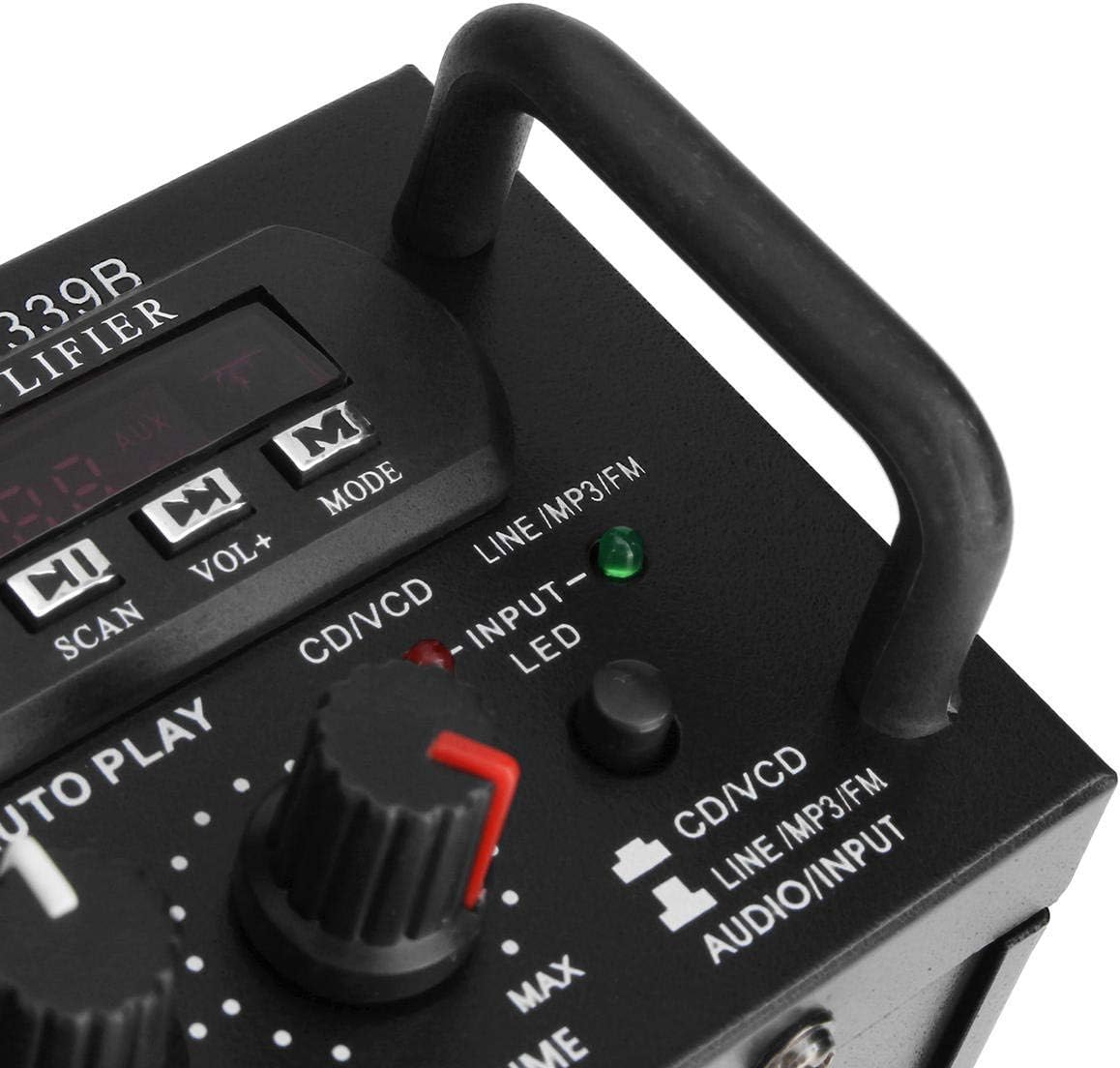
2. irudia: Xehetasuna view ren amplifier's front panel, highlighting the various knobs, buttons, and input ports.
- POWER switch: Biratzen du ampbiziago edo aktibatuta.
- OIHARTZUN-kontrola: Mikrofonoen oihartzun efektua doitzen du.
- MIC1/MIC2 Input: 1/4-inch jacks for connecting microphones.
- M.BASS/M.TREBLE: Adjusts bass and treble for microphone input.
- MIKROFONOA/BOLUMENA: Adjusts the volume level for microphones.
- VU METROA: Displays audio output level.
- USB/SD Card Slot: For connecting USB flash drives or SD memory cards.
- Bistaratze digitala: Uneko modua, pistaren zenbakia edo FM maiztasuna erakusten ditu.
- Control Buttons (SCAN, VOL-, VOL+, MODE): For navigating USB/SD/FM functions.
- BASS/AGUTZAK: Adjusts the main audio bass and treble levels.
- bolumena: Audio iturri guztientzako bolumen nagusiaren kontrola.
- INPUT hautatzailea: Cycles through input sources (CD/VCD, LINE, MP3/FM, Bluetooth).
- INPUT LED Indicators: Lights up to show the currently selected input source.
Atzeko panela Gainetikview

3. Irudia: Atzealdea view ren amplifier, showing the various input and output terminals for connecting speakers and audio sources.
- INPUT (CD/VCD, LINE): RCA (L/R) audio input jacks for connecting external audio sources like CD/DVD players, TVs, or other line-level devices.
- HIZLAREN SISTEMA: Spring clip terminals for connecting passive speakers. Ensure correct polarity (+ to + and - to -).
- POWER DC 12V INPUT: DC power input for 12V power supply (e.g., car battery, not included).
- AC 110V 60Hz: AC power input for standard household power.
- FM Antena: Connector for the included FM antenna.
Urruneko kontrola amaitu daview
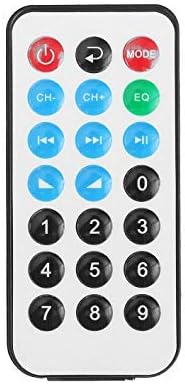
4 irudia: Urrutiko agintearen botoien kokapena.
Urrutiko aginteari esker, erosotasunez erabil daiteke amplifier's functions from a distance. It typically includes buttons for power, mode selection, volume adjustment, track navigation (for USB/SD), and FM radio controls.
Urruneko Kontrolerako bateriaren instalazioa

Figure 5: Step-by-step guide for installing the CR2025 lithium battery into the remote control.
The remote control requires a CR2025 lithium battery (3V). To install or replace the battery:
- Kokatu bateriaren konpartimendua urrutiko agintearen atzealdean.
- Push the small tab to release the battery tray.
- Irristatu bateriaren erretilua.
- Sartu CR2025 bateria alde positiboa (+) gora begira duela.
- Slide the battery tray back into the remote until it clicks into place.
Konfigurazioa
1. Bozgorailuaren konexioa
Connect your passive speakers to the "SPEAKER SYSTEM" terminals on the rear panel. Ensure that the positive (+) terminal of the amplifier connects to the positive (+) terminal of the speaker, and the negative (-) terminal of the amplifier connects to the negative (-) terminal of the speaker. Incorrect polarity can affect sound quality.
2. Audio sarrerako konexioa
- RCA Inputs (CD/VCD, LINE): Use RCA cables to connect external audio sources (e.g., CD player, DVD player, TV audio output) to the corresponding "INPUT" jacks on the rear panel.
- USB/SD txartela: Insert a USB flash drive or SD memory card into the respective slot on the front panel.
- Bluetootha: No physical connection is needed for Bluetooth. Refer to the "Operating Instructions" section for pairing.
3. Mikrofonoaren konexioa
Connect up to two 1/4-inch microphones to the "MIC1" and "MIC2" input jacks on the front panel for karaoke use.
4. FM antenaren konexioa
Connect the included FM antenna to the FM antenna terminal on the rear panel for improved radio reception.
5. Energia-konexioa
Connect the power cord to the AC 110V 60Hz input on the rear panel and then plug it into a standard wall outlet. Alternatively, for DC operation, connect a 12V DC power source (not included) to the "POWER DC 12V INPUT" terminals.
Funtzionamendu-argibideak
1. Piztu/Itzali
Press the "POWER" switch on the front panel to turn the amplifier on or off. The digital display will illuminate when the unit is powered on.
2. Iturriaren hautaketa
Press the "INPUT" button on the front panel or the "MODE" button on the remote control to cycle through available input sources: CD/VCD, LINE, MP3/FM, and Bluetooth. The corresponding LED indicator on the front panel will light up.
3. Bluetooth funtzionamendua
- Select "Bluetooth" as the input source using the "INPUT" or "MODE" button. The digital display will show "BLUE" or a similar indicator.
- Gaitu Bluetooth-a zure gailu mugikorrean (telefonoa, tableta, ordenagailua).
- Bilatu available Bluetooth devices and select "TAV-339BT" or "Sunbuck" from the list.
- Behin parekatuta, audioa haririk gabe erreproduzitu dezakezu zure gailutik ampbiziagoa.
4. USB/SD txartelaren erreprodukzioa
- Sartu MP3 audioa duen USB flash unitate bat edo SD txartel bat files into the respective slot on the front panel.
- Select "MP3/FM" as the input source. The ampLifigailuak automatikoki detektatu eta audioa erreproduzitzen hasiko da files.
- Use the "SCAN", "VOL-", "VOL+" buttons on the front panel or the corresponding buttons on the remote control to navigate tracks (play/pause, next/previous).
5. FM Irratiaren funtzionamendua
- Ensure the FM antenna is connected.
- Select "MP3/FM" as the input source.
- Press the "SCAN" button to automatically scan and store available FM radio stations.
- Use the "VOL-" and "VOL+" buttons (or remote control) to manually tune or select stored stations.
6. Karaoke funtzioa
- Connect microphones to the "MIC1" and "MIC2" jacks.
- Adjust the "MIC/VOL" knob to control the microphone volume.
- Use the "ECHO" knob to add an echo effect to the vocals.
- Adjust "M.BASS" and "M.TREBLE" to fine-tune the microphone's tone.
7. Bolumenaren eta tonuaren kontrola
- bolumena: Use the large "VOLUME" knob on the front panel to adjust the overall output volume.
- BASS/AGUTZAK: Use the "BASS" and "TREBLE" knobs to adjust the low and high frequencies of the main audio output.
Mantentzea
- Garbiketa: Deskonektatu korrontea garbitu aurretik. Erabili zapi leun eta lehor bat unitatearen kanpoaldea garbitzeko. Ez erabili garbitzaile likidorik edo aerosolik.
- Aireztapena: Ensure that the ventilation openings are clear of dust and debris to maintain proper cooling.
- Biltegiratzea: Unitatea denbora luzez gordetzen baduzu, deskonektatu korronte-iturritik eta gorde leku fresko eta lehor batean.
Arazoak konpontzea
| Arazoa | Kausa posiblea | Irtenbidea |
|---|---|---|
| Botererik ez | Kablea ez dago konektatuta; etengailua itzalita; ez dago korronterik entxufetik. | Ensure power cord is securely connected. Turn the POWER switch on. Check the power outlet with another device. |
| Ez dago soinu irteerarik | Incorrect input source selected; Speaker wires loose or incorrectly connected; Volume too low; Mute activated (if applicable). | Select the correct input source. Check speaker connections and polarity. Increase the VOLUME. Ensure no mute function is active. |
| Bluetootha ez da konektatzen | AmpGailua ez dago Bluetooth moduan; Gailua urrunegi dago; Gailua beste bati konektatuta dago dagoeneko amplifier; Bluetooth on device is off. | Select Bluetooth input on the amplifier. Move device closer. Disconnect from other devices. Enable Bluetooth on your device. |
| USB/SD txartela ez da erreproduzitzen | Incorrect input source; Files not in supported format (MP3); USB/SD card corrupted or empty. | Select MP3/FM input. Ensure files are MP3 format. Try another USB/SD card. |
| Urruneko kontrola ez dabil | Battery depleted or incorrectly installed; Obstruction between remote and amplifigadorea; Urrutiko sentsorea blokeatuta dago. | Replace battery (CR2025) and ensure correct polarity. Remove any obstructions. Ensure the remote sensor on the amplifier is clear. |
Zehaztapenak
| Ezaugarri | Xehetasuna |
|---|---|
| Eredua | TAV-339BT |
| Inpedantzia nominatua | 4 eta 8 Ohms |
| RMS potentzia irteera | 200W + 200W (Recommended for speaker boxes with speakers less than 8") |
| Peak Music Power Output (P.M.P.O) | 300W + 300W (Guztira 600W) |
| Elikatze Hornidura | AC: 110V 60Hz or DC: 12V 5A |
| Kanalak | 2 kanal |
| Audio Sarrera | Multi-channel signal input (RCA L/R), USB, SD, Bluetooth |
| Mikrofonoaren sarrera | Dual 1/4-inch Jack |
| Konektibitate Teknologia | Bluetooth, USB, RCA |
| Haririk gabeko mota | Bluetooth, Infrared (for remote) |
| Produktuaren neurriak (L x W x H) | 25.4 x 20.32 x 7.01 cm (10 x 8 x 2.76 hazbete) |
| Produktuaren pisua | 2.72 kg (6 lb) |
| Gailu bateragarriak | Headphones, Laptops, Smartphones |
Bermea eta Laguntza
For warranty information or technical support, please refer to the documentation provided at the time of purchase or contact your retailer. Keep your proof of purchase for warranty claims.


