1. Sarrera
Thank you for choosing the Thomson 55-inch Smart TV, Model TH55MR17. This manual provides essential information for the safe and efficient operation of your new television. Please read it thoroughly before using the product and retain it for future reference.
Your Thomson Smart TV offers a Full HD viewing experience (1920x1080 resolution) and smart functionalities including Wi-Fi connectivity, Android app installation via Google Play, and support for applications like YouTube.
2. Segurtasun informazioa
- Elikatze-iturria: Ensure the TV is connected to a power source within the specified voltage range (220V, 50/60Hz).
- Aireztapena: Ez blokeatu aireztapen-irekidurak. Utzi nahikoa leku telebistaren inguruan aire-fluxu egokia izan dadin.
- Ura eta hezetasuna: Ez jarri telebista euripean edo hezetasunean. Saihestu likidoz betetako objektuak, hala nola loreontziak, telebistaren gainean jartzea.
- Garbiketa: Deskonektatu telebista garbitu aurretik. Erabili zapi leun eta lehor bat. Ez erabili garbitzaile likidorik edo aerosol-garbitzailerik.
- Lekua: Place the TV on a stable, level surface to prevent it from falling. Keep it away from direct sunlight and heat sources.
- Zerbitzua: Ez saiatu telebista zeuk konpontzen. Konponketa guztiak zerbitzu-langile kualifikatuei eskatu.
3. Paketearen edukia
Mesedez, egiaztatu ondorengo elementu guztiak zure paketean sartuta daudela:
- Thomson 55-inch Smart TV (Model TH55MR17)
- Urruneko Kontrola
- Telebista-euskarria (2 pieza)
- Euskarri muntaketarako torlojuak
- Elikatze-kablea
- Erabiltzailearen eskuliburua
4. Konfigurazioa
4.1 Telebistaren euskarria muntatzea
- Kontu handiz jarri telebistaren pantaila beherantz gainazal bigun eta lau batean (adibidez, manta edo apar batean) kalterik ez egiteko.
- Lerrokatu euskarri pieza bakoitza telebistaren behealdeko zirrikituekin.
- Lotu euskarriak emandako torlojuak erabiliz. Ziurtatu ondo estututa daudela.
- Kontu handiz altxa telebista gainazal egonkor batean zutik jarri.
4.2 Kanpoko gailuak konektatzea
Zure telebistak kanpoko gailuak konektatzeko hainbat ataka ditu:
- HDMI atakak (x2): For connecting high-definition devices like Blu-ray players, gaming consoles, or set-top boxes.
- USB atakak (x2): USB biltegiratze gailuak konektatzeko multimedia erreproduzitzeko files.
- PC/VGA Input: Ordenagailu bat konektatzeko.
- RF sarrera: Antena edo kable bidezko telebista konektatzeko.
- Ethernet ataka: Interneteko kable bidezko konexio baterako.
- AV Ports (x2): Bideo konposatu eta audio estereo kableak erabiliz gailu zaharragoak konektatzeko.
After connecting your devices, plug the power cable into the TV and then into a wall outlet.
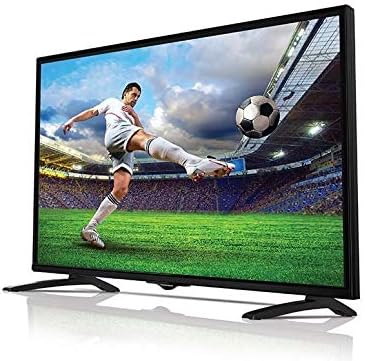
Image: The Thomson 55-inch Smart TV, Model TH55MR17, showcasing its display capabilities with a vibrant football match on screen. The TV features a slim bezel and a stable stand.
5. Telebistaren funtzionamendua
5.1 Urruneko kontrolaren funtzioak
The remote control allows you to access all the TV's features. Familiarize yourself with the buttons:
- Pizteko botoia: Telebista pizten edo itzaltzen du.
- Bolumena igo/behera: Soinu maila doitzen du.
- Kanal gora/behera: Telebistako kateak aldatzen ditu.
- Sarrera/Iturria: Sarrera iturria hautatzen du (HDMI, USB, AV, etab.).
- Nabigazio botoiak (Gora/Behera/Ezkerra/Eskuina): Menu nabigaziorako.
- Ados/Sartu: Hautaketak berresten ditu.
- Itzuli/Irten: Aurreko menura itzultzen da edo uneko menutik irteten da.
- Home/Smart Hub: Smart TV interfazera sartzen da.
- Aplikazioaren botoiak: Dedicated buttons for popular apps like YouTube (if available).
5.2 Oinarrizko telebista funtzioak
- Piztu/Itzali: Sakatu urrutiko agintean edo telebistan pizteko botoia.
- Kanalaren hautaketa: Erabili kanala gora/behera botoiak edo sartu kanal zenbakia zuzenean.
- Bolumenaren doikuntza: Erabili bolumena igotzeko/jaisteko botoiak.
- Sarrera-iturria hautatzea: Press the 'Input' or 'Source' button and select the desired input (e.g., HDMI 1, USB, AV).
5.3 Smart TV Features and Internet Connectivity
Your Thomson Smart TV allows you to connect to the internet and access various online services.
- Wi-Fira konektatzen:
- Press the 'Home' or 'Smart Hub' button on your remote.
- Navigate to 'Settings' or 'Network Settings'.
- Select 'Wi-Fi' and choose your home network from the list.
- Sartu zure Wi-Fi pasahitza pantailako teklatua erabiliz.
- Once connected, the TV will confirm the connection.
- Aplikazioetara sartzea:
- From the 'Home' screen, you can find pre-installed apps like YouTube.
- To install more apps, navigate to the 'Google Play Store' icon.
- Browse or search for desired applications and follow the on-screen instructions to install them.
- Wired Internet Connection:
- Connect an Ethernet cable from your router to the Ethernet port on the TV.
- The TV should automatically detect the wired connection. If not, go to 'Network Settings' and select 'Wired Connection'.
6. Mantentzea
- Pantaila garbitzea: Garbitu pantaila astiro-astiro zapi leun eta pelusik gabeko batekin. Orba egoskorrak izanez gero, garbitu apur batampGarbitu oihal bat urarekin edo pantaila-garbitzaile espezializatu batekin (ez ihinztatu zuzenean pantailan).
- Armairuen garbiketa: Erabili zapi leun eta lehor bat telebistaren armairua garbitzeko.
- Hautsa botatzea: Aldian-aldian, hautsa kendu aireztapen-irekiduretatik gehiegi berotzea saihesteko.
- Elikatze kablea: Aldian-aldian egiaztatu elikatze-kablea kalterik duen.
7. Arazoak
If you encounter any issues with your TV, refer to the following common problems and solutions:
| Arazoa | Kausa posiblea | Irtenbidea |
|---|---|---|
| Botererik ez | Kable elektrikoa ez dago konektatuta; Entxufea ez dabil; Telebista itxarote moduan. | Check power cord connection; Test outlet with another device; Press power button on remote or TV. |
| Ez dago irudirik, baina soinua badago | Sarrera-iturri okerra hautatu da; Kanpoko gailua ez dago piztuta edo behar bezala konektatuta. | Press 'Input' button and select correct source; Check external device power and cable connections. |
| Soinurik ez, baina irudia badago | Bolumena isilarazita edo baxuegia; Kanpoko audio sistemaren arazoa. | Increase volume; Check if TV is muted; If using external speakers, check their connections and power. |
| Ezin da wifira konektatu | Pasahitz okerra; bideratzailearen arazoa; telebista bideratzailetik urrunegi. | Re-enter password carefully; Restart router; Move TV closer to router or use wired connection. |
Irtenbide hauek probatu ondoren arazoa konpontzen ez bada, jarri harremanetan bezeroarentzako arreta-zerbitzuarekin.
8. Zehaztapenak
| Ezaugarri | Zehaztapena |
|---|---|
| Marka | Thomson |
| Ereduaren izena | T551 |
| Elementuaren eredu-zenbakia | TH55MR17 |
| Pantailaren tamaina | 55 hazbete (140 cm-ko diagonal ikusgaia) |
| Bistaratzeko Teknologia | DLED |
| Ebazpena | 1920 x 1080 (HD osoa) |
| Aspektu-erlazioa | 16:9 |
| Konektibitate Teknologia | Kable bidezkoa, Haririk gabekoa (Wi-Fi) |
| Onartutako Interneteko zerbitzuak | YouTube, Google Play Store for Android apps |
| Ezaugarri bereziak | Intelligent Voice Recognition, ECO technology for energy saving, Dual-core processor |
| Dakarten osagaiak | Stand, TV, Remote Control |
| Portuak | 2x HDMI, 2x USB, 1x PC/VGA, 1x RF, 1x Ethernet, 2x AV |
| Boterea | 220V, 50 / 60Hz |
9. Bermea eta Laguntza
For warranty information and customer support, please refer to the warranty card included with your product or visit the official Thomson webgunea. Gorde erosketa-agiria erosketaren frogagiri gisa, berme-erreklamazioetarako.
If you require technical assistance or have questions not covered in this manual, please contact Thomson customer service.


