1. Segurtasun-argibide garrantzitsuak
Please read these instructions carefully before operating your Marantz SR5014 AV Receiver. Keep this manual for future reference.
- Ez blokeatu aireztapen-irekidurak. Instalatu fabrikatzailearen argibideen arabera.
- Ez instalatu bero-iturri inongo ondoan, esate baterako, erradiadoreak, bero-erregistroak, sukaldeak edo beste aparatu batzuk (barne ampberoa sortzen duten argitzaileak).
- Babestu korronte-kablea oinez ibiltzetik edo atxilotzetik, batez ere entxufeetan, erosotasun-harguneetan eta aparatutik irteten diren puntuetan.
- Erabili soilik fabrikatzaileak zehaztutako eranskinak/osagarriak.
- Deskonektatu aparatu hau tximista-ekaitzetan edo denbora luzez erabiltzen ez duzunean.
- Bidali zerbitzu guztiak zerbitzu kualifikatuko langileengana. Aparatuak edozein modutan hondatu direnean mantenimendua egin behar da.
2. Produktua amaitu daview
The Marantz SR5014 is a high-performance 7.2 channel 4K Ultra HD AV Receiver designed to deliver immersive home theater and musical experiences. It features advanced video processing, support for the latest audio formats, and HEOS Built-in for multi-room audio streaming.
2.1 Ezaugarri nagusiak
- 7.2 Channel discrete power amplifier, 180 Watts per channel.
- Supports 4K Ultra HD, HDR, HLG, and Dolby Vision.
- eARC (Enhanced Audio Return Channel) support.
- Dolby Atmos, DTS:X, and DTS Virtual:X decoding.
- HEOS Built-in for multi-room audio, streaming services, and voice control.
- Audyssey MultEQ XT room acoustic correction.
- Multiple HDMI inputs and outputs.
2.2 Aurreko panelaren diseinua
The front panel provides access to essential controls and connections for convenient operation.

Irudia: Aurrealdea view of the Marantz SR5014 AV Receiver, showcasing the central display, input selector, volume knob, and front panel connections.
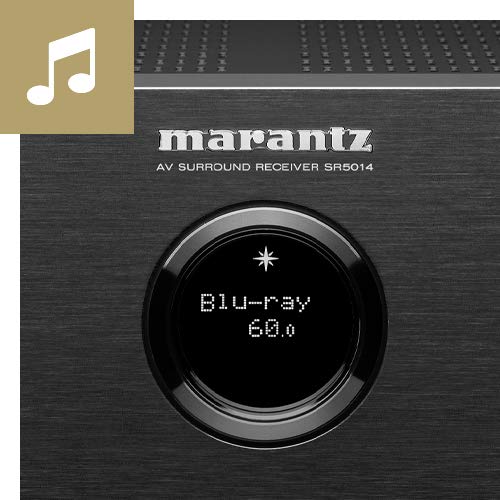
Image: Close-up of the Marantz SR5014's front panel display and controls, highlighting the input selection and volume knobs.
- Pizteko botoia: Unitatea pizten edo itzaltzen du.
- Pantaila: Shows current input, volume level, and other status information.
- Sarrera hautatzailea: Rotates to select different audio/video sources.
- Bolumen-eskulekua: Bolumen nagusiaren maila doitzen du.
- TELEFONOAK Jack: Entzungailuak konektatzeko.
- USB ataka: USB biltegiratze gailuak konektatzeko.
- HDMI Sarrera: Front HDMI input for quick connection of devices like cameras or game consoles.
2.3 Atzeko panelaren konexioak
The rear panel houses all the necessary connections for your home theater system, including HDMI, audio, and speaker terminals.
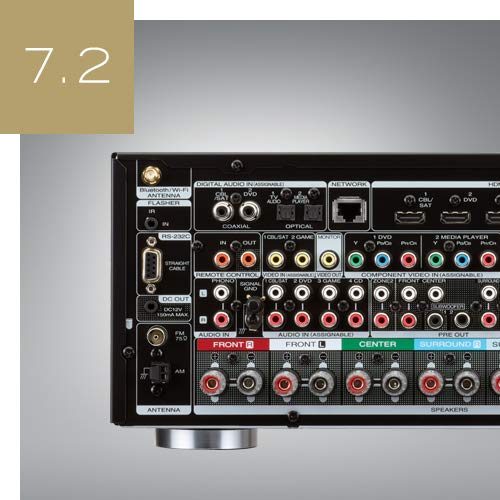
Irudia: Atzealdea view of the Marantz SR5014 AV Receiver, showing the extensive array of input and output ports, including HDMI, speaker terminals, and network connections.
- HDMI sarrerak/irteerak: Connect your video sources (Blu-ray player, game console) and display (TV, projector).
- Hizlariaren terminalak: Connect your speakers (Front, Center, Surround, Surround Back/Height).
- Network Port (Ethernet): Kable bidezko sare konexiorako.
- Wi-Fi/Bluetooth Antennas: For wireless network and Bluetooth connectivity.
- Audio sarrera digitalak (optikoak/koaxialak): Audio iturri digitalak konektatzeko.
- Audio-sarrera analogikoak: Audio iturri analogikoak konektatzeko.
- Aurre-irteerak: Kanpoko energia konektatzeko amplifiers or powered subwoofers.
3. Konfigurazio gida
3.1 Desontziratzea eta kokatzea
Carefully remove the receiver from its packaging. Place the receiver on a sturdy, level surface with adequate ventilation around it. Ensure there is at least 10 cm (4 inches) of clear space above the unit and 5 cm (2 inches) on the sides and rear for proper heat dissipation.
3.2 Bozgorailu konexioak
The SR5014 supports 7.2 channel configurations. Connect your speakers to the corresponding terminals on the rear panel. Ensure correct polarity (+ to + and - to -) for all speakers.
- Aurreko bozgorailuak (E/E): Connect to the FRONT L and FRONT R terminals.
- Zentroko Hizlaria: Konektatu CENTER terminalera.
- Inguruko bozgorailuak (E/E): Connect to the SURROUND L and SURROUND R terminals.
- Surround Back / Height Speakers (L/R): Connect to the SURROUND BACK L and SURROUND BACK R terminals. These can be configured as Surround Back or Height speakers in the setup menu.
- Subwooferak: Connect powered subwoofers to the SUBWOOFER 1 and SUBWOOFER 2 PRE OUT jacks using an RCA cable.
3.3 HDMI konexioak
Connect your video sources and display using high-speed HDMI cables.
- Connect your TV or projector to the HDMI MONITOR OUT port. For eARC functionality, ensure your TV's HDMI port also supports eARC and connect to the designated eARC HDMI output on the receiver.
- Connect your Blu-ray player, game console, or other HDMI devices to any of the available HDMI Sarrera portuak.
3.4 Sareko konexioa
A network connection is required for HEOS features, firmware updates, and internet radio.
- Kable bidezko konexioa: Connect an Ethernet cable from your router to the NETWORK port on the receiver.
- Haririk gabeko konexioa: Attach the two Wi-Fi/Bluetooth antennas to the rear panel. During initial setup, you will be prompted to connect to your wireless network.
3.5 Initial Setup and Audyssey Calibration
After connecting all components, power on the receiver and follow the on-screen setup assistant. This assistant will guide you through speaker configuration, network setup, and input assignments.
The included Audyssey MultEQ XT microphone should be used to perform room acoustic correction. Place the microphone at various listening positions as prompted by the on-screen guide. This process optimizes the sound for your specific room and speaker setup.
4. Funtzionamendu-argibideak
4.1 Oinarrizko funtzionamendua
- Piztu/Itzali: Sakatu aurrealdeko panelean edo urrutiko agintean dagoen pizteko botoia.
- Sarrera hautatzea: Use the INPUT SELECTOR knob on the front panel or the dedicated input buttons on the remote control to switch between connected sources (e.g., Blu-ray, TV Audio, Game).
- Bolumenaren doikuntza: Use the VOLUME knob on the front panel or the VOLUME +/- buttons on the remote control.
- Ezkutatu: Press the MUTE button on the remote control to temporarily silence the audio.
4.2 HEOS Built-in
The SR5014 features HEOS Built-in technology, allowing you to stream music from various online services, network storage, and control multi-room audio.
- Deskargatu HEOS aplikazioa on your smartphone or tablet (available for iOS and Android).
- Open the app and follow the instructions to add your SR5014 to your HEOS system.
- Browse and play music from streaming services (e.g., Spotify, Amazon Music), internet radio, or your local music library.
- Group multiple HEOS-enabled devices to play the same music in perfect synchronization across different rooms.
4.3 Audio moduak
The receiver automatically detects the incoming audio format and applies the appropriate decoding. You can also manually select various sound modes.
- Auto: Automatically selects the optimal sound mode based on the input signal.
- Filma: Optimized for movie soundtracks (e.g., Dolby Atmos, DTS:X, Dolby Surround, DTS Neural:X).
- Musika: Optimized for music playback (e.g., Stereo, Multi-Channel Stereo).
- Jokoa: Jokoetarako audioa optimizatua.
- Pure Direct: Bypasses all processing for the purest audio signal.
5. Mantentzea
5.1 Garbiketa
To maintain the appearance of your receiver, wipe the cabinet and front panel with a soft, dry cloth. Do not use abrasive cleaners, waxes, or solvents as they may damage the finish.
5.2 Firmware eguneraketak
Marantz periodically releases firmware updates to improve performance and add new features. Ensure your receiver is connected to the internet to receive these updates.
- You will typically be notified on the display when an update is available.
- Follow the on-screen prompts to initiate the update.
- Do not power off the unit during a firmware update, horrek kalteak eragin ditzakeelako.
6. Arazoak
If you experience issues with your Marantz SR5014, refer to the following common problems and solutions.
| Arazoa | Kausa posiblea | Irtenbidea |
|---|---|---|
| Botererik ez | Kable elektrikoa deskonektatuta; Energia itzalitatage | Check power cord connection; Check household circuit breaker. |
| Soinurik ez | Incorrect input selected; Volume too low; Mute engaged; Speaker wires disconnected | Select correct input; Increase volume; Disable mute; Check speaker connections. |
| Ez dago bideorik | Incorrect input selected; HDMI cable issue; TV input not set correctly | Select correct input; Check HDMI cable connections; Ensure TV is on correct HDMI input. |
| Sareko konexioa huts egiten du | Incorrect network settings; Router issue; Wi-Fi signal weak | Re-run network setup; Restart router; Ensure Wi-Fi antennas are properly attached. |
| Urruneko kontrola ez dabil | Bateriak agortuta; Oztopoa urrutiko agintearen eta hargailuaren artean | Ordeztu bateriak; kendu oztopo guztiak. |
If the problem persists after trying these solutions, please contact Marantz customer support.
7. Zehaztapenak
| Ezaugarri | Xehetasuna |
|---|---|
| Marka | Marantz |
| Eredua | SR5014 / N1B |
| Kanalak | 7.2 |
| Irteera Potentzia | 180 Watts (Speakers Maximum Output Power) |
| Produktuaren neurriak (LxWxH) | 44 x 33.8 x 16.11 cm |
| Elementuaren pisua | 10 kg |
| Konektibitate Teknologia | HDMI, Ethernet, USB |
| HDMI atakak | Multiple (Total HDMI Ports: 1 is listed, but typically more for AV Receiver) |
| Ezaugarri bereziak | HEOS integratua |
| Gailu bateragarriak | Hizlaria |
| Audio irteera modua | Estereoa, Inguratzailea |
| Inguruko soinu-kanalaren konfigurazioa | 5.1 (Note: Product title states 7.2CH, this may be a default or minimum configuration) |
| Media Format Support | 4K |
| Urrunekoa barne | Bai |
8. Bermea eta Laguntza
Marantz products are designed for reliability and performance. For information regarding your product's warranty, please refer to the warranty card included in the product packaging or visit the official Marantz webzure eskualderako gunea.
Laguntza teknikoa, eskuliburu honetatik haratagoko arazoak konpontzeko laguntza edo zerbitzu-kontsultak egiteko, jarri harremanetan Marantz bezeroarentzako arreta-zerbitzuarekin bere zerbitzu ofizialaren bidez. webgune edo zerbitzu-zentro baimenduak.
Informazio gehiago eta laguntza baliabideak hemen aurki ditzakezu: www.marantz.com


