1. Sarrera
This manual provides detailed instructions for the installation, operation, and maintenance of your TMEZON 8-Channel 3MP Wireless Security Camera System. Please read this manual thoroughly before using the product to ensure proper setup and functionality. Keep this manual for future reference.

Image 1.1: TMEZON 8-Channel NVR and 4 Wireless Cameras
2. Paketearen edukia
Egiaztatu behean zerrendatutako elementu guztiak zure paketean sartuta daudela:
- 1 x 8-Channel Wireless NVR (Network Video Recorder)
- 4 x 3MP Wireless IP Cameras
- 1 x 1TB Hard Disk Drive (pre-installed in NVR)
- 1 x NVR energia egokitzailea
- 4 x Kamera-egokitzaile
- 1 x USB sagua
- 1 x Ethernet kablea
- 1 x Erabiltzailearen eskuliburua (dokumentu hau)
3. Segurtasun informazioa
Mesedez, kontuan hartu segurtasun neurri hauek:
- Use only the power adapters provided with the system.
- Ensure proper ventilation for the NVR to prevent overheating.
- Do not expose the NVR or cameras to extreme temperatures, humidity, or dust.
- Avoid placing the NVR near strong magnetic fields.
- Installation should be performed by qualified personnel if working at heights or with electrical wiring.
- The cameras are IP66 weather-resistant, suitable for outdoor use, but avoid direct submersion in water.
4. Sistemaren konfigurazioa
4.1 NVR konexioa
- Konektatu USB sagua NVR-ko USB ataka batera.
- Connect a monitor or TV to the NVR using an HDMI or VGA cable.
- Connect the NVR to your router using the provided Ethernet cable for internet access and remote viewing.
- Connect the NVR power adapter to the NVR and then to a power outlet. The NVR will power on automatically.

Image 4.1: NVR Rear Panel Connections
4.2 Kameraren instalazioa eta parekatzea
The cameras are designed for wireless connection and auto-pair with the NVR. Ensure cameras are within range of the NVR for optimal signal strength.
- Mount the cameras in desired locations, ensuring a clear line of sight to the area you wish to monitor.
- Connect each camera to its respective power adapter and plug into a power outlet.
- The cameras will automatically attempt to connect to the NVR. Once connected, their video feeds will appear on the monitor.

Image 4.2: Wireless Connection Range Guidelines
4.3 Mobile App Setup (Remote Access)
To access your system remotely, download the free mobile application:
- Deskargatu IP Pro aplikaziotik App Store (iOS gailuetarako) edo Google Play (Android gailuetarako).
- Erregistratu kontu bat aplikazioaren barruan.
- Follow the in-app instructions to add your NVR device. This typically involves scanning a QR code on the NVR or manually entering its ID.

Image 4.3: Remote Access Setup via Mobile App
5. Sistemaren funtzionamendua
5.1 Bizi View
After successful setup, the NVR will display live video feeds from all connected cameras on the monitor. You can switch between single-camera view eta kamera anitzeko sareta view using the NVR interface.
5.2 Grabaketa
The system supports continuous recording, scheduled recording, and motion-triggered recording. Access the NVR's main menu (right-click with mouse) to configure recording settings. The pre-installed 1TB HDD provides ample biltegiratze.
5.3 Erreprodukzioa
Berrizview foo grabatuatage, navigate to the 'Playback' option in the NVR menu. Select the date and time to view recordings. You can also access playback via the mobile app.
5.4 Audioaren monitorizazioa
Each camera is equipped with a built-in microphone, allowing for audio recording and live audio monitoring. Ensure audio settings are enabled in the NVR or app interface to utilize this feature.

Image 5.1: Camera with Audio Recording Capability
5.5 Gaueko ikusmena
The cameras feature infrared night vision, providing clear black and white video footage in low-light or no-light conditions.
5.6 Email Alerts
Configure email alerts in the NVR settings to receive notifications on your mobile device or email address when motion is detected. This feature requires the NVR to be connected to the internet.

Image 5.2: Instant Email Alert Notification
6. Mantentzea
6.1 Garbiketa
Regularly clean the camera lenses with a soft, dry cloth to ensure clear image quality. Do not use harsh chemicals or abrasive materials.
6.2 Firmware eguneraketak
Aldian-aldian egiaztatu fabrikatzailearen website for firmware updates for your NVR and cameras. Updating firmware can improve performance and add new features. Follow the instructions provided with the update carefully.
6.3 Disko gogorraren kudeaketa
The 1TB hard drive will automatically overwrite the oldest recordings when full. You can configure recording retention settings in the NVR menu.
7. Arazoak
| Arazoa | Kausa posiblea | Irtenbidea |
|---|---|---|
| Ez dago irudirik monitorean | NVR not powered on; monitor not connected; camera not powered or paired. | Check NVR power, monitor cable, camera power, and ensure cameras are paired. |
| Grabaziorik ez | Recording settings incorrect; HDD full or faulty. | Verify recording schedule and settings. Check HDD status in NVR menu. |
| Urruneko sarbidea ez dabil | NVR not connected to internet; incorrect app settings; firewall issues. | Ensure NVR is connected to router. Check app device ID and network settings. Consult router manual for port forwarding if necessary. |
| Bideoaren kalitate eskasa | Dirty lens; poor camera placement; wireless interference. | Clean camera lens. Adjust camera position. Reduce distance between camera and NVR or minimize obstacles. |
8. Zehaztapenak
- Eredua: HM-WF8413BA-01/EU
- Marka: TMEZON
- NVR Channels: 8-Kanal
- Kameraren bereizmena: 3MP (supports 1080p, 960p video capture)
- Biltegiratze Edukiera: 1 TB HDD (pre-installed)
- Konektibitatea: Haririk gabekoa (Wi-Fi), Kable bidezkoa (Ethernet)
- Ezaugarri bereziak: App Control, Weather-resistant (IP66), Night Vision, Audio Recording
- Energia iturria: Cable (AC adapters included)
- Operating System (App): Android, iOS
- Produktuaren neurriak: 39 x 18 x 30 cm
- Produktuaren pisua: 3.77 kg

Image 8.1: Camera Application Versatility
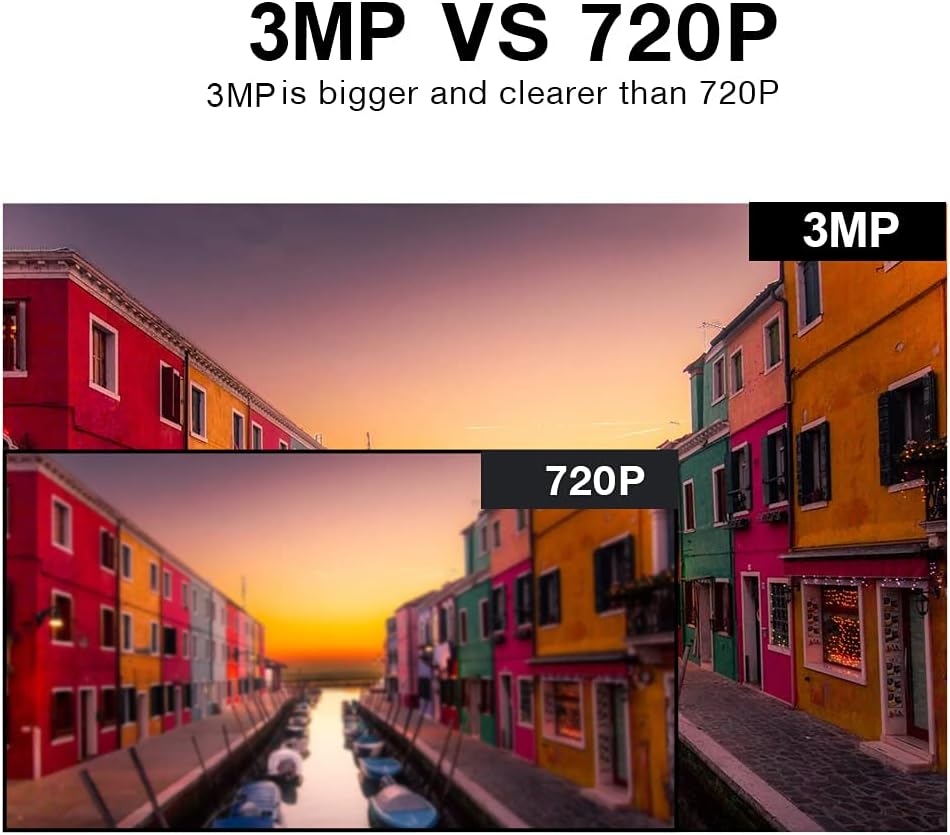
Image 8.2: 3MP vs 720P Resolution Comparison
9. Bermea eta Laguntza
TMEZON products typically come with a limited warranty. Please refer to the warranty card included with your product or visit the official TMEZON webwebgunean bermearen baldintza zehatzak ikusteko.
Laguntza teknikoa, arazoak konpontzeko laguntza edo berme erreklamazioak jasotzeko, jarri harremanetan TMEZON bezeroarentzako arreta-zerbitzuarekin, haien zerbitzu ofizialaren bidez. website or the contact information provided in your product packaging. When contacting support, please have your product model number (HM-WF8413BA-01/EU) and purchase details ready.


