1. Sarrera
Thank you for choosing the Kaidi KD-750 Bluetooth Headphones. This manual provides essential information for the proper setup, operation, and maintenance of your device. Please read it thoroughly before use to ensure optimal performance and longevity of your headphones.
2. Paketearen edukia
Egiaztatu elementu guztiak zure paketean daudela:
- 1 x Kaidi KD-750 Bluetooth Headphones
- 1 x USB kargatzeko kablea
- 1 x Reinforced 3.5mm Audio Cable with Microphone (P2 Cable)
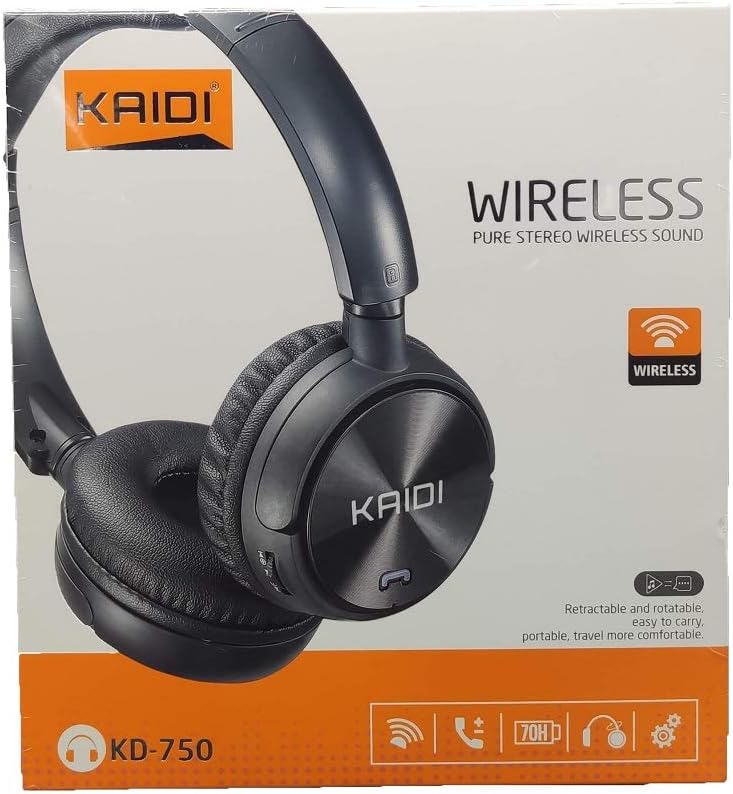
Irudia: Aurrealdea view of the Kaidi KD-750 retail packaging, showing the headphones and branding.
3. Produktua amaitu daview
Familiarize yourself with the various parts and controls of your Kaidi KD-750 headphones.

Irudia: Aurrealdea view of the Kaidi KD-750 Bluetooth Headphones, showcasing the earcups with Kaidi logo and the adjustable headband.
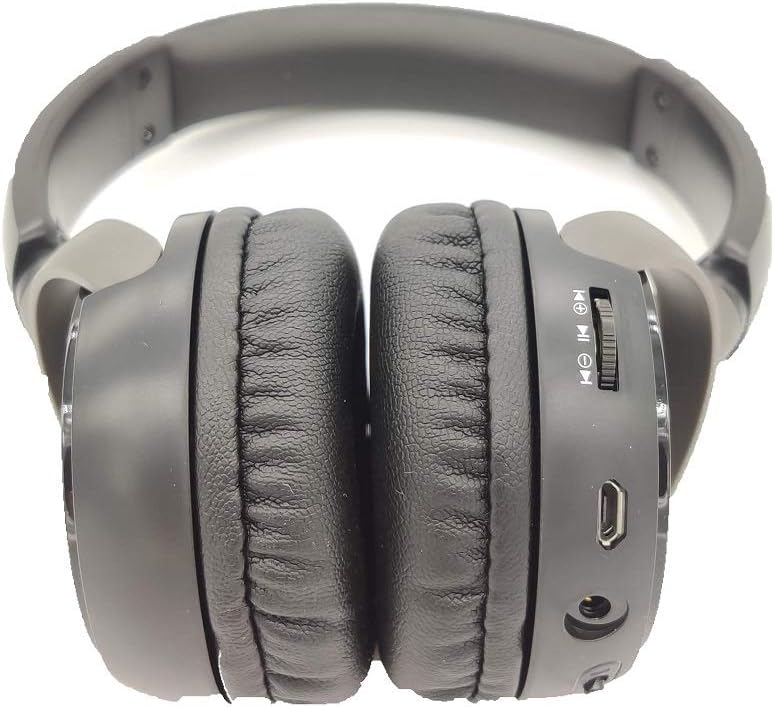
Irudia: Albokoa view of the Kaidi KD-750 Bluetooth Headphones, highlighting the control buttons, charging port, and audio jack on the earcup.

Image: Back of the Kaidi KD-750 retail box, featuring a diagram of the headphone controls and key product features.
3.1. Kontrolak eta atakak
- Pizteko botoia / Funtzio anitzeko botoia: Piztu/Itzali, Erreproduzitu/Pausatu, Deiari erantzun/Amaitu.
- Bolumena igotzeko / Hurrengo abestia botoia: Sakatu labur bolumena igotzeko, sakatu luze hurrengo abestia agertzeko.
- Bolumena jaisteko / Aurreko abestia botoia: Sakatu labur bolumena jaisteko, sakatu luze aurreko abestia agertzeko.
- Modu botoia (M): Switch between Bluetooth, FM Radio, and SD Card modes.
- Mikro USB kargatzeko ataka: Entzungailuak kargatzeko.
- 3.5 mm AUX sarrera: Kable bidezko konexiorako, barneko audio kablea erabiliz.
- Mikro SD txartelaren zirrikitua: Mikro SD txarteletik musika zuzenean erreproduzitzeko.
- Mikrofonoa: Esku libreko deiak egiteko.
4. Konfigurazioa
4.1. Entzungailuak kargatzea
Lehenengo aldiz erabili aurretik, kargatu guztiz entzungailuak.
- Konektatu kargatzeko kablearen mikro USB muturra entzungailuen kargatzeko atakara.
- Konektatu kargatzeko kablearen USB-A muturra USB elikatze-egokitzaile batera (ez dago barne) edo ordenagailuaren USB ataka batera.
- The LED indicator will illuminate (usually red) during charging.
- Once fully charged (approximately 2 hours), the LED indicator will change color or turn off (refer to specific LED behavior in the specifications).
Oharra: Bateriaren iraupena 5 ordukoa da, gutxi gorabehera, guztiz kargatuta.
4.2. Bluetooth parekatzea
Parekatu entzungailuak Bluetooth gaitutako gailu batekin.
- Ziurtatu entzungailuak itzalita daudela.
- Press and hold the Power Button for approximately 3-5 seconds until the LED indicator flashes blue and red alternately, indicating pairing mode.
- Zure gailuan (telefono adimenduna, tableta, ordenagailua), gaitu Bluetooth eta bilatu eskuragarri dauden gailuak.
- Select "KD-750" from the list of found devices.
- Once paired, the LED indicator will typically flash blue slowly or remain solid blue.
- Pasahitza beharrezkoa bada, idatzi "0000".
The effective Bluetooth range is approximately 10 meters (33 feet).
5. Funtzionamendu-argibideak
5.1. Piztu/Itzali
- Piztu: Press and hold the Power Button for 2-3 seconds until the LED indicator lights up.
- Itzali: Press and hold the Power Button for 3-4 seconds until the LED indicator turns off.
5.2. Music Playback (Bluetooth Mode)
- Erreproduzitu/Pausatu: Sakatu labur pizteko botoia.
- Hurrengo ibilbidea: Sakatu luze bolumena igotzeko botoia.
- Aurreko pista: Sakatu luze Bolumena Jaisteko botoia.
- Bolumena igo: Sakatu labur bolumena igotzeko botoia.
- Bolumena jaitsi: Sakatu labur Bolumena Jaisteko botoia.
5.3. Telefono-deiak
- Erantzun deia: Short press the Power Button when an incoming call rings.
- Amaitu deia: Sakatu labur pizteko botoia dei batean zehar.
- Deia baztertu: Long press the Power Button when an incoming call rings.
- Berriz markatu azken zenbakia: Sakatu bi aldiz pizteko botoia.
5.4. Mode Switching (FM Radio / SD Card / AUX)
Sakatu Modu (M) botoia to cycle through available modes: Bluetooth, FM Radio, and SD Card playback.
5.4.1. FM Irrati modua
- Switch to FM mode using the Mode (M) Button.
- Sakatu luze pizteko botoia eskuragarri dauden FM irratiak automatikoki eskaneatu eta gordetzeko.
- Short press the Volume Up/Down buttons to adjust volume.
- Long press the Volume Up/Down buttons to switch between saved stations.
5.4.2. Mikro SD txartelaren erreprodukzioa
- Insert a Micro SD card (with MP3 files) into the SD card slot.
- Switch to SD Card mode using the Mode (M) Button. The headphones will automatically begin playing music from the card.
- Use the Play/Pause, Volume Up/Down, and Next/Previous Track controls as in Bluetooth mode.

Irudia: Gertuko planoa view of the Micro SD card slot on the Kaidi KD-750 headphones.
5.4.3. AUX Wired Mode
- Connect one end of the included 3.5mm audio cable to the AUX input on the headphones.
- Konektatu beste muturra zure gailuaren 3.5 mm-ko audio irteerara.
- Entzungailuak automatikoki aldatuko dira AUX modura.
- In AUX mode, controls on the headphones (volume, track control) may not function; use your connected device for control.
6. Mantentzea eta Zainketa
- Garbitu entzungailuak oihal leun eta lehor batekin. Ez erabili garbitzaile edo disolbatzaile urratzailerik.
- Saihestu entzungailuak muturreko tenperaturen, hezetasunaren edo eguzki-argiaren eraginpean jartzea.
- Ez sartu entzungailuak uretan edo beste likidoren batean.
- Gorde entzungailuak leku fresko eta lehor batean erabiltzen ez dituzunean.
- Bateriaren egoera mantentzeko, denbora luzez erabili ez badira ere, entzungailuak aldizka kargatu.
7. Arazoak
7.1. Entzungailuak ez dira pizten.
Irtenbidea: The battery may be depleted. Connect the headphones to a power source using the USB charging cable and allow them to charge for at least 30 minutes before attempting to power on again.
7.2. Ezin da Bluetooth gailu batekin parekatu.
- 1. irtenbidea: Ensure the headphones are in pairing mode (LED flashing blue and red alternately).
- 2. irtenbidea: Make sure Bluetooth is enabled on your device and it is within 10 meters of the headphones.
- 3. irtenbidea: Itzali Bluetooth-a zure gailuan, piztu berriro eta saiatu berriro bilatzen.
- 4. irtenbidea: If previously paired, try "forgetting" or "unpairing" the headphones from your device's Bluetooth list and then re-pairing.
7.3. Soinurik ez edo bolumen baxua.
- 1. irtenbidea: Egiaztatu entzungailuen eta konektatutako gailuaren bolumen-mailak.
- 2. irtenbidea: Ensure the headphones are properly connected via Bluetooth or the 3.5mm AUX cable.
- 3. irtenbidea: AUX modua erabiltzen baduzu, ziurtatu kablea entzungailuetan eta audio iturrian guztiz sartuta dagoela.
7.4. FM radio reception is poor.
Irtenbidea: Move to an open area away from obstructions or electronic interference. The 3.5mm audio cable can sometimes act as an antenna; try connecting it even if not using AUX mode for improved reception.
8. Zehaztapenak
| Bluetooth bertsioa: | v4.2 |
| Onartutako protokoloak: | AVRCP1.3, A2DP1.0, HFP1.5, HSP1.0 |
| Eraginkortasun gama: | 10 metro (33 oin) |
| Lan-maiztasuna: | 2.402GHz - 2.480GHz |
| Bateria mota: | Built-in 3.7V 300mAh Rechargeable Lithium Battery |
| Kargatzen Voltage: | Korronte zuzena 4.2 V - 5.5 V |
| Kargatzeko denbora: | 2 ordu gutxi gorabehera |
| Bateriaren iraupena: | Gutxi gorabehera 5 ordu (erreprodukzioa) |
| Bozgorailuaren inpedantzia: | 32 ohmio |
| Zarata kontrola: | Zarata Ezeztapen Pasiboa |
| Konektibitate Teknologia: | Bluetootha, 3.5 mm-ko konektua |
| Gailu bateragarriak: | Any device supporting Bluetooth connectivity |
| Produktuaren pisua: | 190 g |
| Kolorea: | Beltza |
9. Bermea eta Laguntza
The Kaidi KD-750 Bluetooth Headphones come with a standard manufacturer's warranty against defects in materials and workmanship. Please refer to the warranty card included with your purchase for specific terms and conditions, including the warranty period.
For technical support, troubleshooting assistance, or warranty claims, please contact your retailer or the official Kaidi customer service. Contact information can typically be found on the product packaging or the official Kaidi webgunea.
Gorde erosketaren egiaztagiria bermearen ondorioetarako.


