1. Sarrera
The Roccat Vulcan 122 is a high-performance mechanical gaming keyboard designed for precision and durability. It features Roccat's unique Titan switches, advanced AIMO RGB lighting, and a robust aluminum construction. This manual provides detailed instructions for setting up, operating, maintaining, and troubleshooting your keyboard.

Image: The Roccat Vulcan 122 keyboard shown with a Roccat mouse and headset, demonstrating its vivid, dynamic lighting synergy with AIMO.
Ezaugarri nagusiak:
- Unique design with lowered keycaps and reduced reaction time.
- RGB lighting with configurable LED effects and adjustable AIMO effects.
- High-quality and resistant design with robust materials and an anodized aluminum surface.
- Advanced anti-ghosting with N-Key Rollover (NKRO).
- Programmable macro keys and ROCCAT Easy-Shift[+].
2. Konfigurazioa
2.1 Teklatua konektatzea
To connect your Roccat Vulcan 122 keyboard:
- Unpack the keyboard and its accessories.
- Plug the USB connector from the keyboard into an available USB port on your computer.
- Sistema eragileak automatikoki detektatu eta instalatuko ditu beharrezko kontrolatzaileak.
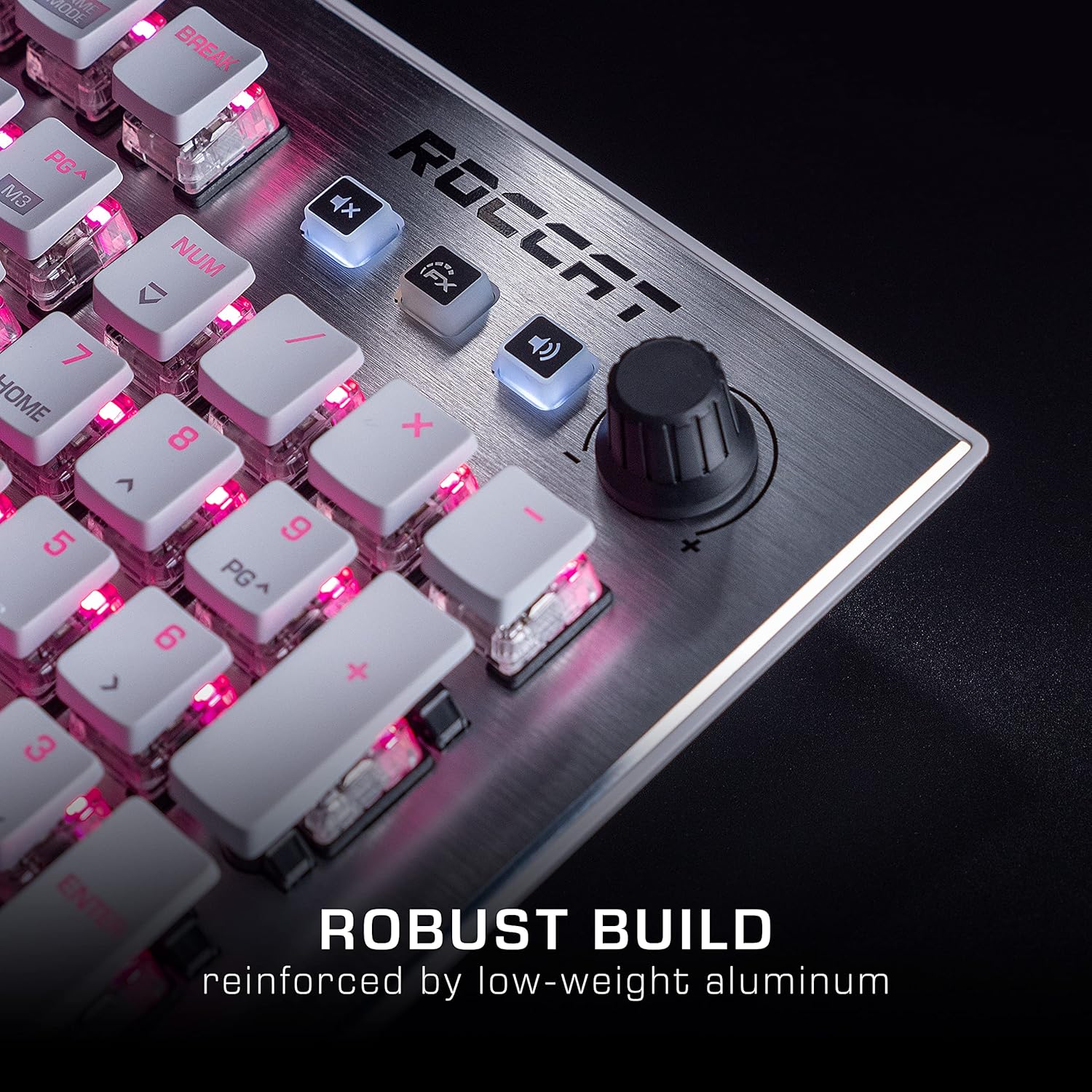
Image: The Roccat Vulcan 122 keyboard shown with its detachable wrist rest, ready for connection.
2.2 Softwarearen instalazioa (ROCCAT Swarm)
For full functionality and customization, install the ROCCAT Swarm software:
- Bisitatu ROCCAT ofiziala webgunea (www.roccat.com) and navigate to the support section.
- Download the latest version of the ROCCAT Swarm software for your operating system.
- Exekutatu instalatzailea eta jarraitu pantailako argibideei.
- After installation, launch ROCCAT Swarm to configure your keyboard settings, lighting, and macros.
3. Teklatua erabiltzea
3.1 Standard Key Functions
The Vulcan 122 functions as a standard QWERTY keyboard. All alphanumeric keys, function keys (F1-F12), navigation keys, and the numeric keypad operate as expected.
3.2 Media Controls
The keyboard features dedicated media controls for convenient audio management.
- Bolumen-eskulekua: Located in the upper right corner, rotate to adjust system volume.
- Mututu botoia: Sakatu audioa isilarazteko/aktibatzeko.
- FX botoia: Cycles through lighting effects or other programmable functions.

Irudia: Gertutik view of the mixer-style media controls on the Roccat Vulcan 122, including the volume knob and dedicated function keys.
3.3 RGB Lighting Customization (AIMO)
The Vulcan 122 features advanced RGB lighting with Roccat's AIMO intelligent lighting system. Use the ROCCAT Swarm software to:
- Select from various pre-set lighting effects.
- Customize individual key illumination.
- Adjust brightness and speed of effects.
- Synchronize lighting with other AIMO-compatible devices.
3.4 Programmable Macro Keys and Easy-Shift[+]
The keyboard includes programmable macro keys and the Easy-Shift[+] function, allowing you to assign secondary functions to keys.
- Use the ROCCAT Swarm software to record and assign macros to designated keys.
- Easy-Shift[+] allows you to double the number of assignable functions by holding down the Easy-Shift[+] key (usually Caps Lock by default, configurable in Swarm) and pressing another key.
3.5 Anti-Ghosting with NKRO
The Vulcan 122 features advanced anti-ghosting technology with N-Key Rollover (NKRO), ensuring that every key press is registered accurately, even when multiple keys are pressed simultaneously.

Image: A hand demonstrating typing on the Roccat Vulcan 122 keyboard, emphasizing the ergonomic design of the keys for comfortable use.
4. Mantentzea
4.1 Teklatua garbitzea
To ensure the longevity and optimal performance of your Vulcan 122 keyboard, regular cleaning is recommended.
- Deskonektatu teklatua ordenagailutik garbitu aurretik.
- Erabili lipurrik gabeko zapi leun bat dampened with water or a mild cleaning solution to wipe the keycaps and surface. Avoid harsh chemicals.
- For dust and debris between keys, use compressed air. The raised keycap design makes cleaning easier.
- Ensure the keyboard is completely dry before reconnecting it.

Image: A close-up of the Roccat Vulcan 122 keyboard keys, illustrating their design which facilitates easy cleaning and resistance to dust and liquids.
5. Arazoak
If you encounter issues with your Roccat Vulcan 122 keyboard, refer to the following common problems and solutions:
- Teklatuak ez du erantzuten:
- Ziurtatu USB kablea ondo konektatuta dagoela bai teklatura bai ordenagailura.
- Saiatu teklatua beste USB ataka batera konektatzen.
- Berrabiarazi ordenagailua.
- Check if the keyboard is disabled in your operating system's device manager.
- RGB argiztapena ez dabil edo ez dabil ondo:
- Ensure the ROCCAT Swarm software is installed and up to date.
- Egiaztatu argiztapen ezarpenak Swarm softwarean.
- Perform a firmware update for the keyboard via Swarm.
- Giltzak ez dira erregistratzen edo mamuak agertzen dira:
- Clean the affected keys as described in the Maintenance section.
- Ensure the keyboard's firmware is up to date.
- Probatu teklatua beste ordenagailu batean sistemaren arazo espezifikoak baztertzeko.
- ROCCAT Swarm software not detecting keyboard:
- Ziurtatu teklatua behar bezala konektatuta dagoela.
- Restart the Swarm software and your computer.
- Berriro instalatu ROCCAT Swarm softwarea.
- Check for any conflicting software or drivers.
6. Zehaztapenak
| Ezaugarri | Xehetasuna |
|---|---|
| Marka | ROCCAT |
| Ereduaren izena | Vulkano 122 |
| Modelo zenbakia | ROC-12-940-BN |
| Teklatuaren deskribapena | Mekanikoa |
| Aldatu mota | Ukimenezkoa |
| Materiala | Aluminioa |
| Ezaugarri bereziak | Atzeko argiztapena |
| Gailu bateragarriak | Laptop (PC) |
| Sistema eragilearen euskarria | Windows 10, Windows 7, Windows 8 |
| Produktuaren neurriak | 46.2 x 23.5 x 3.2 cm |
| Elementuaren pisua | 1.15 kg |

Irudia: Leherketa bat view diagram illustrating the components of a Roccat Titan Tactile mechanical switch, highlighting its design for swift and precise response.
7. Bermea eta Laguntza
7.1 Bermearen informazioa
Your Roccat Vulcan 122 keyboard is covered by a manufacturer's warranty. The specific terms and duration of the warranty may vary by region and retailer. Please retain your proof of purchase for warranty claims. For detailed warranty information, refer to the warranty card included with your product or visit the official ROCCAT webgunea.
7.2 Laguntza Teknikoa
For technical assistance, driver updates, or further inquiries, please visit the official ROCCAT support page:
Maiz egiten diren galderak, arazoak konpontzeko gidak eta bezeroarentzako arreta-zerbitzuko harremanetarako informazioa aurki ditzakezu haien webgunean. webgunea.


