1. Sarrera
Thank you for choosing the Kaidi KD913 Wireless Stereo Headphone. This manual provides essential information for setting up, operating, and maintaining your new headphones. Please read it carefully before use to ensure optimal performance and longevity of the product.
2. Segurtasun informazioa
- Bolumen kontrola: Saihestu bolumen maila altuetan entzutea denbora luzez, entzumenaren kalteak saihesteko.
- Uraren esposizioa: Do not expose the headphones to water or moisture. This product is not waterproof.
- Bero-esposizioa: Keep the headphones away from extreme temperatures, direct sunlight, and heat sources.
- Garbiketa: Erabili zapi leun eta lehor bat garbitzeko. Ez erabili garbitzaile edo disolbatzaile urratzailerik.
- Desmihiztatu: Ez saiatu entzungailuak desmuntatzen edo aldatzen. Horrek bermea baliogabetuko du.
3. Paketearen edukia
Mesedez, egiaztatu paketea elementu hauek dituen:
- Kaidi KD913 Wireless Stereo Headphone
- USB kargatzeko kablea
- Erabiltzailearen eskuliburua
4. Produktua amaitu daview
Familiarize yourself with the components of your Kaidi KD913 headphones.
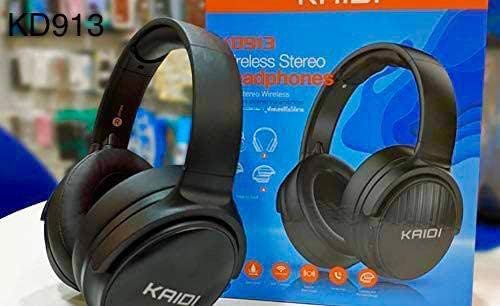
Image: Kaidi KD913 Headphone in a folded position, showcasinbere diseinu trinkoa dela eta.
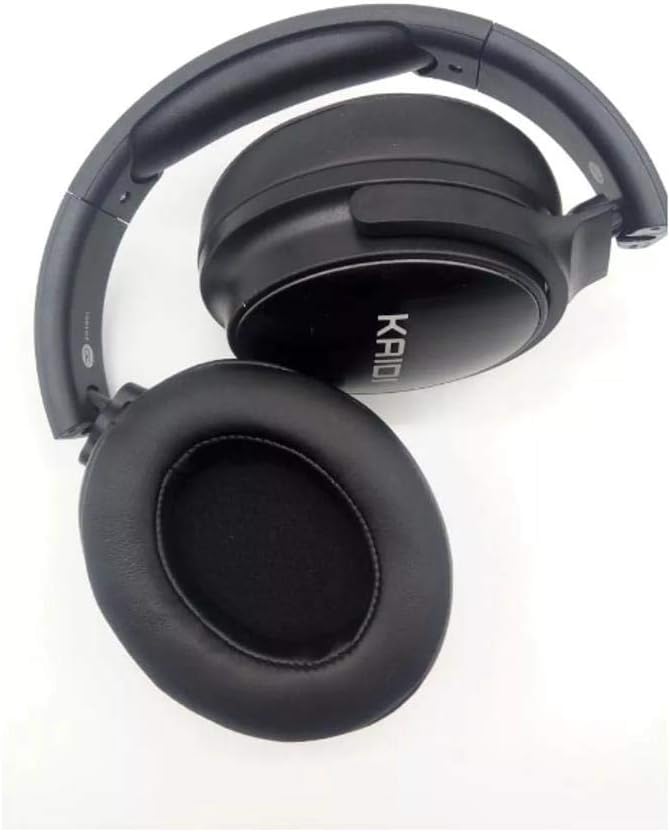
Irudia: Gertuko planoa view of a Kaidi KD913 Headphone earcup, highlighting the cushioning and 'KAIDI' branding.
Entzungailuen osagaiak:
- Pizteko/Funtzio anitzeko botoia: Pizteko/itzaltzeko, erreproduzitzeko/pausatzeko, deiak erantzuteko/amaitu ahal izateko erabiltzen da.
- Bolumena igotzeko/hurrengo abestiaren botoia: Increases volume, skips to the next track.
- Bolumena jaisteko/aurreko abestiaren botoia: Decreases volume, goes to the previous track.
- LED adierazlea: Pizte-egoera, kargatze-egoera eta parekatze-egoera erakusten ditu.
- Mikrofonoa: Esku libreko deiak egiteko.
- USB kargatzeko ataka: Kargatzeko kablea konektatzeko.
- AUX sarrerako ataka: Kable bidezko audio konexiorako.
5. Konfigurazioa
5.1. Entzungailuak kargatzea
- Connect the small end of the USB charging cable to the USB charging port on the headphone.
- Konektatu USB kargatzeko kablearen mutur handiena USB elikatze-egokitzaile batera (ez dago barne) edo ordenagailuaren USB ataka batera.
- LED adierazlea piztuko da (normalean gorriz) kargatzen ari den bitartean.
- Once fully charged, the LED indicator will change color (typically blue) or turn off. Disconnect the charging cable.
Note: For first-time use, fully charge the headphones before use.
5.2. Pairing with Devices (Bluetooth)
- Piztu: Press and hold the Power/Multi-function button for approximately 3-5 seconds until the LED indicator flashes blue and red alternately. This indicates the headphones are in pairing mode.
- Aktibatu Bluetootha: Zure gailuan (telefono adimenduna, tableta, ordenagailu eramangarria), gaitu Bluetooth-a.
- Bilatu Gailuak: Zure gailuaren Bluetooth ezarpenetan, bilatu eskuragarri dauden gailuak.
- Select 'KD913': From the list of found devices, select 'KD913'.
- Berretsi parekatzea: Once successfully paired, the LED indicator on the headphones will flash blue slowly, and you will hear an audible confirmation.
Note: If a password is required, enter '0000'. The headphones will automatically connect to the last paired device when powered on, if Bluetooth is enabled on the device.
6. Funtzionamendu-argibideak
6.1. Piztu/Itzali
- Piztu: Press and hold the Power/Multi-function button for 3 seconds. The LED indicator will flash blue.
- Itzali: Press and hold the Power/Multi-function button for 3 seconds. The LED indicator will turn off.
6.2. Musika erreproduzitzeko kontrolak
- Erreproduzitu/Pausatu: Sakatu behin pizteko/funtzio anitzeko botoia.
- Hurrengo ibilbidea: Sakatu eta eutsi bolumena igotzeko botoiari.
- Aurreko pista: Eduki sakatuta bolumena jaisteko botoia.
6.3. Deien kudeaketa
- Erantzun deia: Sakatu behin pizteko/funtzio anitzeko botoia.
- Amaitu deia: Press the Power/Multi-function button once during a call.
- Deia baztertu: Sakatu eta eutsi pizteko/funtzio anitzeko botoia 2 segundoz.
- Berriz markatu azken zenbakia: Sakatu bi aldiz pizteko/funtzio anitzeko botoia.
6.4. Bolumenaren kontrola
- Handitu bolumena: Sakatu labur bolumena igotzeko botoia.
- Murriztu bolumena: Sakatu labur Bolumena Jaisteko botoia.
6.5. Wired Mode (AUX-in)
To use the headphones in wired mode, connect a 3.5mm audio cable (not included) from your audio source to the AUX-in port on the headphones. The Bluetooth function will automatically disable when an AUX cable is connected.
7. Mantentzea
7.1. Garbiketa
Wipe the headphones with a soft, dry, lint-free cloth. Do not use liquid cleaners, sprays, or harsh chemicals.
7.2. Biltegiratzea
When not in use, store the headphones in a cool, dry place, away from direct sunlight and extreme temperatures. If storing for an extended period, ensure the headphones are partially charged to maintain battery health.
8. Arazoak
| Arazoa | Kausa posiblea | Irtenbidea |
|---|---|---|
| Entzungailuak ez dira pizten. | Bateria baxua. | Kargatu entzungailuak guztiz. |
| Ezin da gailuarekin parekatu. | Headphones not in pairing mode; Bluetooth not enabled on device; device too far. | Ziurtatu entzungailuak parekatze moduan daudela (gorri/urdin keinukari). Gaitu Bluetooth-a zure gailuan. Hurbildu gailua entzungailuetara. |
| Soinurik ez. | Bolumena baxuegia; entzungailuak ez daude konektatuta; audio irteera okerra hautatuta. | Igo entzungailuen eta gailuaren bolumena. Berriro parekatu entzungailuak. Egiaztatu gailuaren audio irteeraren ezarpenak. |
| Soinu kalitate txarra. | Interferentzia; gailua urrunegi; bateria gutxi. | Move closer to the paired device. Avoid strong electromagnetic interference. Charge the headphones. |
9. Zehaztapenak
- Marka: Kaidi
- Eredua: KD913
- Konektibitate Teknologia: Haririk gabekoa
- Haririk gabeko komunikazio teknologia: Bluetootha
- Entzungailuen forma-faktorea: Over-ear (Circumaurais)
- Belarrien kokapena: Over-ear (Circumaurais)
- Kolorea: Beltza
- Gailu bateragarriak: Cell phones, Notebooks, Tablets, Televisions
- Kablearen Ezaugarriak: Wireless (No cable)
10. Bermea eta Laguntza
Kaidi products are designed for reliability and performance. For warranty information or technical support, please refer to the warranty card included with your purchase or contact your local retailer or Kaidi customer service.


