1. Sarrera
Microsoft Surface Pro 7 2-in-1 gailu polifazetikoa da, hainbat lan eta bizimodu beharretara egokitzeko diseinatua. Ordenagailu eramangarri baten potentzia tableta baten malgutasunarekin konbinatzen du, produktibitatetik hasi eta sormen lanetaraino zeregin ugaritarako egokia bihurtuz. Eskuliburu honek zure Surface Pro 7 konfiguratzeko, erabiltzeko eta mantentzeko ezinbesteko informazioa eskaintzen du.
2. Zer dago kutxan
Microsoft Surface Pro 7-ren kaxa irekitzean, elementu hauek aurkituko dituzu:
- Microsoft Surface Pro 7 tableta
- Elikatze Hornidura
- Hasierako gida azkarra (QSG)
- Berme eta Betetze Gida (WACG)
Kontuan izan: Type Cover teklatua, Surface boligrafoa eta sagua bezalako osagarriak bereiz saltzen dira eta ez daude pakete estandarrean sartuta.

Irudia: Microsoft Surface Pro 7 tableta, elikatze-iturria eta aparte saltzen diren osagarrien leku-markak, hala nola Type Cover, Surface Pen eta sagua.
3. Produktua amaitu daview
Surface Pro 7-ak diseinu dotore eta ultra-mehea du, gutxi gorabehera 1.70 kilo pisatzen du, oso eramangarria bihurtuz. Bere euskarri integratuak hainbat modutan kokatzeko aukera ematen du.
3.1 Ezaugarri fisikoak eta atakak
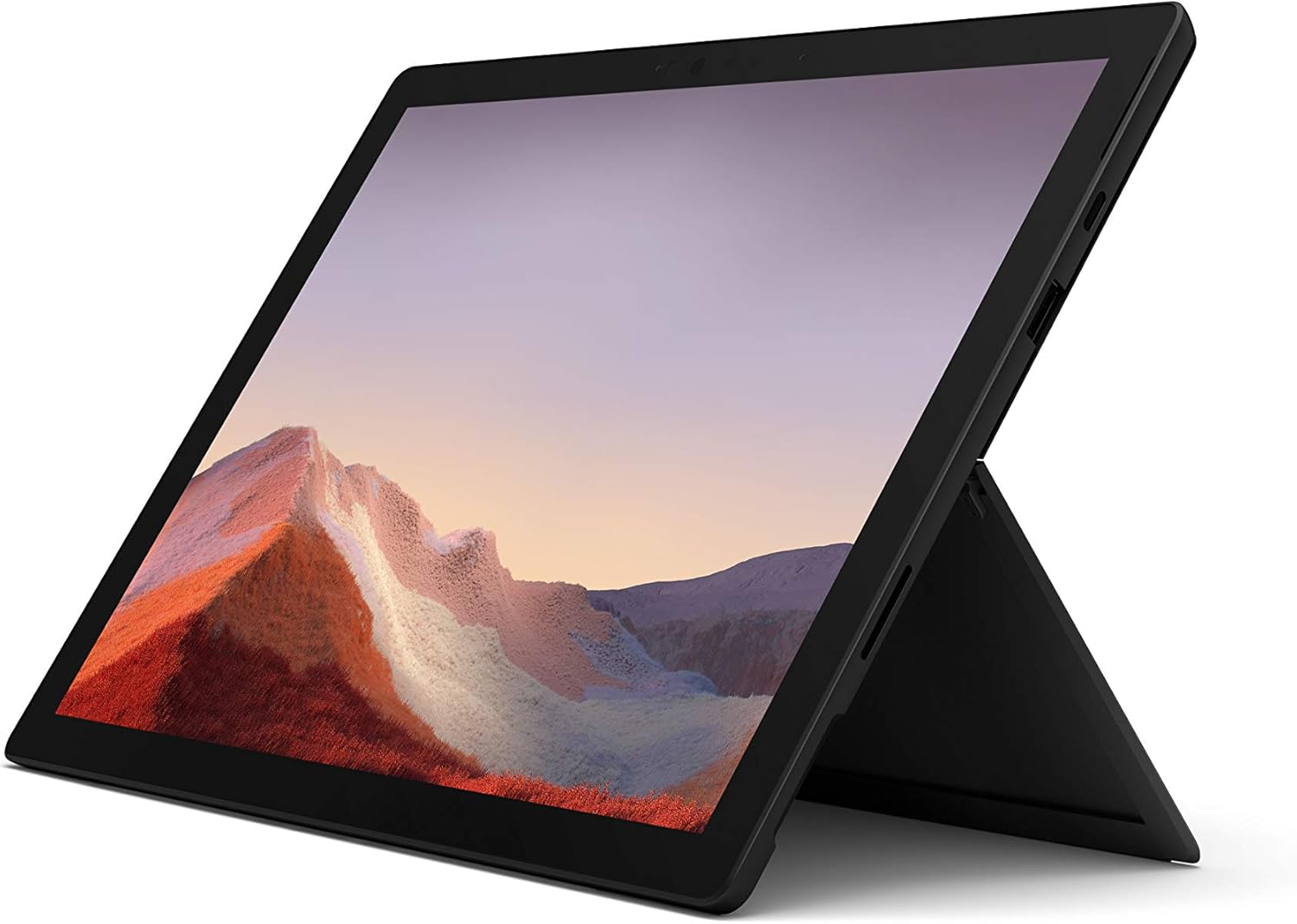
Irudia: Aurrealdea view Microsoft Surface Pro 7 zutik dagoen posizioan, erakustenasinbere pantaila eta euskarria.
- Pizteko botoia: Goiko ertzean kokatua.
- Bolumen-kulunkaria: Pizteko botoiaren ondoan.
- USB-C ataka: Datuak transferitzeko, bideo irteerarako eta kargatzeko ataka polifazetikoa.
- USB-A ataka: Periferikoak konektatzeko USB ataka estandarra.
- Azalera konektatzeko ataka: Surface Dock osagarriak kargatzeko eta konektatzeko.
- MicroSD txartel irakurgailua: Biltegiratze zabalagoa ahalbidetzeko euskarriaren azpian kokatuta.
- Aurrealdeko kamera: Bideo-deietarako eta Windows Hello aurpegi-ezagutzarako.
- Atzeko kamera: 8 MP-ko kamera argazkiak eta 1080p-ko bideoak ateratzeko.
- Estudioko mikrofonoak: Mikrofono bikoitzak audio sarrera hobetzeko.

Irudia: Alboko profesionalafile Surface Pro 7-ren irudia, USB-C eta USB-A ataken kokapena erakusten duena.

Irudia: Atzealdea view Surface Pro 7-aren euskarria zabalduta, Microsoft-en logotipoa agerian utziz.
4. Konfigurazioa
4.1 Hasierako piztea eta Windows konfigurazioa
- Gailua kargatu: Lehenengo aldiz erabili aurretik, konektatu Surface Pro 7 elikatze-iturrira barneko kargagailua erabiliz. Gailuak kargatze azkarra onartzen du.
- Piztu: Sakatu eta eutsi gailuaren goiko ertzean dagoen pizteko botoia Microsoft-en logotipoa agertu arte.
- Jarraitu pantailan agertzen diren argibideei: Windows 10 Home-k hasierako konfigurazio prozesuan zehar gidatuko zaitu. Horrek barne hartzen ditu zure eskualdea eta hizkuntza hautatzea, Wi-Fi sare batera konektatzea, lizentzia-kontratua onartzea eta erabiltzaile-kontu bat sortzea edo Microsoft kontu batekin saioa hastea.
- Windows eguneraketak: Hasierako konfigurazioaren ondoren, gomendagarria da Windows eguneratze eskuragarri guztiak egiaztatzea eta instalatzea errendimendu eta segurtasun optimoa bermatzeko. Zure gailuak Windows 11ra doan eguneratzeko eskubidea du eskuragarri dagoenean.
5. Oinarrizko Funtzionamendua
5.1 Ordenagailu eramangarri eta tablet moduak
Surface Pro 7ak ordenagailu eramangarri oso potentzialaren eta tableta polifazetiko baten arteko trantsizio leuna egiten du. Aukerako Type Cover-a erantsi besterik ez duzu egin behar ordenagailu eramangarri gisa erabiltzeko, edo kendu tabletaren funtzionaltasuna izateko.

Irudia: Surface Pro 7 bere Type Cover teklatuarekin, ordenagailu eramangarriaren konfigurazioa erakusten.

Irudia: Surface Pro 7 tableta moduan, aukerako Surface Pen ondoan duela.
5.2 Ukipen, boligrafo eta teklatu bidezko sarrera
- Ukipen-pantaila: Elkarreragin zuzenean 12.3 hazbeteko PixelSense pantailarekin ukipen anitzeko keinuak erabiliz.
- Surface boligrafoa (aukerakoa): Idazketa, marrazketa eta nabigazio zehatzerako. Boligrafoak tinta-fluxu naturala eta inklinazio-laguntza eskaintzen ditu.
- Mota-azala (aukerakoa): Idazketa eta nabigazio erosoa ahalbidetzeko, teklatu argiztatua eta beirazko ukipen-panel handi bat eskaintzen ditu.
6. Konektibitatea
6.1 Haririk gabeko konexioak
- Wi-Fi: Konektatu haririk gabeko sareetara 802.11ax Wi-Fi integratua erabiliz abiadura handiko interneterako sarbidea lortzeko.
- Bluetootha: Parekatu Bluetooth gaitutako gailuak, hala nola entzungailuak, saguak eta teklatuak.
6.2 Kable bidezko konexioak
- USB-C: Erabili ataka hau periferiko modernoak, kanpoko pantailak konektatzeko edo gailua kargatzeko.
- USB-A: Konektatu USB gailuak, hala nola flash unitateak, kanpoko disko gogorrak edo periferiko zaharrak.
7. Errendimendua eta bateria
Surface Pro 7-ak 10. belaunaldiko Intel Core prozesadore bat du, eta errendimendu hobetua eskaintzen du hainbat zeregin aldi berean egiteko eta aplikazio zorrotzetarako. Grafikoen errendimendu hobetua du esperientzia bisual leunagoa lortzeko.
Bideoa: Microsoft-en bideo emanaldi ofizialaasinSurface Pro 7-ren ezaugarriak, besteak beste, multiataza azkarragoa, grafiko hobetuak, berehala pizteko gaitasuna eta egun osoko bateriaren iraupena.
Bideoa: Microsoft-en erreportaje ofizial bat, Surface Pro 7-ren 2-in-1 diseinua, abiadura handiko USB-C, PixelSense pantaila, prozesadore azkarragoa, Studio Mics eta osagarriak nabarmentzen dituena.
7.1 Bateriaren iraupena eta kargatzea
Surface Pro 7-ak 10.5 ordu arteko erabilera eskaintzen du gailuaren ohiko moduan. Kargatze azkarra onartzen du, eta horrek bateriaren % 80 inguru kargatzea ahalbidetzen du ordubete baino gehiagotan. Bateriaren iraupen optimoa lortzeko, saihestu tenperatura muturrekoak eta bateria maiz erabat deskargatzea.
8. Mantentzea
- Garbiketa: Erabili zapi leun eta lihorik gabeko bat pantaila eta kanpoaldea garbitzeko. Orban egoskorrak garbitzeko, garbitu zapi pixka bat.amp Urarekin zapi bat edo pantaila-garbitzaile leun bat erabil daiteke. Saihestu material urratzaileak edo produktu kimiko gogorrak.
- Software eguneraketak: Egiaztatu eta instalatu aldizka sistema eragilearen eta kontrolatzaileen eguneraketak, zure gailuak ondo eta seguru funtzionatzen duela ziurtatzeko.
- Biltegiratze kudeaketa: Aldian behin berriroview eta kudeatu zure biltegiratzea lekua askatzeko. Erabili microSD txartelaren zirrikitua biltegiratze gehigarrirako behar izanez gero.
- Ingurumen-baldintzak: Kalteak saihesteko, erabili gailua gomendatutako tenperatura eta hezetasun tarteetan.
9. Arazoak
Zure Surface Pro 7-rekin arazoak badituzu, saiatu arazoak konpontzeko oinarrizko urrats hauek:
- Gailuak ez du erantzuten: Sakatu eta eutsi pizteko botoia 10 segundo inguru gailua itzali arte, eta gero sakatu berriro berrabiarazteko.
- Bistaratzeko arazoak: Kanpoko pantaila bat erabiltzen baduzu, ziurtatu kable guztiak ondo konektatuta daudela. Saiatu Windows-en pantailaren ezarpenak doitzen.
- Konektibitate arazoak: Wi-Fi edo Bluetooth arazoetarako, saiatu dagokion funtzioa itzaltzen eta berriro pizten, edo berrabiarazi gailua. Egiaztatu zure bideratzailea edo Bluetooth osagarria.
- Bateria azkar husten: Egokitu energia-ezarpenak bateria aurrezteko modura, murriztu pantailaren distira eta itxi beharrezkoak ez diren aplikazioak.
- Softwarearen akatsak: Ziurtatu zure Windows sistema eragilea eguneratuta dagoela. Arazoak konpontzen ez badira, kontuan hartu Windows Arazo-konpontzaileak exekutatzea edo sistemaren leheneratzea egitea.
10. Zehaztapenak
| Ezaugarri | Xehetasuna |
|---|---|
| Marka | Microsoft |
| Ereduaren izena | Surface Pro 7 |
| Elementuaren eredu-zenbakia | PUV-00016 |
| Pantailaren tamaina | 12.3 hazbete |
| Pantailaren bereizmena | 2736x1824 (Gehienez 1920x1080) |
| Prozesadorea | 10. belaunaldiko Intel Core i5 |
| RAM | 8 GB DDR4 |
| Disko gogorra | 256 GB SSD |
| Koprozesadore grafikoa | Intel Graphics integratua |
| Haririk gabeko mota | Bluetooth, 802.11ax |
| USB atakak | USB-C, USB-A |
| Bateriaren batez besteko iraupena | Gehienez 10.5 ordu |
| Sistema eragilea | Windows 10 Home (Windows 11ra eguneratu daiteke) |
| Elementuaren pisua | 1.7 kilo |
| Produktuaren neurriak | 12.74 x 9.09 x 1.91 hazbete |
| Kolorea | Beltza Mattea |
11. Bermea eta Laguntza
Bermeari buruzko informazio zehatza eta laguntza teknikoa lortzeko, kontsultatu produktuaren paketean dagoen Berme eta Betetze Gida edo bisitatu Microsoft-en laguntza ofiziala. webgunea. Microsoftek arazoak konpontzeko, kontrolatzaileak deskargatzeko eta zerbitzu aukerak emateko baliabideak eskaintzen ditu.