1. Segurtasun-argibide garrantzitsuak
Please read all instructions carefully before using the ProfiCare PC-BSR 3043 Robot Vacuum Cleaner. Keep this manual for future reference.
- Tresna hau etxeko erabilerarako soilik da.
- Do not immerse the robot, charging station, or power adapter in water or other liquids.
- Keep the robot away from open flames and heat sources.
- Ziurtatu potentzia boltage matches the rating label on the charging adapter.
- Ez erabili robota gainazal bustietan edo ur geldirik dagoen eremuetan.
- Gainbegiratu haurrak aparatuarekin jolasten ez dutela ziurtatzeko.
- Only use original accessories and spare parts provided or approved by ProfiCare.
- The robot contains a lithium-ion battery. Do not expose it to high temperatures or direct sunlight.
- Elikatze-kablea hondatuta badago, fabrikatzaileak, bere zerbitzu-agenteak edo antzeko kualifikatuak diren pertsonek ordeztu beharko dute arriskurik ekiditeko.
2. Paketearen edukia
Egiaztatu osagai guztiak daudela eta egoera onean daudela paketea deskonektatzean:
- ProfiCare PC-BSR 3043 Robot Vacuum Cleaner
- Kargatzeko estazioa
- Kargatzeko estaziorako korronte egokitzailea
- Urruneko Kontrola
- 2 x Side Brushes (one pair)
- 1 x HEPA Filter (pre-installed or spare)
- Argibide eskuliburua (dokumentu hau)

Image: The ProfiCare PC-BSR 3043 robot vacuum cleaner, showcasing its sleek design, along with its remote control and a smartphone displaying the companion app interface.
3. Produktua amaitu daview
The ProfiCare PC-BSR 3043 is a high-quality robot vacuum cleaner designed for efficient and autonomous floor cleaning. It features rotating floor and side brushes to effectively remove dirt, dust, crumbs, and pet hair from various surfaces.
- Garbiketa polifazetikoa: Suitable for all hard floors and short-pile carpets.
- Nabigazio adimenduna: Utilizes gyroscope technology for systematic and efficient cleaning paths.
- Diseinu trinkoa: Extra-flat dimensions (only 7.5 cm high) allow cleaning under furniture.
- Iragazketa Aurreratua: Equipped with a HEPA filter for high-efficiency particle air filtration.
- Funtzio automatizatuak: Automatic return to charging station, stair and obstacle detection.
- Kontrol aukera anitz: Sensor touch display, multi-function remote control, and Wi-Fi app control.

Irudia: Albokoa view of the ProfiCare PC-BSR 3043 robot vacuum cleaner, highlighting its compact height of 75 mm and a diameter of 300 mm, ideal for cleaning under furniture.
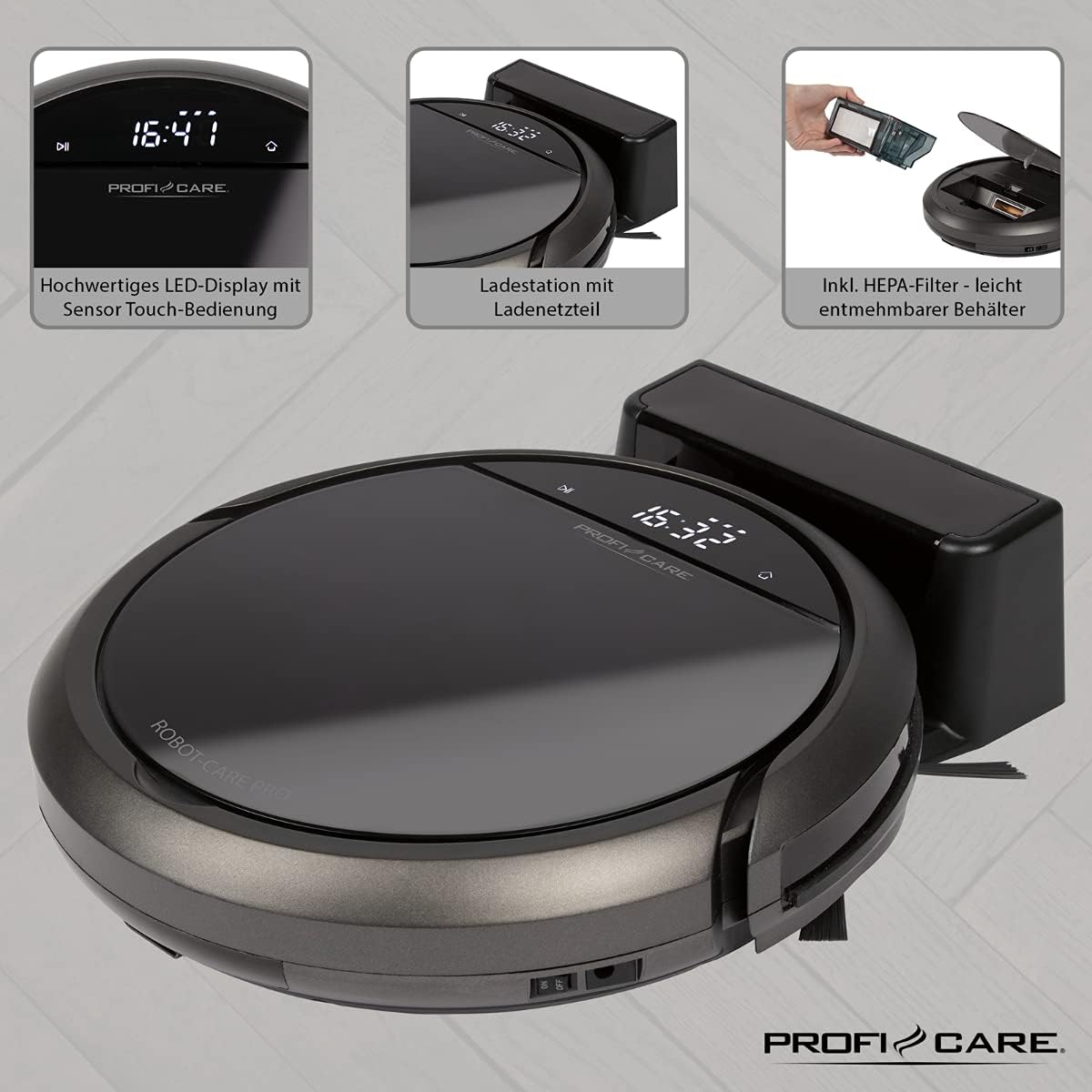
Irudia: Goian view of the ProfiCare PC-BSR 3043 robot vacuum cleaner with key features labeled, including LED display, sensor touch operation, Wi-Fi app control, auto-return function, 2600 mAh / 14.8 V Lithium-ion battery, and 120 minutes runtime.
4. Konfigurazioa
4.1 Robota kargatzea
- Jarri kargatzeko estazioa horma baten kontra gune ireki batean, ziurtatu alboetan metro 1eko erradioan eta aurrean 2 metroko erradioan oztoporik ez dagoela.
- Connect the power adapter to the charging station and plug it into a power outlet. The indicator light on the charging station will illuminate.
- Place the robot vacuum onto the charging station. Ensure the charging contacts on the robot align with those on the station. The robot will emit a sound and the display will show charging status.
- Allow the robot to fully charge before first use (approximately 3 hours).

Image: The ProfiCare PC-BSR 3043 robot vacuum cleaner docked on its charging station, illustrating the automatic return and charging capability.
4.2 Alboko eskuilak instalatzea
Gently push the side brushes onto the square posts on the underside of the robot until they click into place.
4.3 Wi-Fi eta aplikazioen konfigurazioa
- Download the ProfiCare app from the Google Play Store (for Android 4.4 or higher) or Apple App Store (for iOS 9.0 or higher).
- Open the app and follow the on-screen instructions to register an account and add your PC-BSR 3043 robot.
- Ensure your Wi-Fi network is 2.4 GHz, as 5 GHz is not supported.
5. Robot-xurgagailuaren funtzionamendua
5.1 Piztu/Itzaltzea
Press and hold the power button on the robot's display or the remote control to turn the robot on or off.
5.2 Garbiketa moduak
The robot offers four distinct cleaning programs:
- Modu automatikoa: Robotak sistematikoki garbitzen du, eremu osoa estaliz.
- Spot modua: The robot cleans a concentrated area in a spiral pattern, ideal for heavily soiled spots.
- Corners Mode: The robot focuses on cleaning along walls and in corners.
- Systematic Mode (Gyroscope Controlled): Ensures independent orientation for faster and more efficient cleaning results.
5.3 Kontrol-aukerak
- Sensor Touch Display: Use the integrated LED display with touch controls for basic operations.
- Urruneko kontrola: The multi-function remote allows for timer settings, individual control, and recalling the robot to the charging station.
- Aplikazioen kontrola: The smartphone app provides advanced features like 2D map function, live tracking, remote control functions, cleaning plan creation (day, time, frequency), cleaning program selection, and battery status display.
- Ahots kontrola: The robot supports voice control for convenient operation.
5.4 Funtzio automatikoak
- Itzulera automatikoa: The robot automatically returns to the charging station after completing a program or when the battery level is low.
- Oztopoak hautematea: Infrared sensors detect obstacles, allowing the robot to navigate around furniture and other items. Mechanical soft protection is also included for sensitive furniture.
- Stair Detection: Infrared sensors prevent the robot from falling down stairs.
- Berrezarri automatikoa: After recharging, the robot continues cleaning from the last cleaned position.

Image: The ProfiCare PC-BSR 3043 robot vacuum cleaner actively cleaning a wooden floor in a home environment, demonstrating its ability to navigate and clean open spaces.
6. Mantentzea
Mantentze-lan erregularrak zure robot-xurgagailuaren errendimendu optimoa bermatzen du eta bizitza luzatzen du.
6.1 Zaborrontzia hustea
- Press the dustbin release button and pull out the 400 ml dirt tank.
- Ireki zaborrontziaren tapa eta hustu edukia zaborrontzi batera.
- Itxi hauts-ontziaren tapa eta sartu berriro robotean klik egin arte.
6.2 HEPA iragazkia garbitzea
The HEPA filter should be cleaned regularly and replaced periodically (e.g., every 3-6 months, depending on usage).
- Kendu hauts-ontzia goian azaldu bezala.
- Carefully remove the HEPA filter from the dustbin.
- Tap the filter gently over a trash can to remove loose dust. Do not wash the HEPA filter with water.
- Brush off any remaining debris with a soft brush.
- Reinsert the clean filter and dustbin.
6.3 Cleaning Side Brushes and Main Brush
Regularly check the side brushes and main brush for tangled hair or debris. Use scissors to cut away any tangled hair and pull out debris.
6.4 Sentsoreak eta kargatzeko kontaktuak garbitzea
Wipe the infrared sensors (located around the robot's bumper and underside) and the charging contacts on both the robot and the charging station with a clean, dry cloth to ensure proper function.
7. Arazoak
If you encounter issues with your ProfiCare PC-BSR 3043, refer to the following common problems and solutions:
| Arazoa | Kausa posiblea | Irtenbidea |
|---|---|---|
| Robota ez da pizten. | Bateria baxua edo agortuta dago. | Place the robot on the charging station and allow it to fully charge. |
| Robotak ez du kargatzen. | Kargatzeko kontaktuak zikinak edo gaizki lerrokatuta daude. | Clean the charging contacts on both the robot and the station. Ensure proper alignment. |
| Robota maiz trabatuta geratzen da. | Too many obstacles or tangled cables. | Clear the cleaning area of excessive clutter, cables, and small objects. |
| Garbiketa-errendimendu eskasa. | Dustbin is full, filter is clogged, or brushes are tangled. | Empty the dustbin, clean or replace the HEPA filter, and clean the side and main brushes. |
| Robot does not connect to Wi-Fi. | Incorrect Wi-Fi band (5 GHz not supported) or incorrect password. | Ensure your Wi-Fi network is 2.4 GHz. Re-enter Wi-Fi password carefully. Restart router and robot. |
| Robota eskaileretatik erortzen da. | Stair sensors are dirty or obstructed. | Clean the stair sensors on the underside of the robot. |
For issues not listed here, or if problems persist, please contact ProfiCare customer support.
8. Zehaztapen Teknikoak
| Ezaugarri | Zehaztapena |
|---|---|
| Modelo zenbakia | PC-BSR 3043 |
| Marka | ProfiCare |
| Neurriak (L x W x H) | 33 x 33 x 7 cm (approx. 31 x 22 x 13 cm packaged) |
| Pisua | 2.5 kilogramo |
| Bateria mota | Litio-ioi |
| Bateria Edukiera | 14.8 V, 2600 mAh |
| Funtzionamendu Denbora | Gutxi gorabehera. 120 minutu |
| Kargatzeko Denbora | Gutxi gorabehera. 3 ordu |
| Zaborrontzien edukiera | 400 ml |
| Iragazki mota | HEPA iragazkia |
| Zarata Maila | Gutxi gorabehera. 61 dB |
| Konektibitatea | Wi-Fi 2.4 GHz (5 GHz not supported) |
| Kontrol mota | App Control, Remote Control, Sensor Touch |
| Azalera gomendioa | Tiles, Hard Floors, Short-Pile Carpets |
9. Bermea eta Laguntza
ProfiCare products are manufactured with high quality standards. For information regarding warranty terms and conditions, please refer to the warranty card included with your product or visit the official ProfiCare webgunea.
If you require technical assistance, have questions about product operation, or need to order spare parts, please contact ProfiCare customer support. Contact details can typically be found on the product packaging, the official webgunea, edo zure dendariaren bidez.
Please note that information regarding the availability of spare parts for this specific model is currently unavailable through standard channels. It is recommended to contact ProfiCare directly for any spare part inquiries.


