1. Sarrera
Welcome to the Argon Audio FORTE A5 powered speaker system. This manual provides essential information for setting up, operating, and maintaining your speakers to ensure optimal performance and longevity. Please read this manual thoroughly before using your speakers.
2. Segurtasun-argibideak
To prevent fire or electric shock, do not expose this appliance to rain or moisture. Do not open the cabinet. Refer servicing to qualified personnel only.
- Aireztapena: Ensure adequate ventilation around the speakers. Do not block any ventilation openings.
- Energia iturria: Connect the speakers only to the specified power supply.
- Ura eta hezetasuna: Do not expose the speakers to dripping or splashing water. Do not place objects filled with liquids, such as vases, on the speakers.
- Garbiketa: Garbitu zapi lehor batekin bakarrik. Ez erabili garbitzaile likidorik edo aerosol garbigarririk.
- Beroa: Ez instalatu bero-iturri inongo ondoan, esate baterako, erradiadoreak, bero-erregistroak, sukaldeak edo beste aparatu batzuk (barne ampberoa sortzen duten argitzaileak).
- Lekua: Place the speakers on a stable, level surface to prevent them from falling.
3. Paketearen edukia
Mesedez, egiaztatu elementu guztiak paketean daudela:
- Argon Audio FORTE A5 Powered Speakers (1 pair)
- Special Speaker Cable (3 meters)
- Urruneko Kontrola
- Elikatze-kablea
- Erabiltzailearen eskuliburua (dokumentu hau)
4. Produktua amaitu daview
4.1 Aurreko panela
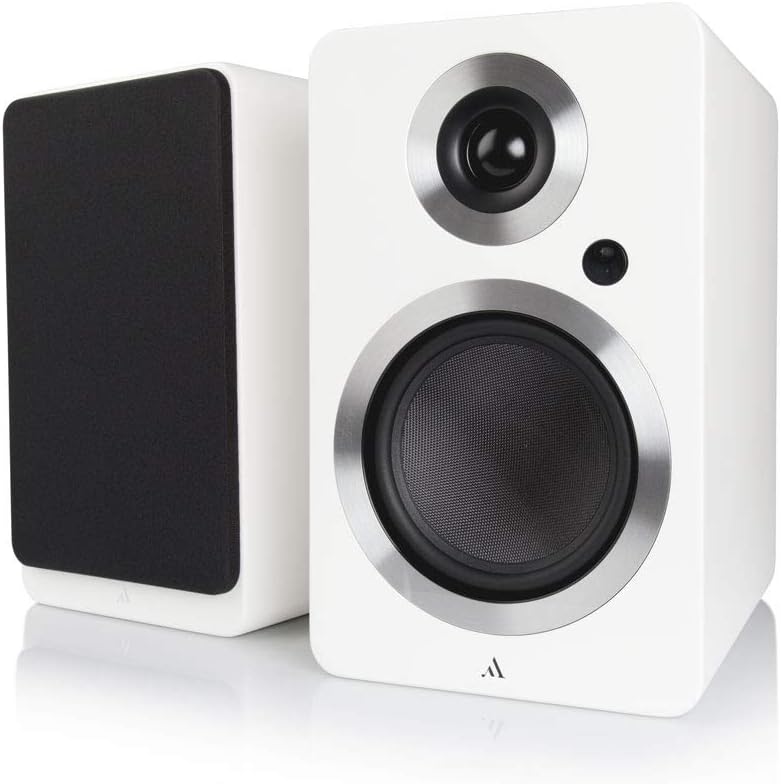
Irudia: Aurrealdea view of the Argon Audio FORTE A5 speakers. The image displays two white bookshelf speakers with black speaker cones and metallic rings around the drivers. The left speaker is shown from the side, while the right speaker is shown from the front, highlighting its clean design.
- Txiolaria: High-frequency driver.
- Mid/Bass Driver: Maiztasun ertainak eta baxuak kudeatzen ditu.
- Egoera LED: Indicates power status and selected input.
4.2 Atzeko panela

Irudia: Atzealdea view of the Argon Audio FORTE A5 speakers. The image shows the back panel of the active speaker with various connection ports including RCA, optical, USB, and speaker terminals. The passive speaker's rear panel is also visible, showing only the speaker terminals.
- RCA sarrerak (E/E): For connecting analog audio sources like CD players or turntables.
- Optical Inputs (OPT1, OPT2): For connecting digital audio sources like TVs or game consoles.
- Sub Out: For connecting an external subwoofer.
- USB Charge (5V/1A): Gailu mugikorrak kargatzeko.
- Speaker Cable Output: Connects to the passive speaker.
- Potentzia sarrera: AC elikadura iturrira konektatzen da.
5. Konfigurazioa
5.1 Jartzea
Place the speakers on a stable surface, such as a bookshelf or speaker stands. For optimal stereo imaging, position the speakers equidistant from your listening position and angle them slightly towards you (toe-in). Ensure there is sufficient space behind the speakers for proper ventilation and cable connections.
5.2 Konexioak
- Konektatu bozgorailuak: Use the provided speaker cable to connect the active speaker (with all the inputs) to the passive speaker. Ensure correct polarity (+ to + and - to -).
- Konektatu audio iturriak:
- RCA: Connect your analog audio device (e.g., CD player, turntable with pre-amp) to the RCA inputs.
- Optikoa: Connect your digital audio device (e.g., TV, game console) to either OPT1 or OPT2.
- Bluetootha: For wireless connection, see section 6.3.
- Konektatu energia: Plug the power cable into the active speaker's power input, then plug the other end into a wall outlet.
6. Funtzionamendua
6.1 Piztu/Itzali
The speakers will automatically enter standby mode when no audio signal is detected for a period. They will wake up automatically when an audio signal is received on the selected input. To manually power off, use the remote control or the power button on the active speaker (if available).
6.2 Sarrera hautatzea
Use the input selection buttons on the remote control or the active speaker to cycle through the available audio inputs (RCA, Optical 1, Optical 2, Bluetooth). The Status LED will change color to indicate the currently selected input.
6.3 Bluetooth parekatzea
- Select the Bluetooth input on your speakers. The Status LED will blink, indicating pairing mode.
- On your Bluetooth device (smartphone, tablet, laptop), enable Bluetooth and search for new devices.
- Select "Argon Audio FORTE A5" from the list of available devices.
- Once connected, the Status LED on the speaker will turn solid, and you can now play audio wirelessly.
6.4 Urruneko kontrolaren funtzioak
The included remote control allows you to:
- Adjust Volume (Up/Down)
- Mutu/Eskutatu
- Aukeratu Sarrerako iturria
- Piztu/Itzali (Esatean)
7. Mantentzea
To keep your Argon Audio FORTE A5 speakers in optimal condition:
- Garbiketa: Use a soft, dry, lint-free cloth to clean the cabinet surfaces. Do not use abrasive cleaners, waxes, or solvents.
- Parrillak: The speaker grilles can be carefully removed for cleaning, but ensure they are reattached securely to protect the drivers.
- Hautsa: Regularly dust the speakers to prevent accumulation, especially around the drivers and ventilation ports.
8. Arazoak
If you experience issues with your speakers, please refer to the following table:
| Arazoa | Kausa posiblea | Irtenbidea |
|---|---|---|
| Soinurik ez | Energia ez dago konektatuta; Sarrera okerra hautatu da; Bolumena baxuegia da; Kableak solteak. | Check power connection; Select correct input; Increase volume; Reconnect all cables securely. |
| Soinu distortsionatua | Volume too high; Source audio quality poor; Cables damaged. | Reduce volume; Try a different audio source; Check and replace cables if necessary. |
| Bluetootha ez da konektatzen | Speakers not in pairing mode; Device too far; Previously paired device connected. | Ensure speakers are in Bluetooth pairing mode; Move device closer; Disconnect from other Bluetooth devices. |
| Urruneko kontrola ez dabil | Batteries dead; Obstruction between remote and speaker. | Ordeztu bateriak; kendu oztopo guztiak. |
If the problem persists, please contact Argon Audio customer support.
9. Zehaztapenak
| Ezaugarri | Zehaztapena |
|---|---|
| Eredua | FORTE A5 |
| Elementuaren pisua | 6.7 kilogramo |
| Produktuaren neurriak (W x P x H) | 16.5 x 23 x 27 cm |
| Bozgorailuen irteerako potentzia maximoa | 80 Watt |
| Konektibitate Teknologia | Bluetootha |
| Audio irteera modua | Estereoa |
| Muntatze Mota | Apalategia |
| Hizlari mota | Subwoofer (Note: This refers to the capability to connect a subwoofer, as these are bookshelf speakers) |
| Gailu bateragarriak | Smartphone, Tablet, Laptop, TV, Desktop, Turntable, MP3 Player |
| Inguruko soinuaren konfigurazioa | 2.0 |
10. Bermea eta Laguntza
Argon Audio products are designed and manufactured to the highest quality standards. For information regarding warranty terms and conditions, please refer to the warranty card included with your product or visit the official Argon Audio website. For technical support or service inquiries, please contact your local dealer or Argon Audio customer service.
Webgunea: www.argonaudio.com