1. Sarrera
The HUAWEI B311-221 4G LTE WiFi Router is designed to provide high-speed internet access. It supports 4G LTE CAT4 with download speeds up to 150Mbps and Wi-Fi speeds up to 300Mbps (802.11n). This router allows you to share a 3G/4G network connection with up to 32 Wi-Fi enabled devices, including tablets, mobile phones, and laptops. Its plug-and-play functionality makes it suitable for various environments where traditional broadband internet may not be available. The HUAWEI HiLink app offers convenient management of your network and connected devices.
2. Paketearen edukia
Mesedez, egiaztatu arretaz paketearen edukia. Elementuren bat falta bada edo hondatuta badago, jarri harremanetan zure saltzailearekin.
- 1 x HUAWEI B311-221 4G LTE WiFi Router
- 1 x Ethernet kablea
- 1 x korronte egokitzailea
- 1 x Hasierako gida azkarra
3. Produktua amaitu daview
3.1 Aurrealdea View

This image shows the front of the HUAWEI B311-221 router, featuring a clean white design with indicator lights for power, network status, Wi-Fi, and signal strength. The HUAWEI logo is visible at the bottom center.
3.2 Atzekoa View eta Portuak
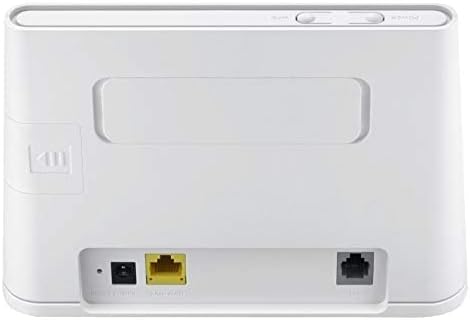
Atzealdea view of the router displays the various ports for connectivity. These include the power input, a Gigabit Ethernet LAN/WAN port (yellow), and an RJ11 port for voice services.
3.3 SIM txartelaren zirrikitua

This image highlights the integrated SIM card slot located on the side of the router, which is essential for 4G LTE connectivity. The slot is shown open, indicating where the SIM card should be inserted.
3.4 Adierazle argiak

A close-up of the router's top panel, showing the indicator lights for Power, Wi-Fi, Network Mode, and Signal Strength. These lights provide visual feedback on the router's operational status.
4. Konfiguratzeko argibideak
Follow these steps to set up your HUAWEI B311-221 router:
- Sartu SIM txartela: Locate the SIM card slot on the side of the router. Carefully insert your standard-sized 3G/4G SIM card into the slot until it clicks into place. Ensure the SIM card is activated by your service provider.
- Konektatu energia: Connect the power adapter to the router's power input port and then plug it into a power outlet. The router will automatically power on.
- Piztu: Press the Power button on the router. The Power indicator light should turn on.
- Sare-konexioa: Wait for the Network Mode and Signal Strength indicator lights to stabilize. A solid blue or green light typically indicates a successful 4G LTE connection.
- Konektatu gailuak:
- Wi-Fi: On your device (laptop, phone, tablet), search for available Wi-Fi networks. Select the network name (SSID) printed on the label at the bottom of your router. Enter the Wi-Fi password (Key) also found on the label.
- Ethernet: For wired connections, connect an Ethernet cable from the router's LAN/WAN port to your computer or other network device.
- Sarbide Kudeaketa Interfazea: Ireki a web browser on a connected device and enter the default IP address (usually 192.168.8.1) to access the router's web management page. Log in using the default username and password (found on the router label or in the Quick Start Guide).
- HUAWEI HiLink App: For easier management, download the HUAWEI HiLink app from your device's app store. Connect your phone to the router's Wi-Fi and use the app to monitor network status, manage connected devices, and configure settings.
5. Funtzionamendu-argibideak
5.1 Gailuak konektatzea
The router supports up to 32 Wi-Fi devices simultaneously. Ensure your devices are within the Wi-Fi coverage area for optimal performance.

This diagram illustrates the Wi-Fi coverage provided by the HUAWEI B311-221 router within a typical home environment, showing multiple devices connected wirelessly.
5.2 Interneterako sarbidea
Once connected, devices can access the internet via the 4G LTE network. The router provides high-speed data for streaming, browsing, and online activities.

This image demonstrates the router's capability to deliver 4G internet at speeds up to 150Mbps to a connected laptop, facilitating fast downloads and online activities.
5.3 Using the HUAWEI HiLink App
The HUAWEI HiLink app allows you to:
- Check network strength and status.
- Read SMS messages received on the router's SIM card.
- Set data usage limits.
- View and manage all connected devices.
- Modify Wi-Fi settings (SSID, password).
Ensure your smartphone is connected to the router's Wi-Fi network to use the app.
6. Mantentzea
To ensure optimal performance and longevity of your HUAWEI B311-221 router, follow these maintenance guidelines:
- Lekua: Place the router in an open area, away from obstructions, large metal objects, and other electronic devices that may cause interference.
- Garbiketa: Erabili zapi leun eta lehor bat bideratzailea garbitzeko. Ez erabili garbitzaile likidorik edo aerosolik.
- Aireztapena: Ensure the router's ventilation openings are not blocked to prevent overheating.
- Firmware eguneraketak: Aldian-aldian egiaztatu firmwarearen eguneraketak routerraren bidez web management interface or the HUAWEI HiLink app. Keeping the firmware updated ensures the best performance and security.
- Potentzia-zikloa: If you experience minor issues, try power cycling the router by unplugging it from the power outlet for 10 seconds and then plugging it back in.
7. Arazoak
Zure bideratzailearekin arazoak badituzu, jo ezazu honako arazo eta irtenbide ohikoenei:
| Arazoa | Irtenbide posiblea |
|---|---|
| Ez dago Interneteko konexiorik |
|
| Slow Wi-Fi speed |
|
| Cannot access router management page |
|
| Wi-Fi seinalea maiz jaisten da |
|
8. Zehaztapenak
| Ezaugarri | Xehetasuna |
|---|---|
| Marka | HUAWEI |
| Ereduaren izena | B311-221 |
| Elementuaren eredu-zenbakia | B311-221 |
| Produktuaren neurriak | 18.1 x 12.6 x 3.6 cm |
| Elementuaren pisua | 218 gramo |
| Kolorea | Zuria |
| Konektibitate Teknologia | Wi-Fi, 4G LTE |
| Haririk gabeko komunikazio estandarra | 802.11n |
| Maiztasun Banda Klasea | Banda bakarra (2.4 GHz) |
| Wi-Fi abiadura maximoa | Gehienez 300 Mbps |
| Max 4G LTE Speed | Gehienez 150 Mbps |
| Ethernet Portuak | 1 x Gigabit Ethernet LAN/WAN port |
| Voice Port | 1 x RJ11 ataka |
| SIM txartelaren zirrikitua | Integrated (Standard SIM) |
| Ezaugarri Berezia | WPS, HUAWEI HiLink App Management |
| Gailu bateragarriak | Smart TV, Tablet, Personal Computer, Laptops, Phones, Gaming Devices |
| Pilak barne | Ez |
| Operating System (Compatibility) | Windows (and other OS via Wi-Fi/Ethernet) |
9. Bermearen informazioa
This HUAWEI product is covered by a limited warranty. The specific terms and duration of the warranty may vary depending on your region and local regulations. Please refer to the warranty card included in your product package or visit the official HUAWEI webwebgunea bermearen informazio zehatza lortzeko. Gorde erosketaren frogagiria bermearen erreklamazioetarako.
10. Laguntza
For technical support, product inquiries, or service requests, please contact HUAWEI customer support through one of the following methods:
- Lineako laguntza: Bisitatu HUAWEIren laguntza ofiziala webMaiz egiten diren galderen, arazoak konpontzeko giden eta harremanetarako aukeren gunea.
- HUAWEI HiLink App: Use the support features available within the HiLink application.
- Zerbitzuen telefonoa: Refer to your Quick Start Guide or HUAWEI's official website for regional service hotline numbers.
When contacting support, please have your product model (B311-221) and serial number ready.


