1. Sarrera
This manual provides essential information for the safe and correct use of the Keyence LR-W500C Self-Contained Full-Spectrum Sensor. Please read this manual thoroughly before using the product to ensure optimal performance and prevent potential hazards. Keep this manual in a safe place for future reference.
2. Segurtasun informazioa
Observe the following safety precautions to prevent accidents and ensure proper operation:
- Elikatze-iturria: Ziurtatu elikadura hornidura boltage is within the specified range (10-30V DC). Incorrect voltage can damage the sensor.
- Kableatua: Connect wiring correctly according to the provided diagram. Incorrect wiring may cause malfunction or damage.
- Ingurumena: Do not use the sensor in environments with flammable gases, corrosive substances, excessive dust, or extreme temperatures.
- Instalazioa: Mount the sensor securely to prevent it from falling or being dislodged during operation.
- Mantentzea: Deskonektatu korrontea mantentze-lan edo garbiketa egin aurretik.
3. Produktua amaitu daview
The Keyence LR-W500C is a self-contained full-spectrum sensor designed for reliable detection across various industrial applications. It features an M12 connector and a 4-pin configuration, offering a detection distance of 30 to 500 mm.
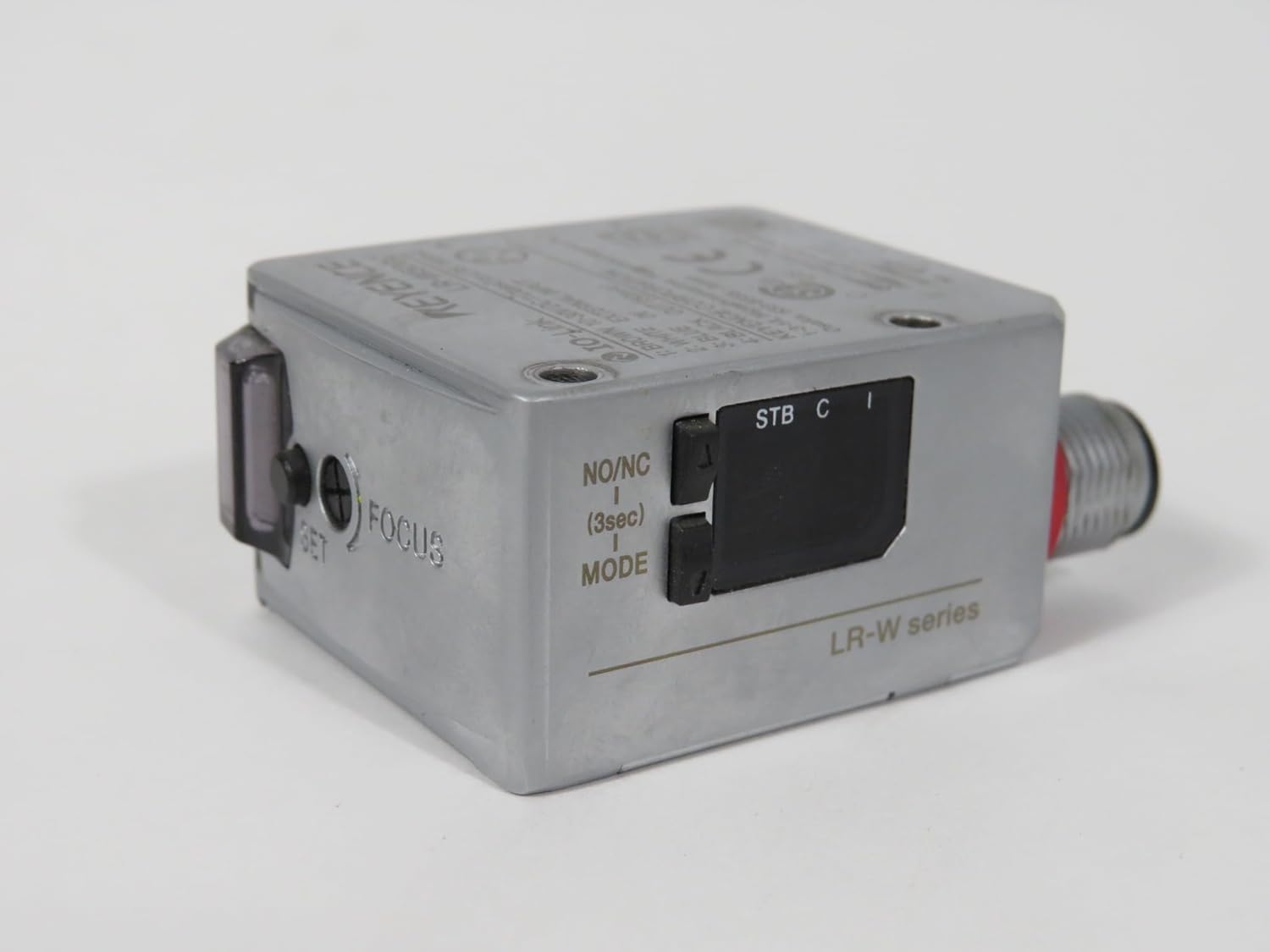
3.1. irudia: Aurrealdea view of the Keyence LR-W500C sensor, showing the control buttons (SET, FOCUS, NO/NC, MODE) and indicator lights (STB, C, I).

3.2. irudia: Aldea view of the Keyence LR-W500C sensor, highlighting the M12 connector for power and signal, and the optical lens for detection.
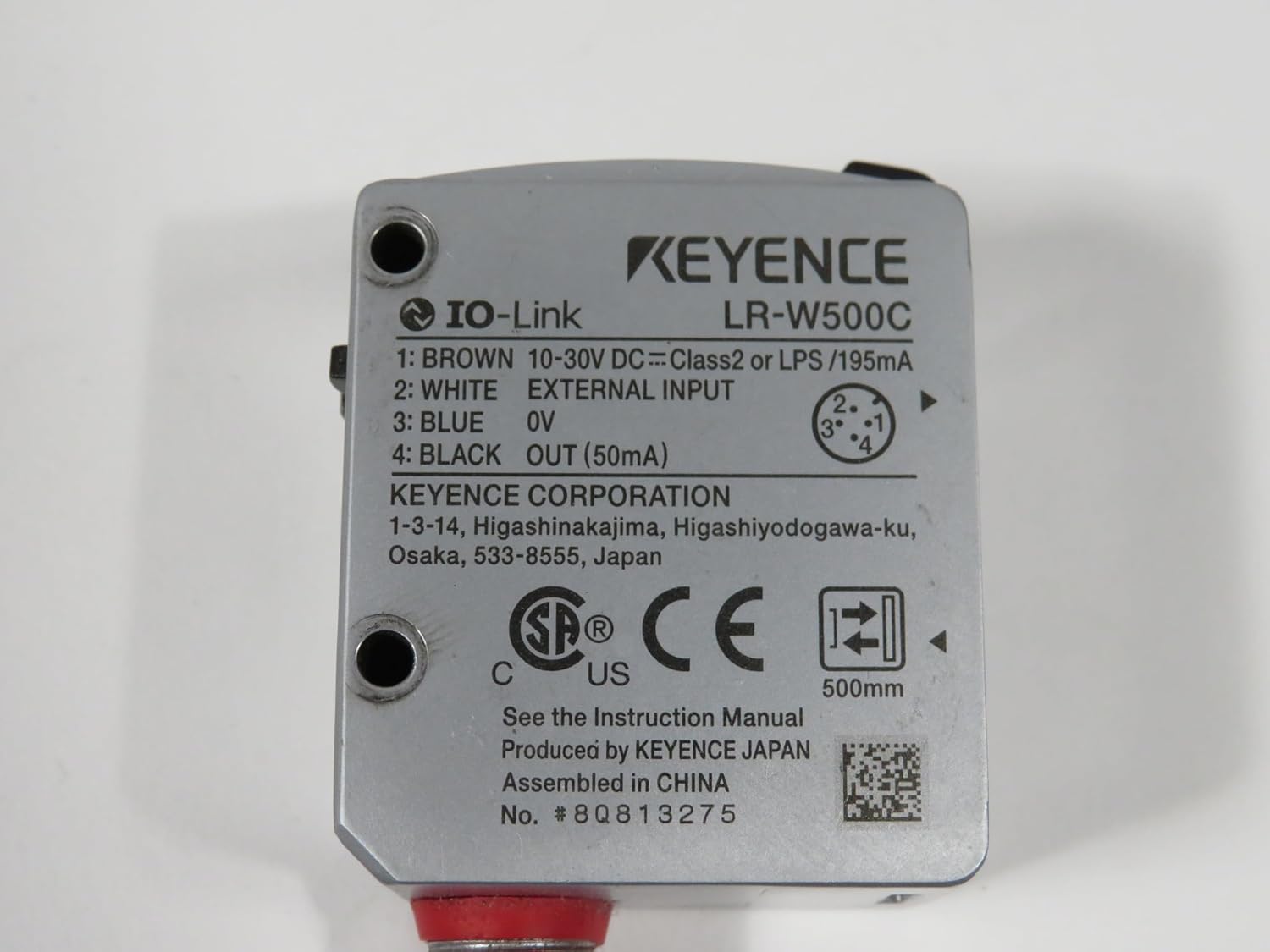
3.3. irudia: Atzealdea view of the Keyence LR-W500C sensor, displaying the wiring diagram for the 4-pin M12 connector and key product specifications.
4. Konfigurazioa eta instalazioa
4.1 Muntaketa
Securely mount the sensor using appropriate hardware in a location that provides a clear line of sight to the target object and is free from excessive vibration or impact.
4.2 Kableatua
The LR-W500C sensor uses a 4-pin M12 connector. Refer to the diagram below and the sensor's label for correct wiring. Ensure power is disconnected before making any connections.
| Pin | Hariaren Kolorea | Funtzioa |
|---|---|---|
| 1 | Marroia | Power (10-30V DC) |
| 2 | Zuria | Kanpo Sarrera |
| 3 | Urdina | 0V (Lurra) |
| 4 | Beltza | Output (50mA) |
After wiring, ensure all connections are secure and insulated.
5. Funtzionamendu-argibideak
5.1 Piztu
Once wired correctly, apply power (10-30V DC) to the sensor. The STB (Stability) indicator will illuminate.
5.2 Modu hautaketa
The sensor features a MODE button to cycle through different operating modes:
- NO/NC (Normally Open/Normally Closed): Press the MODE button briefly to toggle between Normally Open (NO) and Normally Closed (NC) output configurations.
- Fokua: Press and hold the MODE button for approximately 3 seconds to enter Focus mode, allowing for fine-tuning of the detection area.
5.3 Setting Detection
Use the SET button to teach the sensor the desired detection threshold. Follow the specific instructions for your application to set the sensor accurately.
5.4 Adierazle argiak
- STB (Stability): Indicates the stability of the detection. A steady light typically means stable operation.
- C (Control Output): Illuminates when the control output is active (e.g., an object is detected).
- I (Input): Indicates the status of the external input.
6. Mantentzea
Regular maintenance ensures the longevity and reliable operation of your sensor.
- Garbiketa: Gently wipe the sensor lens and housing with a soft, dry cloth. For stubborn dirt, use a cloth lightly dampened with a mild, non-abrasive cleaner. Do not use organic solvents.
- Ikuskapena: Periodically check wiring for damage or loose connections. Ensure the sensor is securely mounted.
- Itzali: Always disconnect power to the sensor before performing any cleaning or inspection.
7. Arazoak
If the sensor is not operating as expected, refer to the following common issues and solutions:
- Sensor not powering on:
- Egiaztatu elikadura-iturri boltage (10-30V DC).
- Verify wiring connections (Brown to +V, Blue to 0V).
- No detection or unstable detection:
- Ensure the sensor lens is clean and free from obstructions.
- Check the detection distance; it should be within 30-500mm.
- Re-perform the SET procedure to teach the sensor the target.
- Adjust the sensor's position or angle relative to the target.
- Check for excessive ambient light or reflective surfaces interfering with detection.
- Output not switching:
- Verify the NO/NC setting is correct for your application.
- Check the wiring of the output (Black wire).
- Ensure the load connected to the output is within the sensor's current capacity (50mA).
If problems persist, contact Keyence technical support.
8. Zehaztapenak
| Parametroa | Balioa |
|---|---|
| Modelo zenbakia | LR-W500C |
| Mota | Self-Contained Full-Spectrum Sensor |
| Detekzio Distantzia | 30 eta 500 mm bitartekoak |
| Potentzia Voltage | 10-30 V DC |
| Egungo Kontsumoa | 65mA or less @ 24V DC / 120mA or less @ 12V DC |
| Konektorea | M12, 4 pin |
| Irteera | 50mA (Black wire) |
| Produktuaren neurriak | 0.31 x 0.31 x 0.31 hazbete |
| Pisua | 1.00 lb |
| Fabrikatzailea | KEYENCE |
9. Bermea eta Laguntza
For warranty information and technical support, please refer to the official Keyence website or contact your local Keyence representative. Keep your purchase receipt as proof of purchase.
Keyence Corporation: www.keyence.com


