1. Sarrera
This manual provides essential instructions for the safe and effective use of your PPLEE Emergency Solar Hand Crank Radio, Model 1009Pro. This multifunctional device is designed to provide critical information and utility during emergencies and outdoor activities.
The PPLEE weather radio is engineered to keep your family safe during natural disasters such as hurricanes, earthquakes, wildfires, and snowstorms. By tuning into your local weather station, this emergency radio can timely report various life-threatening severe weather alerts issued by the National Weather Service. It will alert you with a loud siren and a flashing red light, ensuring you are prepared even during the night.
Ezaugarri nagusiak:
- Emergency survival kit for natural disasters, featuring NOAA weather alert and SOS alarm for family safety.
- Multifunctional radio with flashlight, reading lamp, USB mobile phone charger, and a 5000 mAh rechargeable battery.
- Five charging modes: internal rechargeable battery, solar power, hand crank, 5V USB input, and 3 AAA batteries (not included) for continuous use.
2. Segurtasun informazioa
Please do not listen to the radio while charging to avoid static interference.
Always ensure the device is kept away from extreme temperatures, direct sunlight for prolonged periods, and water. Do not attempt to disassemble or modify the radio, as this may void the warranty and pose safety risks.
3. Konfigurazioa
3.1 Paketatzea
Kontu handiz atera osagai guztiak paketetik. Ziurtatu elementu hauek daudela:
- PPLEE Emergency Weather Radio with built-in 5000 mAh rechargeable battery
- USB kargatzeko kablea
- Portable braided belt
- Carabiner and compass
- Jabearen eskuliburua
3.2 Gailua piztea
Your radio offers five sustainable power options:
- Barneko bateria kargagarria: The radio comes with a built-in 5000 mAh rechargeable battery.
- USB kargatzea: Connect the supplied USB cable to the DC 5V input port on the radio and a USB power adapter (not included) or computer. The charging indicator will illuminate.
- Eskuko biradera: Rotate the hand crank clockwise or counter-clockwise at a steady pace (approximately 130-150 RPM) for 3-5 minutes to generate power for short-term use or to initiate charging.
- Eguzki-panela: Place the radio in direct sunlight. The solar panel will slowly charge the internal battery. This method is ideal for maintaining charge or for very slow charging.
- AAA bateriak: For backup power, insert 3 AAA batteries (not included) into the battery compartment. Ensure correct polarity.

Figure 1: A detailed diagram showcasing the five sustainable power sources for the PPLEE Emergency Radio. These include a DC 5V USB input for charging, an internal rechargeable battery, a compartment for 3 AAA batteries (not included), a hand crank for manual power generation, and a solar panel for charging via sunlight.
4. Funtzionamendu-argibideak
4.1 Radio Function (AM/FM/SW/NOAA)

Figure 2: A comprehensive labeled diagram of the PPLEE Emergency Radio, pointing out its various components and functions: solar panel, crank handle, LED reading lamp, USB port, flashlight button, reading lamp button, SOS control button, LED flashlight, and the SW/AM/FM/WB tuning display.
- Piztu/Itzali: Rotate the VOLUME knob clockwise to turn the radio on and counter-clockwise to turn it off.
- Bandaren hautaketa: Use the BAND switch to select between AM, FM, SW (Shortwave), or WB (Weather Band/NOAA).
- sintonia: Rotate the TUNING knob to scan for stations. Extend the telescopic antenna for better reception, especially for FM and SW bands.
- NOAAren eguraldi alerta: In WB mode, the radio can receive NOAA weather alerts. It is designed to report life-threatening severe weather issued by the National Weather Service.
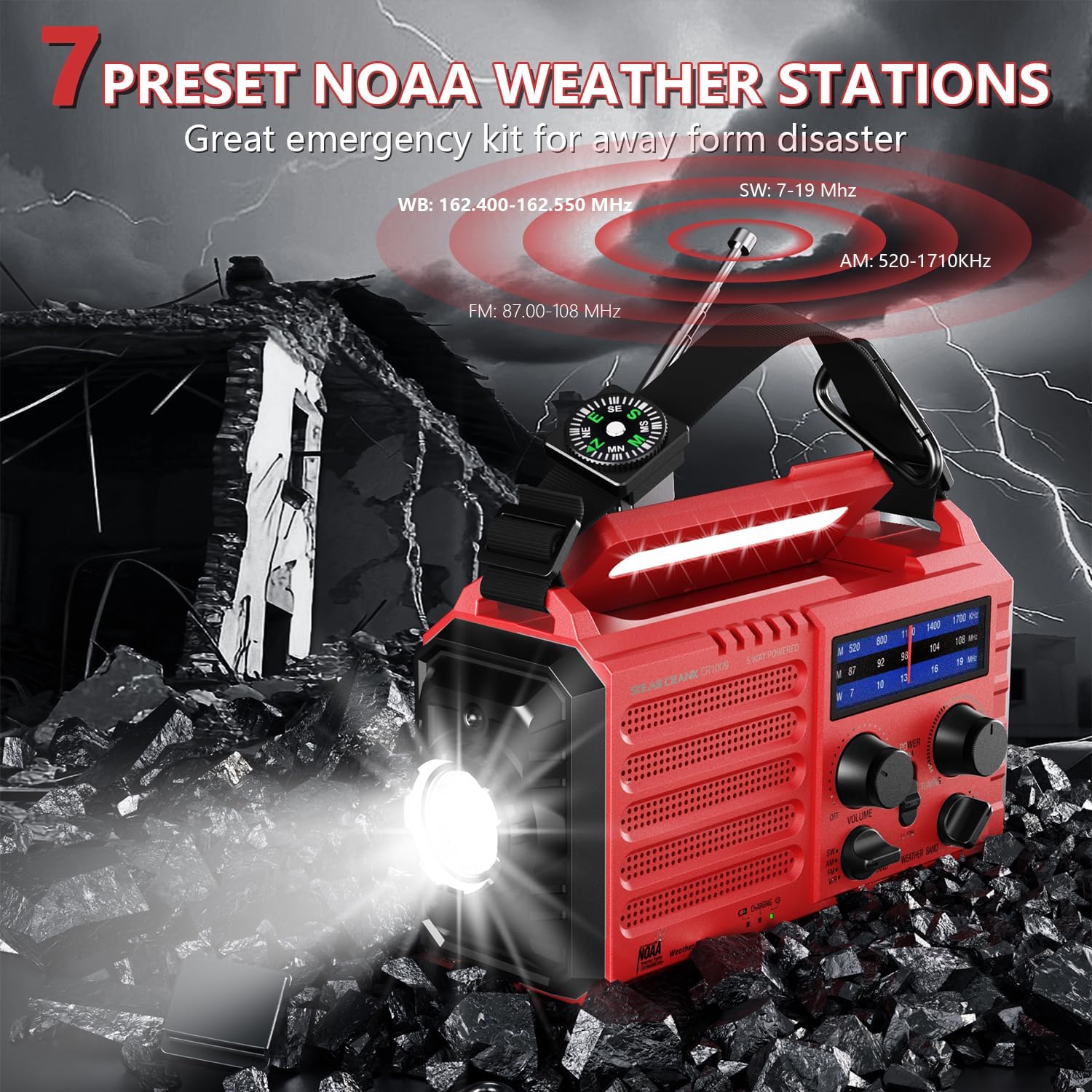
Figure 3: This image illustrates the PPLEE Emergency Radio in a simulated disaster environment, with debris and lightning. It highlights the radio's capability to receive 7 preset NOAA weather stations (WB: 162.400-162.550 MHz), AM (520-1710KHz), FM (87.00-108 MHz), and SW (7-19 MHz) bands, crucial for emergency information.

Figure 4: The PPLEE Emergency Radio is shown with its display indicating weather band frequencies, alongside small images depicting various natural hazards like floods, fires, snowstorms, and tornadoes. This emphasizes its role in providing timely weather alerts across WB (162.400-162.550 MHz), AM (520-1710KHz), FM (87.00-108 MHz), and SW (7-19 MHz) bands.
4.2 Flashlight and Reading Lamp
- Linterna: Press the flashlight button to turn on the LED flashlight. Press again to cycle through brightness levels (typically two levels) or turn off.
- Irakurtzen Lamp: Sakatu l irakurgaiaamp button to activate the LED reading lamp. Lamp can be adjusted from 0° to 90° for optimal illumination.

Figure 5: This image illustrates the lighting capabilities of the PPLEE Emergency Radio. It shows the two levels of brightness for the LED flashlight and the adjustable reading lamp, which can be angled from 0° to 90° for optimal illumination.
4.3 SOS Alarma
To activate the SOS alarm, press the SOS control button. The radio will emit a loud 116dB siren and a flashing red light to attract attention in emergency situations. Press the button again to deactivate the alarm.

Figure 6: The PPLEE Emergency Radio is depicted in an emergency scenario with first responders, illustrating its SOS alarm feature. When activated, the radio emits a loud 116dB siren and a flashing red light to signal for help.
4.4 Emergency Power Bank
The built-in 5000 mAh rechargeable battery allows the radio to function as an emergency power bank. Connect your smartphone or other USB-powered devices to the USB output port using your device's charging cable. The radio can provide power to your devices when other power sources are unavailable.

Figure 7: The PPLEE Emergency Solar Hand Crank Radio, Model 1009Pro, is shown in red, actively charging a smartphone via its USB output port. The radio features a clear display, tuning knobs, and a built-in flashlight.
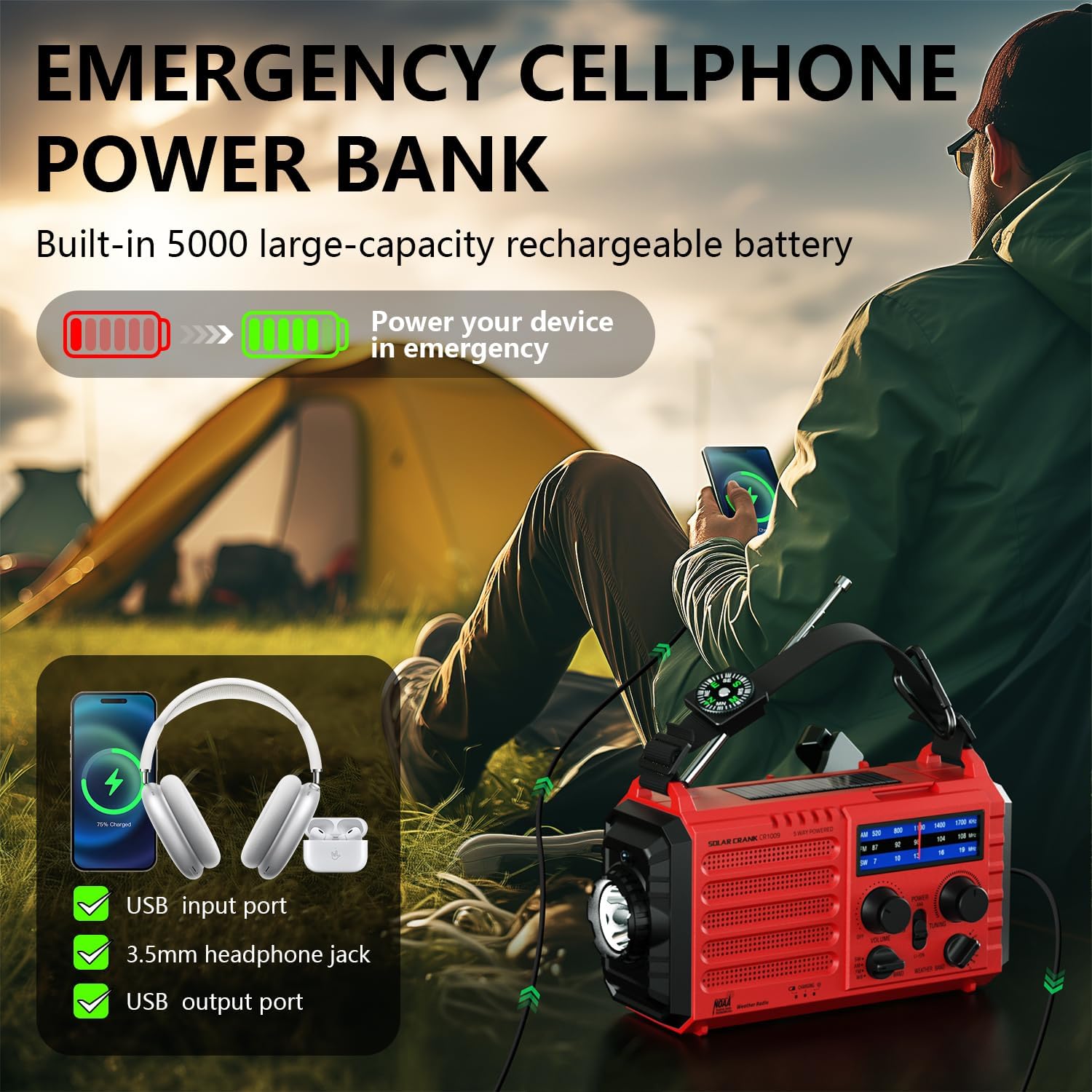
Figure 8: This image demonstrates the PPLEE Emergency Radio's function as an emergency power bank. It shows the radio charging a smartphone and headphones, highlighting its USB input port, 3.5mm headphone jack, and USB output port, powered by its built-in 5000 mAh rechargeable battery.
5. Mantentzea
- Garbiketa: Erabili zapi leun eta lehor bat irratiaren kanpoaldea garbitzeko. Ez erabili garbitzaile edo disolbatzaile urratzailerik.
- Biltegiratzea: Store the radio in a cool, dry place away from direct sunlight and extreme temperatures. If storing for extended periods, ensure the internal battery is partially charged (around 50%) and recharge it every 3-6 months to maintain battery health.
- Bateria zaintzea: If using AAA batteries, remove them if the radio will not be used for a long time to prevent leakage.
6. Arazoak
- Potentziarik gabe: Check the battery level. Ensure the internal battery is charged, or insert fresh AAA batteries. If using the hand crank, ensure consistent rotation.
- Irrati-harrera eskasa: Extend the telescopic antenna fully. Try repositioning the radio. For AM, rotating the radio might improve reception.
- Kargatzeko arazoak: Ensure the USB cable is securely connected. Try a different USB power source or cable. If using solar, ensure direct sunlight.
- Flashlight/Lamp Ez dabil: Check power source. Ensure the buttons are pressed firmly.
- Unstable Circuit/Unexpected Activation: If the flashlight or SOS alarm activates unexpectedly, ensure buttons are not being accidentally pressed or obstructed. If the issue persists, contact customer support.
7. Zehaztapenak
| Ezaugarri | Zehaztapena |
|---|---|
| Marka | PPLEE |
| Ereduaren izena | 1009Pro |
| Modelo zenbakia | PPLEE-CR1009-R |
| Tuner Teknologia | AM/FM/SW/NOAA Weather Radio |
| Compatible Radio Bands | AM/FM/SW/NOAA Weather Radio |
| Ezaugarri bereziak | USB mobile phone charger, flashlight, reading camping lamp, shortwave AM FM SW radio, NOAA weather alert, rechargeable battery, SOS alarm, emergency lights for home power failure, headphone jack |
| Energia iturri mota | Solar panel, manual hand crank, 5000 mAh rechargeable battery, 3 AAA batteries, micro USB input |
| liburukiatage | 5 Volt |
| Peak Speaker Power | 5 watt |
| Maiztasuna | 108 MHz (FM max) |
| Total USB Inputs | 2 (Input/Output) |
| Konektibitate Teknologia | USBa |
| Hardware interfazea | USB, 3.5 mm Audio |
| Bistaratzeko Teknologia | LCD / LED |
| Produktuaren pisua | 454 g (gutxi gorabehera 1 lb) |
| Produktuaren neurriak | 16.99 x 9.5 x 5.99 cm (gutxi gorabehera 6.69 x 3.74 x 2.36 hazbete) |
| Beharrezko bateriak | 3 AAA (ez dago barne) |
| Bateria kargagarria | Yes (built-in 5000 mAh) |


