
1. Sarrera eta Overview
Escort EDM 1111A multimetro digital polifazetikoa da, hainbat parametro elektriko zehatz neurtzeko diseinatua. Gailu hau ezinbestekoa da elektrizistentzat, teknikarientzat eta zaletuentzat zirkuituak, osagaiak eta energia iturriak probatzeko. Pantaila digital argia eta neurketa funtzio desberdinak hautatzeko biraketa-markagailu bat ditu.

Escort EDM 1111A multimetro digitala, kable gorri eta beltzak konektatuta, erabiltzeko prest.
Funtzio nagusien artean daude:
- DC bolumenatage (DCV) neurketa
- AC Boltage (ACV) neurketa
- Korronte zuzenaren (DCA) neurketa
- Korronte alternoaren (ACA) neurketa
- Erresistentzia (Ω) neurketa
- Kapazitantziaren (CX) neurketa
- Diodo eta transistoreen (hFE) probak
2. Konfigurazioa
2.1 Bateriaren instalazioa
Escort EDM 1111A-k funtzionatzeko DC 9V 006P bateria behar du. Bateria instalatu edo ordezkatzeko:
- Ziurtatu multimetroa itzalita dagoela.
- Bilatu bateriaren konpartimentua unitatearen atzealdean.
- Kontu handiz irristatu edo askatu bateriaren estalkia.
- Sartu 9V-ko 006P bateria berri bat, polaritate zuzena (+/-) errespetatuz.
- Jarri bateriaren estalkia ongi.

Atzealdea view Escort EDM 1111A multimetro digitalaren irudia, bateriaren konpartimentuaren estalkia eta produktuaren etiketa erakusten dituena.
2.2 Proba-kableak konektatzea
Multimetroak bi proba-kable ditu, normalean bat gorria (positiboa) eta bestea beltza (negatiboa/komuna). Konexio egokia ezinbestekoa da neurketa zehatzak eta seguruak egiteko.
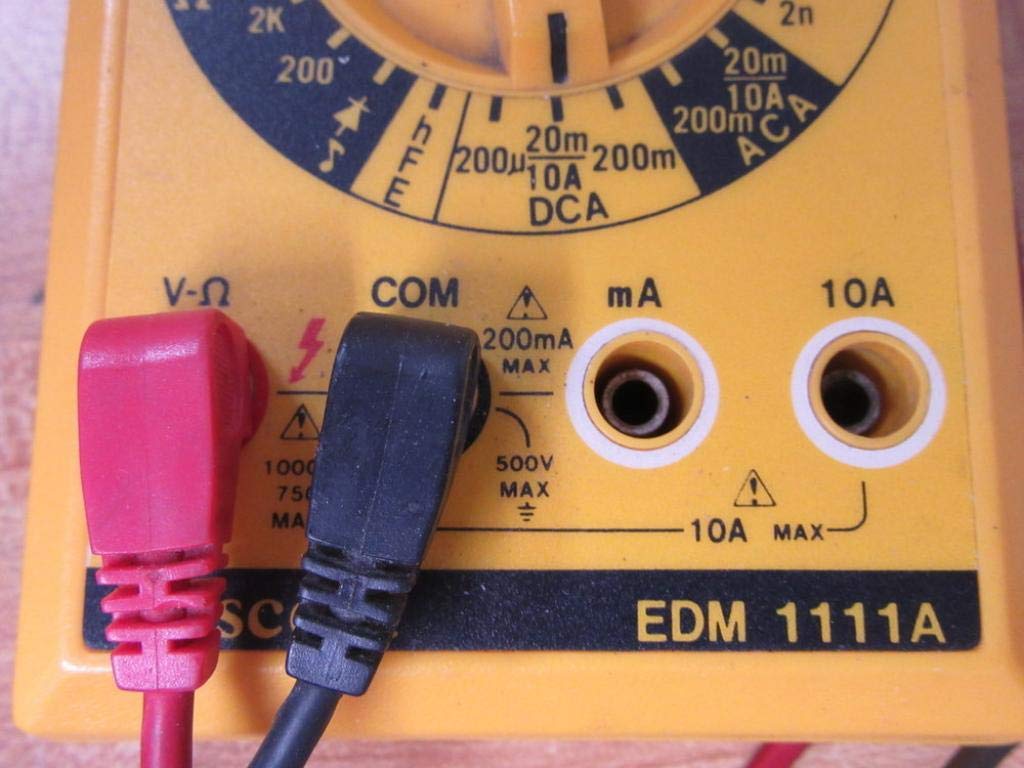
- Bolumen gehienarentzattage, erresistentzia eta korronte baxuko neurketak egiteko, konektatu kable beltza 'COM' (Komuna) konektorera.
- Konektatu kable gorria 'V-Ω-mA' konektorera bolumenaren neurketarako.tage, erresistentzia eta miliampegungo neurketak.
- Korronte handiko neurketetarako (10A-ra arte), konektatu kable gorria '10A' konektorera. Ziurtatu beti entxufe egokia erabiltzen dela neurgailuari edo zirkuituari kalterik ez egiteko.

Sarrerako konektoreei (V-Ω, COM, mA, 10A) eta biraketa-markagailuaren beheko zatiari begirada hurbilagoa, korrontearen neurketa-eremuak adierazten dituztenak.

Escort EDM 1111A multimetro digitalarekin erabiltzen diren proba-zunda (kable) gorri eta beltzak, kontaktu elektrikorako punta zorrotzekin.
3. Funtzionamendu-argibideak
Neurketarik egin aurretik, ziurtatu proba-kableak behar bezala konektatuta daudela eta biraketa-markagailua funtzio eta tarte egokira ezarrita dagoela.

Xehetasuna view Escort EDM 1111A multimetro digitalaren biraketa-hautatzailearen markagailua, hainbat neurketa-funtzio bistaratuz, hala nola DCV, ACV, Ω, DCA, ACA eta CX.
3.1 DC Vol. neurtzeatage (DCV)
- Ezarri biraketa-botoia nahi duzun DCV tartean (adibidez, 200m, 2, 20, 200, 1000). Aukeratu espero den bolumena baino handiagoa den tarte bat.tage.
- Konektatu kable gorria zirkuituaren alde positibora (+) eta kable beltza alde negatibora (-).
- Irakurri liburukiatagPantailako balioa.
3.2 AC Vol. neurtzeatage (ACV)
- Ezarri biraketa-markagailua nahi duzun ACV tartean (adibidez, 200m, 2, 20, 200, 750). Aukeratu espero den bolumena baino handiagoa den tarte bat.tage.
- Konektatu proba-kableak AC bolumenaren artean.tagiturria. Polaritateak ez du axola korronte alternoko bolumenarentzattage.
- Irakurri liburukiatagPantailako balioa.
3.3 Erresistentzia neurtzea (Ω)
- Ziurtatu zirkuitua edo osagaia deskonektatuta dagoela erresistentzia neurtu aurretik.
- Ezarri biraketa-botoia nahi duzun Ω-tartean (adibidez, 200, 2K, 20K, 200K, 2M, 20M, 200M).
- Konektatu proba-kableak neurtu beharreko osagaira.
- Irakurri erresistentziaren balioa pantailan.
3.4 Korronte zuzena neurtzea (DCA)
- Ziurtatu zirkuitua desenergizatuta dagoela.
- Ezarri biraketa-makinaren botoia nahi duzun DCA tartean (adibidez, 200µ, 2m, 20m, 200m, 10A).
- Garrantzitsua: 200mA-rainoko korronteetarako, erabili 'V-Ω-mA' konektorea kable gorrirako. 10A-rainoko korronteetarako, erabili '10A' konektorea.
- Moztu zirkuitua eta konektatu multimetroa seriean kargarekin. Korrontea multimetrotik igaro behar da.
- Berriro piztu zirkuitua eta irakurri uneko balioa.
3.5 Korronte alternoa neurtzea (ACA)
- Ziurtatu zirkuitua desenergizatuta dagoela.
- Ezarri biraketa-botoia nahi duzun ACA tartean (adibidez, 200µ, 2m, 20m, 200m, 10A).
- Garrantzitsua: 200mA-rainoko korronteetarako, erabili 'V-Ω-mA' konektorea kable gorrirako. 10A-rainoko korronteetarako, erabili '10A' konektorea.
- Moztu zirkuitua eta konektatu multimetroa kargarekin seriean.
- Berriro piztu zirkuitua eta irakurri uneko balioa.
3.6 Kapazitantzia neurtzea (CX)
- Ziurtatu kondentsadorea guztiz deskargatuta dagoela probatu aurretik.
- Ezarri biraketa-makinaren botoia CX tartean (adibidez, 2n, 20n, 200n, 2µ, 20µ).
- Konektatu proba-kableak kondentsadorearen terminaletara.
- Irakurri kapazitantziaren balioa pantailan.
3.7 Diodo eta transistoreen (hFE) probak
Kontsultatu diodo eta transistoreen proba funtzioetarako markagailuko marka espezifikoak. Normalean, diodoen proba moduak aurreranzko bolumena egiaztatzeko aukera ematen du.tagDiodo baten e jaitsiera, eta hFE modua erabiltzen da transistoreen korronte zuzeneko irabazia neurtzeko.
4. Mantentzea
4.1 Bateria ordezkatzea
Ordeztu 9V 006P bateria bateria baxuaren adierazlea pantailan agertzen denean edo multimetroa pizten ez bada. Jarraitu 2.1 ataleko argibideak.
4.2 Garbiketa
Multimetroa garbitzeko, erabili zapi leun eta lehorra.amp oihal. Ez erabili garbitzaile edo disolbatzaile urratzailerik, kaltetu baitezakete casing edo pantaila. Ziurtatu gailua itzalita eta zirkuituetatik deskonektatuta dagoela garbitu aurretik.
4.3 Biltegiratzea
Denbora luzez erabiltzen ez baduzu, gorde multimetroa leku fresko eta lehor batean, eguzki-argitik eta muturreko tenperaturetatik babestuta. Kontuan hartu bateria kentzea isuriak saihesteko, barneko osagaiak kaltetu baitezakete.
5. Arazoak
| Arazoa | Kausa posiblea | Irtenbidea |
|---|---|---|
| Pantailarik ez edo pantaila iluna | Bateria baxua edo agortuta | Ordeztu 9V 006P bateria. |
| Irakurketa okerrak | Hautatutako tarte okerra Berun-konexio txarra Kaltetutako proba-kableak Sarrera-jack okerra erabili da | Aukeratu barruti egokia. Ziurtatu kableak ondo konektatuta daudela. Kaltetutako kableak ikuskatu eta ordezkatu. Egiaztatu kableak V-Ω-mA edo 10A-ko konektore egokian daudela. |
| "OL" (Gainkarga) bistaratzen da | Neurketa hautatutako tartea gainditzen du | Aldatu barruti altuago batera. |
| Jarraitutasun-txirrinik ez | Jarraitutasun funtzioa ez da hautatu Zirkuitu irekia | Ziurtatu markagailua jarraitutasun/diodo proban dagoela. Egiaztatu zirkuitua etenaldirik dagoen. |
6. Zehaztapenak
| Parametroa | Balioa |
|---|---|
| Eredua | EDM 1111A |
| Produktuaren neurriak (L x W x H) | 8 x 4 x 2 hazbete |
| Elementuaren pisua | 1.84 kilo |
| Energia iturria | DC 9V 006P bateria |
| Neurketa Mota | Multimetroa |
| Fabrikatzailea | Eskolta |
| Eskuragarri dagoen lehen data | 21ko azaroaren 2019a |
| DC bolumenatage Barrutiak | 200mV, 2V, 20V, 200V, 1000V |
| AC Boltage Barrutiak | 200mV, 2V, 20V, 200V, 750V |
| Korronte zuzeneko tarteak | 200µA, 2mA, 20mA, 200mA, 10A |
| Korronte alternoaren tarteak | 200µA, 2mA, 20mA, 200mA, 10A |
| Erresistentzia-tarteak | 200Ω, 2KΩ, 20KΩ, 200KΩ, 2MΩ, 20MΩ, 200MΩ |
| Kapazitantzia-tarteak | 2nF, 20nF, 200nF, 2µF, 20µF |
7. Bermearen informazioa
Escort EDM 1111A multimetro digitalari buruzko bermearen xehetasun zehatzak lortzeko, kontsultatu erosketa unean emandako dokumentazioa edo jarri harremanetan fabrikatzailearekin zuzenean. Berme-baldintzek normalean materialen eta fabrikazioaren akatsak estaltzen dituzte erabilera normalaren pean.
8. Bezeroarentzako arreta
Eskuliburu honetan azaltzen ez diren arazorik edo galderarik baduzu, jarri harremanetan Escort bezeroarentzako arreta-zerbitzuarekin. Laguntza azkarrago jasotzeko, eduki zure produktuaren modelo zenbakia (EDM 1111A) eta serie zenbakia (hala badagokio, atzeko etiketan aurkituko duzu) eskura laguntza-zerbitzura deitzean.
Escort EDM 1111A-ren atzealdean dagoen produktuaren etiketa, 'DIGITAL MULTIMETER DC 9V 006P BATTERY', serie-zenbakia eta 'MADE IN TAIWAN ROC' adieraziz.