Sarrera
This instruction manual provides detailed information on the installation, operation, and maintenance of your Blaupunkt DENVER 212 DAB BT car radio. Please read this manual thoroughly before using the device to ensure proper functionality and to prevent damage. Keep this manual for future reference.

Image: Blaupunkt DENVER 212 DAB BT product banner.
Segurtasun Informazioa
- Ensure proper installation by a qualified professional to avoid electrical hazards or damage to your vehicle.
- Ez erabili gailua gidatzeari arreta galarazten dizun moduan. Eman beti lehentasuna errepideko segurtasunari.
- Saihestu unitatea tenperatura altuen, eguzki-argiaren eraginpean edo hezetasunean jartzea.
- Erabili onartutako osagarriak eta piezak soilik.
- Disconnect the vehicle's battery before installation to prevent short circuits.
Paketearen edukia
Egiaztatu elementu guztiak paketean daudela:
- Blaupunkt DENVER 212 DAB BT Car Radio Unit
- Muntatzeko markoa
- Kableatu-arnesa (ISO konektorea)
- DAB+ Antenna (if included with specific models)
- Kanpoko Mikrofonoa
- Disassembly Keys
- Erabiltzailearen eskuliburua (dokumentu hau)
Produktua amaituview
The Blaupunkt DENVER 212 DAB BT is a 1-DIN car radio featuring DAB+ digital radio, Bluetooth hands-free calling, and media streaming. It offers a robust design and short installation depth for versatile vehicle compatibility.

Image: Front panel of the Blaupunkt DENVER 212 DAB BT, showing display, control knobs, and buttons.
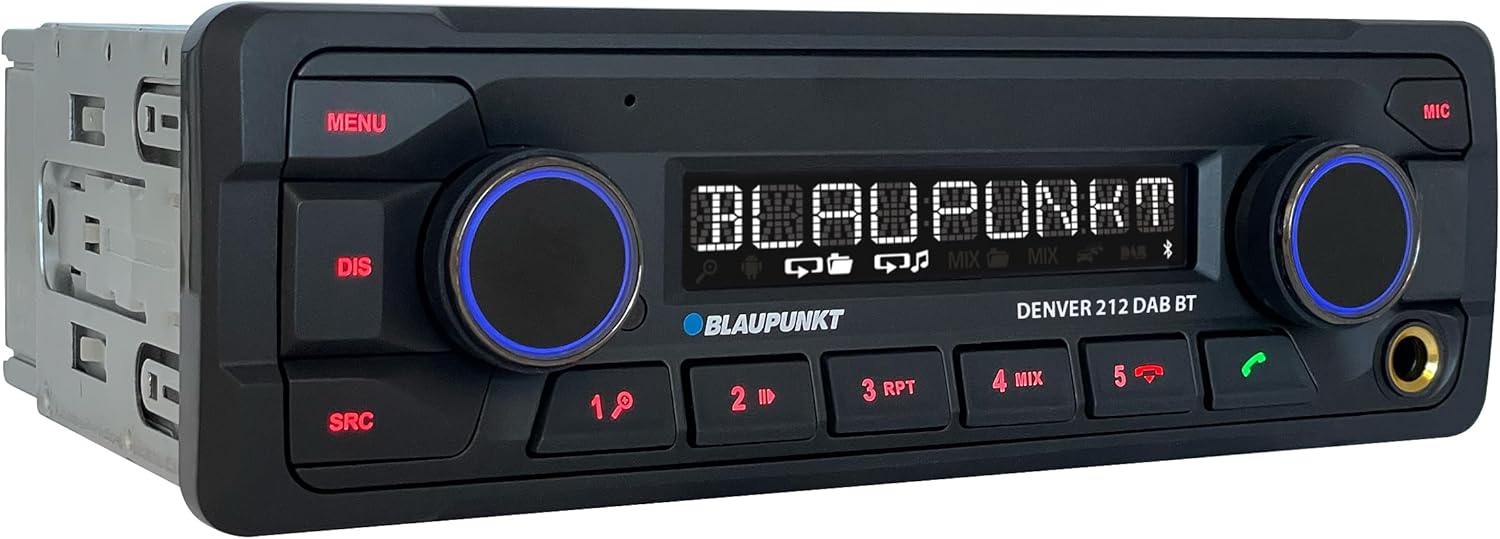
Irudia: Angelua view of the Blaupunkt DENVER 212 DAB BT, highlighting its compact design.
Aurreko paneleko kontrolak:
- MENU botoia: Sistemaren ezarpenetara eta aukeretara sartzen da.
- DIS Button: Pantailako informazioa aldatzen du.
- SRC Button: Selects audio source (Radio, DAB, Bluetooth, USB, AUX).
- Volume Knob (Left): Adjusts audio volume. Press to mute/unmute.
- Selection Knob (Right): Menuetan nabigatzen du eta aukerak hautatzen ditu.
- Aurrezarritako botoiak (1-6): Store and recall radio stations, control media playback.
- Call Buttons (Green/Red): Answer/end Bluetooth calls.
- USB ataka: Konektatu USB biltegiratze gailuak multimedia erreproduzitzeko.
- AUX sarrera (3.5 mm-ko jacka): Connect external audio sources.
Konfigurazioa eta Instalazioa
Instalazio urratsak:
- Prestaketa: Deskonektatu zure ibilgailuaren bateriaren terminal negatiboa.
- Muntaketa: Insert the supplied mounting frame into the vehicle's 1-DIN opening. Bend the tabs to secure it.
- Kableatua: Connect the wiring harness according to the diagram below. Ensure all connections are secure.
- Antena konexioa: Connect the FM antenna and the DAB+ antenna (if applicable) to the corresponding inputs on the rear of the radio.
- Mikrofonoaren konexioa: Connect the external microphone to the designated input for optimal hands-free call quality.
- Txertatu unitatea: Slide the radio unit into the mounting frame until it clicks into place.
- Azken egiaztapena: Reconnect the vehicle's battery and test the unit.
Wiring Diagram (General):
| Hariaren Kolorea | Funtzioa |
|---|---|
| Horia | 12V konstantea (Bateria) |
| Gorria | Piztu 12V (pizte) |
| Beltza | Lurra |
| Urdina | Antena elektrikoa / Amplifier Urruneko |
| Laranja/Zuria | Argiztapena |
| Speaker Wires (e.g., White, Grey, Green, Purple pairs) | Connect to vehicle speakers (Front Left, Front Right, Rear Left, Rear Right) |
| Bolantearen Kontrol Sarrera | Connect to vehicle's steering wheel control interface (if applicable) |
Note: Specific wire colors may vary. Always refer to your vehicle's wiring diagram and the radio's included diagram for precise connections.

Image: The Blaupunkt DENVER 212 DAB BT car radio seamlessly integrated into a vehicle's dashboard.
Funtzionamendu-argibideak
1. Oinarrizko funtzioak:
- Piztu/Itzali: Press the volume knob (left) briefly to turn the unit on. Press and hold to turn off.
- Bolumen kontrola: Rotate the volume knob (left) to adjust the sound level.
- Iturburuaren hautaketa: Sakatu SRC button repeatedly to cycle through available audio sources (FM, DAB, Bluetooth Audio, USB, AUX).
- Menuen nabigazioa: Sakatu MENUA button to enter the main menu. Use the right knob to navigate and select options.
2. Radio (FM/DAB+):
- Selecting Radio Mode: Sakatu SRC until FM or DAB is selected.
- Sintonizazio automatikoa: In FM/DAB mode, press and hold the right knob or seek buttons (if available) to automatically search for stations.
- Eskuzko sintonizazioa: Briefly press the right knob or seek buttons to fine-tune frequencies.
- Aurrezarpenak gordetzea: Tune to a desired station, then press and hold one of the numeric preset buttons (1-6) until you hear a confirmation beep.
- Aurrezarpenak gogoratzen: Briefly press a numeric preset button (1-6) to recall a stored station.
3. Bluetooth funtzionamendua:
- Gailu bat parekatzea:
- Ziurtatu Bluetootha gaituta dagoela zure gailu mugikorrean.
- Select "Bluetooth" as the source on the car radio. The display will show "PAIRING".
- On your mobile device, search for Bluetooth devices and select "BLAUPUNKT DENVER".
- Eskatzen bazaizu, baieztatu parekatzea bi gailuetan.
- Esku libreko deiak:
- Dei bati erantzutea: Sakatu deitzeko botoi berdea.
- Dei bat amaitzea: Press the red call button.
- Dei bat egitea: Dial from your phone; audio will transfer to the car radio.
- Bluetooth audio erreprodukzioa: Once paired, select "Bluetooth Audio" as the source. Play music from your mobile device, and it will stream through the car radio. Use the preset buttons (e.g., 4 for MIX, 5 for RPT) for playback control (play/pause, skip tracks).
4. USB and AUX Input:
- USB erreprodukzioa: Insert a USB storage device into the front USB port. The unit will automatically switch to USB mode and begin playback.
- AUX sarrera: Connect an external audio device (e.g., MP3 player) to the 3.5mm AUX input jack using an audio cable. Select "AUX" as the source.
5. Sound Settings (Equalizer):
- Sakatu MENUA button, then navigate to "AUDIO" or "EQ" settings.
- Adjust bass, treble, balance, and fader settings to your preference.
- Pre-set equalizer modes (e.g., Pop, Rock, Classic) may be available.
Bideoa: Amaiera batview of the Blaupunkt DENVER 212 DAB BT car radio's features and basic operation.
Mantentzea
- Garbiketa: Erabili zapi leun eta lehor bat unitatearen aurrealdeko panela garbitzeko. Ez erabili garbitzaile edo disolbatzaile urratzailerik.
- USB ataka: Keep the USB port free from dust and debris.
- Firmware eguneraketak: Check the official Blaupunkt webwebgunea aldian-aldian bisitatu zure modeloarentzako firmware eguneratzerik dagoen ikusteko.
Arazoak konpontzea
| Arazoa | Kausa posiblea | Irtenbidea |
|---|---|---|
| Botererik ez | Blown fuse; incorrect wiring (constant/switched 12V); loose connection. | Check vehicle fuses and the radio's fuse. Verify wiring connections, especially constant and ignition power. Ensure the unit is properly seated. |
| Soinurik ez | Bolumena baxuegia; isilaraztea aktibatuta; bozgorailuen kableatu okerra; ampbizigarri arazoak. | Increase volume. Check if mute is active. Verify speaker connections. If an external amplifier is used, check its power and connections. |
| Poor radio reception (FM/DAB) | Antena ez dago konektatuta; antena hondatuta; seinale ahula eremuan. | Ensure antenna is securely connected. Check antenna for damage. Consider a stronger antenna or signal booster if in a weak signal area. For DAB+, ensure the DAB antenna is correctly installed and positioned. |
| Bluetooth konexio arazoak | Device not in pairing mode; incorrect wiring (ignition+ and constant+); interference. | Ensure both devices are in pairing mode. Delete previous pairings and try again. Verify that the constant 12V and switched 12V wires are correctly connected to the radio, as improper wiring can affect Bluetooth stability. Move away from other Bluetooth devices. |
| USB ez da ezagutzen | Onartu gabe file format; USB drive not formatted correctly; damaged USB drive. | Ziurtatu audioa files are in supported formats (e.g., MP3, WMA). Format the USB drive to FAT32. Try a different USB drive. |
Zehaztapenak
| Ezaugarri | Xehetasuna |
|---|---|
| Marka | BLAUPUNKT |
| Modelo zenbakia | Denver 212 DAB BT |
| Kolorea | Beltza |
| Konektibitate Teknologia | Bluetootha, USBa |
| Konektore mota | 3.5 mm-ko jack-a, USB |
| Ezaugarri bereziak | DAB, RDS, Equalizer, Bluetooth Hands-free |
| Gailu bateragarriak | Smartphone |
| USB portuak guztira | 1 |
| Audio irteera modua | Estereoa |
| Inguruko soinu-kanalaren konfigurazioa | 4.0 |
| Produktuaren neurriak | 12D x 17.8W x 5.2H zentimetro |
| Fabrikatzailea | Blaupunkt |
| Ordezko piezen erabilgarritasuna | 1 Urte |
Bermea eta Laguntza
This Blaupunkt product comes with a manufacturer's warranty. For specific warranty terms and conditions, please refer to the warranty card included with your product or visit the official Blaupunkt website. For technical support, troubleshooting assistance, or spare parts inquiries, please contact Blaupunkt customer service through their official channels.
Ordezko piezak, oro har, erosketa-datatik urtebetez daude eskuragarri.
Official Blaupunkt Webgunea: www.blaupunkt.com


