1. Sarrera
Eskerrik asko erosketagatik.asing the TWS i17 Dual Earbuds. This manual provides essential information for setting up, operating, and maintaining your new wireless earbuds. Please read this manual thoroughly before use to ensure optimal performance and longevity of your device.
2. Segurtasun informazioa
To prevent damage to your earbuds or injury to yourself or others, please observe the following precautions:
- Ez jarri entzungailuak edo kargatzeko zorroa muturreko tenperaturen, hezetasunaren edo likidoen eraginpean.
- Saihestu gailua erortzea, kolpeak ematea edo desmuntatzea.
- Ez erabili garbitzaile edo disolbatzaile urratzailerik. Garbitu zapi leun eta lehor batekin.
- Entzun bolumen moderatuan entzumen-kalteak saihesteko.
- Mantendu haurren eskura.
- This product is not water resistant. Avoid exposure to water or excessive moisture.
3. Paketearen edukia
Egiaztatu elementu guztiak zure paketean daudela:
- TWS i17 Dual Earbuds (Left and Right)
- Kargatzeko kaxa
- USB kargatzeko kablea
- Erabiltzailearen eskuliburua

Image: The TWS i17 Dual Earbuds, with one earbud partially removed from its charging case, showcasindiseinu beltz dotorea.
4. Konfigurazioa
4.1 Entzungailuak eta zorroa kargatzea
Lehenengo aldiz erabili aurretik, kargatu guztiz entzungailuak eta kargatzeko zorroa.
- Jarri bi entzungailuak kargatzeko zorroan. Ziurtatu ondo sartuta daudela.
- Connect the USB charging cable to the charging port on the bottom of the case and the other end to a USB power source (e.g., computer, wall adapter).
- The indicator light on the case will show charging status. It will turn off or change color when fully charged.
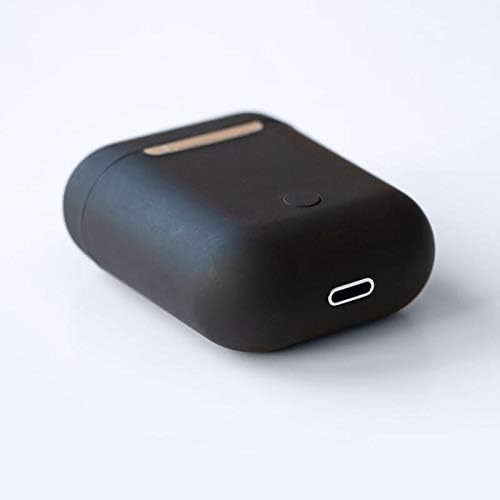
Irudia: Gertutik view of the bottom of the TWS i17 charging case, highlighting the USB charging port and a small button.
4.2 Zure gailuarekin parekatzea
The i17 earbuds use Bluetooth for wireless connection.
- Ziurtatu entzungailuak kargatuta daudela.
- Ireki kargatzeko zorroa. Entzungailuak automatikoki sartuko dira parekatze moduan (adierazle-argiak keinuka hasiko dira).
- On your mobile phone or Bluetooth-enabled device, go to Bluetooth settings and turn Bluetooth on.
- Bilatu available devices. Select "i17" from the list.
- Once connected, the indicator lights on the earbuds will stop flashing. You are now ready to use your earbuds.

Image: The TWS i17 Dual Earbuds resting inside their open charging case, ready for pairing or use.
5. Funtzionamendu-argibideak
5.1 Piztu/Itzali
- Piztu: Atera entzungailuak kargatzeko zorrotik. Automatikoki piztuko dira eta azken parekatutako gailura konektatuko dira.
- Itzali: Jarri entzungailuak berriro kargatzeko zorroan. Automatikoki itzali eta kargatzen hasiko dira.
5.2 Musika erreproduzitzea
- Erreproduzitu/Pausatu: Sakatu behin aurikular batean.
- Hurrengo ibilbidea: Sakatu birritan eskuineko aurikularra.
- Aurreko pista: Sakatu birritan ezkerreko aurikularra.
5.3 Deien kudeaketa
- Deia erantzun/amaitu: Sakatu behin aurikular batean.
- Deia baztertu: Eduki sakatuta aurikularretako bat 2 segundoz.
5.4 Ahots laguntzailea
- Aktibatu ahots-laguntzailea (Siri/Google Assistant): Sakatu hiru aldiz entzungailu batean.
6. Mantentzea
Proper maintenance ensures the longevity of your earbuds:
- Garbiketa: Erabili zapi leun, lehor eta lihorik gabeko bat entzungailuak eta kargatzeko zorroa garbitzeko. Ez erabili likidorik edo sprayrik.
- Biltegiratzea: Erabiltzen ez dituzunean, gorde entzungailuak kargatzeko zorroan babesteko eta kargatuta mantentzeko. Gorde leku fresko eta lehor batean.
- Bateria zaintzea: To prolong battery life, avoid fully discharging the earbuds frequently. Charge them regularly.

Image: The TWS i17 Dual Earbuds securely stored within their closed charging case, ready for transport or charging.
7. Arazoak
| Arazoa | Kausa posiblea | Irtenbidea |
|---|---|---|
| Entzungailuak ez dira parekatzen | Low battery; Out of range; Not in pairing mode; Bluetooth off on device. | Charge earbuds; Move closer to device; Ensure case is open for pairing; Turn on Bluetooth on device. |
| Aurikular bakarra funtzionatzen du | One earbud not charged; Earbuds not properly synced. | Ensure both earbuds are charged; Place both earbuds back in case, close, then reopen to re-sync. |
| Soinurik ez | Volume too low; Not connected; Media paused. | Increase volume on device; Reconnect earbuds; Check media playback status. |
| Kargatzeko kaxa ez da kargatzen | Faulty cable/adapter; Loose connection. | Try a different USB cable or power adapter; Ensure cable is securely plugged in. |
8. Zehaztapenak
| Ezaugarri | Xehetasuna |
|---|---|
| Modelo zenbakia | i17 |
| Marka | TWS |
| Konektibitate Teknologia | Haririk gabeko (Bluetooth) |
| Entzungailuen forma-faktorea | Belarri barnean |
| Mikrofonoa barne | Bai |
| Zarata Deuseztatzea | Ez |
| Bateragarria | Telefono mugikorrak |
| Kolorea | Beltza |
| Materiala | Plastikoa |
| Kable Ezaugarri | Kablerik gabe |
| Uraren Erresistentzia Maila | Ez Urarekiko Erresistentea |
| Bidalketa neurriak | 12.6 x 8.8 x 3.6 cm |
| Pisua | 96 gramo |
| Eskuragarri dagoen lehen data | 15ko urtarrilaren 2020a |
9. Bermea eta Laguntza
For warranty information and customer support, please refer to the contact details provided on the product packaging or the official TWS webgunea. Gorde erosketaren egiaztagiria bermearen erreklamazioetarako.
For further assistance, please contact TWS customer service.


