1. Sarrera
Thank you for choosing the Homcloud AS-CM1 Wi-Fi Smart Shutter Module. This module is designed to integrate your traditional roller shutters, blinds, or curtains into your smart home system, allowing for convenient control via a smartphone application or voice commands. Please read this manual carefully before installation and use to ensure proper operation and safety.
2. Produktua amaitu daview
The Homcloud AS-CM1 is a compact Wi-Fi module that can be recessed into a standard electrical box (e.g., 503 type) behind your existing shutter switch. It enables smart control of motorized shutters while retaining the functionality of your traditional wall switch. Key features include remote control, timer scheduling, and compatibility with popular voice assistants like Amazon Alexa and Google Home.

2.1. irudia: Homcloud Wi-Fi Curtain Module AS-CM1 product label. This image displays the product label of the Homcloud Wi-Fi Curtain Module, model AS-CM1. It shows the Homcloud logo, product name 'Wi-Fi Curtain Module', Homcloud code AS-CM1, model QS-WIFI-C01, operating voltage 220-240V~50Hz, maximum current 3A, Wi-Fi specification 2.4Ghz 802.11 b/g/n, and the website www.homcloud.com. Below these details are the terminal markings N, L, and symbols for motor connections.
3. Segurtasun informazioa
- Arrisku elektrikoa: Installation should only be performed by a qualified electrician or a person with a thorough understanding of electrical systems.
- Potentzia deskonexioa: Deskonektatu beti korrontea zirkuitu-etengailu nagusian edozein lan elektriko egin aurretik.
- liburukiatage eta Korrontea: Ensure the module's specifications (220-240V~50Hz, Max. 3A) are compatible with your electrical system and motor.
- Barruko erabilera soilik: This device is intended for indoor use in dry environments.
- Haurren segurtasuna: Mantendu gailua haurren eskura.
4. Zehaztapenak
| Ezaugarri | Zehaztapena |
|---|---|
| Fabrikatzailea | Homcloud |
| Elementuaren kodea | AS-CM1 |
| Produktuaren neurriak | 4.6 x 4.6 x 1.8 cm |
| Elementuaren eredu-zenbakia | AS-CM1 |
| Wattage | 650 watt |
| Funtzionamendu modua | Piztu-itzali-piztu |
| Korronte nominatua | 3 Ampere |
| Bolumen eragileatage | 230 Volt |
| Kontaktu mota | Normalean itxita |
| Aldatu mota | Smart, 1 way |
| Terminala | Soldadura |
| Materiala | Plastikoa |
| Ezaugarri bereziak | APP control, Works in parallel with traditional switches |
| Elementuaren pisua | 40 g |
| Pilak barne? | Ez |
| Pilak behar dira? | Ez |
5. Instalazioa
Garrantzitsua: Ensure power is disconnected at the main circuit breaker before starting installation.
- Prestatu kutxa elektrikoa: Open the electrical box (e.g., 503 type) where your traditional shutter switch is located.
- Kableatua: Connect the Homcloud AS-CM1 module according to the wiring diagram. The module has terminals for Line (L), Neutral (N), and motor control (Up/Down). Ensure correct connections to avoid damage to the module or motor.

5.1. irudia: Homcloud Wi-Fi Smart Shutter Module 2-gang/2-way wiring diagram. This image provides a detailed wiring diagram for the Homcloud Wi-Fi Smart Shutter Module in a 2-gang/2-way configuration. It shows connections for Line (L), Neutral (N), and motor control (up/down arrows), along with the physical switches and the module itself, illustrating how to integrate it into an existing electrical system.
- Moduluaren kokapena: Carefully place the module inside the electrical box behind the existing shutter switch. Its compact size is designed to fit into standard recessed boxes.
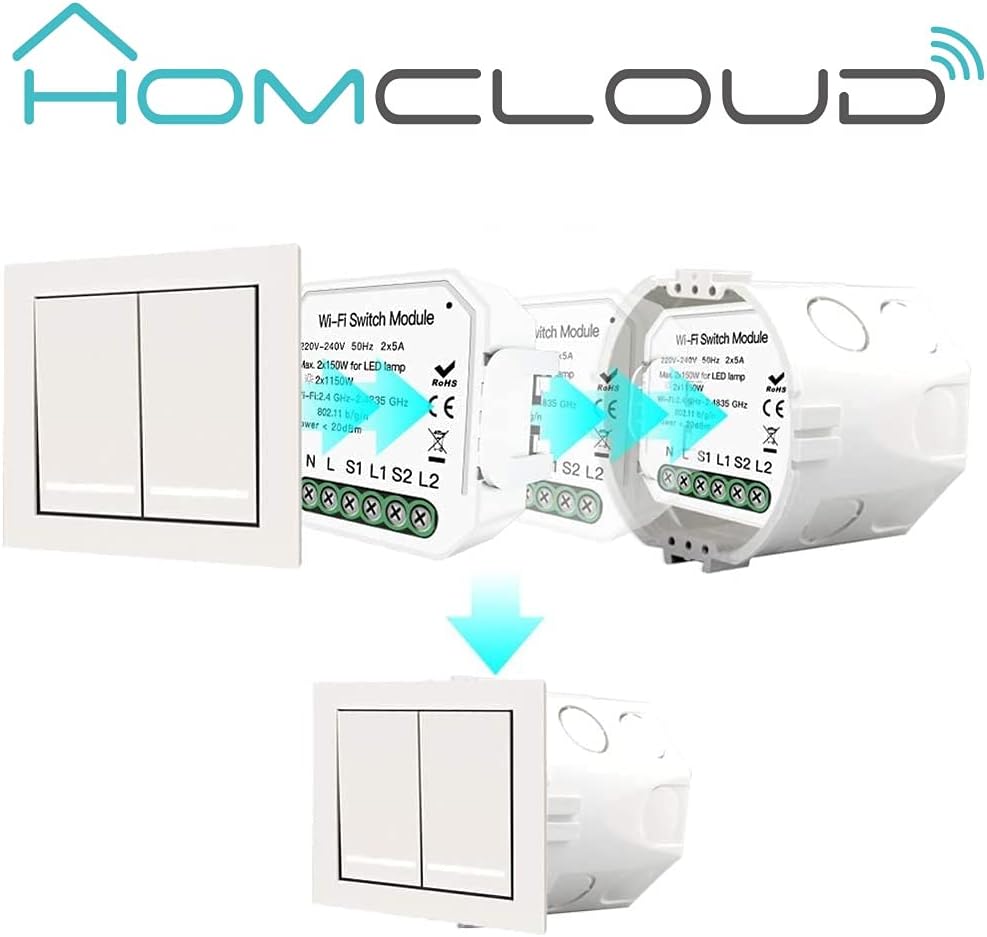
5.2. irudia: Homcloud Wi-Fi Smart Shutter Module installation diagram. This diagram illustrates the installation process of the Homcloud Wi-Fi Smart Shutter Module. It shows a standard wall switch, the smart module, and how the module is placed behind the switch within the electrical box, indicating a seamless integration.

5.3. irudia: Homcloud Wi-Fi Smart Shutter Module recessed installation. A close-up view showing the Homcloud Wi-Fi Smart Shutter Module neatly installed inside a standard electrical wall box, positioned behind the wall switch. This demonstrates its compact design suitable for recessed installation.
- Energia ziurtatu eta berreskuratu: Close the electrical box and secure the switch plate. Restore power at the main circuit breaker.
6. Konfigurazioa
6.1. Aplikazioaren deskarga eta erregistroa
- Deskargatu Homcloud aplikazioa or Smart Life aplikazioa App Store-tik (iOS) edo Google Play Store-tik (Android).
- Erregistratu kontu berri bat edo hasi saioa lehendik duzun batekin.

6.1. irudia: Homcloud Smart Home Solutions app download. This image shows multiple smartphones displaying the Homcloud app interface, along with QR codes and buttons for downloading the app from the App Store and Google Play. It highlights the 'Homcloud Smart Home Solutions' branding and the app's availability for both iOS and Android devices. You can also find the app at smartapp.tuya.com/homcloudsmart.
6.2. Gailuaren parekatzea
- Ziurtatu zure telefonoa 2.4 GHz-ko Wi-Fi sare batera konektatuta dagoela.
- After restoring power to the module, it should enter pairing mode (often indicated by a blinking light or sound). If not, locate the reset button on the module (refer to Image 6.2) and press it for 5-10 seconds until it enters pairing mode.

6.2. irudia: Homcloud Wi-Fi Smart Shutter Module with reset button. This diagram illustrates the Homcloud Wi-Fi Smart Shutter Module, highlighting its reset button ('Ripristino/reset') and the mounting clip ('Clip montaggio'). This shows key physical features for installation and initial setup.
- In the Homcloud/Smart Life App, tap '+' or 'Add Device'.
- Select 'Curtain Switch' or 'Shutter Module' from the device list.
- Follow the on-screen instructions to connect the module to your Wi-Fi network. This typically involves confirming the indicator light status and entering your Wi-Fi password.
- Once connected, you can rename the device for easier control (e.g., "Living Room Shutter").
6.3. Kalibrazioa
For accurate partial opening/closing, you need to calibrate the module by setting the maximum operation time:
- In the app, navigate to the device settings for your shutter module.
- Find the calibration or 'Motor Travel Time' setting.
- Measure the time it takes for your shutter to fully open or fully close (e.g., 30 seconds).
- Enter this duration in seconds into the app. This allows the module to estimate the shutter's position for percentage-based control.
7. Funtzionamendu-argibideak
7.1. Aplikazioen kontrola
The Homcloud/Smart Life App provides comprehensive control over your smart shutter module:
- Ireki/Itxi: Tap the respective buttons to fully open or close the shutters.
- Partial Control: Use the slider or percentage input to set the shutter to a specific open position (e.g., 50% open).
- Timer/Schedule: Set schedules for automatic opening and closing at specific times (e.g., open at 7 AM, close at 8 PM).
- Eszena sortzea: Integrate the shutter module into smart scenes with other devices (e.g., 'Good Morning' scene opens shutters and turns on lights).
- Gailua partekatzea: Partekatu moduluaren kontrola familiako kideekin aplikazioaren bidez.

7.1. irudia: Remote control via smartphone app. This image depicts a hand holding a smartphone displaying the Homcloud app interface, with a large power button icon, indicating remote control functionality for the smart shutter module. The background shows a modern living room, suggesting smart home integration.
7.2. Ahots kontrola
The module is compatible with Amazon Alexa and Google Home. Link your Homcloud/Smart Life account to your voice assistant app.
- Oinarrizko komandoak:
- "Alexa, open [Device Name]"
- "Hey Google, close [Device Name]"
- Partial Control Commands:
- "Alexa, ezarri [Gailuaren izena] % 50era"
- "Hey Google, open [Device Name] by 20%"
7.3. Eskuzko Kontrola
The Homcloud AS-CM1 module works in parallel with your traditional wall switch. You can still use the physical switch to open, close, or stop the shutters. The app will reflect the current status even after manual operation.
8. Mantentzea
- Garbiketa: Ensure the module is clean and free from dust. Disconnect power before cleaning. Use a dry, soft cloth.
- Erabiltzaileak ez du zerbitzurik gabeko piezarik: Do not attempt to open or repair the module yourself. This will void the warranty and may pose a safety risk.
- Firmware eguneraketak: Periodically check the Homcloud/Smart Life App for available firmware updates to ensure optimal performance and security.
9. Arazoak
- Moduluak ez du erantzuten:
- Check if the module has power.
- Egiaztatu zure Wi-Fi sarea aktibo dagoela eta modulua irismenaren barruan dagoela.
- Try restarting the module by cycling its power at the circuit breaker.
- If issues persist, attempt to re-pair the device with the app.
- Aplikazioen konexio-arazoak:
- Ziurtatu zure telefonoa internetera konektatuta dagoela.
- Confirm your Wi-Fi router is functioning correctly and providing a 2.4GHz signal.
- Berrabiarazi zure Wi-Fi bideratzailea.
- Inaccurate Shutter Position (Calibration):
- Recalibrate the motor travel time in the app settings (refer to Section 6.3).
- Ensure the shutter moves freely without obstruction.
- Ahots-kontrola ez dabil:
- Verify that your Homcloud/Smart Life account is correctly linked to Alexa or Google Home.
- Check the device name in the voice assistant app and ensure it matches your commands.
- Ensure your voice assistant device is online and functioning.
10. Bermea eta Laguntza
Homcloud provides support for its products. If you encounter any issues not covered in this manual or require further assistance, please contact Homcloud customer support. Refer to the product packaging or the Homcloud webharremanetarako informazioa lortzeko gunea.


